


dfang
-
Posts
224 -
Joined
-
Last visited
Content Type
Profiles
Forums
Gallery
Downloads
Store
Everything posted by dfang
-
No,,,couldn't find stock decals,,had to make it... Only thing with that is,,you will have to make a seperate VMA 121 folder or else all of your A-4E's will have the Green Knight insignia on the side... Thats no problem though,,i did it with a couple fictional F-19's i've done....
-
How's this one looking?? *****************************************************************************************
-
Eightlein,, Is this the one? ***************************************************************************************** ***************************************************************************************** Charlie, I can't see your screen shots....
-
You got a pic of that baby?? :)
-
Hummm.... I was fiddlin around with the badge,,& came up with this... Don't know how accurate it is,,cause i don't have a pic.... I'll try & find a pic for reference... :) *****************************************************************************************
-
Charlielima, Where can i find the VMFA-121 A-4E??? Where is the badge location on the fuselage??
-
Sidewinder, Yes you can, First,, make sure the AB.tga you want to use is in your Effects folder,,im using AB#11.tga for this EXAMPLE,,as i said in the pack readme,,put all of the AB.tga's you want in your effects folder just to keep em sort of organized for easy use... One way to do it would be to make a copy of the AfterburnerEmitter.ini that was provided in the pack,,,rename it to say... AfterburnerEmitter1.ini,, put it in the [Effects] folder,,open it and make two changes,,EXAMPLE: [EmitterType001] Name=AfterburnerEmitter1<<<<<-------Change to this EmissionType=ORIENTED_EMITTER UpdateType=NON_MOVING MaxVisibleDistance=8000.000000 EmissionRate=0.000800 EmissionVolume=0.010000,0.010000,0.010000 EmissionVelocityTableType=CONSTANT EmissionVelocity=0.000000,-125.000000,0.000000 HasLightSource=TRUE LightColor=0.405,0.396,0.342 LightRange=200.0 LightSrcOffset=0.0,0.0,0.0 SubLightSourceX=TRUE SubLightSrcDist=5.0 ParticleUpdateType=SIMPLE_POINT ParticleRenderType=SPRITE ParticleRandomOrientation=FALSE ParticleLifeTime=0.040000 ParticleLifeTimeDeviation=0.040000 ParticleWeight=-0.15000 ParticleRandomness=0.010000 ParticleDragFactor=18.000000 ParticleInheritence=0.900000 ParticleColorTableType=TABLE ParticleColor[01].Time=0.000000 ParticleColor[01].Value=0.100000,0.080000,0.060000,0.010000 ParticleColor[02].Time=0.200000 ParticleColor[02].Value=0.150000,0.150000,0.150000,0.00900 ParticleColor[03].Time=0.700000 ParticleColor[03].Value=0.100000,0.080000,0.060000,0.001000 ParticleColor[04].Time=1.000000 ParticleColor[04].Value=0.000000,0.000000,0.000000,0.000000 ParticleSizeTableType=TABLE ParticleSize[01].Time=0.000000 ParticleSize[01].Value=0.380000 ParticleSize[02].Time=0.250000 ParticleSize[02].Value=0.360000 ParticleSize[03].Time=0.500000 ParticleSize[03].Value=0.310000 ParticleSize[04].Time=0.750000 ParticleSize[04].Value=0.240000 ParticleSize[05].Time=1.000000 ParticleSize[05].Value=0.200000 ParticleSizeDeviation=0.015000 TextureMaterial=AfterburnerMaterial [AfterburnerMaterial] DepthBufferCheck=TRUE DepthBufferWrite=FALSE IgnoreRenderOrder=FALSE AlphaTestEnabled=FALSE LightEnabled=FALSE UseLightLevel=FALSE SpecularEnabled=FALSE EmissiveEnabled=FALSE AmbientColor=1.000000,1.000000,1.000000,1.000000 DiffuseColor=1.000000,1.000000,1.000000,1.000000 ZBufferOffset=2.000000 PriorityLevel=3 BlendOp=BLEND_INV_SRC_ALPHA_ADD_SRC NumTextureStages=1 TextureStage[01].TextureName=AB#11.tga<<<<<----Change to this, if you wanted to use this AB effect TextureStage[01].MipMap=FALSE TextureStage[01].FilterEnabled=TRUE TextureStage[01].StageColorOp=TEXTURE_MODULATE_DIFFUSE TextureStage[01].StageAlphaOp=TEXTURE_MODULATE_DIFFUSE ***************************************************************************************** Then choose the aircraft you want to use AB#11.tga,,open it's Data.ini & scroll down to [ENGINES],, and make this change,,EXAMPLE: [Engine] SystemType=JET_ENGINE InputName=THROTTLE_CONTROL EngineID=1 HasAfterburner=TRUE NumAfterburnerStages=1 SLThrustDry=45371.9 SLThrustWet=71171.6 ThrustAngles=0.0,0.0,0.0 ThrustPosition=0.0,0.0,0.0 ThrottleRate=0.4 NozzleAnimationID=7 IdleThrottle=0.10 IdleRPM=0.68 IdleNozzle=0.0 CruiseThrottle=0.37 CruiseRPM=0.82 CruiseNozzle=0.0 MilThrottle=0.65 MilRPM=1.00 MilNozzle=0.0 MaxThrottle=0.78 MaxRPM=1.00 MaxNozzle=0.0 FullABThrottle=1.12 FullABRPM=1.00 FullABNozzle=1.00 AltitudeTableNumData=7 AltitudeTableDeltaX=3048.0 AltitudeTableStartX=0.0 AltitudeTableData=1.000,0.690,0.463,0.300,0.182,0.123,0.000 DryMachTableNumData=5 DryMachTableDeltaX=0.4 DryMachTableStartX=0.0 DryMachTableData=1.000,0.942,1.041,1.240,0.000 WetMachTableNumData=5 WetMachTableDeltaX=0.4 WetMachTableStartX=0.0 WetMachTableData=1.000,0.991,1.207,1.683,2.473 TSFCM0=0.770 TSFCM1=1.060 AfterburnerTSFC=2.100 MinFuelFlow=0.02 ExhaustEmitterName=DirtyExhaustEmitter ExhaustPosition=0.0,-7.009,-0.215 AfterburnerNodeName=afterburner AfterburnerEmitterName=AfterburnerEmitter1<<<<<<<<------Change to this... MinExtentPosition=-0.56,-7.36,-0.81 MaxExtentPosition= 0.56,-2.28, 0.35 FireSuppression=TRUE GasTempMaxRPM=580.0 GasTempIdleRPM=340.0 GasTempChangeRate=5.0 OverheatTemp=680.0 DamageTempDelta=300.0 OilPressMaxRPM=48.0 OilPressIdleRPM=42.0 OilPressChangeRate=0.3 LowOilPress=35.0 LowOilTempDelta=400.0 ***************************************************************************************** Simply put, you would have to have a separate AfterburnerEmitter.ini file for each different AB effect you want to use for a particular aircraft... :)
-
I've put a little afterburner pack together,,,31 to choose from,,,hope you'll find one you like... You can get em....Here ****************************************************************************************
-
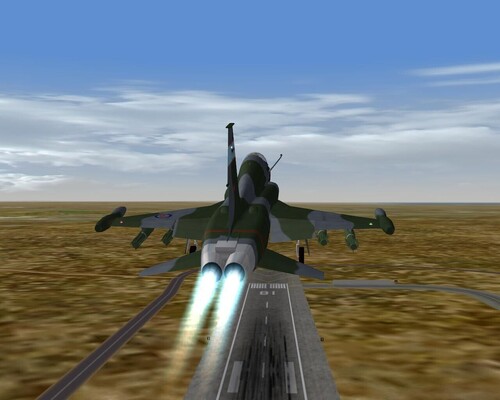
1,910 downloads
Some 31 different afterburner effects to play with.. Thanks to Deuces for his help with info.. Readme instructions included... -
ashpolez, If you can't find it,,supply me your addy,,an i'll send it to you in it's uncompleted state... :) You can PM me....
-

395 downloads
Some Camo tanks for your Hun... Thanks to Pasko & Starfighter2 for these.... Install instructions included... -
Icon Pack #5 is ready to go,,,,it has 7 new icon aircraft for your WOV/SFP1 installl.... You can get it....HERE.... ***************************************************************************************** *****************************************************************************************
-
392 downloads
This icon pack contains 7 new aircraft for your WOV/SFP1 installs... The icons are: F-106A,TU-16A,F-15C,TornadoFMK3,Mig-25PD,F/A-18A,Mig-29A Installation instructions included.... -
A couple more for Icon Pack #5.. :) ****************************************************************************************
-
Icon Pack #5 is almost ready for release,,this is the last pack i will be doing,,but, if anyone wants any particular aircraft done for your specific install,,let me know & i'll be happy to do it... This pack contains a F/A-18A Hornet,Mig-25PD,TornadoFMK3,Mig-29,& F-15C... ***************************************************************************************** *****************************************************************************************
-
***************************************************************************************** You may be correct Sidewinder,,seems like the desert.cat file also comes with a add on terrain or campaign,,...(PUTS THINKING CAP ON)....but i can't remember which one...
-
Thank you for putting up the new calendars,,i really enjoy them... :)
-
***************************************************************************************** Yes it will,,,IF....you have SFP1 so you can copy the desert terrain into your WOV terrain folder,,then copy the Desert.cat file from it to your ANW terrain folder,,renameing it ANW... :)
-
Working on Icon Pack #5..this is what i've done so far.... Also doing a F/A-18A,Mig-25PD, & TornadoFMK3 for it... :) *****************************************************************************************
-
658 downloads
Landing/Taxi/Position lights for all Phantom variants... ******************************** Install instructions included... Some of these were already done by their authors, i just went over each one, tweaked & added some lights.. Thanks to Russo Uk for the original Landing Lights fix.... Thanks to all the artists who made the Mighty Phantoms... -
467 downloads
Some inflight map icons for your WOV SEA installs,,5 aircraft,,F-105F,Mig-21,B-52D,Mig-17F, & F-4J Phantom II... Install instructions included in Readme.. Hope you all enjoy.. dfang -
315 downloads
New map icons for your Korean installs.. Pack contains 3 icons,,a F-86F Sabre,Mig-15, & F9F-5 Panther.. Instructions included... :) -
257 downloads
Some new inflight map icons for your ETO installs,,contains a P-51D,Spitfire MKIA, & FW-190A8R2... Instructions for installing included.. -
377 downloads
This is a little icon pack to enhance your SFP1 gameing experience,,the pack includes some new inflight map runways & aircraft icons,desktop icons,PTO specific install desktop icons,.. install instructions included.. -
I would like to lay the blu-82 down in the horizontal position,,it's currently deployed in the vertical... How would i go about changing the model??? LOD edit?? Any direction appreciated...