


Wataru Matsunaga
-
Posts
4 -
Joined
-
Last visited
About Wataru Matsunaga

Wataru Matsunaga's Achievements





-
Version 1.0.0
21 downloads
Unofficial experimental fix for a command-recipient issue affecting AI-controlled aircraft in Strike Fighters 2. TESTED GAME: STRIKE FIGHTERS 2 COMPLETE (SF2 COMPLETE) This modification was tested in SF2 Complete. Compatibility with other Strike Fighters 2 editions, patch levels, or DLL builds has NOT been verified. The original Comm.dll was dated July 2, 2013 in Windows Explorer. A file date alone does not establish compatibility with other DLL builds. 1. PURPOSE ---------- When the player selected Flight One > Engage Ground from the in-game communication menu, the player's wingman respond to the order and join the ground attack along with the other aircraft. This experimental modification changes recipient selection for the Flight One > Engage Ground command so the player's wingman is excluded from that order. 2. HOW THE FIX WAS DEVELOPED ---------------------------- The modification was developed by examining the command-recipient selection logic in Comm.dll. A small change was made to the recipient-selection path for the Flight One > Engage Ground command. The change is intended to exclude the player's wingman from this specific order while leaving other communication commands unchanged. This is an experimental fix based on binary analysis and in-game testing. It is not a general rewrite of the communication system. 3. IN-GAME TEST IN SF2 COMPLETE ------------------------------- The modification was tested in SF2 Complete using a four-aircraft flight. After the fix, the player's wingman remained outside the Flight One ground-attack order, while the other intended aircraft responded and proceeded with the attack. LIMITATIONS: * Tested in SF2 Complete only. * Flight Two and Flight Three commands were not intentionally modified. * Flight Two and Flight Three have not been exhaustively tested with this modification. * Results with other missions, flight compositions, game builds, or communication commands are unknown. 4. INSTALLATION AND BACKUP -------------------------- BACK UP YOUR ORIGINAL Comm.dll BEFORE MAKING ANY CHANGES. Close the game before installing the patch. Install the modified Comm.dll in the Flight folder of your SF2 Complete game installation (NOT in the Objects folder and NOT in the Mods folder). If using the included trial DLL, rename Comm_FlightOne_EngageGround_noWingman_trial.dll to Comm.dll Place the resulting file here: <SF2 Complete game folder>\Flight\Comm.dll Replace the existing Comm.dll only after backing it up. Keep the original file in a safe location outside the game's active Flight folder. This patch is build-specific. Do not blindly replace a Comm.dll from another version of the game. If your original DLL differs from the tested build, do not apply this binary patch. 5. UNINSTALLATION ----------------- Close the game and restore your backed-up, unmodified Comm.dll. Do not overwrite or delete your only original copy. 6. TROUBLESHOOTING AND FEEDBACK ------------------------------- If the game fails to start, crashes, or behaves unexpectedly, restore the original Comm.dll immediately. Do not mix DLL files from different Strike Fighters 2 builds. Community testing is welcome. Please report: * The game edition and DLL build/date * The mission and flight composition * Which communication menu item was selected * Which aircraft responded * Which aircraft actually joined the attack * Whether the original DLL behaves differently in the same scenario Testing of Flight Two and Flight Three commands would be especially useful. 7. GENERAL NOTICE ----------------- ORIGINAL DLL CREDIT The original Comm.dll was developed by Third Wire Productions. All credit for the original DLL and its underlying code belongs to Third Wire Productions. This is an unofficial fan-made modification and does not claim authorship or ownership of the original DLL. This is an unofficial, experimental, community-made modification. It is not produced, endorsed, or supported by Third Wire Productions. Use it at your own risk. No guarantees are made regarding stability, compatibility, correctness, or effectiveness. Always preserve your original game files and respect the game's license and applicable copyright rules. Unless redistribution of modified proprietary game DLLs is permitted, share a patch or patch instructions instead of the original or modified proprietary DLL. No warranty is provided, to the extent permitted by applicable law. W. Matsunaga 2026/10/22 -
 pvince san Thank you. I’m very happy about this. Currently, I’m working on a bug where the wingman responds even when I order Flight 2 to conduct a ground attack.
 -
I confirmed the deployment of chaff from an external pod against SA-6 SAM. The aircraft successfully evaded the SAM. 2026.10.14
-
Version 1.0.0
33 downloads
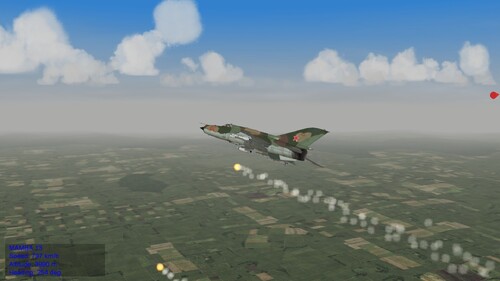
SF2 COMPLETE - NPC EXTERNAL DECOY POD FIX (EXPERIMENTAL) ======================================================== Unofficial experimental fix for AI-controlled aircraft using externally mounted chaff/flare dispenser pods in Strike Fighters 2. TESTED GAME: STRIKE FIGHTERS 2 COMPLETE (SF2 COMPLETE) This modification was tested in SF2 Complete. Compatibility with other Strike Fighters 2 editions, patch levels, or DLL builds has NOT been verified. The modification was prepared from an AircraftObject.dll with a July 2, 2013 PE build timestamp. The timestamp alone does not establish compatibility with other DLL files. 1. PURPOSE ---------- In some versions of Strike Fighters 2, AI-controlled aircraft appear unable to release chaff or flares from externally mounted dispenser pods. This experimental modification attempts to correct that behavior without requiring a simulated built-in dispenser or a separate dummy pod. 2. HOW THE FIX WAS DEVELOPED ---------------------------- The modification was developed by comparing an older AircraftObject.dll from the original Strike Fighters series (2008) with a newer one from Strike Fighters 2 (2013), and examining the countermeasure-handling code. The investigation suggested that two release-count fields used by the newer DLL were initialized for internal dispensers, but not for external dispenser pods. A small 28-byte change to the newer AircraftObject.dll sets the external dispenser's default chaff and flare release counts to four each, matching the defaults used for internal dispensers. This is a proposed fix based on binary analysis, NOT a fully established root-cause finding. The modification does not force continuous dispensing, bypass threat detection, or otherwise intentionally alter the AI's decision to release countermeasures. 3. IN-GAME TEST IN SF2 COMPLETE ------------------------------- In SF2 Complete, an AI-controlled MiG-21MF equipped with an external decoy dispenser was observed releasing both chaff and flares while engaged in combat. Screenshot description (see the accompanying screenshot): The MiG-21MF's INI files were edited to allow a decoy dispenser pod to be mounted on its centerline pylon, where that pod was not available in the original aircraft configuration. For easy visual identification, a makeshift decoy pod used the visual model of a UB-13 rocket pod. Syrian MiG-21MF fighters were then placed in combat against Israeli F-15A Baz fighters. The screenshot shows a MiG-21MF releasing flares from the external pod; chaff release was also observed. This was a test setup, not a claim of a historically authentic loadout. The special MiG-21MF INI edits and UB-13-based visual model are NOT required by the DLL modification and are not included unless separately provided. IMPORTANT LIMITATIONS: * Chaff and flare release were observed with the modified DLL installed. * Whether the dispensed countermeasures successfully decoy incoming missiles has not been verified. * Results with other aircraft, pods, missions, and game builds are unknown. * The modified DLL has not yet been compared with the original DLL under identical in-game test conditions. 4. INSTALLATION AND BACKUP -------------------------- BACK UP YOUR ORIGINAL AircraftObject.dll BEFORE MAKING ANY CHANGES. Close the game before installation. Keep the original DLL in a safe location outside the game's active DLL directory. Rename the supplied file: AircraftObject_decoy_ReleaseCount_trial.dll to: AircraftObject.dll Install it in the Objects folder of your SF2 Complete game installation (NOT in the Mods folder): <SF2 Complete game folder>\Objects\AircraftObject.dll Replace the existing AircraftObject.dll only after backing it up. This modification is build-specific. Do not replace a DLL from another version of the game. If your original DLL differs from the version for which this modification was prepared, do not install the modified DLL. 5. UNINSTALLATION ----------------- Close the game and restore your backed-up, unmodified AircraftObject.dll. Do not overwrite or delete your only original copy. 6. TROUBLESHOOTING AND FEEDBACK ------------------------------- If the game fails to start, crashes, or behaves unexpectedly, restore the original DLL immediately. Do not mix DLL files from different SF2 builds. Community testing is welcome. Please report the game edition and build, aircraft, dispenser pod, missile type, whether chaff or flares were released, and whether the original DLL behaves differently in the same scenario. Reports of successful missile decoying are especially useful. 7. GENERAL NOTICE ----------------- ORIGINAL DLL CREDIT The original AircraftObject.dll was developed by Third Wire Productions. All credit for the original DLL and its underlying code belongs to Third Wire Productions. This is an unofficial fan-made modification and does not claim authorship or ownership of the original DLL. This is an unofficial, experimental, community-made modification. It is not produced, endorsed, or supported by Third Wire Productions. Use it at your own risk. No guarantees are made regarding stability, compatibility, correctness, or effectiveness. Always preserve your original game files and respect the game's license and applicable copyright rules. Redistribution of proprietary game files, including modified DLLs, may require permission from the rights holder. No warranty is provided, to the extent permitted by applicable law. Thank you, ChatGPT 2026/10/13

