


Wild Cat
-
Posts
67 -
Joined
-
Last visited
Content Type
Profiles
Forums
Gallery
Downloads
Store
Everything posted by Wild Cat
-
View File Pilot Demo Team WildCat´s Netjerlands Demo Team pilot Installation instructions in read me Submitter Wild Cat Submitted 05/27/2012 Category Pilot Mods
-
75 downloads
WildCat´s Netjerlands Demo Team pilot Installation instructions in read me -
View File F-16 Demo Team WildCat´s Holland F-16 Demo Team To use this skin you must have F-16A_Blk1 by The Mirage Factory Installation --Airplane: Copy the "F-16DemoNL" folder to your "...\Objects\Aircraft/F-16A_Blk1" folder --BMP files: If you want to change The _Hangar and _Loading bmp files copy them to your F-16A_Blk1 folder, and change the name in the "F-16A_Blk1.ini" file. --Pilot: If you wish, you can download the pilot from Object mods / Pilot mods ******************************************************************************* *** Credits *** ******************************************************************************* Many thanks to The Mirage Factory Submitter Wild Cat Submitted 05/27/2012 Category F-16 Fighting Falcon Skins
- 1 reply
-
- 1
-

-

135 downloads
WildCat´s Holland F-16 Demo Team To use this skin you must have F-16A_Blk1 by The Mirage Factory Installation --Airplane: Copy the "F-16DemoNL" folder to your "...\Objects\Aircraft/F-16A_Blk1" folder --BMP files: If you want to change The _Hangar and _Loading bmp files copy them to your F-16A_Blk1 folder, and change the name in the "F-16A_Blk1.ini" file. --Pilot: If you wish, you can download the pilot from Object mods / Pilot mods ******************************************************************************* *** Credits *** ******************************************************************************* Many thanks to The Mirage Factory -
View File A-6A VA-75 Skin (MCZ) WildCat´s A-6A VA-75 Skin This is for Monty CZ's A-6, and other modifications. I´ve made paint modifications and new decals for fuselage. Installation --SKIN: Copy the "VA-75" folder to your "...\Objects\Aircraft\A-6A" folder --BMP files: If you want to change The _Hangar and _Loading bmp files copy them to your A-6A folder, and change the name in the "A-6A.ini" file. --Pilot: If you wish you can download my VA-75 pilots : http://combatace.com/files/category/313-pilot-mods/ ******************************************************************************* *** Credits *** ******************************************************************************* Many thanks to DaveJS for authorization, and Sundowner for the skin Submitter Wild Cat Submitted 07/01/2011 Category A-6/EA-6 Intruder Skins
-
View File Pilots A-6A VA-75 WildCat´s A-6A VA-75 pilots These pilots are for A-6A VA-75 "Sunday Punchers" There are two pilots availables. One Pilot and one RIO, you choose. Installation Copy the files to your "...\Objects\Aircraft" folder Change the name of pilot in the A-6A_data.ini : // Crew --------------------------------------------------------- [Pilot] SystemType=PILOT_COCKPIT PilotModelName=PilotoVA-75 <--- this line -- Position=-0.4,2.3,0.80 SeatModelName=seat_f-4 SeatPosition=-0.4,2.33,0.45 MinExtentPosition=-0.65, 2.19,-0.05 MaxExtentPosition=-0.15, 3.04, 1.00 CanopyNodeName=CanopyFrame02 HasArmor=TRUE ArmorMaterial=GLASS Armor[FRONT].Thickness=20 [Navigator] SystemType=PILOT_COCKPIT PilotModelName=Piloto2VA-75 <--- this line -- Position=0.4,2.25,0.75 SeatModelName=seat_f-4 SeatPosition=0.4,2.28,0.40 MinExtentPosition= 0.65, 2.19,-0.05 MaxExtentPosition= 0.15, 3.04, 1.00 HasArmor=TRUE ArmorMaterial=GLASS Armor[FRONT].Thickness=20 ******************************************************************************* *** Credits *** ******************************************************************************* Many thanks to DIEGO LOZANO (Old Diego) for the original pilot skin. Submitter Wild Cat Submitted 07/01/2011 Category Pilot Mods
-
118 downloads
WildCat´s A-6A VA-75 Skin This is for Monty CZ's A-6, and other modifications. I´ve made paint modifications and new decals for fuselage. Installation --SKIN: Copy the "VA-75" folder to your "...\Objects\Aircraft\A-6A" folder --BMP files: If you want to change The _Hangar and _Loading bmp files copy them to your A-6A folder, and change the name in the "A-6A.ini" file. --Pilot: If you wish you can download my VA-75 pilots : http://combatace.com/files/category/313-pilot-mods/ ******************************************************************************* *** Credits *** ******************************************************************************* Many thanks to DaveJS for authorization, and Sundowner for the skin -
116 downloads
WildCat´s A-6A VA-75 pilots These pilots are for A-6A VA-75 "Sunday Punchers" There are two pilots available. One Pilot and one RIO, you choose. Installation instructions in the read me -
No estoy perdido, sólo muy liado. Cuando pueda me pongo las pilas. Nos vemos
-
View File F-18 VFA-131 Wildcats WildCat´s F-18 VF-131 WildCats This is a skin of VF-131 wildcats (Red tails). I´ve used the "SpanishHornet" skin by Mike1 to make this skin. To use this skin you need the F/A-18A by USAFMTL or Column5 Installation --SKIN: Copy the VF-131 folder to your ...\Objects\Aircraft\FA-18a folder --Tanks: You need to have installed the "Mirage Factory Weapons Pack 01/25/2009" Copy the content of "Tank" folder in your ...\Objects\Weapons\Tank_F-18 folder. --BMP files: If you want to change The _Hangar and _Loading bmp files copy them to your FA-18a folder, and change the name in the "FA-18A.ini" file. --Pilots: If you wish you can download my VF-131 pilot: http://forum.combatace.com/index.php?app=downloads&showcat=313 ******************************************************************************* *** Credits *** ******************************************************************************* Many thanks to Mike1 for the skin Submitter Wild Cat Submitted 03/18/2010 Category F/A-18 Hornet Skins
-
View File Pilot, VFA-131 WildCat´s VFA-131 Wildcat pilot This pilot is for FA-18 VFA-131. Installation instructions in read me Submitter Wild Cat Submitted 03/18/2010 Category Pilot Mods
-

133 downloads
WildCat´s F-18 VF-131 WildCats This is a skin of VF-131 wildcats (Red tails). I´ve used the "SpanishHornet" skin by Mike1 to make this skin. To use this skin you need the F/A-18A by USAFMTL or Column5 Installation --SKIN: Copy the VF-131 folder to your ...\Objects\Aircraft\FA-18a folder --Tanks: You need to have installed the "Mirage Factory Weapons Pack 01/25/2009" Copy the content of "Tank" folder in your ...\Objects\Weapons\Tank_F-18 folder. --BMP files: If you want to change The _Hangar and _Loading bmp files copy them to your FA-18a folder, and change the name in the "FA-18A.ini" file. --Pilots: If you wish you can download my VF-131 pilot: http://forum.combatace.com/index.php?app=downloads&showcat=313 ******************************************************************************* *** Credits *** ******************************************************************************* Many thanks to Mike1 for the skin -
126 downloads
WildCat´s VFA-131 Wildcat pilot This pilot is for FA-18 VFA-131. Installation instructions in read me -
Thank you friends.
-
Thank you my friend. I´m glad you like it.
-
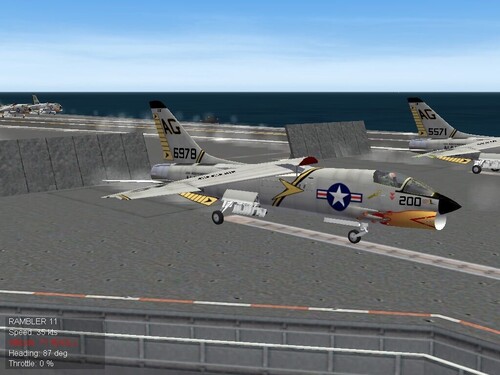
View File F-8C VF-84 (TMF) WildCat´s F-8C VF-84 I´ve used the VF-24 'Checkertails' (1967) skin by GOCAD to make this skin. This skin is for Mirage Factory´s "SFP1_WOV_WOE_F_8C_Pack_V1.2.exe" Installation --SKIN: Copy the VF-84 folder to your "...\Objects\Aircraft\F-8C_MF" folder --BMP files: If you want to change the _Hangar and _Loading bmp files copy them to your F-8C_MF folder, and change the name in the "F-8C_MF.ini" file. --Pilot: If you wish you can download my F-8C VF-84 pilot: http://forum.combatace.com/index.php?app=downloads&showcat=313 ******************************************************************************* *** Credits *** Many thanks to: GOCAD for his F-8C Skin. Submitter Wild Cat Submitted 03/11/2010 Category F-8 Crusader Skins
-
View File Piloto F-8C VF-84 WildCat´s F-8C VF-84 pilot This pilot is for F-8C VF-84 Jolly Rogers. Installation Copy the files to your "...\Objects\Aircraft folder Change the name of pilot in the F-8C_data.ini : // Crew --------------------------------------------------------- [Pilot] SystemType=PILOT_COCKPIT PilotModelName=PilotoF-8-VF-84 <--- This line -- Position=0.0,6.92,0.920 SeatModelName=seat_f-4 SeatPosition=0.00,6.92,0.455 MinExtentPosition=-0.415,6.296,0.621 MaxExtentPosition=0.415,7.593,1.125 CanopyNodeName=Canopy CanopyAnimationID=6 HasArmor=TRUE ArmorMaterial=GLASS Armor[FRONT].Thickness=20 ******************************************************************************* *** Credits *** ******************************************************************************* Many thanks to DIEGO LOZANO (Old Diego) for the original pilot skin. Submitter Wild Cat Submitted 03/11/2010 Category Pilot Mods
-
136 downloads
WildCat´s F-8C VF-84 I´ve used the VF-24 'Checkertails' (1967) skin by GOCAD to make this skin. This skin is for Mirage Factory´s "SFP1_WOV_WOE_F_8C_Pack_V1.2.exe" Installation --SKIN: Copy the VF-84 folder to your "...\Objects\Aircraft\F-8C_MF" folder --BMP files: If you want to change the _Hangar and _Loading bmp files copy them to your F-8C_MF folder, and change the name in the "F-8C_MF.ini" file. --Pilot: If you wish you can download my F-8C VF-84 pilot: http://forum.combatace.com/index.php?app=downloads&showcat=313 ******************************************************************************* *** Credits *** Many thanks to: GOCAD for his F-8C Skin. -
121 downloads
WildCat´s F-8C VF-84 pilot This pilot is for F-8C VF-84 Jolly Rogers. Installation instructions in read me -
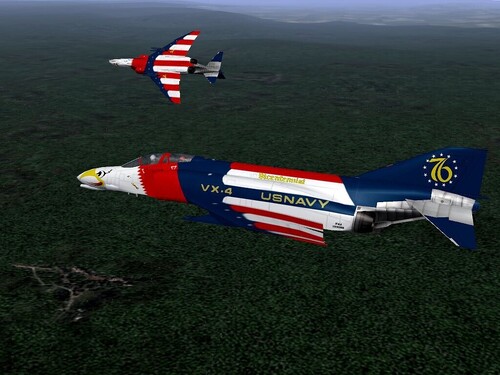
View File F-4B Bicentennial 76 WildCat´s F-4 Bicentennial 76 This is The F-4 Phantom Bicentennial. Painted to commemorate the bicentennial of american revolution, 1776-1976. I´ve used the F-4B template by BUFF to make this skin. Installation --SKIN: Copy the VX4 folder to your "...\Objects\Aircraft\F-4B" folder --Tanks: You need to have install the "Mirage Factory Weapons Pack 01/25/2009" Copy the content of "Tank370_F4" folder and "Tank600_F4" folder in their respective folders inside the "...\Objects\Weapons" folder. --BMP files: If you want to change The _Hangar and _Loading bmp files copy them to your F-4B folder, and change the name in the "F-4B.ini" file. --Pilots: There are two pilots availables for this skin. One with white helmet for Pilot and one with red helmet for RIO. If you wish you can find them in Pilot Mods section: http://forum.combatace.com/index.php?app=downloads&showcat=313 ******************************************************************************* *** Credits *** ******************************************************************************* Many thanks to: BUFF for his F-4B Template. Mirage Factory for tank skins. Submitter Wild Cat Submitted 03/08/2010 Category F-4 Phantom II Skins
-
View File Pilots F-4 Bicentennial WildCat´s VX-4 Bicentennial pilots This pilots are for WildCat´s F-4B Bicentennial skin. There are two pilots. White helmet front, and red helmet rear. Install instructins in read me Submitter Wild Cat Submitted 03/08/2010 Category Pilot Mods
-
123 downloads
WildCat´s F-4 Bicentennial 76 This is The F-4 Phantom Bicentennial. Painted to commemorate the bicentennial of american revolution, 1776-1976. I´ve used the F-4B template by BUFF to make this skin. Installation --SKIN: Copy the VX4 folder to your "...\Objects\Aircraft\F-4B" folder --Tanks: You need to have install the "Mirage Factory Weapons Pack 01/25/2009" Copy the content of "Tank370_F4" folder and "Tank600_F4" folder in their respective folders inside the "...\Objects\Weapons" folder. --BMP files: If you want to change The _Hangar and _Loading bmp files copy them to your F-4B folder, and change the name in the "F-4B.ini" file. --Pilots: There are two pilots availables for this skin. One with white helmet for Pilot and one with red helmet for RIO. If you wish you can find them in Pilot Mods section: http://forum.combatace.com/index.php?app=downloads&showcat=313 ******************************************************************************* *** Credits *** ******************************************************************************* Many thanks to: BUFF for his F-4B Template. Mirage Factory for tank skins. -
86 downloads
WildCat´s VX-4 Bicentennial pilots This pilots are for WildCat´s F-4B Bicentennial skin. There are two pilots. White helmet front, and red helmet rear. Install instructins in read me