
About This File
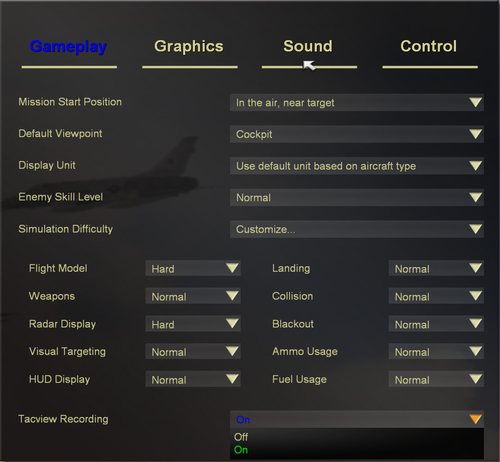
ACMI recordings for your sorties! Recorded files are delta-encoded and compressed, so they use minimal storage.
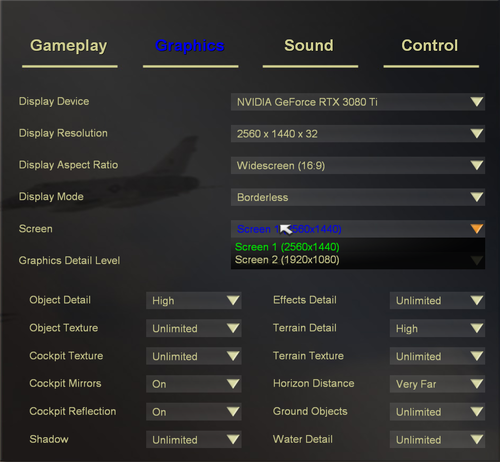
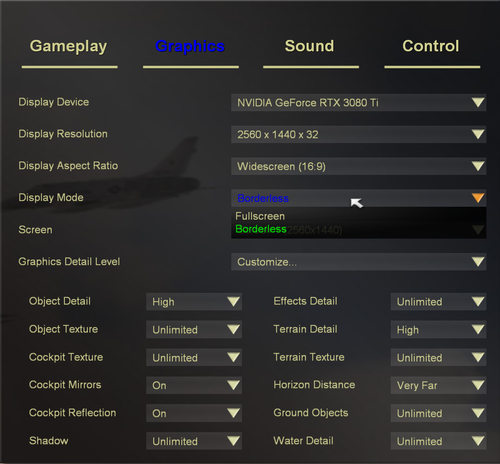
While exploring telemetry recording, I hooked Borderless fullscreen into the game for smooth Alt+Tab behaviour.
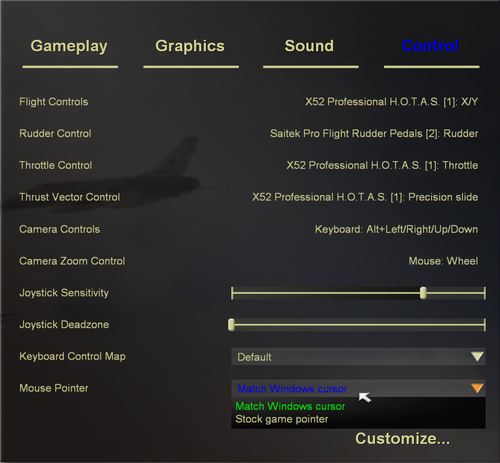
Matching Windows cursor ensures smoother mouse movement in menus.
Code is open source and hosted here: https://github.com/LazyWorksZA/lazy-sf2-patch/tree/master
Changelog:
1.0.0 (2026-11-25)
First public release.
Display and mouse
- Display Mode (Options › Graphics): Fullscreen or Borderless. A change applies live when you leave Options.
- Screen (Options › Graphics): the monitor the game runs on.
- Borderless keeps the game out of exclusive fullscreen and off "always on top", turns off Alt+Enter, and lets the Windows key work.
- Mouse Pointer (Options › Controls): "Match Windows cursor" puts the game's pointer exactly on the Windows cursor, so it no longer drifts, including over remote-control tools such as RustDesk. In Fullscreen the cursor stays on the game screen while the game is active.
- Fixes for stock game problems: Alt-Tab back into exclusive Fullscreen works; a lost graphics device and display scaling other than 100% are handled; the Display Mode hint text shows in full.
Tacview
-
Tacview Recording (Options › Gameplay, default Off) records every flight, single-player included, to Saved Games\ThirdWire\StrikeFighters2\Tacview\SF2 <date>.zip.acmi, which Tacview opens directly. A recording holds:
- aircraft at 10 Hz, with type names so Tacview shows 3D models;
- missiles, bombs and rockets at 20 Hz, each linked to the aircraft that fired it;
- ground objects (buildings, sites, AAA and SAM) at 1 Hz, and ground vehicles and ships at 5 Hz, with their type names;
- flares and chaff at 10 Hz, and tracer rounds at 20 Hz (up to 128 at a time) linked to the shooter;
- Destroyed events and explosions;
- the theatre's airfields as named aerodrome markers.
- Recordings are compact: each line holds only the values that changed, and the finished file is zipped (one measured 19.6 MB recording came to about 1.4 MB). While a flight runs the file is a plain .acmi; if the game exits before packing finishes, it stays a plain .acmi that Tacview opens just the same. A recording is capped at 512 MB.
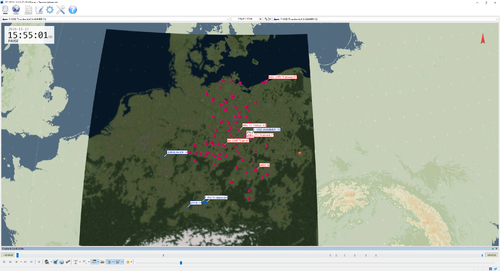
- Tacview terrain. The first recorded flight in each theatre exports that theatre for Tacview: its heightmap, a ground texture built from the theatre's own tiles, and a sharp patch of real ground tiles around each airfield's runways. A theatre whose ini gives a geographic position is placed there (GermanyCE sits over central Germany); the others sit on open Atlantic. The files go to %APPDATA%\Tacview\Data\Terrain\ and are made once per theatre; delete them to have them made again.
- Tacview add-on. The patch writes a small add-on to %APPDATA%\Tacview\AddOns\LazySF2Patch\. Enable "Lazy SF2 Patch" in Tacview's Add-ons menu (Tacview 1.9.5 or newer) and it shows only the ground of the recording's theatre, hiding the others. Its "Lazy SF2 Patch: theatre switch" option turns this off.
Edited by LazyGameDevZA