


Wrench
-
Posts
27,828 -
Joined
-
Last visited
-
Days Won
159
Content Type
Profiles
Forums
Gallery
Downloads
Store
Posts posted by Wrench
-
-
looks like someone didn't update their 17PFU Izrumd nose to use the 'fake pilot' seating arrangment. The one you're using is either set to a) a gunpod, as originally issues in 2005 or b) set as an ECM pod.
d/l the 17PFU upgrade pak from our handy dandy downloads section, and follow the detailed instructions I wrote, and all will be well
wrench
kevin stein
-
ah....no
wrench
kevin stein
-
again, we refer you to FC's post above ... none of the DAT members post here anymore.
wrench
kevin stein
-
Happy Birthday Ed!!! Have a GREAT day!!
wrench
kevinstein
-
neither are designed for use with the 08-level 1st Gen sims and most definately NOT with the SF2 series. To say nothing of that original terrain (to many flaws to even list, and it's from 05, don't even have water effects)
for those folks spending time on a Korean War mod, and not paying attention to whats going on all around, I'd tell you to stop wasting your time ... a whole NEW set up is being built for KAW.
Some of the best people in The Community are on it.
Be paitent, and be ready to be stunned. In several months, of course
wrench
kevin stein
-
yes, the bmp files for the 3 barbed wires sets are missing.....
that's because they're tgas
wrench
kevin stein
-
real money says the control key swapping is due to an older version of the aircraftobject.ini residing in the /Objects folder.
There's thread in the KB on just that very subject. Delete it, and I"ll be the keys come back to 'normal'
as to the 'crash', well, without an error message, or WHICH aircraft and WHICH terrain it's happening on, can't help
the quote Dr. Asimov: "There is as yet insuffiecnt data for a meaningful response"
wrench
kevin stein
-
could you be a little less vague with "progarm bugs out"??? A little better defination, please
you do know that this is a WW2 terrain only, right?? It ain't designed for jets. And that even in the 'what if...' world of SWOTL, there's only my MTO 262 and 229 skins readily available.
there's plenty of MEDIUM airbases available on the Axis side for the 2 jets to fly from ... they should ONLY be set to MinBaseSize=MEDIUM in their data ini (something I forgot on the 229 update mod); given their long spool=up times and relativly low power/throttle response.
I just tested BOTH the 262 and 229, and had no issues (excepting the expected odd behavior of the Horten, which needs a FM update for 06 levels). Didn't test the 162, as it weren't used in MTO (even in SWOTL what ifs)
wrench
kevin stein
-
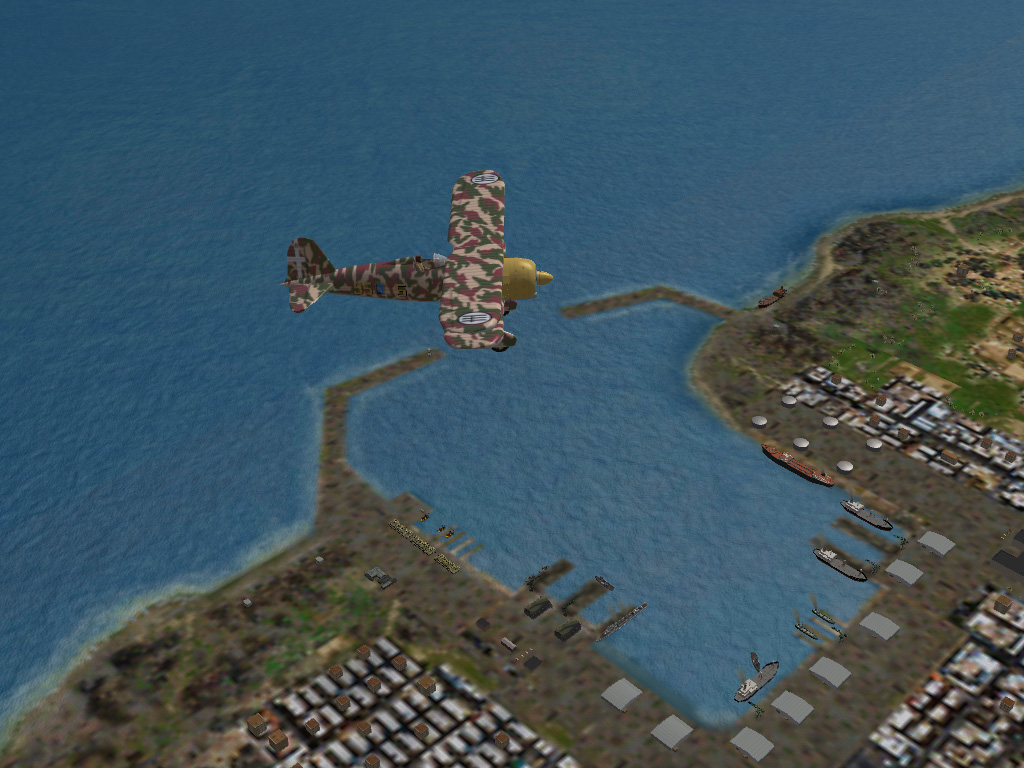
WW2 Tunisia/Western Med Update Pak
Tunisia Terrain & Targets Upgrade For SF/WoV/WoE WW2 MTO mods
This started out as a simple targets upgrade, and turned into a major rework of Edward's Tunisia Terrain for WW2. As you can expect, the targets have been greatly 'enhanced', with many additions, and most areas have been retiled for ease of targetization. The visuals (ie: the eye candy) has been enhanced by these revamped target areas. This will allow single mission and campaign builders more latitude in their creation of missions and campaigns. It also has the side effect of enhancing in-game generated single mission play, too!
This is a COMPLETE terrain, designed to REPLACE the original verison in it's entirety. It is also NOT compatable with any other terrain retiling or TOD mods to the original terrain that are presently available. All necessary parts are included; tiles, inis, LOTS of new terrain items, with the excpetion for some 'permission-only' GroundObject items. All new planning maps are also included. Also, there are at LEAST 3 Easter Eggs on the map. There are also several brand new tiles, and their associated TODs (new city ports and some other interestering items).
There ARE some historical flaws (and probably physical geographic ones as well!!); they are fully detailed in the "Notes & Explinations" section below. You may also experience extended or longer than usual loading times; this is normal due to the shear number of terrain objects on this map.
The data ini has been upgraded to the semi-latest standards (ie: 2006 patch level). Water effects are active, so Vista users beware...more information for you is below in the Install Instructions. See "Notes for Vista Users". NOTE: this is NOT designed for the post-08 patch or SF2 "NextGen" series. The terrain's data ini does NOT have the new Height Data included!!! (however, that is easily added if you're familiar with the varous terrain data inis, and how to 'update' them).
= MAKE SURE YOU HAVE THE WW2 WEAPONS PAK !! =
= MAKE SURE YOU HAVE THE LATEST, WW2 NATIONS INI IN YOUR FLIGHT FOLDER =
= MAKE SURE YOU HAVE THE LATEST WW2 FORMATIONS INI IN YOUR FLIGHT FOLDER =
= MAKE SURE YOU HAVE GEO'S WW2 GROUND OBJECTS PAKS!! MOST IMPORTANT!!! =
It has been tested in 06 Patch Level WoE (my WW2 install of choice), using the cat pointer line to all the Origianl 3 Terrain Cats (Desert, GermanyCE and VietnamSEA). As most of the new terrain objects and tiles are residing directly in the terrain folder, you should have no problems. (see the CombatAce Knowledge Base for the tutorial on using the cat pointer line). It has NOT, however, been tested in post-08 SF/SFG/WoV/WoE/WoI or any of the SF2 'NextGen' series; it is NOT designed for useage in those type of game installs. If you choose to do so, expect NO support from me -- you're on your own. Although, it should work pretty well in most case. Some data ini adjustments will probably be required for the additional effects. Consult the SF2 Knowledge Base at CombatAce for more information on "how to.."
As always, it's reccomended you unzip this to a temp folder somewhere's thats easy to find. This will give you access to the rest of the readme for full, detailed install instructions and the Usual Notes and Other Ramblings...
Follow these instructions herein =EXACTLY= and you should have no problems. It's =HIGHLY= reccomended you read this document completly through before installing this mod.
Good Hunting!
Wrench
Kevin Stein
-
Submitter
-
Submitted01/19/2010
-
Category
-
-
to quote the Trolly Boy from 'Hot Fuzz', "Yarrp" :yes:
it should alse be mentioned, that the 06 patch level is as high as you want to go, due to 350+ aircraft needed completly new flight models (and there are some even at 06 levels that are "iffy")
wrench
kevin stein
-
I'll bet real money that it's for the next title, NOT for the SF2 series. (even though the terrain in the background kinda looks like israelme)
I'd be very happy to eat my words, but don't expect to be doing so
wrench
kevin stein
-
maybe a screenie would help us ID said "canoe"??? although I suspect it's the LD
wrench
kevin stein
-
Not anymore!!!

wrench
kevin stein
-
Sorry folks....I don't get over here very often (TS, you shoulda let me know there was a question!!!)
Anyway, what you're trying to do is convert a terrain object into a ground object. In particular, you're speaking of the parked statics that iirc, Capun did. They are best left alone, for what they are ... eye candy and something to strafe. Now, the game WILL generate it's own parked static aircraft, so there's no real need for these even to exist.
These were created before one of the patches/expansion pak that allowed the in-game generation.
You're also consusing GroundObjects with TerrainObjects. TerrainObjects ONLY exist inside the terrain cat, or, like these aftermarket parked statics, in the terrain folder itself.
GroundObjects are added, as you've figured out, via edits of the _targets and _types ini.
An example of a ground objects being used, are the various trucks seen on the airfields. An example of terrrain objects are the hangars, tents, oil drums, etc. Anything that is NOT an aircraft, ship or vehicle found in the GO folder. This would include the aforemetioned 3rd Party parked aircraft; terrain objects.
I haven't looked at the airfield inis for FE, well, ever, but if it uses similiar statements as SF/Wo* and SF2 series, said airfield inis will have parking slots assigned. Now, if one wants to ADD more parked aircraft, you'll have to plot the positions using the HUDData.ini DisplayDebug set to TRUE, and note the offsets.
All in all, I believe it's simply something NOT worth messing with. Leave them as terrain objects, and be done. Take it from the Terrain Targets Guy!
as to building missions, I never figured out how to use either of the mission builders. I just wouldn't worry about it. The game should generate the stock parked planes on it's own (well, at least in SF/Wo* sometimes!). If the airfield inis are like the other, there should be parkingchance= percentage. Up that to 90-99 and see what happens.
wrench
kevin stein
-
I stand corrected, thanks Greg!!
one can assume they work as well for us cowards that fly on normal??? (I like my "here's the enemy pointer"
)wrench
kevin stein
-
even better than using the Alt/D switch, is simply edit the HUDData.ini.
Extract from flightdata.cat, leave in /Flight folder and edit as follows:
(just ingore the DisplayDebug=TRUE, that only used for terrrain targting)
[Debug]
DisplayDebug=FALSE
//DisplayDebug=TRUE
TextFontName=Arial
TextSize=12
[infoDisplay]
//BackgroundImage=TextBackground.tga
BottomLeftPosition=0.01,0.985
BottomRightPosition=0.99,0.985
DisplayWidth=0.20
VerticalBorder=0.0015
HorizontalBorder=0.008
EnemyTargetColor=1.0,0.0,0.0,1.0
FriendlyTargetColor=0.0,0.0,1.0,1.0
UnknownTargetColor=1.0,1.0,0.0,1.0
WaypointColor=1.0,1.0,1.0,1.0
TextFile=HUDText.str
NormalColor=1.0,1.0,1.0,1.0
WarningColor1=1.0,1.0,0.0,1.0
WarningColor2=1.0,0.0,0.0,1.0
AGLAltStart=609.6
AGLAltWarning=152.4
[Display001]
DisplayType=DIRECTOR
ObjectType=TARGET_ENEMY
ConeSize=25
BoxSize=10
BoxType=SQUARE
BoxColor=1.0,0.0,0.0,0.75
ConeModelName=redcone
[Display002]
DisplayType=DIRECTOR
ObjectType=TARGET_FRIENDLY
ConeSize=25
BoxSize=10
BoxType=SQUARE
BoxColor=0.0,0.0,1.0,0.75
ConeModelName=bluecone
[Display003]
DisplayType=DIRECTOR
ObjectType=NEXT_WAYPOINT
ConeSize=25
BoxSize=10
BoxType=TRIANGLE
BoxColor=1.0,1.0,1.0,0.75
ConeModelName=whitecone
[Display004]
DisplayType=RADAR
PosX=0.865
PosY=0.015
Width=0.125
Height=0.16666667
Alpha=0.60
InitTime=2.0
[Display005]
DisplayType=DIRECTOR
ObjectType=RADAR_TARGET
ConeSize=25
BoxSize=10
BoxType=DIAMOND
BoxColor=1.0,1.0,0.0,0.75
ConeModelName=
try those edits, and see how they work. Be advised, that if you're EVER use one of the radar-equipped nightfighers, you will have NO display in the cockpit, so it's vitaly important that the radar display is left intact. As we don't have any pits with scopes (since most were handled by the GIB anyway...)
HARD flight model is NOT reccomended, as there are no WW2 aircraft taht I'm aware of that make use of it. All DAT birds are optimized for NORMAL, and using hard will cause 'issues'
Most, if not all info needed on setting up is the the SF (1st Gen) Knowledge Base.
wrench
kevin stein
-
I thought the Ekco just 'hung there' on the pylon ... are you saying it has a clear nose, and the dish is animated???
Now, THAT would be cool!!
wrench
kevin stein
-
Happy Birthday Sandesh!!!
wrench
kevin stein
-
EDIT:
lets just say that new screen templates, based off the originals -with all the hotspots in the exact same places, with swappaable backgrounds* DO exist...
they're just not available yet.
the hangar is a multi-layered template that has the 2 different concrete backgrounds, 2 different carrier decks (with expansion joints and taxi lines), 2 different 'dirt' textures, and a grass one.
wrench
kevin stein
*=you can switch the background pic, as long as it's 1024x768
-
you know, Slartibartfast is a member here....maybe he can help out with the fjords??? After all, he DID get an award for them!!
wrench
kevin stein
sorry, couldn't resist!!
W
-
 1
1
-
-
I must disqualify myself, as I belive Fub and I discussed this one time.
but, am I thinking of PPTH??? and 13?
wrench
kevin stein
-
1
-
-
you'd have to extract them from the menudata.cat in WoV.
and no, first gen screens won't work on next gen sims ... already tried. Excepting hangar screens, and even they are a 'bit weird', especially my patentpending artwork styles.
The hotspots, while adjustable via the screen inis, are all in different places (it can be done, with LOTS of hair pulling and jumping about)
if you can work with layers in PS or Gimp, you can try and adapt them, but otherwise ...
wrench
kevin stein
-
I never did an update for the Suez terrain ... only Isreal2 and the stock WoI IsraelME. Sorry, can't help you. But..it DOES require the desert cat, like shusjake said above, for all the stock desert tiles.
Replacement sets are in the downloads section, and even the stock tiles are 'hidden in plane sight' in many other terrains. You just have to look for them, cause I don't recall where/which/when/whatever
wrench
kevin stein
-
Interesting!!! I wonder how many other birds Wolf's sitting on???? ... I'm just dying to see his Spit and Hurri...
got for it Ed!! It'll look good over the Tunisia/West Med terrain (if I can ever finish it....)
wrench
kevin stein
SUEZ 2 Revisited
in Mods/Skinning Discussion
Posted
you can also download the black HM bmps I created right after the issue appeared with the 08 1st GEn patchs.
what these do, is "fool" the game engine into thinking it's a hard surface. Also, as Gepard instructed, change the HMS number to 1.
wrench
kevin stein