


Wrench
-
Posts
28,271 -
Joined
-
Last visited
-
Days Won
186




About Wrench

Recent Profile Visitors
92,216 profile views



Wrench's Achievements






-
USN F-4Bs Some Black skins From wings over vietnam mods
Wrench replied to DEVIL11's topic in Mods & Skinning Discussion
maybe installed on wrong Phantom (ie, not a stock one?) -
Nice one DA!! You know he does drop in from time to time ... and now he knows where the hole in his barbed wire and shields are!
-
Unguided rockets as air to air weapon
Wrench replied to Gepard's topic in Mods & Skinning Discussion
Well, they MIGHT eventually hit the ground (?). That's something I've NEVER missed hitting!! The target? Maybe. The ground, always!!! hahha! Glad you got it working!!! It's a real challenge, even for the Human Player (tm) -
Most important advice you can get on the subject: Learn To Live Without Anything From the DAT. We don't deal with them or their products. You're on you own with them. Good Luck. You'll need it.
-
you could have also just renamed the HudData.ini, too.
-
Ant, that's what I think too. Piracy is just TOO easy. But, like you said, for legit 3d modders, who want to fix abandonware models, yeah.
-
Thanks! You can thank Raven for the Hercules powered Hurricane. It actually flies pretty good, maybe better the Real World (tm) version.
-
So, in theory then, even 3rd party models that have a number of flaws could be 'repaired' (like catch or cast shadow) and made better (can't think of a better term)? Off the top of my head, we have several aircraft (and ground/terrain objects) that have serious shadow issues, like not casting when told too, or oddly shaped or the famous Tractor Beam (tm). Things like misaligned pivots or rotating items (tires, props, etc). That could really be a game changer for a LOT of old mods that the Author isn't around any more
-
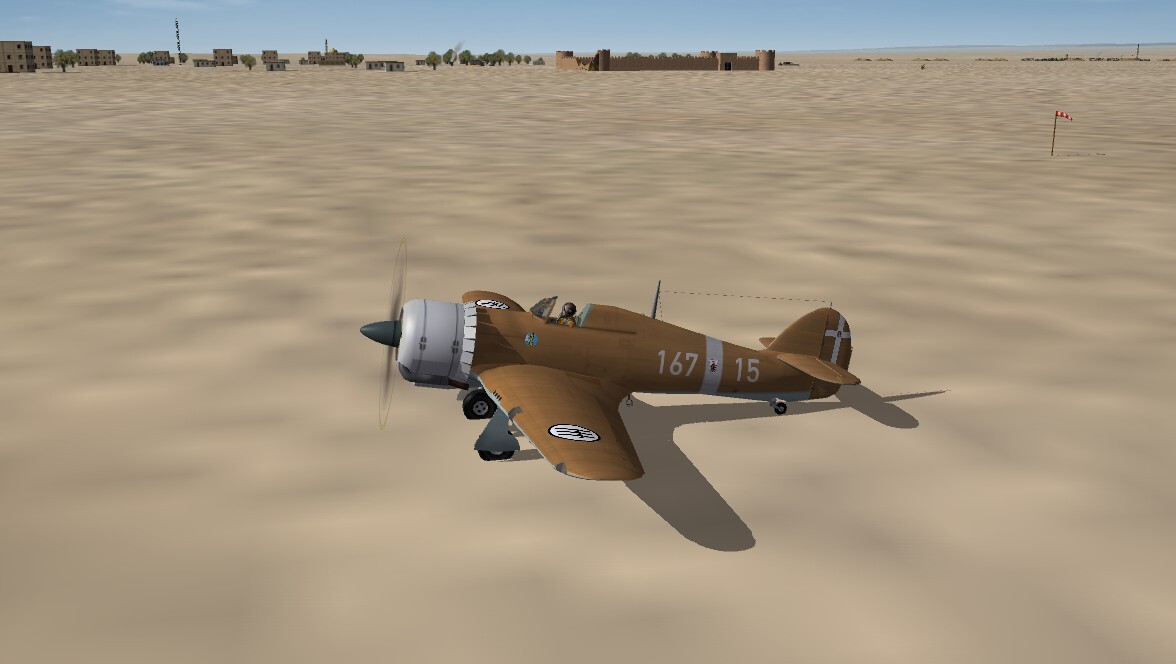
Macchi C.200 (ok, not really; call it a Fakkhi C.200) Gotta have something to replace the irreplaceable. Closest of all the radial birds of the 'time period' we've got If you close one eye, turn off the lights in the room, squint with the other eye, and turn off your monitor, and stand 20 feet way, it doesn't look too bad... Still need to finish the camo. Went with all white numbers, as decals are easily repainted.
-
Damn! And the animations remained intact???
-
Unguided rockets as air to air weapon
Wrench replied to Gepard's topic in Mods & Skinning Discussion
never mind, here's a more SF2 version by christian59, that uses the sf2 lod -
Unguided rockets as air to air weapon
Wrench replied to Gepard's topic in Mods & Skinning Discussion
this is the 1stGen mod for the MiG-17PF SP-16. This has the rockets and pods. I can't find my in game version, so I'll test this one later today. They may need some tweeking for SF2 use the attached file instead. Be aware, this is the 1stGen mod, and shouldn't use the stock SF2 lod, but use the information on rocket placements from the data ini into a NEW version of the SF2 data ini for a modded stock 17PF -
Unguided rockets as air to air weapon
Wrench replied to Gepard's topic in Mods & Skinning Discussion
The rockets need to be treated as a 'gun' of sorts .. that's how I did it with the F-89 Scorpions. I also cheated with the rockets, giving them a sustainer. There's a MiG-17 around here someplace I did with the same kind of working A-A rockets. I can hunt around for the specifics, if you want. -
Version 1.0.0
19 downloads
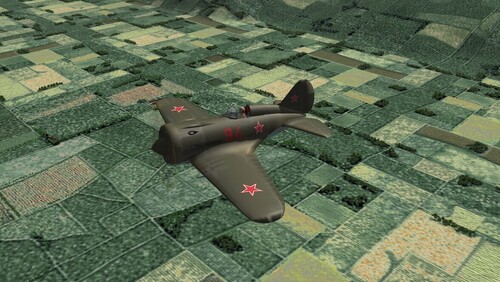
SF2 Polikarpov I-16 'Rata' Upgrade Package 8/25/2026 -For SF2 =ONLY= (Full/5 Merged Recommended) This contains a full SF2 upgrade package for Wolf257's Polikarpov I-16 'Rata'. I've collected all the skins (i hope!) available, or new skins made to replace the original lo rez bmps. Many changes on this old bird have been implemented, see the "Notes" section for the Change List. The package includes the following skins: 254 IAP, VVS (a somewhat generic skin) 71 IAP Leningrad '41 (Camo) 4th GvIAP Baltic Fleet (1942?) 21st Squadron, Chinese Nationalist AF (1937) 1st Squadron, Republican AF <1937 (Spain) When possible, and available, the original author's read me and image are included in their skin folder. All skins are in jpg format, at 2048x, and all markings are decals. Decal randomization is TRUE. Some skins got all new decals, some use stock 3W Soviet Bort numbers. The Chinese and Spanish numbers ARE 100% historically correct. On the Aircraft Selection Drop Down Screen you'll see: I-16-10 "Rata" (W) The W is obviously for Wolf257. I don't think there's another Rata, but ???? Everything is included: WW2 bombs, pilot figures and so forth. You'll also be adding a 'new' sound, so have your SoundList ini extracted, or be ready to extract it and add the new sound's data. Full instructions are in below, in the "To Install" section. My original 'Box Art' Hangar Screen has been revamped for SF2 usage; it's in a kind of 'wide-ish-screen'. A BRAND NEW!!! Loading screen was created for this mod as well!! As is always recommended, unzip to a temp folder or your desktop to give easy access to the rest of this readme for it's install instructions. PLEASE read them, before installing!!! Please read the Notes section for any other useless bits of information, the change log, Please also take note of changes in the Standard Disclaimer in the "Legal BS" section at the bottom. Also, a reminder this is a VERY old model (2005) and will have some flaws. Happy Landings! Wrench Kevin Stein- 1 review
-
- 6
-

-

-
View File SF2 Polikarpov I-16 'Rata' Upgrade Package SF2 Polikarpov I-16 'Rata' Upgrade Package 8/25/2026 -For SF2 =ONLY= (Full/5 Merged Recommended) This contains a full SF2 upgrade package for Wolf257's Polikarpov I-16 'Rata'. I've collected all the skins (i hope!) available, or new skins made to replace the original lo rez bmps. Many changes on this old bird have been implemented, see the "Notes" section for the Change List. The package includes the following skins: 254 IAP, VVS (a somewhat generic skin) 71 IAP Leningrad '41 (Camo) 4th GvIAP Baltic Fleet (1942?) 21st Squadron, Chinese Nationalist AF (1937) 1st Squadron, Republican AF <1937 (Spain) When possible, and available, the original author's read me and image are included in their skin folder. All skins are in jpg format, at 2048x, and all markings are decals. Decal randomization is TRUE. Some skins got all new decals, some use stock 3W Soviet Bort numbers. The Chinese and Spanish numbers ARE 100% historically correct. On the Aircraft Selection Drop Down Screen you'll see: I-16-10 "Rata" (W) The W is obviously for Wolf257. I don't think there's another Rata, but ???? Everything is included: WW2 bombs, pilot figures and so forth. You'll also be adding a 'new' sound, so have your SoundList ini extracted, or be ready to extract it and add the new sound's data. Full instructions are in below, in the "To Install" section. My original 'Box Art' Hangar Screen has been revamped for SF2 usage; it's in a kind of 'wide-ish-screen'. A BRAND NEW!!! Loading screen was created for this mod as well!! As is always recommended, unzip to a temp folder or your desktop to give easy access to the rest of this readme for it's install instructions. PLEASE read them, before installing!!! Please read the Notes section for any other useless bits of information, the change log, Please also take note of changes in the Standard Disclaimer in the "Legal BS" section at the bottom. Also, a reminder this is a VERY old model (2005) and will have some flaws. Happy Landings! Wrench Kevin Stein Submitter Wrench Submitted 10/11/2026 Category Soviet Origin
-
- 3
-
-
