


wilco
-
Posts
527 -
Joined
-
Last visited
Content Type
Profiles
Forums
Gallery
Downloads
Store
Everything posted by wilco
-
Fixed!
-
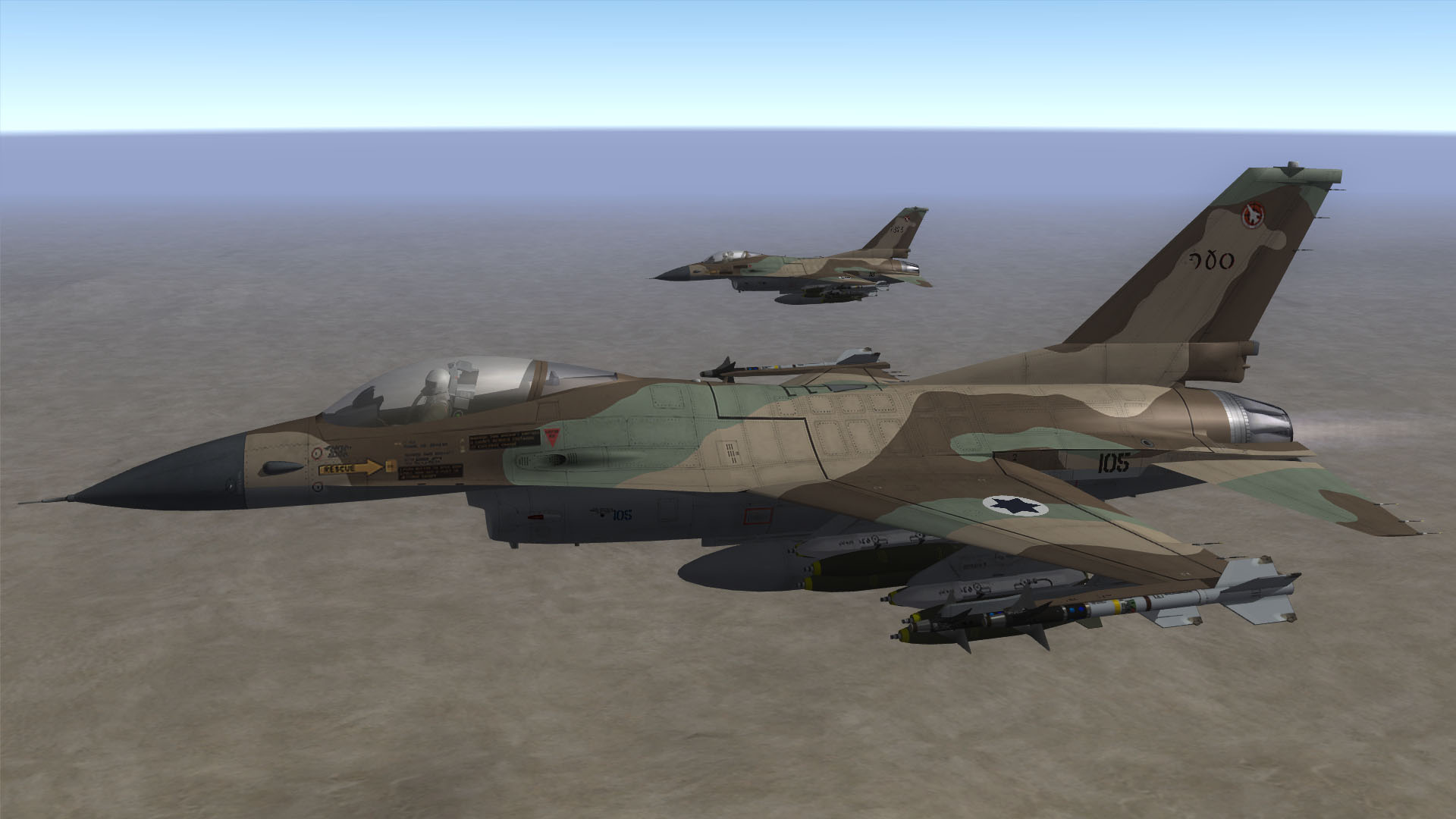
F-16A Netz of IDF's First Jet Squadron in 1982. Coming to a CombatAce near you.
-
guyran, The stencils on the wings (spoilers and ailerons) are mirrored, too. I corrected those issues while I was working on the A-4N conversion (which is currently on hold). The rescue arrow may need an overhaul, but I'll try to upload the replacement bmps this weekend.
-
Well, Germany won yesterday's match against Azerbaijan (4-0) and are leading their group, but Russia is down by only one point.
-
Hey Oliver, You can find some excellent MiG pits in the SF 1 Series section of the downloads, those should work like a charm!
-
Happy Birthday!
-
Happy Birthday!
-
Happy birthday!
-
Would it be feasible to add suspected targets like truck parks and weapons caches? I was thinking of (invisible) objects placed randomly among the trees, maybe near the truck routes, with low target values and no secondary explosions when destroyed.
-
-
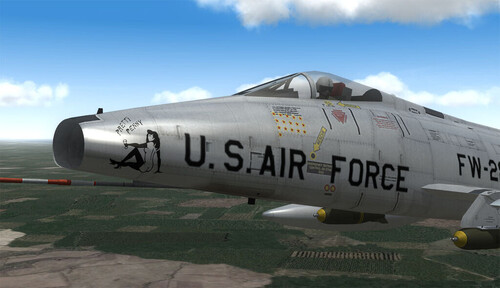
232 downloads
F-100D 'Pretty Penny' (481TFS) skin for SF2V: This skin is for Thirdwire's stock F-100D_64. It represents a single F-100D of 481st Tactical Fighter Squadron. "Pretty Penny" was flown by 1/Lt. Peter Vanderhoef and 1/Lt. Gerry Sloame. It was named for Sloame's wife. INSTALLATION: Unzip and put the Objects folder into your SF2V mod directory. KNOWN ISSUES: None, but the original kills marks for AG are missing (you'll get the ones for AA kills instead) and the markings are in black instead of insignia blue. The latter issue won't be fixed, since both sources show black markings. SOURCES: -ESCI F-100D Super Sabre in 1/72, Kit 9022 -Drendel, Lou. F-100 Super Sabre in Action. Squadron/Signal Publications, 1973. p. 26. Have fun! wilco Released under the CombatAce Fair-Use License. For more information on this license, please visit http://forum.combatace.com/index.php?showtopic=26131. -
View File F-100D (64) Pretty Penny for SF2V F-100D 'Pretty Penny' (481TFS) skin for SF2V: This skin is for Thirdwire's stock F-100D_64. It represents a single F-100D of 481st Tactical Fighter Squadron. "Pretty Penny" was flown by 1/Lt. Peter Vanderhoef and 1/Lt. Gerry Sloame. It was named for Sloame's wife. INSTALLATION: Unzip and put the Objects folder into your SF2V mod directory. KNOWN ISSUES: None, but the original kills marks for AG are missing (you'll get the ones for AA kills instead) and the markings are in black instead of insignia blue. The latter issue won't be fixed, since both sources show black markings. SOURCES: -ESCI F-100D Super Sabre in 1/72, Kit 9022 -Drendel, Lou. F-100 Super Sabre in Action. Squadron/Signal Publications, 1973. p. 26. Have fun! wilco Released under the CombatAce Fair-Use License. For more information on this license, please visit http://forum.combatace.com/index.php?showtopic=26131. Submitter wilco Submitted 08/02/2009 Category F-100
-
Penny got herself some custom droptanks. Not sure if I should I upload this skin, since it's just a slightly refurbished version of the one I did for WoV.
-
Penny is back.
-
-
Well, that's better than nothing, isn't it?
-
I use Avast Home Edition, Firefox with NoScript etc. and Spybot S&D, though gwar is absolutely right: The best protection (at least in most cases) is the thingy behind your eyes.
-
Happy birthday!
-

185 downloads
IDF Camo skin for TMF's F-16A Fighting Falcon Block 10 IDF: This 'generic' skin for TMF's F-16A Netz Blk 10 includes tailmarkings for four IDF squadrons: 110 (Knights of the North) 117 (First Jet) 140 (Golden Eagle) 253 (Negev) INSTALLATION: Extract the content of the archive and put the 'IDFCamo1' folder right into your F-16A_Blk10-IDF folder, while the content of the Decals folder goes to .../Objects/Decals. If you don't have the F-16 yet, get it here: - http://www.column5.us/miragef.shtml - http://forum.combatace.com/index.php?autoc...p;showfile=3502 KNOWN ISSUES: - WOI-only skin, as it uses WOI's stock NetzSN decals. - You'll need to select the squadrons from the loadout menu. Have fun! wilco Team Flying Dragon Released under the CombatAce Fair-Use License. If you encounter any problems or if you have comments and/or suggestions, contact me at CombatAce. BTW: You can use the bmps provided with this skin to update our older No.115 Squadron skin (http://forum.combatace.com/index.php?autocom=downloads&showfile=8880). To do so, copy F16-001.bmp, F16-002.bmp and F16-003.bmp to the 115IDF folder. -
View File IDF skin for TMF's F-16A IDF Camo skin for TMF's F-16A Fighting Falcon Block 10 IDF: This 'generic' skin for TMF's F-16A Netz Blk 10 includes tailmarkings for four IDF squadrons: 110 (Knights of the North) 117 (First Jet) 140 (Golden Eagle) 253 (Negev) INSTALLATION: Extract the content of the archive and put the 'IDFCamo1' folder right into your F-16A_Blk10-IDF folder, while the content of the Decals folder goes to .../Objects/Decals. If you don't have the F-16 yet, get it here: - http://www.column5.us/miragef.shtml - http://forum.combatace.com/index.php?autoc...p;showfile=3502 KNOWN ISSUES: - WOI-only skin, as it uses WOI's stock NetzSN decals. - You'll need to select the squadrons from the loadout menu. Have fun! wilco Team Flying Dragon Released under the CombatAce Fair-Use License. If you encounter any problems or if you have comments and/or suggestions, contact me at CombatAce. BTW: You can use the bmps provided with this skin to update our older No.115 Squadron skin (http://forum.combatace.com/index.php?autocom=downloads&showfile=8880). To do so, copy F16-001.bmp, F16-002.bmp and F16-003.bmp to the 115IDF folder. Submitter wilco Submitted 07/05/2009 Category F-16 Fighting Falcon Skins
-
Happy birthday! Now go kick some Hessian ass!
-
Got it, though I had to register a new account as well. Anyway, the $15 are well spent. Pure awesomeness.
-
RIP.
-
Happy birthday!
-
F-16C of 101 First Fighter Squadron over the Med.