


HrntFixr
-
Posts
1,957 -
Joined
-
Last visited
-
Days Won
1
Content Type
Profiles
Forums
Gallery
Downloads
Store
Everything posted by HrntFixr
-
These are in the terrain/vietnamsea folder only, nothing with object folder. You don't replace your airfield's , just modifying what you have. :) open airfield4 in notepad and copy paste the runway taxiway sets and the light sets.
-
These are just the approach lights not the taxi/runway lights. You have to add whichever lightset you want into your VietnamSEA_Airfield#.ini. (# = being 1,2,5,6) Same goes with the large airfield for VietnamSEA_Airfield4.ini. READ the READ me file it should be in there also how to do this. As for the taxi/runway lights Piett fixed those and posted that fix at the Thirdwire forums. Here.... http://bbs.thirdwire.com/phpBB/viewtopic.php?t=2112&start=16 .... Scroll down to his post.
-
No Problem... Most (98%) SFP1 mods will work in WOV. It's the same game engine.
-
Airfield 4 is called Large airfield approach lights. Yes they all work in WOV. Downloads/StrikeFighters/ObjectMods you will find them. ---------> Object Mods <---------
-
Can someone please send me a F-4E template set that works??? I have downloaded from Thirdwire 3 times and the set will not open for me.
-
I have a clean install of SFP1 with OTC added. My question is this: Why are my buildings white??? Anyone? I know it's a object problem, but can't find what it is.
-
skymod = unzip 1 each of the zips into your flight folder. runway = unzip into your terrain (i.e. = desert, ANW, etc etc) folder. Not sure if they will work in wov. Sea = i dont have WOV loaded so I don't know, but my guess is terrain folder. Search the forums there are plenty of post about this.
-
My brother is getting a new machine built for me as my christmas gift. I hope he gets it completed soon... I need more harddrive space and speed for all these great mods!!!!!!!!
-
yepper... using them as wallpaper myself this year.
-
I do believe he can use his vietnamSEA.cat from WOV for add-on terrains. Do a search for it here or at SIMHQ, C5 forums. I'm sure it has been discussed.
-
1,192 downloads
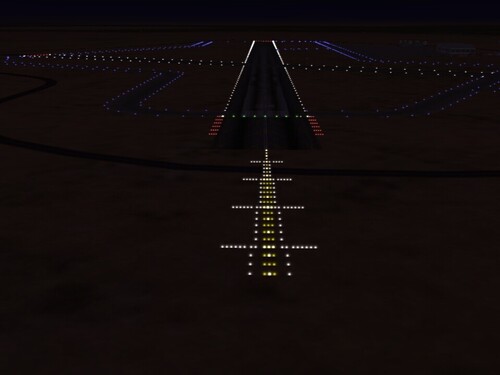
First version that can be used with Desert_Airfield4.ini Now you can land with approach lights on any of the 4 runways. This is a joint effort from myself and Piett. Many thanks and full credit to him. BACK-UP your ORIGINAL FILES BEFORE YOU MOD!!!!!! Install details in the Read-Me. So READ it!!!! -
Thanks bro! version 5 in the works along with the large multi-runway airfields...
-
1,295 downloads
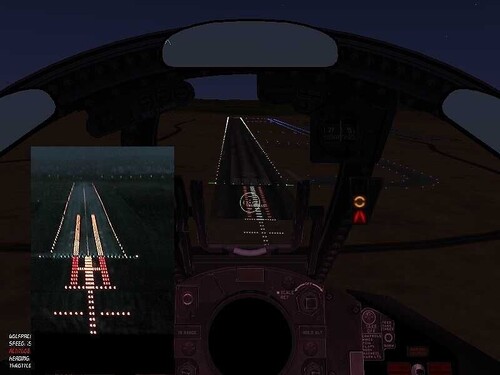
4 versions of approach lights for SFP1. Based off pictures found on the web. 2 for FUN , 2 for "realism". Read the read me included in the zip first. As always back up your files before you mod!!!! Many thanks to Deuces for his help and advice. Included in the zip: ini's jpg's read me Question's PM or email me through CA. -
Version 3 I figured out how to get the approach lights at either end of the runway, so you can land any way you want and have them. Highlighted the runway numbers to show each direction.
-
Still haven't figured it out yet, lights, on the tower. If anyone gets them to working, please show me how you did it. I know it's gonna be something simple I'm overlooking.
-
I'm having same trouble, have nbeen for awhile. I have reloaded the weps editor twice now as per this post. Even re-downloaded the weps pack/updates and re-installed them.... no joy still don't see the 84's.
-
LOL lemme see if I can add them first....... If I have to edit a lod or shd... where can I get a program to do that with?
-
OK... had a few hours free time and thought I would monkey around with the light setup.... Learning the different positons and what not.... just a WIP that's also a learning tool.... Figured out the blue taxiway lights that cut across the runway on airfield1.ini but can't find why on the other ini's..
-
GET OUT of my HEAD!!!!! I have been thinking about that. Still learning all this stuff... any other hints??????
-
LOL ... I guess I forgot to post this here at CA...... here ya go guys This is going to be a huge post.... as always back-up your files before you mod!!!! quote: -------------------------------------------------------------------------------- [LightSet007] LightOn=0.25 Color=0.93,0.62,0.02 Material=LightMaterial Height=0.5000 Size=00.2000 Directional=TRUE Direction=180 Prefix=ENPoint ENPoint001=-3.0000,-1603.9454 ENPoint002=-3.0000,-1613.9454 ENPoint003=-3.0000,-1623.9454 ENPoint004=-3.0000,-1633.9454 ENPoint005=-3.0000,-1643.9454 ENPoint006=-3.0000,-1653.9454 ENPoint007=-3.0000,-1663.9454 ENPoint008=-3.0000,-1673.9454 ENPoint009=-3.0000,-1683.9454 ENPoint010=-3.0000,-1693.9454 ENPoint011=-3.0000,-1703.9454 ENPoint012=-3.0000,-1713.9454 ENPoint013=-3.0000,-1723.9454 ENPoint014=-3.0000,-1733.9454 ENPoint015=3.0000,-1603.9454 ENPoint016=3.0000,-1613.9454 ENPoint017=3.0000,-1623.9454 ENPoint018=3.0000,-1633.9454 ENPoint019=3.0000,-1643.9454 ENPoint020=3.0000,-1653.9454 ENPoint021=3.0000,-1663.9454 ENPoint022=3.0000,-1673.9454 ENPoint023=3.0000,-1683.9454 ENPoint024=3.0000,-1693.9454 ENPoint025=3.0000,-1703.9454 ENPoint026=3.0000,-1713.9454 ENPoint027=3.0000,-1723.9454 ENPoint028=3.0000,-1733.9454 ENPoint029=-6.0000,-1743.9454 ENPoint030=-6.0000,-1753.9454 ENPoint031=-6.0000,-1763.9454 ENPoint032=-6.0000,-1773.9454 ENPoint033=-6.0000,-1783.9454 ENPoint034=-6.0000,-1793.9454 ENPoint035=-6.0000,-1803.9454 ENPoint036=-6.0000,-1813.9454 ENPoint037=-6.0000,-1823.9454 ENPoint038=-6.0000,-1833.9454 ENPoint039=6.0000,-1743.9454 ENPoint040=6.0000,-1753.9454 ENPoint041=6.0000,-1763.9454 ENPoint042=6.0000,-1773.9454 ENPoint043=6.0000,-1783.9454 ENPoint044=6.0000,-1793.9454 ENPoint045=6.0000,-1803.9454 ENPoint046=6.0000,-1813.9454 ENPoint047=6.0000,-1823.9454 ENPoint048=6.0000,-1833.9454 [LightSet008] LightOn=0.25 Color=0.88,0.25,0.25 Material=LightMaterial Height=0.5000 Size=00.3000 Directional=TRUE Direction=180 Prefix=ENPoint ENPoint001=-0.0000,-1503.9454 ENPoint002=-0.0000,-1513.9454 ENPoint003=-0.0000,-1523.9454 ENPoint004=-0.0000,-1533.9454 ENPoint005=-0.0000,-1543.9454 ENPoint006=-0.0000,-1553.9454 ENPoint007=-0.0000,-1563.9454 ENPoint008=-0.0000,-1573.9454 ENPoint009=-0.0000,-1583.9454 ENPoint010=-0.0000,-1593.9454 ENPoint011=-0.0000,-1603.9454 ENPoint012=-0.0000,-1613.9454 ENPoint013=-0.0000,-1623.9454 ENPoint014=-0.0000,-1633.9454 ENPoint015=-0.0000,-1743.9454 ENPoint016=-0.0000,-1753.9454 ENPoint017=-0.0000,-1763.9454 ENPoint018=-0.0000,-1773.9454 ENPoint019=-0.0000,-1783.9454 ENPoint020=-0.0000,-1793.9454 ENPoint021=-0.0000,-1803.9454 ENPoint022=-0.0000,-1813.9454 ENPoint023=-0.0000,-1823.9454 ENPoint024=-0.0000,-1833.9454 ENPoint025=-0.0000,-1843.9454 ENPoint026=-0.0000,-1853.9454 ENPoint027=-0.0000,-1863.9454 ENPoint028=-6.0000,-1843.9454 ENPoint029=-6.0000,-1853.9454 ENPoint030=-6.0000,-1863.9454 ENPoint031=6.0000,-1843.9454 ENPoint032=6.0000,-1853.9454 ENPoint033=6.0000,-1863.9454 [LightSet009] LightOn=0.25 Color=0.25,0.88,0.25 Material=LightMaterial Height=0.5000 Size=0.2000 Directional=TRUE Direction=180 Prefix=ESPoint ESPoint001=-52.8252,-1344.1091 ESPoint002=-50.8252,-1344.1091 ESPoint003=-48.8252,-1344.1091 ESPoint004=-46.8252,-1344.1091 ESPoint005=-44.8252,-1344.1091 ESPoint006=52.8252,-1344.1091 ESPoint007=50.8252,-1344.1091 ESPoint008=48.8252,-1344.1091 ESPoint009=46.8252,-1344.1091 ESPoint010=44.8252,-1344.1091 [LightSet010] LightOn=0.25 Color=0.88,0.25,0.25 Material=LightMaterial Height=0.5000 Size=0.2000 Directional=TRUE Direction=180 Prefix=ESPoint ESPoint001=-44.8252,-1394.1091 ESPoint002=-46.8252,-1394.1091 ESPoint003=-48.8252,-1394.1091 ESPoint004=-50.8252,-1394.1091 ESPoint005=-52.8252,-1394.1091 ESPoint006=44.8252,-1394.1091 ESPoint007=46.8252,-1394.1091 ESPoint008=48.8252,-1394.1091 ESPoint009=50.8252,-1394.1091 ESPoint010=52.8252,-1394.1091 [LightSet011] LightOn=0.25 Color=0.25,0.88,0.25 Material=LightMaterial Height=0.5000 Size=00.2000 Directional=TRUE Direction=180 Prefix=ENPoint ENPoint001=-3.0000,-1633.9454 ENPoint002=-5.0000,-1633.9454 ENPoint003=-7.0000,-1633.9454 ENPoint004=-9.0000,-1633.9454 ENPoint005=-11.0000,-1633.9454 ENPoint006=3.0000,-1633.9454 ENPoint007=5.0000,-1633.9454 ENPoint008=7.0000,-1633.9454 ENPoint009=9.0000,-1633.9454 ENPoint010=11.0000,-1633.9454 ENPoint011=-5.0000,-1683.9454 ENPoint012=-7.0000,-1683.9454 ENPoint013=-9.0000,-1683.9454 ENPoint014=-11.0000,-1683.9454 ENPoint015=-13.0000,-1683.9454 ENPoint016=5.0000,-1683.9454 ENPoint017=7.0000,-1683.9454 ENPoint018=9.0000,-1683.9454 ENPoint019=11.0000,-1683.9454 ENPoint020=13.0000,-1683.9454 ENPoint021=-5.0000,-1733.9454 ENPoint022=-7.0000,-1733.9454 ENPoint023=-9.0000,-1733.9454 ENPoint024=-11.0000,-1733.9454 ENPoint025=-13.0000,-1733.9454 ENPoint026=5.0000,-1733.9454 ENPoint027=7.0000,-1733.9454 ENPoint028=9.0000,-1733.9454 ENPoint029=11.0000,-1733.9454 ENPoint030=13.0000,-1733.9454 ENPoint031=-10.0000,-1783.9454 ENPoint032=-12.0000,-1783.9454 ENPoint033=-14.0000,-1783.9454 ENPoint034=-16.0000,-1783.9454 ENPoint035=-18.0000,-1783.9454 ENPoint036=10.0000,-1783.9454 ENPoint037=12.0000,-1783.9454 ENPoint038=14.0000,-1783.9454 ENPoint039=16.0000,-1783.9454 ENPoint040=18.0000,-1783.9454 [LightSet012] LightOn=0.25 Color=0.93,0.62,0.02 Material=LightMaterial Height=0.5000 Size=0.2000 Directional=TRUE Direction=180 Prefix=ESPoint ESPoint001=-44.8252,-1354.1091 ESPoint002=-46.8252,-1354.1091 ESPoint003=-48.8252,-1354.1091 ESPoint004=-50.8252,-1354.1091 ESPoint005=-44.8252,-1374.1091 ESPoint006=-46.8252,-1374.1091 ESPoint007=-48.8252,-1374.1091 ESPoint008=-50.8252,-1374.1091 ESPoint009=44.8252,-1354.1091 ESPoint010=46.8252,-1354.1091 ESPoint011=48.8252,-1354.1091 ESPoint012=50.8252,-1354.1091 ESPoint013=44.8252,-1374.1091 ESPoint014=46.8252,-1374.1091 ESPoint015=48.8252,-1374.1091 ESPoint016=50.8252,-1374.1091 -------------------------------------------------------------------------------- You can add these to: Terrain_Airfield1.ini Terrain_Airfield5.ini Terrain_Airfield6.ini (Terrain being Desert,ANW,Kosovo, etc etc) You can also add to: Terrain_Airfield2.ini But you have to re-number the lightset's to keep them in the correct order with the sets already there.
-
Unable to use air-to-air guns in combat
HrntFixr replied to Chapman2424's topic in General Discussion
Do a search for Mig-29 guns here and at SimHQ I had that same thing awhile ago. Is some ini tweaking that needs to happen. -
I finally seen it.... woohooo! Thanks for the help guys! Now I have to learn the position stuff and how to figure all that out.
-

224 downloads
Fictional Skin! Yes I know there was never a VF-86. I spent half my Navy career in the Sidewinders.... this is a "what if" skin. Many thanks and credit go to Fox Monter for making the aircraft. -
Thanks krfrge!!! the pic helped big time! I didn't have the ini file. working it now and will fly around to see it. Where will I see it??? I have the SFP1 Desert, Kosovo, and ANW terrains. I have added the ini lod and shd to all.
-
I added it to the types.ini. I have no clue how to add it to the targets.ini.