FastCargo
-
Posts
8,142 -
Joined
-
Last visited
-
Days Won
16
Content Type
Profiles
Forums
Gallery
Downloads
Store
Everything posted by FastCargo
-
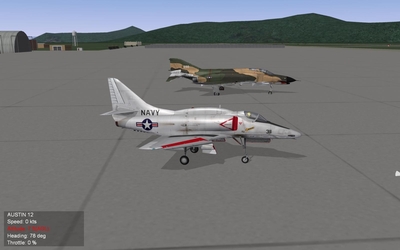
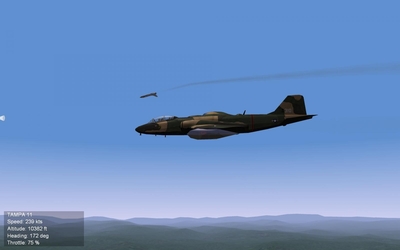
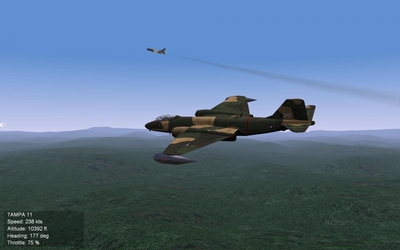
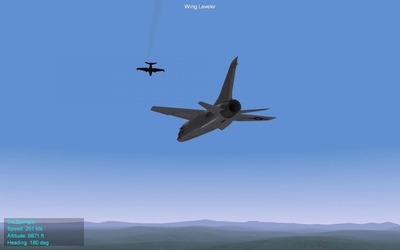
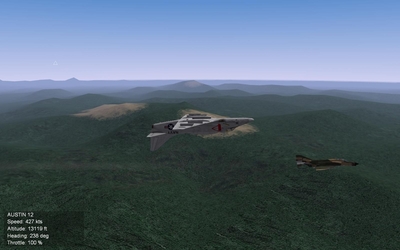
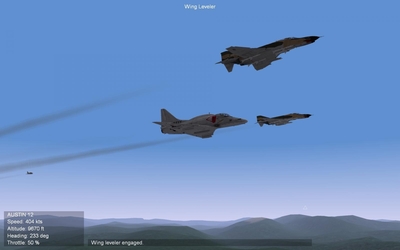
Well, been dabbling in multiplayer a bit...a few coop pics: Did a bombing mission in a B-57 while Da.Spungie flew top cover in an F-8. While limping home, he checked me over for battle damage. Deciding to show off.. Hmmm...looks like I did lose my right engine... Then another coop mission with me in an A-4 taking out some fuel tanks. Post strike, heading home Showing off... Post landing...jumping out to have a beer... Looking forward to doing more... FastCargo
-
Awww man, you're kidding!!! They made some of the best stuff... I guess it was inevitable though...as inkjet tech has advanced, plus the internet, it's become easier and easier to make your own... FastCargo
-
It's not the initial cost...it's the cost of keeping and running it. FastCargo
-
That's not the latest patch...latest one is dated 08.30.06. Okay, try installing the Weapons Pack first, then installing the Burning Sands 1983 addon campaign. Let us know how it goes. FastCargo
-
Awesome...looking forward to it! FastCargo
-
Need just a few more details. Stock install? If not, what addons? Single mission I assume...did you try different years? Choose weapons from loadout screen...be specific. Is it that specific stations only give you the option of <Empty>? Is it that you choose a weapon, then go to fly and there is no weapon hanging from that pylon? FastCargo
-
Actually, you're thinking of the YF-12 interceptor, of which 3 models of the A-12 were converted to. The notch in the chines were due to the installation of a large radar and 2 primitive IRSTs. 2 A-12s were modified to carry the D-21 drone. Both modifications (YF-12 and D-21 drone launcher) involved the installation of a second seat. Reference: http://www.unrealaircraft.com/gravity/sr71.php The biggest difference between the A-12 and the SR-71 (other than the second seat and paint scheme) is that the SR-71 forward chines are more 'rounded'. If you look closely at some A-12 pics, you can see the chines are straighter at the nose area. FastCargo
-
From the album: Combat pics
-
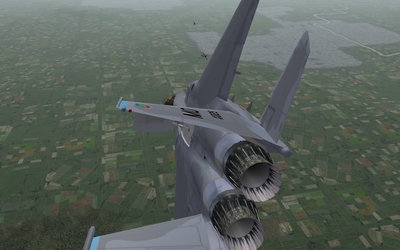
Pictures from multplayer action
-
-
From the album: Multiplayer pics
-
From the album: Multiplayer pics
-
From the album: Multiplayer pics
-
From the album: Multiplayer pics
-

From the album: Multiplayer pics
-
From the album: Multiplayer pics
-
From the album: Multiplayer pics
-
Jules's first attempt at modelling a cockpit
FastCargo replied to Julhelm's topic in Mods/Skinning Discussion
Very nice! Love those old school toggle switches. FastCargo -
Actually, I thought the USAF Muesum was pretty well lit...but not enough for most cameras for normal handheld settings. I try to use a tripod when I go to muesums...I find it works better because I don't need a flash. Nice pics Dave...I really need to get back there someday. FastCargo
-
Good point. These changes are to help avoid you user selecting odd loadouts. Loadout.ini files typically will override Weapondata.ini limitations. This goes hand in hand with fixing your loadout.ini files to get rid of these conflicts. FastCargo
-
question regarding loading out the Prowler
FastCargo replied to gopher66ca's topic in General Discussion
Yep, it's actually VERY easy. Go into the aircraft's data.ini, in this case - EA-6B_data.ini. Go down the file until you find the weapon stations entries. Lets look an example: See the line in bold? GroupIDs are the key. Note how there are 5 weapon stations for the EA-6B, but there are only 3 groups. One group for the outer stations, one group for the inner stations, and the center station is it's own group. Just change the GroupID number, and you can mix and match groupings. But be careful. You can get unintended consequences if you screw it up. You can only have a max of 6 groups to choose from...any more, and those weapons stations won't show up in the loadout menu. For your situation, just make the StationID and the StationGroupID the same number for each weapon station. You should end up with 5 separate groups...perfect for an asymetrical loadout. FastCargo -
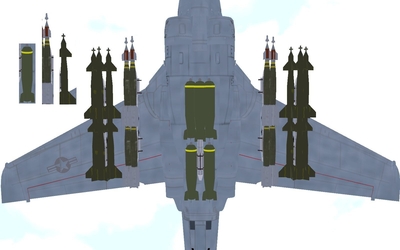
Alrighty then...LGBs on MERs in the Weaponspack. Any of you encountered this problem? Ignore the quality, I had to up the contrast and brightness to make it easier to see the weapons. On the aircraft, left to right (LODs): GBU-12P1, GBU12B, SUU30, GBU12B, GBU-12P1 Upper left inset (LODs): SUU30, GBU12B, GBU-12P1 The problem: The lengths are wrong in the Weaponspack for the GBU-12 series of weapons. The length is stated as 2.18 meters for all the GBU-12 variants. Looking at the inset, the SUU30 canister is about 2.18 meters long...WAY shorter than the LGB models. Assuming you applied the fix to the MER in the Weaponspack for the Mk82 and CBUs, your max weapon length can only be 2.24 meters on a MER. In addition, the model used for Weaponspack versions of the GBU-12 (GBU12B and etc) is not the model used by the stock TW sims (GBU-12P1). In the stock versions of the TW sims, the length of the GBU-12 series of weapons is stated as 2.65 meters. This seems to closely match the actual size of the LOD file (GBU-12P1) based on the inset picture. Raytheon's own website source material state the length of the GBU-12 series of weapons is around 3.3 meters. This seems to match the visual model used by the Weaponspack. So, who's right? Well, that depends on which page you look at. Going back to designation-systems.net (awesome weapons site btw), they have separate pages for Paveway I and Paveway II weapons. The visual picture on the Paveway I page for the GBU-12/B seems to conform roughly to the TW model (note the large fins on the front and rear). However, the length stated is 3.2 meters...significantly longer than the actual visual model. The author of the website stats that several sources had variations in the specs listed...so the numbers might be off. However, the Paveway II page shows models and specs that match very closely with the visual models as used in the Weaponspack. So, what to fix, and how to fix it? Actually, this is pretty straightforward...all we need to do is the standard Weapons Editor dance. Be forewarned though...you will NOT be able to load GBU-12s on MERs after this fix. First, BACKUP your WEAPONSDATA.INI and WEAPONSDATA.DAT files. Then going into the WEAPONSDATA.INI file, look for the weapon entries that have ModelName=GBU12. Variants of this (ModelName=GBU12B_N, ModelName=GBU12_P4, etc) are affected too, including other countries (AUS, PAK, etc). Every weapon that uses a variant of this LOD model (GBU12), change this:Length=2.180000 to this: Length=3.30000. There are exceptions for 3 specific weapon entries. First, GBU-12, Paveway I (first generation). We are going to switch to the stock TW model. It doesn't look as nice as the Weaponspack models, but I think it's a bit more accurate as to what the first generation Paveways looked like. Find this entry: And change it to look like this: [WeaponData114] TypeName=GBU-12 FullName=GBU-12/B Paveway I LGB ModelName=GBU-12P1 Mass=226.800003 Diameter=0.270000 Length=2.650000 AttachmentType=USAF,USN etc... Note the changes in bold. Second, GBU-12B/B Paveway II (second generation). Just a minor text change in the description. Also, since development was started on Paveway II in 1976, all non US models are Paveway II or newer. Find this entry: And change it to look like this: [WeaponData115] TypeName=GBU-12B FullName=GBU-12B/B Paveway II LGB ModelName=GBU12B Mass=226.800003 Diameter=0.270000 Length=3.30000 AttachmentType=USAF,USN etc... Note the changes in bold. Third and final change, Paveway IV (fourth generation}. As far as I can tell, from what I've been able to find, Paveway IV uses a combo laser and GPS setup, and gets rid of the 'ring/lens' sensor at the front of the weapon. So it's just a bit shorter than the rest of it's siblings. And change it to look like this: [WeaponData118] TypeName=GBU-12E FullName=GBU-12E/B Paveway IV LGB ModelName=GBU12_P4 Mass=245.000000 Diameter=0.270000 Length=3.00000 AttachmentType=USAF,USN etc... Note the changes in bold. Okay, so after all that typing...save your WEAPONSDATA.INI file, open up the Weapons Editor, and do the standard Weapons Editor dance for EVERY entry you altered (which will be a lot). Save, and you should be good to go! FastCargo
-
-
Lots of changes to the first post. I'll update the loadout thread stickie. Had to correct some errors and clean it up a little. Thanks! Now to get to those LGBs.... (This is what I get for being anal retentive...no comments from the peanut gallery!) FastCargo
-
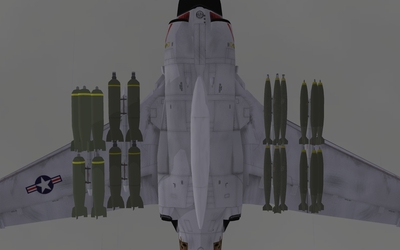
I'm surprised no one has brought this up before...the WeaponsPack adds a lot of nice weapons...but also intros some errors, especially when it comes to MER usage. Here's an example: From left to right (LOD files) - SUU30, SUU-30 (WOE stock), Mk82LD (Weaponspack), Mk82LD (WOE stock). Okay, so if you want to fix these issues...where to start. Read this post IN ITS ENTIRETY first! Remember, this is only for those installations that have the Weaponspack installed!!! First, you need the CAT extractor: HERE . Second, you'll need the Weaponsdata editor, available HERE. Finally, BACKUP your WEAPONSDATA.INI, Mk82LD.LOD and WEAPONSDATA.DAT file! Okay, lets start with the MER (Multiple Ejector Rack). In the stock and Weaponspack WEAPONSDATA.INI file, there is this entry for the MER: [WeaponDataxxx] TypeName=MER FullName=A/A-37B-6 MER ModelName=mer Mass=99.790001 Diameter=0.260000 Length=3.590000 AttachmentType=NATO NationName=USAF StartYear=0 EndYear=0 Availability=3 BaseQuantity=1 Exported=TRUE ExportStartYear=0 ExportEndYear=0 ExportAvailability=3 WeaponDataType=6 WeaponsRackType=MER NumWeapons=6 LoadLimit=500.000000 LengthLimit=2.500000 MaxFuelAmount=0.000000 Attachment01Position=0.180000,1.110000,0.000000 Attachment01Angle=0.000000,0.000000,-2578.310078 Attachment02Position=0.180000,-1.130000,0.000000 Attachment02Angle=0.000000,0.000000,-2578.310078 Attachment03Position=-0.180000,1.110000,0.000000 Attachment03Angle=0.000000,0.000000,2578.310078 Attachment04Position=-0.180000,-1.130000,0.000000 Attachment04Angle=0.000000,0.000000,2578.310078 Attachment05Position=0.000000,1.110000,-0.220000 Attachment05Angle=0.000000,0.000000,0.000000 Attachment06Position=0.000000,-1.130000,-0.220000 Attachment06Angle=0.000000,0.000000,0.000000 Note the bolded areas. The MER has a 2.5m weapon length limit...but you can place 2 bombs in a row with only 2.24m between mounting points. So, use notepad and open up the WEAPONSDATA.INI file, find the MER entry, and change the LengthLimit to LengthLimit=2.24. Do the Weapons Editor dance as per the knowledge base. Two methods to fix the Mk82s. One involves extracting the original LOD file. The second involves doing the Weapon Editor dance. The first method is simpler overall. Use the CAT extractor on the ObjectData.cat file located in "X:/Your TW sim"/Objects directory. Find the MK82.LOD file inside and extract it. Rename the extracted file to Mk82LD.LOD. Copy the newly renamed file to your "X:/Your TW sim"/Objects/Weapons directory (you did backup your Mk82LD.LOD file in that directory first...right?) and allow it to be overwritten. The second method is 'cleaner' but more intensive. Go into the WEAPONSDATA.INI, and substitute every line that says this: ModelName=Mk82LD with this: ModelName=Mk82. Save the WEAPONSDATA.INI. Then use the Weapons Editor as standard. Realise that there are a LOT of entries that use the Mk82 file...so you'll be scrolling through a lot of entries. Now, to fix the clusterbombs (everything based off the SUU-30) canister. A different problem here. First, here was my primary reference: Weapon Diagrams This website had diagrams, dimensions, etc. The problem is that there are 2 SUU-30 LODs. One is named SUU30.LOD and is inside the Weapons directory. It uses the SUU30.BMP file, also in that directory, as a 'skin'. As far as I can tell though, no weapons in the WEAPONSDATA.INI file reference this LOD file. The other SUU-30 LOD is called SUU-30.LOD, and is located in the Objectdata.cat file. It uses the SUU-30.BMP...either in the Weapons directory or in the Objectdata.cat file. In the stock TW WEAPONSDATA.INI, the cluster weapons reference the SUU-30 LOD, and have a length of 2.339 meters. In the Weaponspack WEAPONSDATA.INI file, the cluster weapons also use the SUU-30 LOD file, but have a length of 2.184 meters. The problem is, both length figures are correct...just depends on the subvariant! On the website it states this: Doh! The SUU-30.LODs have an arming mechanism (an air wheel for lack of a better term) that sticks out significantly...which causes the visual conflict. The SUU30.LOD doesn't have an obvious arming mechanism, and is smaller overall...and seems to closely match the diagram for the SUU-30B/B. So, there are three ways to fix this problem. The first two ways are model substitution...the last way is Weaponsdata.ini alterations that will not allow you to mount more than 3 CBUs (that use the SUU-30.LOD) on a MER. The first way is simpler overall. You basically replace the SUU-30 model with the SUU30 model (the smaller, blunt nose model). First, rename your SUU30.BMP file located in the Weapons directory to SUU30.BMP.BAK. Then, take the SUU-30.BMP file (either already in the Weapons directory, or extracted from the ObjectData.cat file) and make a copy...renaming the copy to SUU30.BMP. Next, make a copy of the SUU30.LOD file and rename the copy to SUU-30.LOD. Finally, go into Notepad, start a new file and enter the following text: [LOD001] Filename=SUU-30.lod Distance=1000 Save the file as SUU-30.INI in the Weapons directory and you're done. The second way accomplishes the same thing...just involves the Weapons Editor dance. Go into the WEAPONSDATA.INI, and substitute every line that says this: ModelName=SUU-30 with this: ModelName=SUU30. Save the WEAPONSDATA.INI. Then use the Weapons Editor as standard. Finally,take the SUU-30.BMP file (either already in the Weapons directory, or extracted from the ObjectData.cat file) and make a copy...renaming the copy to SUU30.BMP. And you're done. The third method is similar to the second, except there are no copying of files. But this will make it so you can't mount more than 3 cluster bombs (that use the SUU-30.LOD) on a MER. Go into the WEAPONSDATA.INI, and for every weapon that has ModelName=SUU-30 substitute the line that says this: Length=2.184000 with this: Length=2.339000. Save the WEAPONSDATA.INI. Then use the Weapons Editor as standard. This only fixes Mk82s and SUU-30s...LGBs (the smaller ones) are another issue for another post. FastCargo
-