


ace888
-
Posts
1,383 -
Joined
-
Last visited
-
Days Won
13
Content Type
Profiles
Forums
Gallery
Downloads
Store
Everything posted by ace888
-
This is the Modern Warfare Taiwan. Each time I start the game I get this picture of all these data. How do I remove all these data? Thanks
-

-
Excellent FC I thought the first one was already a great plane, but this update is pretty cool.
-
Thank You for the Christmas Present.
-

Removing Co-pilots from cockpits(in interior view)
ace888 replied to X RAY's topic in General Discussion
Wow, that is pretty detail. -
Thank you Sir
-
Very Nice!!!! Love to see all the Phantom colors of the world! SPOOK Forever! My favorite bird
-
Masters... Thanks for the great info.! Wrench... Yes, I have already extracted all the ObjectData Cat files. Creating new skin via a new layer... cool to know Sundowner... Thank you for downloading the templates. Can't wait to see all the NEW Phantoms you and Ravenclaw did Thanks again gents! Now to figure out how to do the true skinning stuff Happy Holidays to the Community!
-
Guys, How can you determine which templates belongs to which aircraft's .LOD? Under SF1 (which I assume I can use the templates for use on SF2?) there is TWO different F-4E templates. One is from "drdoyo" The other was uploaded by "BUFF" I believe the one uploaded by BUFF is the stock SF1 F-4E Phantom? The one uploaded by drdoyo, I'm not sure which aircraft it is for? Is there templates for SF2 F-4E or like I assume, you can use the SF1 templates and use it for SF2? I am trying to do color skinning patterns, but since templates are use with specific aircraft .LOD I do not know which one belong to which to test if my color skinning is correctly made. Thanks for any help you can provide.
-
Sir, My eyes are watery just by looking at your "Indo/Pak", "Iran/Iraq", and "KAW" Next year would be an excellent year!
-
More Phantoms!!! yaaaaaa Beautiful Birds....
-
You guys are funny Wrench... Ya, I over-did the chaff and flare on the data.ini EricJ... I forgot I have the Apache.
-
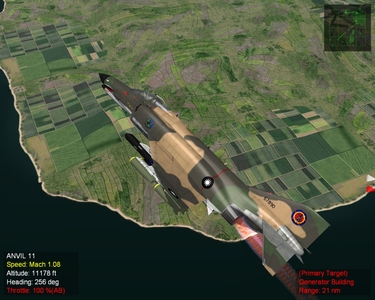
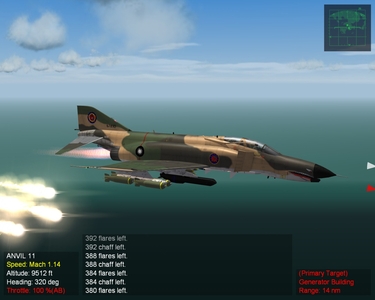
I want to thank "Spinner" for his support and information. I want to thank the community for their excellent work and for sharing with us. My first skin! It is the ROCAF (Taiwan's) 46th Squadron "Aggressors" of the 737th Tactical Fighter Wing out of Taitung, AF. Taiwan had requested the purchase of F-4E Phantom through the Foreign Military Sale Program in the late 70s' ROCAF had also requested F-16s and F/A-18s. All was deny by the Carter Adminstration.
-
-

-
-
Super!!! I got to have this one! SuperHorntet "Blue"
-
SF2: Modern Warfare China Taiwan Confict
ace888 replied to Spectre8750's topic in General Discussion
Very nice.... I second that!!! -
http://www.taiwanairpower.org/ I am slowly learning the skinning stuff. Anyone want to make the skins for the F-5E/F, F-16AM Blk 20, Mirage 2000-5, IDF, and the F-104G... my thanks in advance
-
To all, An error was discovered after I uploaded the skin pack. On IDFCamo 3 under the decal files, the skin mash is still indicating Kurnass_73. Just to make it proper, please rename each skin mash to Kurnass_78 (just copy the exact name of each skin and place _78 instead of _73) Example: F-4E_IDF_73_1 to F-4E_IDF_78_1.
-
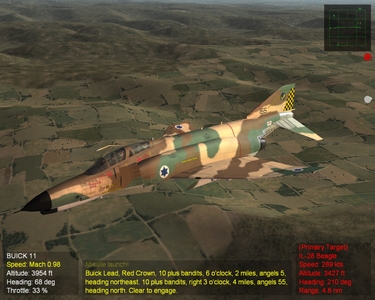
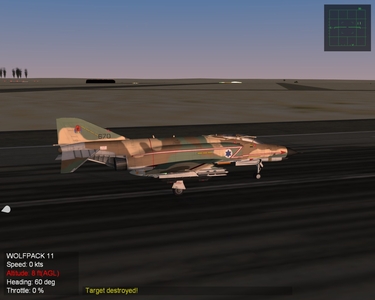
View File F-4E_Kurnass_78 SF2I Skin Pack SF1 (original) Read Me: F-4E Kurnass skins by Sundonwer. Jus put into your F-4 Kurnass folder for WOI and go fly. For WOI only. Enjoy USAFMTL www.combatace.com SF2 Read Me: Sundowner was kind enough to give me the "OK" to upload these excellent skins! Copy/paste the contents of each folder to the proper folder files. Make sure you make the added changes to your "textureset" I name the decal folders after the "stock" Kurnass_78 folder (IDFCamo 1). If you want to adapt to Kurnass_73 or_75, you need to make the name changes and decal changes accordingly. Note: The decals files does not really need to be added... Since Sundowner did a great job on how the skin is apply to the model. But in case it does not work for you for some reason it is best to add it to your decal folder. Credit: Mr. Sundowner Input Credits: Thanks to the guys... Wrench, STORM, Spinners, hgbn, daddyairplanes Have a good fight! Submitter ace888 Submitted 12/13/2010 Category F-4
-

327 downloads
SF1 (original) Read Me: F-4E Kurnass skins by Sundonwer. Jus put into your F-4 Kurnass folder for WOI and go fly. For WOI only. Enjoy USAFMTL www.combatace.com SF2 Read Me: Sundowner was kind enough to give me the "OK" to upload these excellent skins! Copy/paste the contents of each folder to the proper folder files. Make sure you make the added changes to your "textureset" I name the decal folders after the "stock" Kurnass_78 folder (IDFCamo 1). If you want to adapt to Kurnass_73 or_75, you need to make the name changes and decal changes accordingly. Note: The decals files does not really need to be added... Since Sundowner did a great job on how the skin is apply to the model. But in case it does not work for you for some reason it is best to add it to your decal folder. Credit: Mr. Sundowner Input Credits: Thanks to the guys... Wrench, STORM, Spinners, hgbn, daddyairplanes Have a good fight! -
-
-
