

Stephen1918
-
Posts
1,204 -
Joined
-
Last visited
-
Days Won
19
Content Type
Profiles
Forums
Gallery
Downloads
Store
Everything posted by Stephen1918
-
Are you having trouble with the decals in the Phoenix? Which one?
-
I uploaded a flat deck version of the Sikorsky today. Wilches requested it and I wanted to make a plane with four ailerons anyway. The same skins will work for both versions of the Sikorsky. Ojcar made a new FM for the new plane, and I used the same sound file which Nix made for the first one. My next one will be a two seater. A Neiuport 10 has been requested, but I'm going to hold off on that while I study how the gun was mounted. (If anyone can direct me to any good online resources, I'll be grateful.) I'm thinking of an Albatros C.III, a Lloyd C.II, or a Rumpler C.IV. I think the Albatros would be best. What do you folks think? What are your preferences?
-
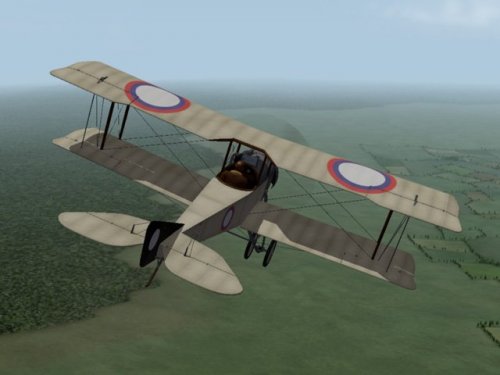
View File Sikorsky S-16 Flatdeck Several versions of the S-16 were produced with slight variations in the fuselage and wing configurations. This version has a flat deck behind the pilot and ailerons on both wings. It is based on my earlier versions of the Sikorsky S-16, but is a completely new plane. The download includes 4 skins - 3 linen and one green - with appropriate decals. This plane has a fully functional cockpit. I have included my skinning templates so others can make new skins if they want. Credits My thanks to ojcar, who made the FM for the Sikorsky S-16. My thanks also to Nixou, who recorded the sound for the Gnome 80hp engine. Version 2 Notes I have made slight changes to model, especially to the way the plane is rigged, and Ojcar has made a new FM for this plane. I have also improved the skins and made new skins for some different Russian squadrons. Version 3 Notes This is a completely new plane with new LODs, skins, and cockpit. This version has higher detail and a lower poly count than the previous version. This model also includes better detail for battle damage to the wings. Installation instructions This is a completely new plane, if you have already installed the Sikorsky S-16 flatdeck, delete it, including the decals, and replace it with this version. The sound file remains the same. For FE1 - Unzip the file and move the folder named "SikorskyS16_var" into the "Aircraft" folder in the FirstEagles/Objects folder. If you have the previous version, then you already have the sound file installed, otherwise you will need to move the sound file "gnome80m4.wav" into the FirstEagles/Sounds folder. For FE2 - Unzip the file and move the folder named "SikorskyS16_var" into the "Aircraft" folder in the FirstEagles/Objects folder. Then in the FirstEagles/Objects/Decals folder, create a new folder named "SikorskyS16_var". Move the folder named "D" from the Aircraft/SikorskyS16_var folder into the Decals/SikorskyS16_var folder you just made. If you have the previous version of the Sikorsky, then you already have the sound file installed, otherwise you will need to move the sound file "gnome80m4.wav" into the FirstEagles/Sounds folder. Submitter Stephen1918 Submitted 06/12/2011 Category Other Entente Aircraft
-
Version v3
436 downloads
Several versions of the S-16 were produced with slight variations in the fuselage and wing configurations. This version has a flat deck behind the pilot and ailerons on both wings. It is based on my earlier versions of the Sikorsky S-16, but is a completely new plane. The download includes 4 skins - 3 linen and one green - with appropriate decals. This plane has a fully functional cockpit. I have included my skinning templates so others can make new skins if they want. Credits My thanks to ojcar, who made the FM for the Sikorsky S-16. My thanks also to Nixou, who recorded the sound for the Gnome 80hp engine. Version 2 Notes I have made slight changes to model, especially to the way the plane is rigged, and Ojcar has made a new FM for this plane. I have also improved the skins and made new skins for some different Russian squadrons. Version 3 Notes This is a completely new plane with new LODs, skins, and cockpit. This version has higher detail and a lower poly count than the previous version. This model also includes better detail for battle damage to the wings. Installation instructions This is a completely new plane, if you have already installed the Sikorsky S-16 flatdeck, delete it, including the decals, and replace it with this version. The sound file remains the same. For FE1 - Unzip the file and move the folder named "SikorskyS16_var" into the "Aircraft" folder in the FirstEagles/Objects folder. If you have the previous version, then you already have the sound file installed, otherwise you will need to move the sound file "gnome80m4.wav" into the FirstEagles/Sounds folder. For FE2 - Unzip the file and move the folder named "SikorskyS16_var" into the "Aircraft" folder in the FirstEagles/Objects folder. Then in the FirstEagles/Objects/Decals folder, create a new folder named "SikorskyS16_var". Move the folder named "D" from the Aircraft/SikorskyS16_var folder into the Decals/SikorskyS16_var folder you just made. If you have the previous version of the Sikorsky, then you already have the sound file installed, otherwise you will need to move the sound file "gnome80m4.wav" into the FirstEagles/Sounds folder. -
It seems that I made the Aviatik-Berg D.1 about 20% too large (thanks quack74 for spotting the mistake.) I have uploaded a revised version which is the correct size. This completely replaces the original plane. Since I was doing it, I put the correct guns in the cockpit. I have also included the FM made by ojcar, and the sound file made by Nix, which were not in the original version. The skins made by quack74 will still work with this plane, but the decals will be in the wrong place. I have sent him a new decals.ini which he is checking. I apologize for the mistake. Stephen1918
-
I still can't get the gunsights to work. I will make a point of checking the spelling in the data file to make sure they show up for those who use them.
-
Yes, I'll do that. :)
-
Nope, still doesn't work for me. I even used the extract utility to check the .cat file to make sure I was spelling it correctly. I tried the SPAD13, the FOKKER, and the CAMEL sights. I tried it in all the graphics levels. Nothing. I'm using FE Gold, is it different from FE2?
-
You're right, the Aviatik is too big. I think the proportions are correct, but the scale is wrong, so the skins should be OK. I'll start rescaling it. Thanks for finding this.
-
That did not work for me. Did it work for you? I've been trying to get the gunsights to appear since my first model, but obviously haven't been successful. Do I need to have something in the mesh for the TGA file to "stick" to? Can anyone help me with this?
-
The Phönix D.IIa has been uploaded. This required slight changes to the LOD files and the cockpit. Ojcar has made a new FM (the D.IIa was slightly more powerful than the D.II) and I made a slightly different skin and new decals, so this is a completely different plane. However, the skins are interchangeable and use the same templates. I welcome your comments and constructive criticism. Stephen 1918

-
View File Phönix D.IIa The Phönix D.IIa was the same as the D.II but with a more powerful 230 hp Hiero engine, which gave it better speed and better climbing ability. My model of the D.IIa is based on my model of the D.II but with a different engine - which means all new .LOD files as well as a new cockpit (the engine is part of the cockpit in this model.) I have made a slightly different skin, new decals, and ojcar has made a different FM, so this is a completely new plane. (You do NOT need the D.II in order to install this plane.) The skins and decals are interchangeable with the D.II. I have included a set of letter decals so you can set flight letters in the Loadout screen, or the game will randomly assign a different letter to each plane. The skinning templates are identical to the D.II, but I have included them here anyway. I have also included my .OUT files for the benefit of future modders. Credits My thanks to ojcar, who created the FM to capture the improved power and performance of this excellent Austro-Hungarian fighter. Installation instructions: For FE1: Unzip the file and move the folder named "PhoenixD2a" into the FirstEagles/Objects/Airplanes folder. For FE2: Unzip the file and move the folder named "PhoenixD2a" into the FirstEagles/Objects/Airplanes folder. Then in the FirstEagles/Objects/Decals folder, create a new folder named "PhoenixD2a". Move the folder named "D" from the Airplanes/PhoenixD2a folder into the Decals/PhoenixD2a folder you just made. Submitter Stephen1918 Submitted 06/10/2011 Category Other Central Powers Aircraft
-

Version v2
535 downloads
The Phönix D.IIa was the same as the D.II but with a more powerful 230 hp Hiero engine, which gave it better speed and better climbing ability. My model of the D.IIa is based on my model of the D.II but with a different engine - which means all new .LOD files as well as a new cockpit (the engine is part of the cockpit in this model.) I have made a slightly different skin, new decals, and ojcar has made a different FM, so this is a completely new plane. (You do NOT need the D.II in order to install this plane.) The skins and decals are interchangeable with the D.II. I have included a set of letter decals so you can set flight letters in the Loadout screen, or the game will randomly assign a different letter to each plane. The skinning templates are identical to the D.II, but I have included them here anyway. I have also included my .OUT files for the benefit of future modders. Credits My thanks to ojcar, who created the FM to capture the improved power and performance of this excellent Austro-Hungarian fighter. Installation instructions: For FE1: Unzip the file and move the folder named "PhoenixD2a" into the FirstEagles/Objects/Airplanes folder. For FE2: Unzip the file and move the folder named "PhoenixD2a" into the FirstEagles/Objects/Airplanes folder. Then in the FirstEagles/Objects/Decals folder, create a new folder named "PhoenixD2a". Move the folder named "D" from the Airplanes/PhoenixD2a folder into the Decals/PhoenixD2a folder you just made. -
I uploaded the Phönix D.II last night. My thanks to ojcar once again for making the FM. And my thanks to all the readers of the Forums who helped me get the details right. Ojcar has also made an FM for the D.IIa, which had a different engine. I will be uploading that plane as soon as soon as I finish making the new engine.

-
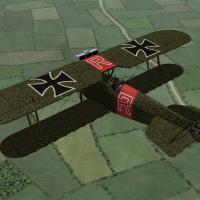
View File Phönix D.II The Austro-Hungarian Phönix D.II was an improved version of the D.I, both of which appeared in 1917. The D.II included changes to the ailerons, elevators, and engine which improved the performance over the D.I. The Phönix was a stable plane and slow to maneuver but could handle steep dives and was considered an excellent fighter. I have included a set of letter decals so you can set flight letters in the Loadout screen, or the game will randomly assign a different letter to each plane. I have included my skinning templates so others can make new skins if they want. I have also included my .OUT files for the benefit of future modders. Credits My thanks to ojcar, who created the FM to capture the power and performance of this sturdy plane. Historical Notes I couldn't find any photos of the D.II cockpit. The cockpit of my model is based on the D.I with a little speculation. I believe it is reasonably accurate. Installation instructions: For FE1: Unzip the file and move the folder named "PhoenixD2" into the FirstEagles/Objects/Airplanes folder. For FE2: Unzip the file and move the folder named "PhoenixD2" into the FirstEagles/Objects/Airplanes folder. Then in the FirstEagles/Objects/Decals folder, create a new folder named "PhoenixD2". Move the folder named "D" from the Airplanes/PhoenixD2 folder into the Decals/PhoenixD2 folder you just made. Submitter Stephen1918 Submitted 06/09/2011 Category Other Central Powers Aircraft
-
Version v2
506 downloads
The Austro-Hungarian Phönix D.II was an improved version of the D.I, both of which appeared in 1917. The D.II included changes to the ailerons, elevators, and engine which improved the performance over the D.I. The Phönix was a stable plane and slow to maneuver but could handle steep dives and was considered an excellent fighter. I have included a set of letter decals so you can set flight letters in the Loadout screen, or the game will randomly assign a different letter to each plane. I have included my skinning templates so others can make new skins if they want. I have also included my .OUT files for the benefit of future modders. Credits My thanks to ojcar, who created the FM to capture the power and performance of this sturdy plane. Historical Notes I couldn't find any photos of the D.II cockpit. The cockpit of my model is based on the D.I with a little speculation. I believe it is reasonably accurate. Installation instructions: For FE1: Unzip the file and move the folder named "PhoenixD2" into the FirstEagles/Objects/Airplanes folder. For FE2: Unzip the file and move the folder named "PhoenixD2" into the FirstEagles/Objects/Airplanes folder. Then in the FirstEagles/Objects/Decals folder, create a new folder named "PhoenixD2". Move the folder named "D" from the Airplanes/PhoenixD2 folder into the Decals/PhoenixD2 folder you just made. -
Thanks again, wrench. This seems like a useful thing to know, I'll give it a try...
-
Thanks wrench, I can make a spinner as soon as I catch up with other stuff. I'm new to this, can someone explain the "fake pilot method" or refer me to a place where I can learn it? Stephen1918
-
It looks like a hemisphere about half a meter in diameter? I'll have some time when I finish the Phoenix. Do you need it as an .lod file? Stephen1918
-
I'll use this skin as the default for the D.II and the original decals with this skin as the default for the D.IIa.
-
Here's where I am so far. Ojcar is going to make 2 FMs, one for the D.II and one for the D.IIa. Quack74 is going to make some skins, as soon as he gets caught up with other stuff. I will make different versions of the engine and release it as two separate planes. Here it is with it's D.II markings. I am working on the cockpit now.


-
I'll see what I can do. I still want to do a plane with 4 ailerons, maybe I'll do a second version of the Sikorsky later this summer.
-
Here are some screen shots of the updated version. I've changed the wingtips, narrowed the ailerons, added a little curve to the fuselage, and added ripples to the elevator. Thanks for your comments everyone, and thanks ojcar for the corrections. Now I'll get to work on the cockpit.


-
You're right, I started with a D.III and didn't change the wingtip. Is the drawing here more correct? What about the tail, should there be ripples in the trailing edge like the wings?


-
I had given up on the bump maps because it dawned on me that I wasn't going to see them, so I couldn't evaluate them. Are the bump maps a separate skin, or are the bumps part of the same skin? I can try to apply the skin in 3DS and send them to you for painting. Stephen1918