

Stephen1918
-
Posts
1,199 -
Joined
-
Last visited
-
Days Won
19
Content Type
Profiles
Forums
Gallery
Downloads
Store
Everything posted by Stephen1918
-
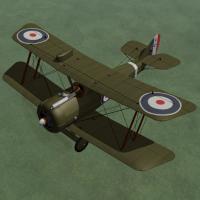
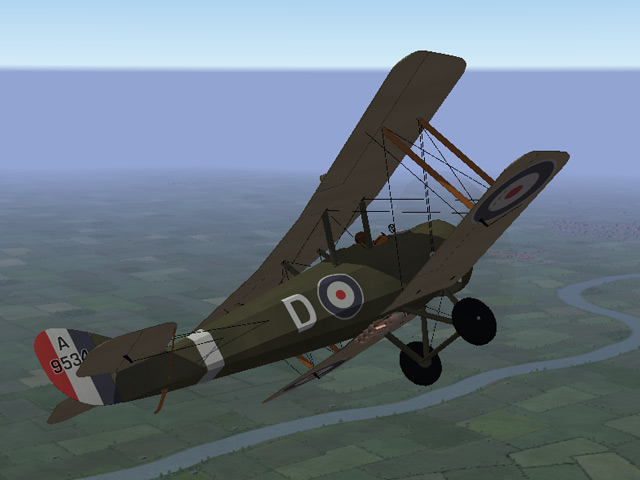
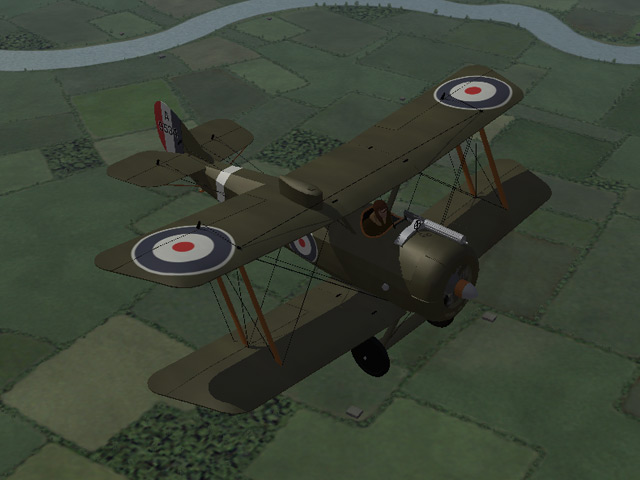
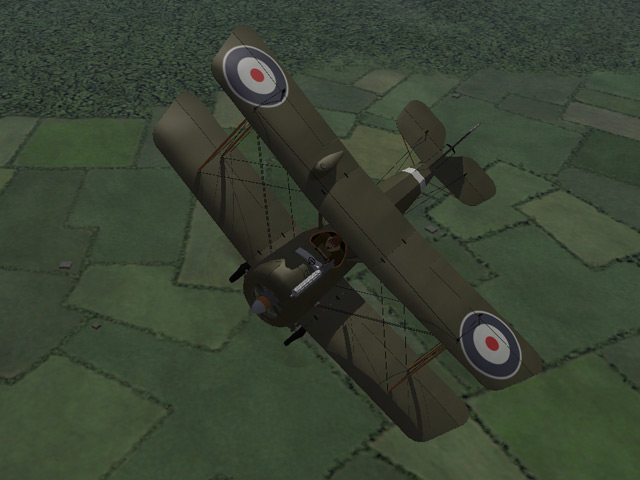
View File Airco D.H.5 The Airco D.H.5 was intended to be an improved version of the D.H.2, combining the power of a forward facing prop with the forward visibility of a pusher. The reverse stagger of the wings was an unusual configuration and the strange appearance of the plane may have contributed to false rumors of its bad performance. Although a slow climber, the D.H.5's strength and maneuverability made it excellent for ground attack and light bombing missions. I have included two skins with decal ini's for both British and Australian markings. Both use the letter decals that come with First Eagles, which you can set in the Loadout screen. The British skin allows you to also set the squadron. (The Australians all used a white stripe on the tail instead of squadron markings.) I have included a set of serial numbers which will be applied randomly. You can also choose a light bomb load in the Loadout screen. Historical Notes The serial numbers are fictious, but in the correct range for most D.H.5s. Credits My thanks to Ojcar for once again making an excellent data file for the D.H.5. My thanks also to Nix for providing the realistic sound file for the Le Rhône engine. Installation Instructions For FE1 - Unzip the file and move the folder named "AircoDH5" into the FirstEagles/Objects/Airplanes folder. You also need to move the sound file "rhone110bn4nC" into the FirstEagles/Sounds folder. For FE2 - Unzip the file and move the folder named "AircoDH5" into the FirstEagles/Objects/Airplanes folder. Then in the FirstEagles/Objects/Decals folder, create a new folder named "AircoDH5". Move the folder named "D" from the Airplanes/AircoDH5 folder into the Decals/AircoDH5 folder you just made. You also need to move the sound file "rhone110bn4nC" into the FirstEagles/Sounds folder. Submitter Stephen1918 Submitted 09/19/2011 Category Other Entente Aircraft
-
571 downloads
The Airco D.H.5 was intended to be an improved version of the D.H.2, combining the power of a forward facing prop with the forward visibility of a pusher. The reverse stagger of the wings was an unusual configuration and the strange appearance of the plane may have contributed to false rumors of its bad performance. Although a slow climber, the D.H.5's strength and maneuverability made it excellent for ground attack and light bombing missions. I have included two skins with decal ini's for both British and Australian markings. Both use the letter decals that come with First Eagles, which you can set in the Loadout screen. The British skin allows you to also set the squadron. (The Australians all used a white stripe on the tail instead of squadron markings.) I have included a set of serial numbers which will be applied randomly. You can also choose a light bomb load in the Loadout screen. Historical Notes The serial numbers are fictious, but in the correct range for most D.H.5s. Credits My thanks to Ojcar for once again making an excellent data file for the D.H.5. My thanks also to Nix for providing the realistic sound file for the Le Rhône engine. Installation Instructions For FE1 - Unzip the file and move the folder named "AircoDH5" into the FirstEagles/Objects/Airplanes folder. You also need to move the sound file "rhone110bn4nC" into the FirstEagles/Sounds folder. For FE2 - Unzip the file and move the folder named "AircoDH5" into the FirstEagles/Objects/Airplanes folder. Then in the FirstEagles/Objects/Decals folder, create a new folder named "AircoDH5". Move the folder named "D" from the Airplanes/AircoDH5 folder into the Decals/AircoDH5 folder you just made. You also need to move the sound file "rhone110bn4nC" into the FirstEagles/Sounds folder. -
Thank you! This will make it more realistic!
-

I'm going to do some photorealistic textures for Nieuport 10
Stephen1918 replied to Hansa's topic in General Discussion
There's a Nieuport 10 at The Old Rhinebeck Aerodrome in New York. Sometimes you can find photos on Flickr or a similar site. -
Alb C.III Hi Res Skin - Bohme plus Wood & Linen
Stephen1918 replied to sinbad's topic in General Discussion
Great skins Sinbad! -
Yes, I can't stop! You gave me the LeRhone 9c 80hp, but I don't have the 9j 110hp.
-
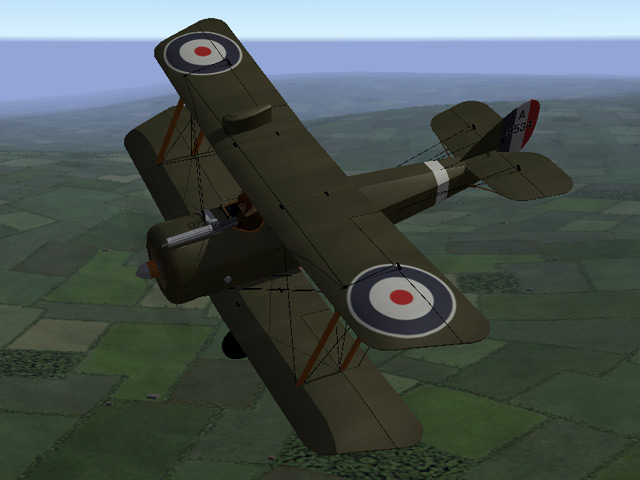
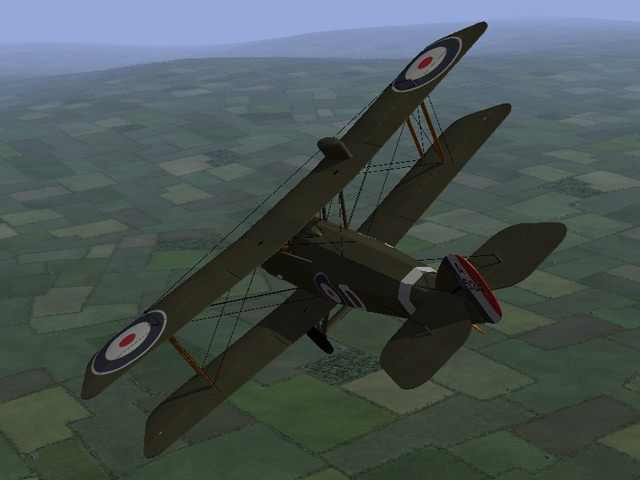
The Airco D.H.5 is built and rigged. The cockpit is done and I've started working on the skins. It should be done in a week or two. It uses the flight letters and squadron markings that come with First Eagles. It seems like a strange plane at first, but I've come to really like the reversed offset of the wings. My monitor crashed a week ago and I'm still haven't got the color adjusted on the new monitor.
-
Excellent skins! The first few times I tried to upload something, I forgot to choose a category on the left side of the screen and I got the same message. Stephen1918
-
I'm still here. I try to get here every day and I've made some bug fixes lately. I posted in another thread that I'm currently working on the DH5, I should have that finished in a few weeks. I agree with Hansa that an eastern front would be a good addition to FE. That would also allow us to expand into the 1920's and cover the Russian Revolution, the Polish-Bolshevik War, and other fighting that took place in Eastern Europe which used surplus WWI aircraft. I like Ojcar's idea of making short campaigns. That sounds like a good way to learn the ropes before trying to open another front. I've been getting more and more interested in how the game works and what's going on "behind the scenes". Eventually I will do more with the game-play aspects, but right now I'm having too much fun making planes!
-
Thank you all! It's nice to be appreciated. I have really enjoyed making planes for First Eagles, I've learned a lot and I think I'm getting better with each one. You should also thank Ojcar who has been making the FMs for all my planes. A plane that doesn't fly is no good at all and I don't know enough about the data files yet to make my own. So thank him too. And also thank Quack74. He tracked me down and invited me to make planes for FE in the first place. If he hadn't introduced me to First Eagles, I wouldn't even be here. So thank him too. Thanks for making me welcome and thanks to those of you have helped me get started and who have helped with details and bug fixing. You've been generous with your resouces, photos and expertise. That's what makes Combat Ace such a good place. I'm working on the Airco DH5. The exterior is pretty much done, I'm working on the cockpit and skins. I have a real world job and responsibilities so I'm going slower than before. I haven't stopped, I've just slowed down.
-
I'm sure it has something to do with the way the model is made, because it only happens on the guns. It did happen in FE1 in High graphics mode. If I can figure out what is causing it, I can build better models in the future. So I'm assuming that you're still seeing the lines?
-
Did the patch take care of the lines too? I wasn't seeing them, but I have a pretty low graphics card. I'm glad you like the N12, I really enjoyed making it.
-
I hate it when that happens! The white patch in the cockpit was easy. It was a box I was using for reference when I was animating the aileron push rods. I gave myself a slap for forgetting to delete it before I released the plane. The shadow bug was more difficult. It was caused by the guns and was only visible in High graphics mode. I never figured out what was causing it, I ended up making both guns over again from scratch. I also changed the way things are linked. I can't see the glitch anymore, but I can't get to "Unlimited" graphics mode. Please test this and tell me if it's gone. The zip file contains three new LOD files. (Nieuport12.LOD, Nieuport1202.LOD, Nieuport1203.LOD) You have to replace all three for it to work. I have also revised the file in the downloads section. Note: If you were one of the first 6 who downloaded the zip file, you better do it again. The 1st one had a glitch in the wing gun. Sorry about that. N12ShadowFix.zip
-
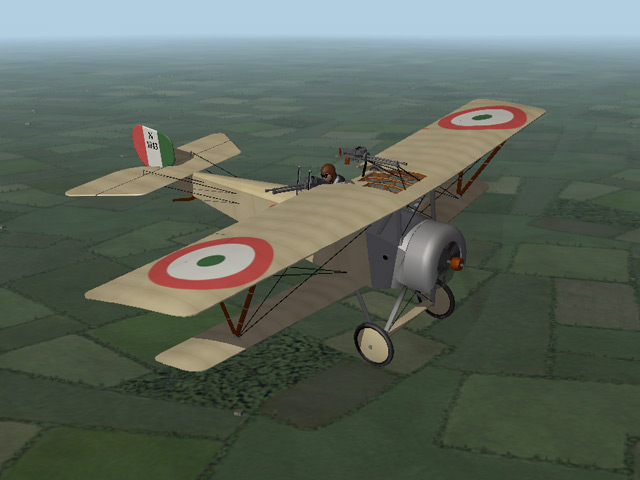
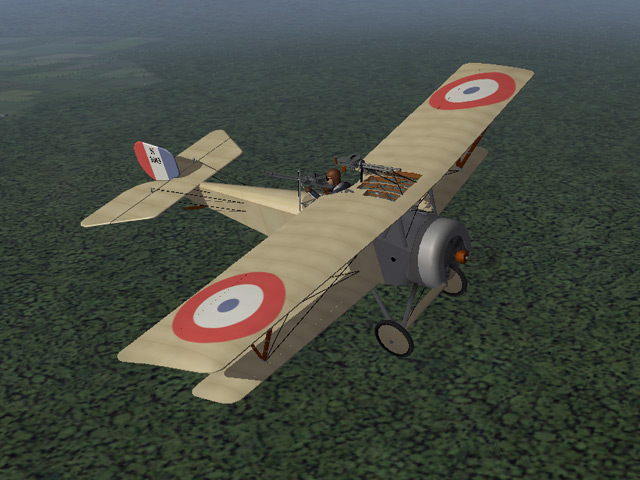
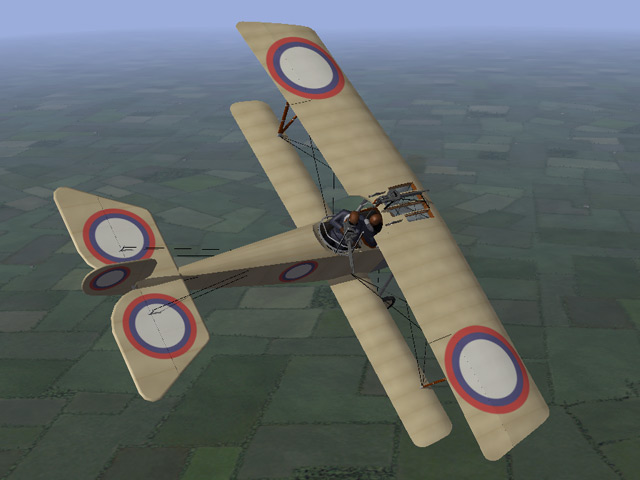
I uploaded the Nieuport 12 this afternoon. It has the Etévé gun mount in the back and windows in the upper wing. My thanks once again to Ojcar for making the FM, and to Nix, Sinbad, Whiteknight06604, and 33Lima who provided suggestions and resources for the Nieuport 12. This will be my last plane for a while. I need to get back to real life. I will keep making planes, but I'll be going much slower than I have been. Your feedback on any of my planes would be appreciated.

-
View File Nieuport 12 The Nieuport 12 was an improved version of the Nieuport 10. It had a more powerful engine, a larger upper wing and a slightly larger tail plane. These features gave the plane the power and performance to fly as a two man fighter. I have fitted my model with an Etévé gun mount holding a Lewis machine gun in the back, and another Lewis gun on the upper wing for the pilot. I have included three skinning options, identical except for the decals. The Italian Linen uses the Italian insignia and includes the red and green underwing panels. The Russian skin uses the Russian insignia and includes the roundels on the tail planes. The Standard Linen can be used for all the other Entente powers. This plane uses the national markings that come with First Eagles, so you can easily change nationalities (in the Standard Linen skin only.) I have included decals for serial numbers which will be applied randomly. Historical Notes: The numbers are fictious, but in the correct range for most Nieuport 12s. British planes carried the serial number on the fuselage. The Nieuport 12 wasn't used by the Italians, but I included the skin anyway. The Etévé gun mount ring should be flush with the fuselage, but because of limits in the way the game animates objects, I had to raise it up to avoid it intersecting the plane when it moved. Credits: My thanks once again to Ojcar for making the excellent data.INI file for this plane. My thanks to Nix for providing the engine sound file. Thanks also to Nix, Sinbad, Whiteknight06604, and 33Lima who provided suggestions and resources for the Nieuport 12. Version 2 Revised data file by ojcar improves performance and corrects hit box locations for the fuel tanks - corrects muzzle location for rear gun - engine sound added - thanks to Panama Red for testing Installation Instructions: For FE1: Unzip the file and move the folder named "Nieuport12" into the FirstEagles/Objects/Airplanes folder. You also need to move the sound file "clerget9b2m2.wav" into the FirstEagles/Sounds folder. For FE2: Unzip the file and move the folder named "Nieuport12" into the FirstEagles/Objects/Airplanes folder. Then in the FirstEagles/Objects/Decals folder, create a new folder named "Nieuport12". Move the folder named "D" from the Airplanes/Nieuport12 folder into the Decals/Nieuport12 folder you just made. You also need to move the sound file "clerget9b2m2.wav" into the FirstEagles/Sounds folder. Submitter Stephen1918 Submitted 08/22/2011 Category Nieuport
-
Yeah, I figured that out. I wish I had known that 3 months ago. If anyone else runs into this problem, try renaming the folders as I said earlier. Thanks for your response Monty CZ. Stephen1918
-
Version Version 2
685 downloads
The Nieuport 12 was an improved version of the Nieuport 10. It had a more powerful engine, a larger upper wing and a slightly larger tail plane. These features gave the plane the power and performance to fly as a two man fighter. I have fitted my model with an Etévé gun mount holding a Lewis machine gun in the back, and another Lewis gun on the upper wing for the pilot. I have included three skinning options, identical except for the decals. The Italian Linen uses the Italian insignia and includes the red and green underwing panels. The Russian skin uses the Russian insignia and includes the roundels on the tail planes. The Standard Linen can be used for all the other Entente powers. This plane uses the national markings that come with First Eagles, so you can easily change nationalities (in the Standard Linen skin only.) I have included decals for serial numbers which will be applied randomly. Historical Notes: The numbers are fictious, but in the correct range for most Nieuport 12s. British planes carried the serial number on the fuselage. The Nieuport 12 wasn't used by the Italians, but I included the skin anyway. The Etévé gun mount ring should be flush with the fuselage, but because of limits in the way the game animates objects, I had to raise it up to avoid it intersecting the plane when it moved. Credits: My thanks once again to Ojcar for making the excellent data.INI file for this plane. My thanks to Nix for providing the engine sound file. Thanks also to Nix, Sinbad, Whiteknight06604, and 33Lima who provided suggestions and resources for the Nieuport 12. Version 2 Revised data file by ojcar improves performance and corrects hit box locations for the fuel tanks - corrects muzzle location for rear gun - engine sound added - thanks to Panama Red for testing Installation Instructions: For FE1: Unzip the file and move the folder named "Nieuport12" into the FirstEagles/Objects/Airplanes folder. You also need to move the sound file "clerget9b2m2.wav" into the FirstEagles/Sounds folder. For FE2: Unzip the file and move the folder named "Nieuport12" into the FirstEagles/Objects/Airplanes folder. Then in the FirstEagles/Objects/Decals folder, create a new folder named "Nieuport12". Move the folder named "D" from the Airplanes/Nieuport12 folder into the Decals/Nieuport12 folder you just made. You also need to move the sound file "clerget9b2m2.wav" into the FirstEagles/Sounds folder. -
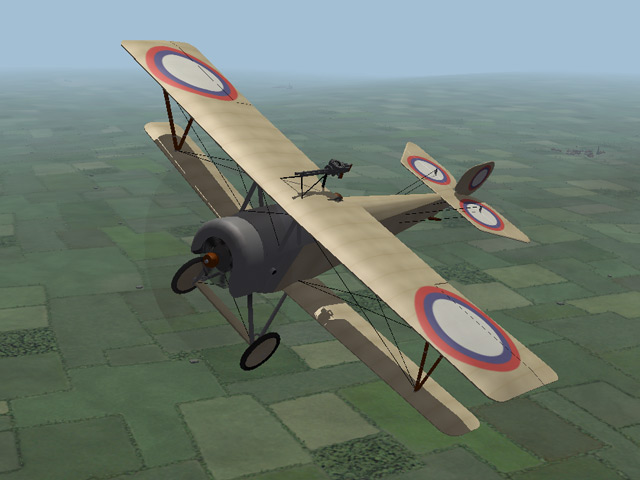
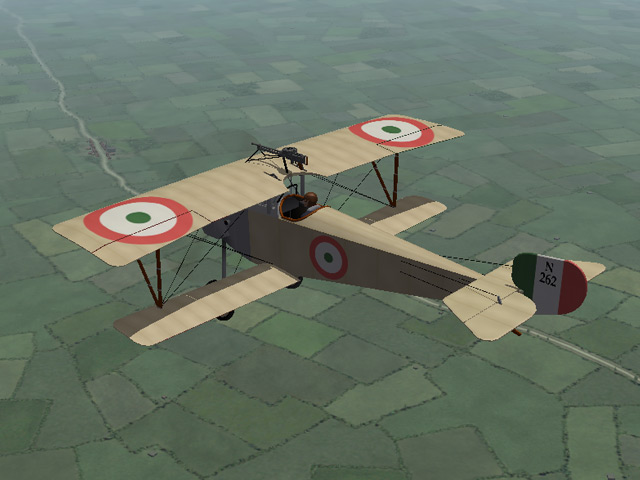
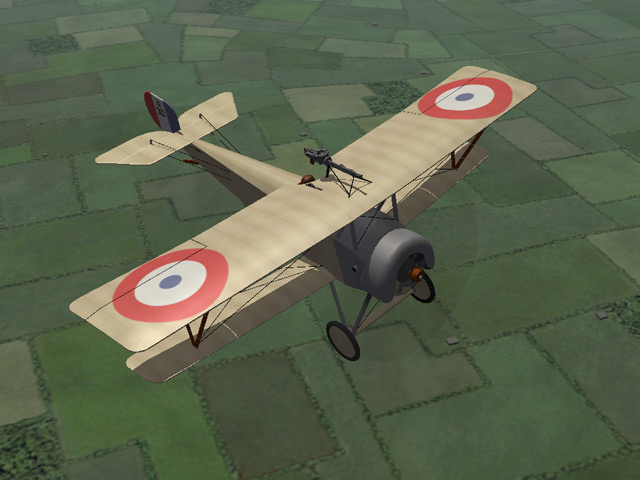
I uploaded the Nieuport 10 last night. It's a single seat fighter with three skinning options for the Entente forces. My thanks once again to Ojcar for making the FM, to Nix for making the engine sound file, and to Nix, Sinbad, Whiteknight06604, and 33Lima who provided suggestions and resources. The 12 is on the way, it should be done in a few more days.
-
View File Nieuport 10 The Nieuport 10 was the first of the classic wing-and-a-half, V-strut Nieuports. Designed in 1914, it combined the visibility of a monoplane with with the strength of a biplane. The Nieuport 10 was designed as a two seater, but was underpowered. Many of them were converted to single seat planes and with the addition of a wing mounted machine gun, the Nieuport 10 became an effective fighter for the early years of World War I. My model is configured as a single seat fighter. I have included three skinning options, which are identical except for the decals. The Italian Linen uses the Italian insignia and includes the red and green underwing panels. The Russian skin uses the Russian insignia and includes the roundels on the tail planes. The Standard Linen can be used for all the other Entente powers. This plane uses the national markings that come with First Eagles, so you can easily change nationalities (in the Standard Linen skin only.) I have included decals for serial numbers which will be applied randomly. Historical Notes: The numbers are fictious, but in the correct range for most Nieuport 10s. British planes carried a four digit serial number on the fuselage, Italian planes used "Ni" instead of "N" in the serial numbers. Credits: My thanks once again to Ojcar for making the excellent data.INI file for this plane. My thanks to Nix for making the realistic sound file for the Le Rhône 80hp engine. Thanks also to Nix, Sinbad, Whiteknight06604, and 33Lima who provided suggestions and resources for the Nieuport 10. Version 2 Revised data file by ojcar improves performance and corrects hit box locations for the fuel tanks - thanks to Panama Red for testing. Installation instructions: For FE1: Unzip the file and move the folder named "Nieuport10" into the FirstEagles/Objects/Airplanes folder. You also need to move the sound file "LeRhone9c80hp1m4.wav" into the FirstEagles/Sounds folder. For FE2: Unzip the file and move the folder named "Nieuport10" into the FirstEagles/Objects/Airplanes folder. Then in the FirstEagles/Objects/Decals folder, create a new folder named "Nieuport10". Move the folder named "D" from the Airplanes/Nieuport10 folder into the Decals/Nieuport10 folder you just made. You also need to move the sound file "LeRhone9c80hp1m4.wav" into the FirstEagles/Sounds folder. Submitter Stephen1918 Submitted 08/20/2011 Category Nieuport
-
Version Version 2
738 downloads
The Nieuport 10 was the first of the classic wing-and-a-half, V-strut Nieuports. Designed in 1914, it combined the visibility of a monoplane with with the strength of a biplane. The Nieuport 10 was designed as a two seater, but was underpowered. Many of them were converted to single seat planes and with the addition of a wing mounted machine gun, the Nieuport 10 became an effective fighter for the early years of World War I. My model is configured as a single seat fighter. I have included three skinning options, which are identical except for the decals. The Italian Linen uses the Italian insignia and includes the red and green underwing panels. The Russian skin uses the Russian insignia and includes the roundels on the tail planes. The Standard Linen can be used for all the other Entente powers. This plane uses the national markings that come with First Eagles, so you can easily change nationalities (in the Standard Linen skin only.) I have included decals for serial numbers which will be applied randomly. Historical Notes: The numbers are fictious, but in the correct range for most Nieuport 10s. British planes carried a four digit serial number on the fuselage, Italian planes used "Ni" instead of "N" in the serial numbers. Credits: My thanks once again to Ojcar for making the excellent data.INI file for this plane. My thanks to Nix for making the realistic sound file for the Le Rhône 80hp engine. Thanks also to Nix, Sinbad, Whiteknight06604, and 33Lima who provided suggestions and resources for the Nieuport 10. Version 2 Revised data file by ojcar improves performance and corrects hit box locations for the fuel tanks - thanks to Panama Red for testing. Installation instructions: For FE1: Unzip the file and move the folder named "Nieuport10" into the FirstEagles/Objects/Airplanes folder. You also need to move the sound file "LeRhone9c80hp1m4.wav" into the FirstEagles/Sounds folder. For FE2: Unzip the file and move the folder named "Nieuport10" into the FirstEagles/Objects/Airplanes folder. Then in the FirstEagles/Objects/Decals folder, create a new folder named "Nieuport10". Move the folder named "D" from the Airplanes/Nieuport10 folder into the Decals/Nieuport10 folder you just made. You also need to move the sound file "LeRhone9c80hp1m4.wav" into the FirstEagles/Sounds folder. -
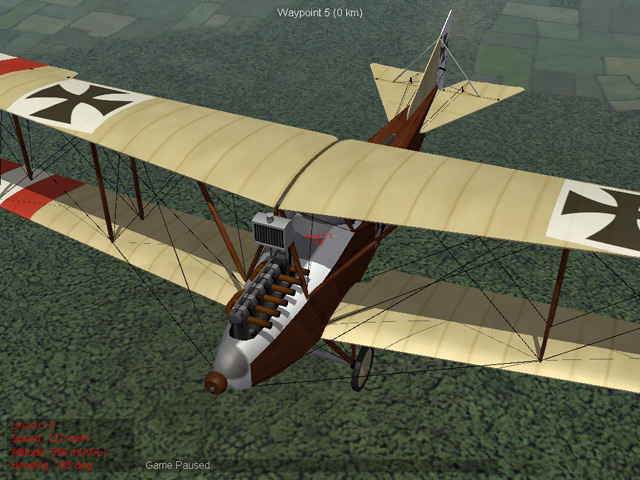
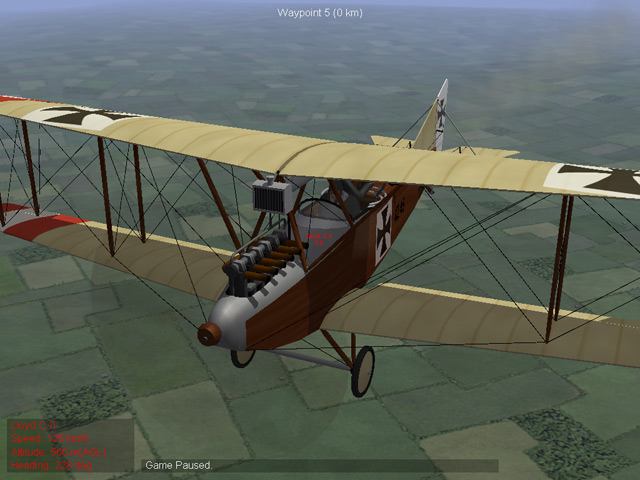
I figured out the problem, I still think it was mostly a memory issue. When I added the Nieuport to my FE1, I started seeing things like this: It took me a while to figure it out because I had to wait for the game to use one of my planes as an enemy plane. Eventually I realized that this plane is using the skin from the Nieuport for the engine cover, but using the correct skin everywhere else. I have been using the same names for the texture folders for all my planes, and some of the skins (like "Fuselage") have been the same in all the planes. When I added the Nieuport (along with all my other planes) it seemed to overwhelm the computer and it grabbed the wrong skin. I was able to fix the problem by simply renaming the folders - "LC3Texture1" instead of "Texture1" - I also had to change the ini file for the plane to point to the new directory name. That solved the problem. Starting with the Nieuport, I will make unique names for the skins and Texture folders. Here it is fixed:
-
It happened 2 or 3 times today. I didn't think to get a screen shot. Now I can't make it happen again. Maybe it's a memory issue, I do have an older computer. I'll post a shot if it happens again. Yes, all my planes have multiple LODs. But I didn't notice the problem until I got closer so I don't know if it's happening to all the versions. If anyone else experiences this problem, please get a screen shot and post it.
-
I've been testing the Nieuport 10 and I came across this weird glitch with the skins. When I fly the plane, everything is fine. But when the game uses one of my planes as an enemy, some of the skins are messed up. I'll see white patches on parts of the plane. It seems like some of the skins are not aligned correctly. It only appears on some of the parts, the rest of the plane seems to be OK. This only seems to be happening with my planes and only when the game uses my plane as an enemy. Has anyone else come across this? Stephen1918
-
Thanks. The drawings section contains some really detailed drawings of the mechanical components. I always find that inspiring.
-
I know what you mean, it seems like they were always experimenting with the planes. There is quite a bit of variation in all the planes I've looked at so far. It can be frustrating sometimes to build a plane, but it also leaves a little room for fudging, as long as it's believable. I try to make my planes accurate, but I have exercised a little "artistic license" in all of them.

