


Eagle114th
-
Posts
1,074 -
Joined
-
Last visited
-
Days Won
23
Content Type
Profiles
Forums
Gallery
Downloads
Store
Everything posted by Eagle114th
-
 Hello everyone, I have a question about the location of weapons .ini files. I have been looking for it using CAT extractor. I am unable to find the .ini files for the weapons in SF2. May I ask if anyone know where I can find it? If someone knows which weapons pack is up-to-date and is released for SF2, please let me know too. I will contact author about tweaking their .ini for weapons, respectfully. If the permission is approved, I will start .ini dancing through a long list of weapons. The information and advice are much appreciated, as always. I am still looking for files again in SF2. I am working on the project that sorts the weapon list like I did with the aircraft list. Cheers!
 -
 Thank you! I just realized that I am hooked to modding SF2. There are a lot to do. :)
 -
Hello everyone, I released the first version fo SF2 - Menu (UI) expansion:
- 27 replies
-
- 1
-

-
- aircraft list
- list
- (and 2 more)
-
View File SF2 - Menu (UI) Expansion Eagle114th's SF2 Menu (UI) Expansion v1.2 --------------------------------------------------------------------------------- This is a second version of SF2 UI Expansion mod. If you face any bugs or problems, please inform me. The purpose of this mod is to expand / improve the SF2 UI. In the first version, it does two things: 1) Change the aircraft list when displaying the list. Aircraft list are sorted by nation first. There are three versions: a. Version #1: Nations’ multi-branches are combined, so you’ll see (USN / USMC) A-4s or (RN / RAF) F-4Ks as an example. If aircraft have skins for a multi-nations, it will have ‘>>’ at end of aircraft name. b. Version #2: There are both symbol ‘>’ and ‘>>’. For any aircraft that is used by multi-branches, will use ‘>’, while any aircraft with skins for a multi nations will have ‘>>’ at the end of name. c. Version #3: Same as version 2 with simplified year tag. Instead of (19XX), it will show as ‘XX. 2) RWR and RADAR being displayed on the screen, there are 4 versions: a. Version #1: RWR + RADAR upper right corner b. Version #2: RWR + RADAR upper left corner c. Version #3: RWR (upper left corner) + RADAR (upper right corner) d. Version #4: RADAR (upper left corner) + RWR (upper right corner) Plans for next version: - New menu + GUI (WIP) - Make smaller version of RWR + RADAR - If time permits, will work on ordinance list, so they will be sorted by type of ordinance before the name. The feedback are always appreciated! ENJOY! --------------------------------------------------------------------------------- INSTALLATION: Note: This mod is covers all aircraft in SF2 with all expansion pack and DLCs. (AIRCRAFT) 1) MAKE A BACK UP COPY OF AIRCRAFT folder in Strike Fighters Project 2 mod directory. It can be found in this directory: SF2 (Main folder) -> Objects -> Aircraft 2) In Aircraft Sorting List folder, choose one of three versions, and then copy and drop Objects folder in SF2 mod main directory. (ORDINANCE) 1) MAKE A BACK UP COPY OF WEAPONS folder in Strike Fighters Project 2 mod directory. It can be found in this directory: SF2 (Main folder) -> Objects -> Weapons 2) In Ordinance Sorting List folder, copy and drop Objects folder in SF2 mod main directory. (RWR + RADAR) 1) MAKE A BACK UP COPY of HUDDATA.INI in FLIGHT folder in SF2 Main directory. 2) In RWR + Radar folder, choose one version of six versions, and then copy and drop Flight folder in SF2 mod directory. --------------------------------------------------------------------------------- UPDATE LOG: v1.0 - First version of SF2 Menu (UI) Expansion v1.2 - Added extra options for RWR + RADAR with half sized version (See Version #1A and #2A screenshot in RWR + RADAR folder) - Added Ordinance Sorting list --------------------------------------------------------------------------------- Current projects - SF2 new MENU and GUI (WIP) --------------------------------------------------------------------------------- PERMISSION: Please contact me first if you want to use my mod for any purposes. Eagle114th / MagicDragon116 Submitter Eagle114th Submitted 04/21/2021 Category Menus
-
Version 1.2
119 downloads
Eagle114th's SF2 Menu (UI) Expansion v1.2 --------------------------------------------------------------------------------- This is a second version of SF2 UI Expansion mod. If you face any bugs or problems, please inform me. The purpose of this mod is to expand / improve the SF2 UI. In the first version, it does two things: 1) Change the aircraft list when displaying the list. Aircraft list are sorted by nation first. There are three versions: a. Version #1: Nations’ multi-branches are combined, so you’ll see (USN / USMC) A-4s or (RN / RAF) F-4Ks as an example. If aircraft have skins for a multi-nations, it will have ‘>>’ at end of aircraft name. b. Version #2: There are both symbol ‘>’ and ‘>>’. For any aircraft that is used by multi-branches, will use ‘>’, while any aircraft with skins for a multi nations will have ‘>>’ at the end of name. c. Version #3: Same as version 2 with simplified year tag. Instead of (19XX), it will show as ‘XX. 2) RWR and RADAR being displayed on the screen, there are 4 versions: a. Version #1: RWR + RADAR upper right corner b. Version #2: RWR + RADAR upper left corner c. Version #3: RWR (upper left corner) + RADAR (upper right corner) d. Version #4: RADAR (upper left corner) + RWR (upper right corner) Plans for next version: - New menu + GUI (WIP) - Make smaller version of RWR + RADAR - If time permits, will work on ordinance list, so they will be sorted by type of ordinance before the name. The feedback are always appreciated! ENJOY! --------------------------------------------------------------------------------- INSTALLATION: Note: This mod is covers all aircraft in SF2 with all expansion pack and DLCs. (AIRCRAFT) 1) MAKE A BACK UP COPY OF AIRCRAFT folder in Strike Fighters Project 2 mod directory. It can be found in this directory: SF2 (Main folder) -> Objects -> Aircraft 2) In Aircraft Sorting List folder, choose one of three versions, and then copy and drop Objects folder in SF2 mod main directory. (ORDINANCE) 1) MAKE A BACK UP COPY OF WEAPONS folder in Strike Fighters Project 2 mod directory. It can be found in this directory: SF2 (Main folder) -> Objects -> Weapons 2) In Ordinance Sorting List folder, copy and drop Objects folder in SF2 mod main directory. (RWR + RADAR) 1) MAKE A BACK UP COPY of HUDDATA.INI in FLIGHT folder in SF2 Main directory. 2) In RWR + Radar folder, choose one version of six versions, and then copy and drop Flight folder in SF2 mod directory. --------------------------------------------------------------------------------- UPDATE LOG: v1.0 - First version of SF2 Menu (UI) Expansion v1.2 - Added extra options for RWR + RADAR with half sized version (See Version #1A and #2A screenshot in RWR + RADAR folder) - Added Ordinance Sorting list --------------------------------------------------------------------------------- Current projects - SF2 new MENU and GUI (WIP) --------------------------------------------------------------------------------- PERMISSION: Please contact me first if you want to use my mod for any purposes. Eagle114th / MagicDragon116 -
Eagle114th's new SF2 Menu Project - WIP
Eagle114th replied to Eagle114th's topic in Mods & Skinning Discussion
Thank you for the feedback. At once I release the first version of SF2 new Menu / GUI mod, I am considering adding more different themes / styles for different era / theater. -
Eagle114th's new SF2 Menu Project - WIP
Eagle114th replied to Eagle114th's topic in Mods & Skinning Discussion
Hello everyone, I re-designed a pilot records screen, here is a final version: Here is new screen for mission debriefing: New campaign screen: -
Here are screenshots for four versions of RADAR + RWR screen mod: Version #1 Version #2 Version #3 Version #4
- 27 replies
-
- 1
-

-
- aircraft list
- list
- (and 2 more)
-
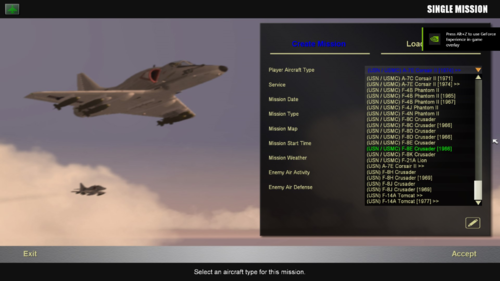
Hello everyone, I have created three versions of aircraft sorting list for SF2 clean installation. Please note, I am using the symbol '>" at the end of the aircraft name to tell you if the aircraft contains the skin for another branch or nation. NOTE: (Nation) tag before aircraft name is directly based on what is coded in _DATA.ini. For example, A-4A is tagged as "USN" as nation in DATA, hence I tagged A-4A as (USN) instead of USMC. '>' = For aircraft that have skins for another branches '>>' = For aircraft that have skins for another nations '>>>' = For aircraft that have skins for another branches AND nations. For example, (USN) A-4A have a skin for USMC, hence it shows up as: (USN) A-4A Skyhawk > Il-28 "Beagle" have skin for other nations, it shows up as: (VVS) IL-28 "Beagle" >> (USN) A-7E Corsair II have the skins for another branches AND nations, it shows up as: (USN) A-7E Corsair II >>> Here are each versions of Aircraft list designed as: Version #1 - There are tags for a multi-branches. For example (USN / USMC) and (RN / RAF). it have '>>' tag only for aircraft with another nation skins. Version #2 - Uses '>', '>>', and '>>>' for aircraft that have skins for another branches and/or nations. Version #3 - A copy of version #2 with simplified years. Instead of using [Year], it uses 'year (last two decimals) Here are screenshots with new aircraft sorted list:
- 27 replies
-
- 1
-
-
- aircraft list
- list
- (and 2 more)
-
Sir, thank you for the information. I am thinking I could make a multi-version of HUDData.ini for this mod. That way people can select which one they prefer the most. I could make it this way: - RWR / RADAR on upper right corner - RWR / RADAR on upper left corner - RWR on upper left / Radar on upper right - Radar on upper left / RWR on upper right
- 27 replies
-
- 1
-
-
- aircraft list
- list
- (and 2 more)
-
Sir, you inspired me to keep going on with the projects too. I shall have both projects done, so the community can enjoy it. I look forward to flying YAK-130, as soon you release it!
- 27 replies
-
- 1
-
-
- aircraft list
- list
- (and 2 more)
-
I sincerely appreciate your concerns. You absolutely have a good reason for it. This is why I am doing it in a small step first and see what community likes. I will make sure not to get overwhelmed with the projects. To be honest, I was doing it for myself at first, since I wanted to have aircraft list being grouped by nations / countries. Seeing how this community share what they create for themselves too, hence here am I. For now, I am only doing it for a clean SF2 installation, so anyone who want to start over with SF2 installation can use this mod. Small steps a time. At once when I am done with both SF2 new Menu / GUI and aircraft sorting list mod, I will see if I can go further with both mods. There are so many projects ideas I want to do for SF2. I didn't have the time nor the courage to create mods a long time ago. But now, I want to take an opportunity to see if I could achieve it, after having accomplished many things in my life.
-
Sir, thank you for sharing your stories. A big respect to you too.
- 27 replies
-
- 1
-
-
- aircraft list
- list
- (and 2 more)
-
Holy moly! You have gone through a lot. Thank you for sharing. A big respect to you too. If you would like an alternative version with the different location of RWR / RADAR on the screen, let me know. I am more than happy to do it for you and other who want or needs it. The more options this mod have, the merrier.
- 27 replies
-
- 1
-
-
- aircraft list
- list
- (and 2 more)
-
Thank you for the feedback, unfortunately, the way SF2 is coded, it is not yet possible to 'tag' aircraft by the specific country / nation dynamically. However, I figured a way to make it less sore eye. I am changing the format. Instead of seeing [Export], you will see small '>>' symbol. However, for now, let's just see it as this way: If you fly in a Middle East, as you stated, and you see (VVS) Il-2 1946 >>, then you know that the aircraft is from Soviet / Russia and you can look at the decal to identity which nation is operating as an exported aircraft. By the way, to make the aircraft list more simple, I am adding two symbols: - For any aircraft that have skins that covers multi branch (For example: USN aircraft that have skins for USMC), will have a symbol '>'. - For any aircraft that have skins that covers multi nations, will have the symbol ">>' - For any aircraft that have skins that covers both multi branchs and nations, will have the symbols '>>>'
- 27 replies
-
- 1
-
-
- aircraft list
- list
- (and 2 more)
-
A) Thank you! I will make two versions. For the first one, I will keep USN / USMC. For a second version, I will do it a bit differently. I will post the update here as soon I finish working on it. B) Yes, sir! I will keep working on it. You inspired me to work on this mod project even more happily. C) I am happy that it is helpful to you. I aim to finish the mod, so the community can enjoy this mod. D) I repiled your DM. :) Yes I agree with you. I hope that TK would add the moddable filter system to the aircraft list on menu someday.
- 27 replies
-
- 1
-
-
- aircraft list
- list
- (and 2 more)
-
Thank you very much! You inspired me to do even more works on this mod. I will release the mod with multi versions. So people can choose the version they prefer. It is not a chore to me, I do it with my passions into modding SF2. I am merely sharing what I love to do with this community. Your feedback is still appreciated.
-
Yes that is understandable about the desires for SF2 to have the filter system for viewing the aircraft list. It would be great if TK could add feature like this, especially making it moddable too.
-
Thank you for the feedback. That is understandable that there are a group of people already are familiar with many of aircraft, as you stated. However, at the same time, there are also the group of people, including me who are not familiar with many variants of each aircraft. Hence, is why I made this mod. I always wished that Thirdwire would add the filter system to the aircraft list, so we could customize the way we view the list (By Country / nation, Type / name of aircraft, etc...). But since it is not yet implemented, I decided to roll my sleeves and start modding all aircraft name in the list. To my amaze, after grouping aircraft by nation, it is quite educational way of viewing the list of aircraft. At the same time, it is more fun to view the list this way too. If it could do the same to other, then great! By the way, about in-game screen (Radar + RWR), I have reason why I group both in the upper right corner: My limited vision. What I have is known as Usher Syndrome. That is why I am deaf with a low vision. This is what my vision looks similar to: I have a tunnel vision with a good center visibility. (Which means I can look at the monitor from close-by to far distance.) In order, to see the surrounding situation, I scan my vision everywhere, including the monitor for the games and simulations. I usually use a limited sized monitor, so I can scan around the monitor less frequently. As stated above, I have a good center vision, so my head is not that far from the monitor. The larger monitor is, the more I have to scan around it with my tunnel vision. I am currently using 23" inches monitor as my maximum size. I have been flying simulations since the 1990s and I always use the symbols / text around the target in various simulations / games, in order, to assist me in spotting them. Now with the way I learn about modding SF2 through .ini dancing, it is a huge relief for me to be able to see both RWR / RADAR this way too. And why do I share it here? That way if anyone could benefit from this too, then great!
- 27 replies
-
- 3
-
-
- aircraft list
- list
- (and 2 more)
-
I am thinking about changing two things: ------------------------------------------------------------------ 1) I could replace [Export] with a symbol '»' (Shows up as '>>'). That way it won't be a sore eye when looking at aircraft name? For example, in a screenshot above, you see (VVS) Il-2 1946 "Beagle" [Export], I could change it to: (VVS) Il-28 "Beagle" » ------------------------------------------------------------------ 2) Changing aircraft that is operated by both USN and USMC. For now, it shows up in the list as (USN / USMC), I could change it this way: (USN) F-4J Phantom II » That way you know that the aircraft is operated by both USN and USMC. ------------------------------------------------------------------ Here is a list of symbols: https://fsymbols.com/keyboard/windows/alt-codes/list/ If any of you have a better idea of which symbol to use, please post here.
-
Hello everyone, It has been a hectic week for me. I am still working on new SF2 menu project slowly. At the same time, since I got a new external SSD as an alternative storage for my external HDD. 1 TB external is affordable now. To my surprise, it is small and doesn't even require me to plug into power outlet, unlike an external HDD. I could just hook it into my gaming laptop's USB 3.1 T Type-C. Oh boy, it made a huge difference. I am able to load SF2 much faster now. I just wiped my old SF2 multi-installation, in order, to have a fresh start with SF2. I spent weeks installing many mods for SF2, in order, to make up for my lost SF2 files. I decided to work on aircraft sorting list for my preference ways of sorting the list by nation first, then aircraft. I started with default SF2. (Note: I bought SF2 complete Edition since it is on sale. It is a perfect time to get it before the time runs out.) Here is what default list looks like: Now with a new sorting list (by nation), it looks like this: NOTE: When you see [Export], it means it have a multi nations skins included. I am very pleased with this. With the new sorting list, I am able to quickly tell which nation specific aircraft belong to. It has been an educational day for me about the nations and aircraft versions. If anyone wants this, I could post it in combatace download section. I modified All the aircraft .ini in a clean SF2 (Without mods). That way anyone can build the mods on it. I am still brainstorming about what to do with [Export] tag. Should I replace it with '*" or any certain symbols to the end of the aircraft name? Feedback are appreciated, as always. Plus, I also can add updated HUDDATA.ini with both RWR and RADAR being included on upper right corner. I modified it this way, so I can easily scan my eyes between both RWR and Radar while padlocking around. (Note: Either RWR / Radar will only show up if aircraft have either. For example, if you fly aircraft that doesn't have either RWR or Radar, it won't show up on the screen.
- 27 replies
-
- 1
-
-
- aircraft list
- list
- (and 2 more)
-
Thank you for the advice. I am studying the FM files more closely. At once when I am done with SF2 menu project, I want to start working with FM to modify the aircraft's handling characters. Thank you for the file, the more files I can study, the merrier. That is noted. Thank you for the information. That is noted, I recently downloaded KAW. I am looking forward to flying and trying the new flight model from KAW. Oh? that is noted too. I shall study [LeftElevator] and [RightElevator]. Understood. I am going to study both KAW MiG-15 and Fubar's MiG-17 FM.
- 8 replies
-
- 1
-
-
- .ini tweak
- flight model
- (and 2 more)
-
Good evening everyone, Since I am working on a big collection of different MiG-15s and MiG-17s for different nations. I found MiG-17 realistic flight model tweak which limits the maneuverability of the MiG-17s at high subsonic speeds, especially above .8M. According to them, I have to look at CLa= and Cmq= tables for the stabs at values .8M and above. This part still confuses me. So I am asking for someone to point me at where to look at. That way, I can understand which codes to tweak for another MiG-15 and 17 that still doesn't have the maneuverability limitation at subsonic speeds. I opened MiG-17's data file and went to [AircraftData]: [LeftStab] ParentComponentName=VertTail ModelNodeName=Left_Stab ShowFromCockpit=TRUE DetachWhenDestroyed=TRUE DamageRating=DISABLED MassFraction=0.012 HasAeroCoefficients=TRUE LiftSurface=TRUE CL0=-0.0024 CLa=0.1946 CD0=0.0005 CDL=0.0003 Cmq=-2.4830 Cmad=-1.1754 Cyb=-0.0753 Clp=-0.0011 Cnb=0.0421 CL0MachTableNumData=13 CL0MachTableDeltaX=0.10 CL0MachTableStartX=0.00 CL0MachTableData=3.256,3.262,3.278,2.462,1.000,0.217,-0.231,-0.523,-0.614,-0.614,-0.738,-0.716,0.481 CLaMachTableNumData=13 CLaMachTableDeltaX=0.10 CLaMachTableStartX=0.00 CLaMachTableData=0.973,0.975,0.979,0.988,1.000,1.016,1.038,1.066,0.201,0.001,0.001,0.001,0.001 CD0MachTableNumData=13 CD0MachTableDeltaX=0.10 CD0MachTableStartX=0.00 CD0MachTableData=2.082,1.249,1.104,1.036,1.000,0.981,0.971,0.986,0.994,0.994,11.881,11.945,12.036 CDLAlphaTableNumData=15 CDLAlphaTableDeltaX=4.00 CDLAlphaTableStartX=-28.00 CDLAlphaTableData=93.444,69.444,49.000,32.111,18.778,9.000,2.778,0.111,1.000,5.444,13.444,25.000,40.111,58.778,81.000 CmqMachTableNumData=13 CmqMachTableDeltaX=0.10 CmqMachTableStartX=0.00 CmqMachTableData=0.971,0.973,0.978,0.987,1.000,1.017,1.040,2.069,10.107,100.107,100.364,100.332,100.199 XacMachTableNumData=13 XacMachTableDeltaX=0.10 XacMachTableStartX=0.00 XacMachTableData=-5.346,-5.346,-5.347,-5.348,-5.350,-5.352,-5.356,-5.359,-5.364,-5.364,-5.438,-5.459,-5.472 CheckStall=TRUE CLmax=0.0708 AlphaStall=17.68 AlphaMax=23.72 AlphaDepart=28.23 StallLiftTableNumData=37 StallLiftTableDeltaX=10.00 StallLiftTableStartX=-180.00 StallLiftTableData=0.000,-0.013,-0.026,-0.042,-0.058,-0.054,-0.047,-0.032,-0.014,0.000,0.017,0.050,0.094,0.140,0.202,0.245,0.340,0.531,0.903,0.586,0.362,0.265,0.210,0.167,0.118,0.074,0.038,0.000,-0.014,-0.032,-0.047,-0.054,-0.058,-0.042,-0.026,-0.013,0.000 StallDragTableNumData=37 StallDragTableDeltaX=10.00 StallDragTableStartX=-180.00 StallDragTableData=0.001,0.008,0.021,0.043,0.082,0.123,0.171,0.227,0.292,0.367,0.451,0.562,0.689,0.825,0.937,1.018,1.142,1.122,1.000,1.122,1.142,1.018,0.937,0.825,0.689,0.562,0.451,0.367,0.292,0.227,0.171,0.123,0.082,0.043,0.021,0.008,0.001 StallXacShiftTableNumData=37 StallXacShiftTableDeltaX=10.00 StallXacShiftTableStartX=-180.00 StallXacShiftTableData=-0.359,-0.359,-0.307,-0.276,-0.273,-0.262,-0.244,-0.225,-0.199,-0.179,-0.160,-0.134,-0.115,-0.097,-0.086,-0.083,-0.052,0.000,0.000,0.000,-0.052,-0.083,-0.086,-0.097,-0.115,-0.134,-0.160,-0.179,-0.199,-0.225,-0.244,-0.262,-0.273,-0.276,-0.307,-0.359,-0.359 DownwashAlphaTableNumData=37 DownwashAlphaTableDeltaX=10.00 DownwashAlphaTableStartX=-180.00 DownwashAlphaTableData=0.000,0.000,0.000,0.000,0.000,0.000,0.000,0.000,0.000,-0.000,-0.141,-0.153,-0.076,-0.002,-0.095,-0.607,-1.666,-2.187,0.407,4.536,8.397,7.739,0.864,0.103,0.678,0.913,0.668,0.000,0.000,0.000,0.000,0.000,0.000,0.000,0.000,0.000,0.000 Chord=1.00 Ymac=-0.71 MinExtentPosition=-0.02,-6.13, 1.35 MaxExtentPosition=-1.75,-4.96, 1.43 CollisionPoint[001]=-1.67,-5.90,1.38 CollisionPoint[002]=-1.67,-6.39,1.38 SystemName[001]=LeftElevator [RightStab] ParentComponentName=VertTail ModelNodeName=Right_Stab ShowFromCockpit=TRUE DetachWhenDestroyed=TRUE DamageRating=DISABLED MassFraction=0.012 HasAeroCoefficients=TRUE LiftSurface=TRUE CL0=-0.0024 CLa=0.1946 CD0=0.0005 CDL=0.0003 Cmq=-2.4830 Cmad=-1.1754 Cyb=-0.0753 Clp=-0.0011 Cnb=0.0421 CL0MachTableNumData=13 CL0MachTableDeltaX=0.10 CL0MachTableStartX=0.00 CL0MachTableData=3.256,3.262,3.278,2.462,1.000,0.217,-0.231,-0.523,-0.614,-0.614,-0.738,-0.716,0.481 CLaMachTableNumData=13 CLaMachTableDeltaX=0.10 CLaMachTableStartX=0.00 CLaMachTableData=0.973,0.975,0.979,0.988,1.000,1.016,1.038,1.066,0.201,0.001,0.001,0.001,0.001 CD0MachTableNumData=13 CD0MachTableDeltaX=0.10 CD0MachTableStartX=0.00 CD0MachTableData=2.082,1.249,1.104,1.036,1.000,0.981,0.971,0.986,0.994,0.994,11.881,11.945,12.036 CDLAlphaTableNumData=15 CDLAlphaTableDeltaX=4.00 CDLAlphaTableStartX=-28.00 CDLAlphaTableData=93.444,69.444,49.000,32.111,18.778,9.000,2.778,0.111,1.000,5.444,13.444,25.000,40.111,58.778,81.000 CmqMachTableNumData=13 CmqMachTableDeltaX=0.10 CmqMachTableStartX=0.00 CmqMachTableData=0.971,0.973,0.978,0.987,1.000,1.017,1.040,2.069,10.107,100.107,100.364,100.332,100.199 XacMachTableNumData=13 XacMachTableDeltaX=0.10 XacMachTableStartX=0.00 XacMachTableData=-5.346,-5.346,-5.347,-5.348,-5.350,-5.352,-5.356,-5.359,-5.364,-5.364,-5.438,-5.459,-5.472 CheckStall=TRUE CLmax=0.0708 AlphaStall=17.68 AlphaMax=23.72 AlphaDepart=28.23 StallLiftTableNumData=37 StallLiftTableDeltaX=10.00 StallLiftTableStartX=-180.00 StallLiftTableData=0.000,-0.013,-0.026,-0.042,-0.058,-0.054,-0.047,-0.032,-0.014,0.000,0.017,0.050,0.094,0.140,0.202,0.245,0.340,0.531,0.903,0.586,0.362,0.265,0.210,0.167,0.118,0.074,0.038,0.000,-0.014,-0.032,-0.047,-0.054,-0.058,-0.042,-0.026,-0.013,0.000 StallDragTableNumData=37 StallDragTableDeltaX=10.00 StallDragTableStartX=-180.00 StallDragTableData=0.001,0.008,0.021,0.043,0.082,0.123,0.171,0.227,0.292,0.367,0.451,0.562,0.689,0.825,0.937,1.018,1.142,1.122,1.000,1.122,1.142,1.018,0.937,0.825,0.689,0.562,0.451,0.367,0.292,0.227,0.171,0.123,0.082,0.043,0.021,0.008,0.001 StallXacShiftTableNumData=37 StallXacShiftTableDeltaX=10.00 StallXacShiftTableStartX=-180.00 StallXacShiftTableData=-0.359,-0.359,-0.307,-0.276,-0.273,-0.262,-0.244,-0.225,-0.199,-0.179,-0.160,-0.134,-0.115,-0.097,-0.086,-0.083,-0.052,0.000,0.000,0.000,-0.052,-0.083,-0.086,-0.097,-0.115,-0.134,-0.160,-0.179,-0.199,-0.225,-0.244,-0.262,-0.273,-0.276,-0.307,-0.359,-0.359 DownwashAlphaTableNumData=37 DownwashAlphaTableDeltaX=10.00 DownwashAlphaTableStartX=-180.00 DownwashAlphaTableData=0.000,0.000,0.000,0.000,0.000,0.000,0.000,0.000,0.000,-0.000,-0.141,-0.153,-0.076,-0.002,-0.095,-0.607,-1.666,-2.187,0.407,4.536,8.397,7.739,0.864,0.103,0.678,0.913,0.668,0.000,0.000,0.000,0.000,0.000,0.000,0.000,0.000,0.000,0.000 Chord=1.00 Ymac=0.71 MinExtentPosition= 0.02,-6.13, 1.35 MaxExtentPosition= 1.75,-4.96, 1.43 CollisionPoint[001]=1.67,-5.90,1.38 CollisionPoint[002]=1.67,-6.39,1.38 SystemName[001]=RightElevator May I ask, which codes limit the Elevator responses at certain airspeed (Mach 0.8 and above)?
-
Eagle114th's new SF2 Menu Project - WIP
Eagle114th replied to Eagle114th's topic in Mods & Skinning Discussion
Here is new OPTION screen (WIP). I would like any feedback on this please. I am still contemplating about how to improve it further. Here are new materials I created for OPTION screen. I think it looks good so far. If there is a way I can improve it further, let me know. -
Eagle114th's new SF2 Menu Project - WIP
Eagle114th replied to Eagle114th's topic in Mods & Skinning Discussion
This is WIP as one of the material planned for the option screen.
