


Eagle114th
-
Posts
1,074 -
Joined
-
Last visited
-
Days Won
23
Content Type
Profiles
Forums
Gallery
Downloads
Store
Everything posted by Eagle114th
-

Eagle114th's new SF2 Menu Project - WIP
Eagle114th replied to Eagle114th's topic in Mods & Skinning Discussion
Everyone, New version of SF2 Screen Overhaul is released. -
Hello everyone, I just submitted new version of SF2 Screen Overhaul mod and is waiting for approval. It will be released soon. UPDATE: It is now released! Enjoy the new version! Cheers!
-
Good afternoon everyone! I have been working on adding more SF2 system icon with different aircraft. I also have template ready for any of you to create more as add-on download for SF2 screen overhaul mod. In a folder for SF2 system icon, you can see different aircraft to choose from: Here is a full preview of each SF2 system icon: I am working on one more project before releasing new version of SF2 screen overhaul. Cheers!
-
Alternative Hangar Template for Eagle114th Screen Overhaul
Eagle114th reviewed snowburn's file in Hangars
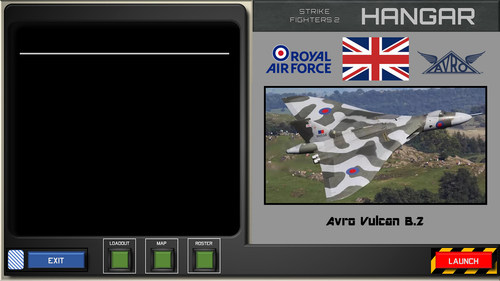 Thank you very much for this wonderful alternative hangar templates! I am happy to see people starting to add things to SF2 screen overhaul. Keep an eye out for new version of SF2 screen overhaul V1.1 - Customizable Edition! Cheers to your awesome mods!
 -
CombatAce modders, Forgive me, it couldn't be helped.
Eagle114th replied to Eagle114th's topic in Mods & Skinning Discussion
Wrench, thank you brother!- 10 replies
-
- 1
-

-
- aircraft list
- individualizing
- (and 2 more)
-
CombatAce modders, Forgive me, it couldn't be helped.
Eagle114th replied to Eagle114th's topic in Mods & Skinning Discussion
Thank you for sharing with me. It is interesting how you organize it this way. As you said, each of us have our own tastes / needs / wants in SFP2. If TK ever happen to decide to add the features in filtering / organizing the aircraft list, that would be Godsend! What I truly dream of is having the filter system on aircraft list working this way (For single mission, mission editor, and other screens.): - When selecting nations from the list, it would show the nation with (numbers) on right side, showing how much aircraft is available for flyable. - After selecting the nation, it would only display the list of aircraft flown by that nations - If anyone wants to see list of all aircraft available, can disable 'filter' system. - Customizable filter and display (For example, if I get to customize how aircraft name show up in both list and screen, for example toggle between '90 to [1990]. With that, I would be more than happy to wipe my current SFP2 installation and have a fresh start with the new system. -
CombatAce modders, Forgive me, it couldn't be helped.
Eagle114th replied to Eagle114th's topic in Mods & Skinning Discussion
One of wise modder here would say, "You ain't really playing SF2 until you start modding SF2." He couldn't be more than true. As the modders have stated above, SFP2 is the simulation / game that allow anyone to customize it to their own liking completly. However, of course, I get to fly SF2 from time to time too! Thanks to the new updated, organized aircraft and ordnance list, I get to fly as Cuban MiG-15bis out of curiosity. It was challenging flying updated NA Terrains with MIM SAMs lurking around. I was flying low, nag to the earth. Then I happen to catch F-84s flying around, jumped on 'em and shot one of them down before I got caught off guard by one of MIM Hawk SAM missile. (NOTE: I use MiG-15 / MiG-15bis flight model from KAW mod. Their flight models is awesome!) (DARN THESE pesky SAMs!) -
CombatAce modders, Forgive me, it couldn't be helped.
Eagle114th replied to Eagle114th's topic in Mods & Skinning Discussion
Thank you for the reply. Just curious, if you wanted the same goal as I do with the organized aircraft list, how would you do it? I like to explore how people would do it in their own various ways. By the way, I think maybe I am a bit too much insane, since I already reorganized weapon from big mod pack too. (Note: Like I said, .ini dancing is like a meditative time for me. Everyone can feel relax doing different things, like music, dancing, boxing, etc. Since I am deaf with low vision, music is not exactly a meditative time for me. When I just do .ini dancing, my mind goes into 'relax' mode where I Just automatically edit the codes and jump to next files in a flowing ways intuitively.)- 10 replies
-
- 1
-

-
- aircraft list
- individualizing
- (and 2 more)
-
CombatAce modders, Forgive me, it couldn't be helped.
Eagle114th replied to Eagle114th's topic in Mods & Skinning Discussion
Agreed! SFP2 is the only simulation / game with the incredible features of moddability as well as having the abilities to have multi installation for different theater / era. The way SFP2 is structured where you can edit .ini to almost every details is also incredible. The modern game / simulation developer should learn from TK about the moddability of the game / sim. There is no other sim like this existed out there yet.- 10 replies
-
- 1
-
-
- aircraft list
- individualizing
- (and 2 more)
-
By individualizing the aircraft in SF2... It could not be helped... Doing a lot of .ini modding is a meditative times for me. After asking for the advice about it in another thread, I stayed with the rules by not dividing aircraft from user lists into a unique aircraft folder for each nation. It could not be helped, because doing many .ini dancing made me feel relaxed. I just simply love to learn as I mod aircraft. Each time I study about each nation briefly, in order, to find the right abbreviate for them. To my surprise, I never knew that Central America nations had P-51s. I learned the same thing about another specific nations operating certain aircraft. Since I also could no longer stand seeing aircraft name with incorrect nation's aircraft. For example, seeing an Egyptian Mig-23s with (VVS) MiG-23s instead of seeing it with the proper nation's abbreviate. Hence, I would rather to see (EAF) MiG-23s for Egyptian MiG-23s. I had to break my self rules and started individualizing each nation's aircraft. It was done several times over as the lesson are learned about tweaking the .ini files. However, I was doing it slowly, gracefully as a fun hobby when taking a short break from modding SF2 screen and real life situations from time to time. I thought it might, would take me over a year, when in fact, it took me a few weeks to achieve it. I learned the tricks of using Windows 10 search function, PowerShell (Cmd), and other tools, to make my task much more effective and efficient. Not only it was fun doing it, I got to learn about the structure and the pro / cons between individualizing Nation's aircraft and using userlist. This is what I learned: Individualizing nation aircraft vs combined nation's aircraft (Userlist) method: NOTE: I applied the individualizing only on essential flyable aircraft (Example: P-51s, Vampire, MiG-21, Su-9, F-4s, etc.) . I do not apply it on non-important aircraft, such as An-12, C-47 and other transport aircraft. Individualizing nation Method Each an individualized aircraft that is deviated from core SF2's aircraft benefits this advantage: - Having their own customized weapon load (For example, I am able to make a specialized version of EAF MiG-21s and configure their _data.ini, so they can carry both Russi and NATO heat seeker missiles. - Nationalized weapons - I am able to mod any specific ordnance and make it only available for certain nations. With that, I can use an individualized aircraft to use that ordnance. - Less chaotic camo list - I was tired of seeing combined nation's skin for one aircraft, so by dividing them into nation aircraft, I am able to just select any skins by default quickly. - More dynamic way of learning about nation's aircraft - Because of that, I am able to experience the living library of learning about nation's own air force / naval force aircraft historically. - By keeping userlist (Even with one nation included), SF2 will still detect and use them in terrains. I get to see many aircraft with proper nation abbreviates, makes my SF2 much more enjoyable dynamically! Combined nation's aircraft (Userlist) Method This method benefit from this feature: - For any aircraft that you do not want individualized, will save you a lot of time. By having multi-nations list in USERLIST.ini, SF2 will automatically use exported aircraft in mission. However, there is a disadvantage to this, for anyone who are like me who prefer having organized aircraft list: - However, there is con about this feature: It will not work well with specific nation abbreviate tags. - There are no ways of telling me which aircraft have certain nations in the list. For example, if I select MiG-17F, and then I select on "nation", it give me a list of all nation, instead of limited nation list. I could select USAF for that MiG-17F. Note: I have not experienced any CTDs (Thank goodness!) and by studying ODS 30 mod, I realized this: As long I keep the core aircraft there, it won't ctd. So it means I can specifically use the cloned core aircraft being nationalized and placing them in the specific SF2 installation that covers the certain theater geographically. For example, I would move nationalized MiG-21s EAF / SyAAF / IrAF / etc to Sf2 - Middle East, while moving F-4Es ROKAF, F-104s ROCAF, etc. to SF2 - Asia. Same thing applied to a different SF2 installation. At the another hand, I made sure all SF2 installation have all core aircraft files. This is done on one of SF2 installation with the purpose of individualizing all essential, flyable aircraft. From there, I can use it to copy and pate into specific theater (geographically) version of SF2 installation. Here are the screenshots: (NOTE: I only installed a few add-on aircraft. I will install add-on aircraft in another SF2 installation later. Just taking it slowly in an enjoyable way.)
- 10 replies
-
- 3
-
-
-
- aircraft list
- individualizing
- (and 2 more)
-
Everyone, I am still alive! I have been gone for a few weeks, due to a busy real life situation. Now I am back and here is what I have been working o: SF2 - Screen overhaul v1.1 - Customizable Edition This version will have the following features: - New system icon - Multi version of system icon with template available (for anyone who want to customize it.) - Reworked codes that allows me to implement customizable buttons for each screen in SF2 - Multi button colors choices - Templates for buttons (without texts) - Templates for each screen (without background images, so anyone can use it to apply on any kind of background images) Here is screenshots of my reworked codes for one of screen: You can see here how I implemented the customizable buttons. In each SF2 screen folder, there will be folders that contains different colors button, including templates. The picture below show you how button colors can be changed. By doing that, you will see the changed color for LOADOUT button: I am aiming to release it by the end of this month or next month.
-
Of course, I always make times for both modding and flying. I am back working on a next new big update for this mod. :)
-
I am satisfied with the new icon colors. F-14 version of SF2 system icon are added too (For customization). If there are requests, I can do various different aircraft.
-
Just a head up, I re-designed a new SF2 system icon. I am still changing the color. For now, it is still WIP. By the way, I have created templates for all menu screen, you will need to use PowerPoint, in order, to apply it over any background image you want to use. As soon I am done with overhauling SF2 system icon, i will work on adding button colors for customization options. (NOTE: I am re-doing the color for left icon (darken the color completely)
-
Thank you for the feedback! I am very happy you enjoyed it a lot! About the hangar pictures, I am truly honored! That is awesome news! I am going to keep expanding this mod for the community through time. About the feedback: 1) I will start working on templates for all screens. That way anyone can change the background pictures behind the GUI. 2) About SF2 icon, that is understandable. I will see what I can do about making it sharper. 3) hat makes sense. How about this, I'll make a multi-version of different button colors for the various buttons. That way people can pick any colors to their own liking? The more customization, the merrier. Cheers!
-
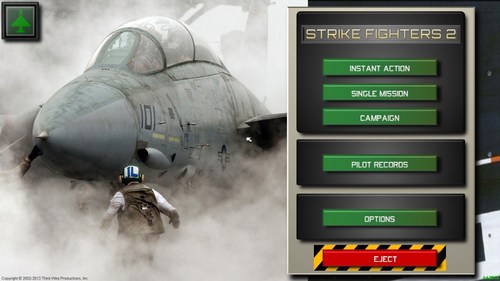 That and a beer Emoticon too! (for cheers) :)
 -
I agree with you! Not only Jane's USAF, as well as Jane's IAF, WWII Fighters, Longbow series, etc... By the way, you can run Jane's USAF on Win 10 fully now. In Discord, there are 'fixes that allow you to fly both Jane's IAF and USAF. You can always re-fly Jane's series for the sake of nostalgic times, as I do from time to time.
-
Sir, I am honored to get the messages from you! I , too, spent countless hours in Jane's ATF Gold, and then Jane's FA. I was and still am big fan of Wrench, Centurian, and other modders (Even though the mods back there for Jane's FA was known as Libs). If you and anyone are interested, we still have sites and discord with the group that are still modding Jane's FA to this day. Here is an invitation code for Jane's series sim discord: https://discord.gg/VvnhzxtM
-
I am happy you liked it! It is great to see people who also have flown old Jane's sim here.
-
1970s and older style screenshot (Experimental)
Eagle114th replied to Eagle114th's topic in Screen Shots
That is noted, I will add that. Which one, 1970s or older style photo? -
View File Screen Overhaul - (1920 x 1080) Strike Fighter Project 2 – Screen Overhaul v1.2 Customizable Edition The new version of SF2 Screen Overhaul 1.2 is now released. Here is the following screen this mod completely overhaul: - Main screen - Single mission screen - Mission editor screen - Hangar (Default) screen - Loadout screen - Planning screen - Roster screen - Campaign screen - Campaign editor screen - Pilot records screen - Options screen It does not yet cover another screen. It is work in progress (WIP) for now. What I am seeking for is feedback that will help me improving the mod further. It is one of my biggest projects I ever worked on for SF2. It gave me opportunity to grow a new skill I enjoy doing. NOTE: Now that SF2 Screen Overhaul is becoming a customizable version. If you make any mods that adds or change anything to this mod, please add my name and mod name to your credit part. You can contact me by PM in CombatAce (I am known as Eagle114th there) or Strike fighter series Discord chat (My username is Magic Dragon, so you can find me there too.) Version 1.2 NOTES: Buttons customization instruction: In Menu folder (SF2 mod folder), you will see various SF2 screen named as “BUTTONS_HANGAR, MAIN, OPTIONS, etc...), there are folders for each button. In order, to change the color of buttons, go to one of button folder, you will see different folders for various color. Copy the file from there and overwrite the files in any BUTTONS_(SCREEN) folder. For example, in BUTTONS_HANGAR, if I want to change the color of “LOADOUT” square button to blue; I go to the folder “LOADOUT”, then “Blue” folder, copy the files: LOADOUT0.bmp, LOADOUT1.bmp, and LOADOUT2.bmp. Then I paste (Overwrite) the files in BUTTONS_HANGAR. Screens and Buttons customization Templates In different “BUTTONS_(different screen names)”, there are folder “_Templates’. You can use it to change the designs, colors, or anything you want to do with the screen background or buttons. This mod uses a font known as Orbitron. I included it in _Fonts folder. I want to express my sincerely big THANKS to Menrva, Wrench, UllyB, Daddyairplanes, Wilches, JosefK, FalonCAF, and everyone else in CombatAce community for making this possible. You all have been a huge help. Because of Operation Desert Storm 30 years anniversary great mod, I was able to study the codes on how SF2 menu work, which led me into developing new menu for SF2. This mod is truly fun to fly in SF2. If anyone hasn’t tried it yet, I highly recommend it. There are detailed instruction that explains how to install in the proper ways in README file. LEASE READ IT BEFORE INSTALLING! I included the plans for the next version in the readme too. The feedback are always welcomed! Submitter Eagle114th Submitted 05/18/2021 Category Menus
-
Eagle114th's new SF2 Menu Project - WIP
Eagle114th replied to Eagle114th's topic in Mods & Skinning Discussion
Everyone, The beta version is now released. I am waiting for the file to be approved. UPDATE: It is now open for anyone to download: Cheers! -
Version 1.2
296 downloads
Strike Fighter Project 2 – Screen Overhaul v1.2 Customizable Edition The new version of SF2 Screen Overhaul 1.2 is now released. Here is the following screen this mod completely overhaul: - Main screen - Single mission screen - Mission editor screen - Hangar (Default) screen - Loadout screen - Planning screen - Roster screen - Campaign screen - Campaign editor screen - Pilot records screen - Options screen It does not yet cover another screen. It is work in progress (WIP) for now. What I am seeking for is feedback that will help me improving the mod further. It is one of my biggest projects I ever worked on for SF2. It gave me opportunity to grow a new skill I enjoy doing. NOTE: Now that SF2 Screen Overhaul is becoming a customizable version. If you make any mods that adds or change anything to this mod, please add my name and mod name to your credit part. You can contact me by PM in CombatAce (I am known as Eagle114th there) or Strike fighter series Discord chat (My username is Magic Dragon, so you can find me there too.) Version 1.2 NOTES: Buttons customization instruction: In Menu folder (SF2 mod folder), you will see various SF2 screen named as “BUTTONS_HANGAR, MAIN, OPTIONS, etc...), there are folders for each button. In order, to change the color of buttons, go to one of button folder, you will see different folders for various color. Copy the file from there and overwrite the files in any BUTTONS_(SCREEN) folder. For example, in BUTTONS_HANGAR, if I want to change the color of “LOADOUT” square button to blue; I go to the folder “LOADOUT”, then “Blue” folder, copy the files: LOADOUT0.bmp, LOADOUT1.bmp, and LOADOUT2.bmp. Then I paste (Overwrite) the files in BUTTONS_HANGAR. Screens and Buttons customization Templates In different “BUTTONS_(different screen names)”, there are folder “_Templates’. You can use it to change the designs, colors, or anything you want to do with the screen background or buttons. This mod uses a font known as Orbitron. I included it in _Fonts folder. I want to express my sincerely big THANKS to Menrva, Wrench, UllyB, Daddyairplanes, Wilches, JosefK, FalonCAF, and everyone else in CombatAce community for making this possible. You all have been a huge help. Because of Operation Desert Storm 30 years anniversary great mod, I was able to study the codes on how SF2 menu work, which led me into developing new menu for SF2. This mod is truly fun to fly in SF2. If anyone hasn’t tried it yet, I highly recommend it. There are detailed instruction that explains how to install in the proper ways in README file. LEASE READ IT BEFORE INSTALLING! I included the plans for the next version in the readme too. The feedback are always welcomed! -
AH i see! That is noted! Thank you and I will keep that in mind.
-
I did some experiment on converting the regular screenshot into 1970s and older photo style. I thought "Why not?" so here it is: Parked A-4s - Rregular screenshot Parked A-4s - 1970s style screenshot Parked A-4s - Older style screenshot Parked MiG-21s - Regular screenshot Parked MiG-21s - 1970s style screenshot Parked MiG-21s - Older style screenshot