
Viper63a
-
Posts
1,584 -
Joined
-
Last visited
Content Type
Profiles
Forums
Gallery
Downloads
Store
Everything posted by Viper63a
-
View File SF2 Hi-Res 1024x768 Menu Screens StrikeFighter2 Hi-Res 1024x768 Menu Screens By Viper This mod includes custom StrikeFighter2 menu screens and pilots. No other (Hangar, Loading or Campaign) screens or INI files are changed. You should unzip the file and preview the new screens before installing them. I recommend doing this as there are MANY alternate screens I have in there that you might like better. If you choose to install these screens, I recommend that you back up your MENU, FLIGHT and PILOTDATA folders in the SF2 Mod folder you're installing this mod into. Just in case you want to go back to your original setup. To install, simply unzip and copy the Flight and Menu folder to your StrikeFighter2 Mod folder. My Win97 folder was..(yours may be different)... C:\Users\<your_id>\Saved Games\Thirdwire\StrikeFighter2\ Enjoy! Submitter viper63a Submitted 11/26/2014 Category Menus
- 1 reply
-
- 2
-

-
Version Version 2
78 downloads
StrikeFighter2 Operation Desert Storm Hi-Res 1024x768 Menu Screens By Viper ~~~~~~~~~~~~~~~~~~~~~ Original Operation Desert Storm Credits to eburger68 & USAFTML (Dave) - See Readme file in the package for all the credits... ~~~~~~~~~~~~~~~~~~~~~ This mod includes custom Desert Storm themed Menu, Campaign and pilot screens. No other (Hangar or Loading) screens or INI files are changed. You should unzip the file and preview the new screens before installing them. I recommend doing this as there are MANY alternate screens I have in there that you might like better. If you choose to install these screens, I recommend that you back up your MENU, FLIGHT and PILOTDATA folders in the SF2 Desert Storm folder. Just in case you want to go back to your original setup. To install, simply unzip and copy the Flight and Menu folder to your StrikeFighter2 Desert Storm Mod folder. My Win97 folder was..(yours may be different)... C:\Users\<your_id>\Saved Games\ThirdWire\StrikeFighter2 Desert Storm\ Note: The "\StrikeFighter2 Desert storm\" is the name I copied the StrikeFighter2 Europe.exe to when I created my clean SF2 Desert Storm game...See the original Operation Desert Storm read me for more info on this... Enjoy! -
 Awesome Campaign!
 -
 Nicely done!
 -
Version Version 2
85 downloads
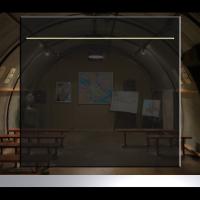
StrikeFighter2 Hi-Res 1024x768 Menu Screens By Viper This mod includes custom StrikeFighter2 menu screens and pilots. No other (Hangar, Loading or Campaign) screens or INI files are changed. You should unzip the file and preview the new screens before installing them. I recommend doing this as there are MANY alternate screens I have in there that you might like better. If you choose to install these screens, I recommend that you back up your MENU, FLIGHT and PILOTDATA folders in the SF2 Mod folder you're installing this mod into. Just in case you want to go back to your original setup. To install, simply unzip and copy the Flight and Menu folder to your StrikeFighter2 Mod folder. My Win97 folder was..(yours may be different)... C:\Users\<your_id>\Saved Games\Thirdwire\StrikeFighter2\ Enjoy! -
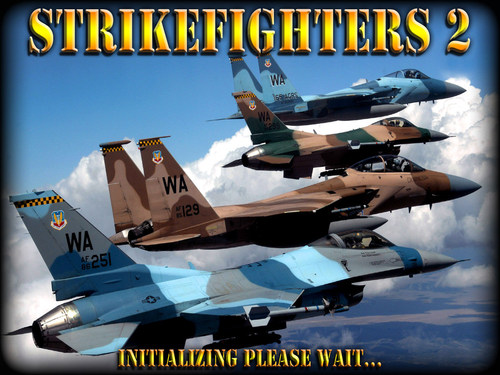
View File StrikeFighters2 Replacement Hi-Res Spash Screens StrikeFighters2 Hi-Res Replacement Spash Screens By Viper Replacement spash (Initializing, Please Wait) screen for SF2. Uncompress the zip file and copy the *.bmp files into "<Your Install location>\Strike Fighters 2\Menu\" folder...where-ever you installed SF2. Simple install: Backup your "INITSCREEN.BMP" and rename one of the new BMP you like to "INITSCREEN.BMP" and all your SF2 starts will show the new splash screen. Complex Install: If you want each of your games to have a different splash screen...Back up and edit the <game>.ini file for the <game>.exe you want to change the splash screen for in the "<Your Install location>\Strike Fighters 2\" folder. Update the "LoadingScreen=" parm with the name of splash screen you want to display on start up: ex. "LoadingScreen=Menu\INITSCREEN (1).BMP". Note: If you copied the <game>.exe file to some other name, you have to copy the <game>.ini file to the same name as a the <game>.exe file. Also, the splash screen has to be a BMP file...PSD included so you can make your own. Thanks to "Squid" for the idea and some elements from his screens! Enjoy! Submitter viper63a Submitted 11/25/2014 Category Menus
-
Version 4.0
157 downloads
StrikeFighters2 Hi-Res Replacement Spash Screens By Viper Replacement spash (Initializing, Please Wait) screen for SF2. Uncompress the zip file and copy the *.bmp files into "<Your Install location>\Strike Fighters 2\Menu\" folder...where-ever you installed SF2. Simple install: Backup your "INITSCREEN.BMP" and rename one of the new BMP you like to "INITSCREEN.BMP" and all your SF2 starts will show the new splash screen. Complex Install: If you want each of your games to have a different splash screen...Back up and edit the <game>.ini file for the <game>.exe you want to change the splash screen for in the "<Your Install location>\Strike Fighters 2\" folder. Update the "LoadingScreen=" parm with the name of splash screen you want to display on start up: ex. "LoadingScreen=Menu\INITSCREEN (1).BMP". Note: If you copied the <game>.exe file to some other name, you have to copy the <game>.ini file to the same name as a the <game>.exe file. Also, the splash screen has to be a BMP file...PSD included so you can make your own. Thanks to "Squid" for the idea and some elements from his screens! Enjoy!- 1 review
-
- 2
-
-

-
- initialize
- initscreen
- (and 5 more)
-
View File SF2 Vietnam Hi-Res 1024x768 Menu Screens and Music! SF2 Vietnam Hi-Res 1024x768 Menu Screens and Music! By Viper Special thanks to Homefies and Spectre8750 for their contributions that led me here... This mod includes custom "Vietnam Era" themed menu screens, pilots and music. God willing, this is the final version! What's new? 1) Cut and looped the menu music so they are smaller and loops nicely in the menu. 2) Entended the loading wav so the sound doesn't cut out while the game is trying to load all the mods (LOL). 3) Updated and completedly redid the Stock and Expanded Vietnam Campaign screens (More of this later). 4) Changed, added and updated some of the menu screens! I can never leave well enough alone...sorry. 5) PLus a couple of easter eggs...well not much of an easter egg...it's on the first screen... Campaign screens: There are two new folders in the package. 1) Campaigns and 2) !Optional... 1) The "Campaigns" folder contain new images for the Vietnam Campaigns. This is optional, but I think they look better when in Campaign mode... 2) The "!Optional" folder contain new images and INI files for the Vietnam Expand Air and Ground War. Read the "Read-Me" in that folder for more detail. Un-compress the package and browse the content. As usual, there are alot of alternate screens you may like better. If you choose to install these screens, I recommend that you back up your CAMPAIGN, FLIGHT, MENU and PILOTDATA folders in the SF2 Mod folder you're installing this mod into. Just in case you want to go back to your original setup. To install, simply unzip and copy the uncompressed CAMPAIGN, FLIGHT, MENU and PILOTDATA folders to your StrikeFighter2 mod folder. If you have the "Expanded Vietnam Air & Ground War" Package installed, take a look and copy the CAMPAIGNS folder in the "!Optional" folder into your mod folder as well. Don't forget to back up before loading any mods! My StrikeFighter2 mod on Win97 64-bit was..(yours may be different)... C:\Users\<your_id>\Saved Games\Thirdwire\StrikeFighter2 Vietnam\ Enjoy! Submitter viper63a Submitted 11/23/2014 Category Menus
-

Version Version 5 Final
209 downloads
SF2 Vietnam Hi-Res 1024x768 Menu Screens and Music! By Viper Special thanks to Homefies and Spectre8750 for their contributions that led me here... This mod includes custom "Vietnam Era" themed menu screens, pilots and music. God willing, this is the final version! What's new? 1) Cut and looped the menu music so they are smaller and loops nicely in the menu. 2) Entended the loading wav so the sound doesn't cut out while the game is trying to load all the mods (LOL). 3) Updated and completedly redid the Stock and Expanded Vietnam Campaign screens (More of this later). 4) Changed, added and updated some of the menu screens! I can never leave well enough alone...sorry. 5) PLus a couple of easter eggs...well not much of an easter egg...it's on the first screen... Campaign screens: There are two new folders in the package. 1) Campaigns and 2) !Optional... 1) The "Campaigns" folder contain new images for the Vietnam Campaigns. This is optional, but I think they look better when in Campaign mode... 2) The "!Optional" folder contain new images and INI files for the Vietnam Expand Air and Ground War. Read the "Read-Me" in that folder for more detail. Un-compress the package and browse the content. As usual, there are alot of alternate screens you may like better. If you choose to install these screens, I recommend that you back up your CAMPAIGN, FLIGHT, MENU and PILOTDATA folders in the SF2 Mod folder you're installing this mod into. Just in case you want to go back to your original setup. To install, simply unzip and copy the uncompressed CAMPAIGN, FLIGHT, MENU and PILOTDATA folders to your StrikeFighter2 mod folder. If you have the "Expanded Vietnam Air & Ground War" Package installed, take a look and copy the CAMPAIGNS folder in the "!Optional" folder into your mod folder as well. Don't forget to back up before loading any mods! My StrikeFighter2 mod on Win97 64-bit was..(yours may be different)... C:\Users\<your_id>\Saved Games\Thirdwire\StrikeFighter2 Vietnam\ Enjoy! -
View File SF2 Europe Hi-Res 1024x768 Menu Screens SF2 Europe Hi-Res 1024x768 Menu Screens By Viper This mod includes custom Cold War Era themed menu screens and pilots. No other (Hangar, Loading or Campaign) screens or INI files are changed. You should unzip the file and preview the new screens before installing them. I recommend doing this as there are MANY alternate screens I have in there that you might like better. If you choose to install these screens, I recommend that you back up your MENU, FLIGHT and PILOTDATA folders in the SF2 Mod folder you're installing this mod into. Just in case you want to go back to your original setup. To install, simply unzip and copy the Flight and Menu folder to your StrikeFighter2 Europe Mod folder. My Win97 folder was..(yours may be different)... C:\Users\<your_id>\Saved Games\Thirdwire\StrikeFighter2 Europe\ Enjoy! Submitter viper63a Submitted 11/21/2014 Category Menus
-
Version Version 2
99 downloads
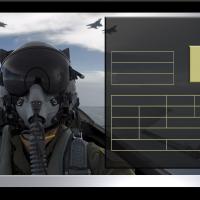
SF2 Europe Hi-Res 1024x768 Menu Screens By Viper This mod includes custom Cold War Era themed menu screens and pilots. No other (Hangar, Loading or Campaign) screens or INI files are changed. You should unzip the file and preview the new screens before installing them. I recommend doing this as there are MANY alternate screens I have in there that you might like better. If you choose to install these screens, I recommend that you back up your MENU, FLIGHT and PILOTDATA folders in the SF2 Mod folder you're installing this mod into. Just in case you want to go back to your original setup. To install, simply unzip and copy the Flight and Menu folder to your StrikeFighter2 Europe Mod folder. My Win97 folder was..(yours may be different)... C:\Users\<your_id>\Saved Games\Thirdwire\StrikeFighter2 Europe\ Enjoy!