michaelk
-
Posts
361 -
Joined
-
Last visited
-
Days Won
1
1 Follower

About michaelk

Recent Profile Visitors
8,990 profile views



michaelk's Achievements


-
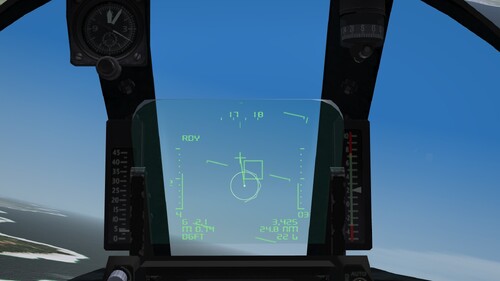
View File Atlas Cheetah C HUD Atlas Cheetah C HUD 1.0.0 Possibly for experienced users. Compiled using information from various sources. This is a one-evening project; I will never add to or modify it further. Feel free to use it as needed. This is a beta version (open to corrections, discussion, and modifications by anyone to improve authenticity). Important: I am using my own versions of the Cheetah (since I cannot use the Mirage IIIO DLC), so please take note of the following: 1. Check the filenames in your folders against mine. 2. Cockpit "Not True" (for presentation only) TW Kfir 1 cockpit; therefore, everything is built around that (it may not be compatible with your setup). Please keep this in mind. 3. The cockpit position line may need adjustment (compare it with your own). 4. Make sure to install the font. Known issues: 1. The HUD fuel remaining indicator (?) has been replaced on the HUD by the distance to the navigation waypoint. 2.The radar characteristics need to be clarified (I was aiming for approximately F 16 Blk30 3. Cockpit "Not True" (for presentation only). Maybe Mr. Lubo.m54 will do it someday; he’ll be better at it than anyone else *)) Thanks to: Eagle114th for extensive research on this subject. Submitter michaelk Submitted 11/10/2026 Category Avionics
-
Version 1.0.0
9 downloads
Atlas Cheetah C HUD 1.0.0 Possibly for experienced users. Compiled using information from various sources. This is a one-evening project; I will never add to or modify it further. Feel free to use it as needed. This is a beta version (open to corrections, discussion, and modifications by anyone to improve authenticity). Important: I am using my own versions of the Cheetah (since I cannot use the Mirage IIIO DLC), so please take note of the following: 1. Check the filenames in your folders against mine. 2. Cockpit "Not True" (for presentation only) TW Kfir 1 cockpit; therefore, everything is built around that (it may not be compatible with your setup). Please keep this in mind. 3. The cockpit position line may need adjustment (compare it with your own). 4. Make sure to install the font. Known issues: 1. The HUD fuel remaining indicator (?) has been replaced on the HUD by the distance to the navigation waypoint. 2.The radar characteristics need to be clarified (I was aiming for approximately F 16 Blk30 3. Cockpit "Not True" (for presentation only). Maybe Mr. Lubo.m54 will do it someday; he’ll be better at it than anyone else *)) Thanks to: Eagle114th for extensive research on this subject. -
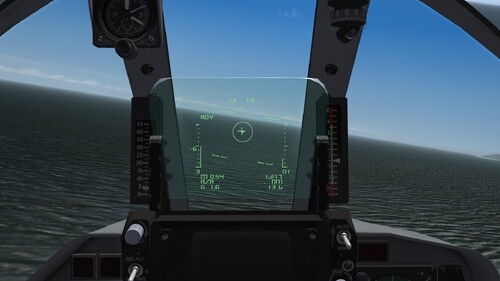
View File Atlas Cheetah E/D HUD Atlas Cheetah E/D HUD 1.0 Possibly for experienced users. Created based on information from a video. This is a one-evening project; I will never add to or modify it further. Feel free to use it as needed. This is a beta version (open to corrections, discussion, and modifications by anyone to improve authenticity). Important: I am using my own versions of the Cheetah (since I cannot use the Mirage IIIO DLC), so please take note of the following: 1. Check the filenames in your folders against mine. 2. I am using the TW Kfir 2 cockpit; therefore, everything is built around that (it may not be compatible with your setup). Please keep this in mind. 3. The cockpit position line may need adjustment (compare it with your own). 4. Make sure to install the font. Known issues: 1. The HUD fuel remaining indicator (?) has been replaced on the HUD by the distance to the navigation waypoint. Thanks to: Eagle114th for extensive research on this subject. Submitter michaelk Submitted 11/03/2026 Category Avionics
- 1 reply
-
- 2
-

-
Version 1.0.1
33 downloads
Atlas Cheetah E/D HUD 1.0.1 Possibly for experienced users. Created based on information from a video. This is a one-evening project; I will never add to or modify it further. Feel free to use it as needed. This is a beta version (open to corrections, discussion, and modifications by anyone to improve authenticity). Important: I am using my own versions of the Cheetah (since I cannot use the Mirage IIIO DLC), so please take note of the following: 1. Check the filenames in your folders against mine. 2. I am using the TW Kfir 2 cockpit; therefore, everything is built around that (it may not be compatible with your setup). Please keep this in mind. 3. The cockpit position line may need adjustment (compare it with your own). 4. Make sure to install the font. Known issues: 1. The HUD fuel remaining indicator (?) has been replaced on the HUD by the distance to the navigation waypoint. Thanks to: Eagle114th for extensive research on this subject. -
 Thank you.
-
Well, this campaign (if it were to exist and be historically accurate) would consist of CAS/STRIKE missions and just a single air-to-air engagement (between a MiG-23 and Pakistani F-16s)—that’s probably not something anyone would find particularly interesting.
-
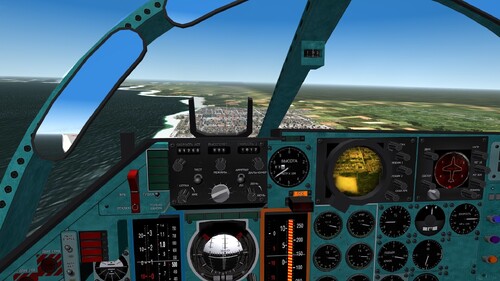
View File Su24/24M/24M2 Liamp51's cockpit upgrade. A visual-only update for the Su-24,24M.24M2 cockpits (to provide a more authentic feel). Use at your needed: this is a very early beta, essentially a "one-evening project." A proper implementation would actually require new gauge scales, instrument recalibration, etc. Whats included: 1. New textures. 2. Correct Russian/Cyrillic labels (to the extent possible). 3. Accurate avionics: PNS/Oryon/ILS-31, GM/Terrain Aviodance only. (to the extent possible). 4.RWR - This is actually a challenging task. I opted for the most visually accurate solution (an early version, seen in two iterations), as it is impossible to implemement "the SPO" in this cockpit. Installation: Readme inside. Thanks to: NormanKnight - F111 pit. Liamp51 - The first cockpit design and the concept. Mago - ILS structure and elements. Eburger68 - Su-24 pack. Submitter michaelk Submitted 10/23/2026 Category Jet Cockpits
-
Version 0.0.9
38 downloads
A visual-only update for the Su-24,24M.24M2 cockpits (to provide a more authentic feel). Use at your needed: this is a very early beta, essentially a "one-evening project." A proper implementation would actually require new gauge scales, instrument recalibration, etc. Whats included: 1. New textures. 2. Correct Russian/Cyrillic labels (to the extent possible). 3. Accurate avionics: PNS/Oryon/ILS-31, GM/Terrain Aviodance only. (to the extent possible). 4.RWR - This is actually a challenging task. I opted for the most visually accurate solution (an early version, seen in two iterations), as it is impossible to implemement "the SPO" in this cockpit. Installation: Readme inside. Thanks to: NormanKnight - F111 pit. Liamp51 - The first cockpit design and the concept. Mago - ILS structure and elements. Eburger68 - Su-24 pack. -
-

Fixed issue with Ravenclaw's F-4s new cockpits
michaelk replied to citizen67's topic in General Discussion
Thank You -
Fixed issue with Ravenclaw's F-4s new cockpits
michaelk replied to citizen67's topic in General Discussion
Dear Ravenclaw, which of the three types of sound is the most authentic? -
Возможно да, но SF2 сугубо как бы "нишевый" продукт/проект, имхо сугубо конечно но "другого такого нет" (с). По флайт модели соглашусь, но сам не пилю в эту сторону. "Пусть цветут сто цветов" как говорится (сравни например ранний/первый Ил 2 и Ил 2 со времен примерно "Перл-Харбора" по флайт модели, Ил 2 сток и SAS изделия ...лучше/хуже. ближе/дальше к аутентичности, истина где то посередине. А в SF как и в WO есть свой шарм. DSC и новый Ил не рассматриваю конечно.
-
Нормальный народ тут, иногда заметен интерес к нашей стороне.
-
Да всё тут более-менее нормально. Вежливо и нейтрально (здешним админам конечно респект). С "наших мест" как говорится, людей единицы, встречаются эпизодически, золотое время WO ушло разумеется, ну и никакого коллаба, "рутина заедает" ).