JamesWilson
-
Posts
181 -
Joined
-
Last visited
About JamesWilson

JamesWilson's Achievements





-
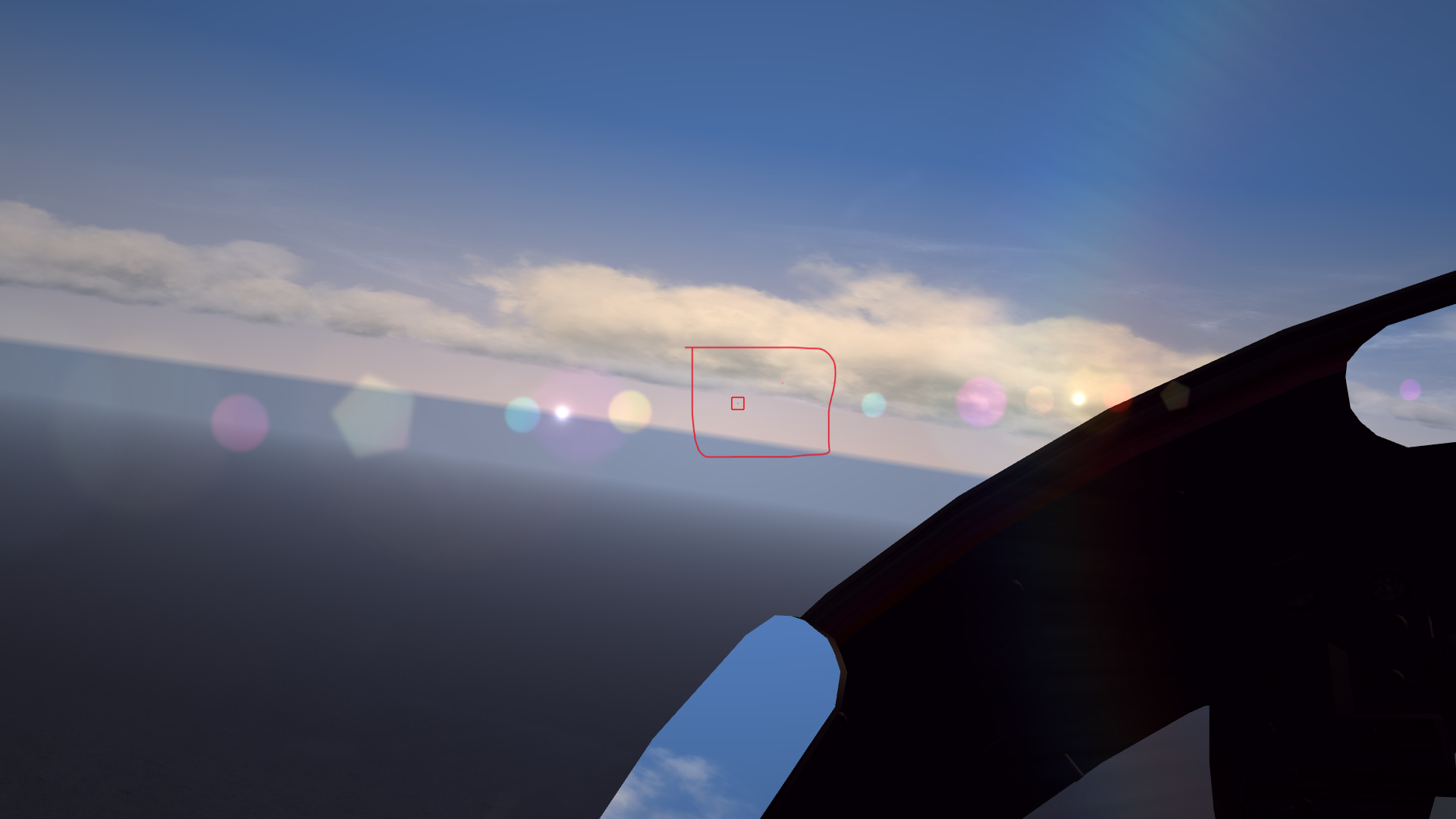
*CORRECTION* (it wont let me edit) I hadn't done it and now it works! There are 3 questions/problems tho: first one: why do i keep seeing red and blue boxes? second one: is it normal that dots are this much tiny? is it realistic? or should they be more visible? third one: Since i think boxes are red, would dots be possible to turn dots black? i've tried in HUDDATA and it is because there are 4 parameters, but not sure for TWFONT cause there are only 3 parameters. In order to set black in HUDDATA it is 0.0,0.0,0.0,1.0 -but for TWFONT it's only 0.0,0.0,0.0 -no 4th digit, how can i copy it since there is no way to set black? EDIT: i've tried HUDDATA 0.0,0.0,0.0,1.0 and TWFONT 0.0,0.0,0.0, and seems like i have black dots now For the red squares i've set BoxSize to 0 so it doesn't show, but i still get "*insert plane name* targeted" showing up and when i turn i see the red cone on the edge of my screen. I've uploaded a pic showing the two dots, one of them gets selected automatically with a red dot. I've highlited the whole with a red rectangle i've drawn. The screenshot is before i tried to change dots color and reducing BoxSize to 0

-
I hadn't done it and now it works! There are 3 questions/problems tho: first one: why do i keep seeing red and black boxes? second one: is it normal that dots are this much tiny? is it realistic? or should they be more visible? third one: are dots red or black? cause i can't see the color unless zommed in. Since i think they're red, would dots be more visible by turning them to black? would it be realistic? I've uploaded a pic showing the two dots, one of them gets selected automatically with a red dot. I've highlited the whole with a red rectangle i've drawn.
-
I've just tried but nothing changed it seems. I still see planes withing extremely short range, no dots that mark them for spotting and dogfighting, still red and blue boxes and only on selected target, not all. Only things that changed are i don't see any label or info box anymore, some fonts are smaller, i only see altitude when low, that's it. I copied and pasted the files into the Flight directory, having to overwrite HUDDATA.INI, there was no TWFONT.FX to overwrite. I thought this was a mod that made you have little red dots for every enemy and blue ones for every friendly within 10nm, and then you can turn the red dots into black dots, just like in DCS you can choose to have little dots on enemies to keep track of them. Apparently almost nothing changed. Let me know if i'm missing something or if got what the mod does wrong.
-
I've just tried but nothing changed it seems. I still see planes withing extremely short range, no dots that mark them for spotting and dogfighting, still red and blue boxes and only on selected target, not all. Only things that changed are i don't see any label or info box anymore, some fonts are smaller, i only see altitude when low, that's it. I copied and pasted the files into the Flight directory, having to overwrite HUDDATA.INI, there was no TWFONT.FX to overwrite. I thought this was a mod that made you have little red dots for every enemy and blue ones for every friendly within 10nm, and then you can turn the red dots into black dots, just like in DCS you can choose to have little dots on enemies to keep track of them. Apparently almost nothing changed. Let me know if i'm missing something or if got what the mod does wrong.
-
Unbelievable, so this should be the solution to all of my problems? I gotta know how it works, i'll read the whole pages and have my tries, i'll let you know if this solves all my problems. If this turns out to be a "draw distance solution" and not a "HUD solution", this could be the turning point: i would be able to choose between full HUD and no HUD while keep seeing planes at 10 nm. Do you by any chance know if it changes only the selected target or all planes? Cause the fix for the first one is something i've already done, the second one is what i need. By reading the forum topic with the link it says selected target, trying to figure out what actually is. Since you wrote "all" i guess it's all.
-
It worked! I've set BoxSize to 1 and color to 0.0,0.0,0.0,0.50 so that the square turns out to be a small black dot, a bit greyish and not too black, just like the one in DCS. This makes spotting enemies withing visual range and turnifighting finally enjoyable. I've set visual identification to normal in menu settings. I've also set waypoint to BoxSize 1 and removed infos like speed altitude etc of player and enemy, so that it's immersive and HUDless with normal HUD settings too, but still with respective squares.
-
You gave me a great idea, that's what i'm gonna try. If this works i'm saved, i'll let you know
-
Changed the LOD on the enemy Su-22M3 from 8000 to 10000 but differences are almost unnoticeable. Found out it's prolly an en engine problem, cause the thing is not just planes do not draw, but also the way they're drawn in SF2 is they are thin and easy to lose. Framerates remained the same tho. I know i shouldn't compare DCS to SF2, i was just comparing the way you keep eyes on enemies, and apparently even under that aspect they have a huge difference. I wish there was that black dot feature in SF2 to add, apparently i have to reduce the square to a dot (if possible) and turn it from red to black. The drawback is that i have to play with HUD on, i solved this by moving the data rectangles outside the screen via coordinates, so that i can have enemy and waypoint squares and triangles, without having anything else. If there's any other way to fix this lemme know. So SF2 players fly with their HUDs on? Breaking immersion? Cause it's hard to even turnfight with this issue, enemies vanish unless you zoom or they're so tiny they basically disappear from your sight even at 3 nm.
-
Hi guys, I've recently picked SF2 once more after a break, and i've noticed something that i didn't recall but apparently has always been there. I play at Unlimited graphics but planes only draw at an extremely short and unrealistic distance, like 2.5 nm, and the "black dot" you spot is so tiny and thin it's very hard to see, and only when very close and zoomed in. This makes dogfights very close range, in a way that when turning there's a high chance to lose eye contact with the plane your fighting, making turn fight or identification quite impossible. When you go head-on the enemy shows up when it's too close and then you instantly lose with due to it shape/dot disappearing once it passes by -> you lose track of him -> you get killed... I've tried messing up with the files and extended draw distance from 4 to 11, and objects not to fade, but even if it starts to show up at more distance, it's still impossible to see and the dot is minuscule and visible only when zooming max. And of course with these settings the framerate drops drastically. The only way around i found is to use the red identification square that pop ups when close to enemies, so that i know where he is, but it shows up even before than the plane actually showing up, and breaks immersion if i want to play without any HUD in a realistic way. Is there any way to make the plane show up from far away, at least at a realistic visibility distance (idk how far away a human eye can see planes IRL) and make it actually visible, like even with a small dot or something that actually let's you see it coming at you and not lose track when dogfighting? There is a setting just for this in DCS and let's you have a small black dot of the plane you're fighting, that's super useful if you're not too close to each other and if you're using a big monitor or tv. What settings do you guys use in SF2 to avoid or reduce these issues? Is there any actual way or it's just the way it is? Let me know so that i can change my settings and my files in order to properly see and fight. Thank you very much for the help!!
-
SF2 not well optimized for newer systems?
JamesWilson replied to JamesWilson's topic in General Discussion
Oh you meant converting textures and doing a modding work instead of just lowering graphical settings? -
SF2 not well optimized for newer systems?
JamesWilson replied to JamesWilson's topic in General Discussion
So i should lower texture settings? -
SF2 not well optimized for newer systems?
JamesWilson replied to JamesWilson's topic in General Discussion
Thanks for all the answers and those who helped. Looks like i gotta live with these random drops and use medium settings whenever i playi maps like "italy", for everything else i'll mostly play at 60 fps -
Hi everyone, i've been playing SF2 for years now on my GTX 1050Ti 16 GB RAM i7 8750H Win 10 gaming laptop at medium graphical settings, getting always very high framerate with basically no drops whatsoever. Now i've moved to a new high-end laptop with GTX 4060 32 GB RAM i7 13650HX Win 11 and i've finally set my graphical settings to unlimited. I get fps locked at 60 most of the times (it's locked at 60 by default, and i don't know why and how to change it, even if that's not a problem) (i remember it used to be unlocked on my previous laptop and i ranged from 50/60 up to 130 with medium settings), but sometimes it drops for an instant (it's shown in "lowest fps" when i turn on parameters) and some other times (like with smoke or very dense models like carriers and terrains like "Italy" or when i move quickly my sight) it drops and stays there until i look away and not too fast. I tried at high settings and the difference is i gain 5/6 fps more when a drop happens. This problem, even if not game breaking, it may sometimes be annoying and disturbing. I'm actually surprised this happens, since i tried MSFS 2020 and i get 50+ fps at ultra, 80+ fps at high and 120+ fps at medium. I finally tried to set my SF2 settings to low, and the lowest fps it goes is 50. Is it because my laptop is not powerful enough (sounds very unlikely to me but i may be wrong) to run SF2 at unlimited and high settings? Or is that SF2 shows its age with newer systems with high-end specs so that's why it tends to lag more than more modern and demanding games? Thanks for the help and suggestions
-
Where Yankee Air Pirate REVAMP has gone?
JamesWilson replied to JamesWilson's topic in General Discussion
Thanks, can't wait them to come out -
Where Yankee Air Pirate REVAMP has gone?
JamesWilson replied to JamesWilson's topic in General Discussion
when does it come out? and Drug War RW and Training School RW? where can i follow updates and dates?