Description:
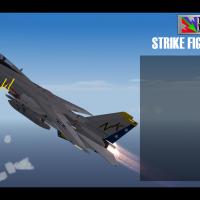
This Fleet Defender Gold theme is a set of menus and music for Strike Fighters 2 in widescreen format: 1600x900. While the basic Fleet Defender theme has been done before for the SF series, Fleet Defender Gold hasn't been represented...until now. The CD-based FD Gold had a MIDI rock theme and early 3D video introduction to the Windows 3.x/95 installation, albeit it ALWAYS skipped. Using Audacity, I was able to fix that issue following track capture. FD Gold's theme seems to have fallen by the wayside compared to the basic DOS music, and it is unfortunate, since it has a great MIDI track. Well, it's back! Fleet Defender Gold still ran the main game in DOS: it was really just a combination of the original FD and its scenario disk, but was Windows compatible for installation and featured a few extras as well: a training section, videos from Aviation Week's "Flight Deck," previews for MicroProse's upcoming games, and most interestingly, the recording of the MiG-23 shoot-downs from the Second Gulf of Sidra incident.
The Package:
The main screen attempts to recreate "Bio" Baranek's famous picture of a VF-2 F-14A in a 30-degree nose up climb, which was used as the cover photo on the game box (albeit with a 1970's era Bullet) and utilizes the Windows FD Gold intro theme. The Single Mission, Loadout, Options, Pilot Record and Roster screens use the actual FD game background music. Campaign start screen uses the FD DOS Intro music. Mission Successful/Failed/Player Killed utilize the FD Mission Successful/Failed music, and the Credits and Medals screens use the FD Mission Successful music (akin to the Top Ten and Credits of the original game). A set of 1600x900 menus have also been made.
-------------
Installation:
NOTE: The theme was tested on an All-5 Merged install, patched to July 2013.
=============
CAUTION: If you didn't see in the description, these menus are in 1600x900 widescreen format! If you're using a different screen ratio, they probably won't work right. I will get around to doing a standard format in the future.
=============
In order to install:
1.) Copy the contents of this archive to a temporary folder.
2.) Create a new folder in your main Mod Folder (e.g. C:\Users\Name\Saved Games\ThirdWire\StrikeFighters2 Europe) called "Menu" (if it doesn't already exist).
3.) Copy the contents of your temp folder into the Menu Folder.
4.) Launch the game!
OF NOTE:
If you can't support the 1600x900 format, or if you want to keep the default or other menu screens, you can still use the Fleet Defender music by only installing the .wav files and menu .ini's. To do so, only copy the .wav and .ini files to your Mod Menu folder.
-------------
Credits:
Menu Package (incl. Music Editing, Screens): Caesar
Original FD Gold Theme: Ronald Rizzo, MicroProse
Original FD Game Music: Michael Bross, MicroProse
SF2 NorthAtlantic "Top Gun" Themed Hi-Res 1024x768 Menu Screens and Music!
By Viper
Special thanks to Homefies and Spectre8750 for their contributions that led me here...
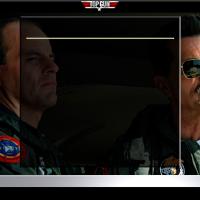
This mod includes custom "Top Gun" themed menu screens, pilots and music. I used the MENU INI files to reuse the music files for different menus. This reduces the size of the package as I don't have duplicates of the same music files for different menus. You should unzip the file and preview the new screens before installing them. I recommend doing this as there are MANY alternate screens I have in there that you might like better.
If you choose to install these screens, I recommend that you back up your FLIGHT, MENU and PILOTDATA folders in the SF2 Mod folder you're installing this mod into. Just in case you want to go back to your original setup.
To install, simply unzip and copy the uncompressed FLIGHT, MENU and PILOTDATA folders to your StrikeFighter2 mod folder.
My StrikeFighter2 mod on Win97 64-bit was..(yours may be different)...
C:\Users\<your_id>\Saved Games\Thirdwire\StrikeFighter2 NorthAtlantic\
Enjoy!
SF2 NorthAtlantic Hi-Res 1024x768 Menu Screens and Music!
By Viper
Special thanks to Homefies and Spectre8750 for their contributions that led me here...
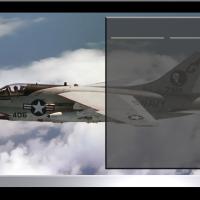
This mod includes custom "US Navy" themed menu screens, pilots and (w/ Top Gun) music. I used the MENU INI files to reuse the music files for different menus. This reduces the size of the package as I don't have duplicates of the same music files for different menus. You should unzip the file and preview the new screens before installing them. I recommend doing this as there are MANY alternate screens I have in there that you might like better.
If you choose to install these screens, I recommend that you back up your FLIGHT, MENU and PILOTDATA folders in the SF2 Mod folder you're installing this mod into. Just in case you want to go back to your original setup.
To install, simply unzip and copy the uncompressed FLIGHT, MENU and PILOTDATA folders to your StrikeFighter2 mod folder.
My StrikeFighter2 mod on Win97 64-bit was..(yours may be different)...
C:\Users\<your_id>\Saved Games\Thirdwire\StrikeFighter2 NorthAtlantic\
Enjoy!
StrikeFighter2 Hi-Res 1024x768 Stock Campaign Images Upgrade!
By Viper
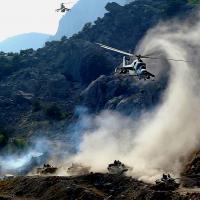
This mod includes replacements for ALL (that's right, ALL) stock campaign images from SF2 to SF2NA. I extracted the MENUDATA.CAT and upgraded all the images I found there. Then I used the Mission.ini and text files to rebuild the "Campaigns" folders! So, this should be complete unless I missed something. If I did, let me know. No other (Hangar, Loading) images or INI files are changed.
1) UNZIP the file and preview the new images. I recommend doing this as there are some alternate images I have in there that you might like better.
2) BACKUP your "Campaigns" folder so you can restore your original set up if you don't like this mod.
3) INSTALL/COPY the "Campaigns" folder into your disired StrikeFighter2 "Saved Game" folder.
My Win97 folders were..(yours may be different)...
C:\Users\<your_id>\Saved Games\Thirdwire\StrikeFighter2\
C:\Users\<your_id>\Saved Games\Thirdwire\StrikeFighter2 Vietnam\
C:\Users\<your_id>\Saved Games\Thirdwire\StrikeFighter2 Europe\
C:\Users\<your_id>\Saved Games\Thirdwire\StrikeFighter2 Israel\
C:\Users\<your_id>\Saved Games\Thirdwire\StrikeFighter2 NorthAtlantic\
4) When/if asked, choose overwrite on any conflicts.
That's it! Enjoy!
StrikeFighter2 Hi-Res 1024x768 Menu Screens
By Viper
This mod includes custom StrikeFighter2 menu screens and pilots. No other (Hangar, Loading or Campaign) screens or INI files are changed. You should unzip the file and preview the new screens before installing them. I recommend doing this as there are MANY alternate screens I have in there that you might like better.
If you choose to install these screens, I recommend that you back up your MENU, FLIGHT and PILOTDATA folders in the SF2 Mod folder you're installing this mod into. Just in case you want to go back to your original setup.
To install, simply unzip and copy the Flight and Menu folder to your StrikeFighter2 Mod folder.
My Win97 folder was..(yours may be different)...
C:\Users\<your_id>\Saved Games\Thirdwire\StrikeFighter2\
Enjoy!
SF2 Israel Hi-Res 1024x768 Menu Screens
By Viper
This mod includes custom Israeli Air Force (IDF) themed menu screens and pilots. No other (Hangar, Loading or Campaign) screens or INI files are changed. You should unzip the file and preview the new screens before installing them. I recommend doing this as there are MANY alternate screens I have in there that you might like better.
If you choose to install these screens, I recommend that you back up your MENU, FLIGHT and PILOTDATA folders in the SF2 Mod folder you're installing this mod into. Just in case you want to go back to your original setup.
To install, simply unzip and copy the Flight and Menu folder to your StrikeFighter2 Israel Mod folder.
My Win97 folder was..(yours may be different)...
C:\Users\<your_id>\Saved Games\Thirdwire\StrikeFighter2 Israel\
Enjoy!
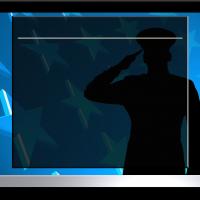
StrikeFighter2 Operation Desert Storm Hi-Res 1024x768 Menu Screens
By Viper
~~~~~~~~~~~~~~~~~~~~~
Original Operation Desert Storm Credits to eburger68 & USAFTML (Dave) - See Readme file in the package for all the credits...
~~~~~~~~~~~~~~~~~~~~~
This mod includes custom Desert Storm themed Menu, Campaign and pilot screens. No other (Hangar or Loading) screens or INI files are changed. You should unzip the file and preview the new screens before installing them. I recommend doing this as there are MANY alternate screens I have in there that you might like better.
If you choose to install these screens, I recommend that you back up your MENU, FLIGHT and PILOTDATA folders in the SF2 Desert Storm folder. Just in case you want to go back to your original setup.
To install, simply unzip and copy the Flight and Menu folder to your StrikeFighter2 Desert Storm Mod folder.
My Win97 folder was..(yours may be different)...
C:\Users\<your_id>\Saved Games\ThirdWire\StrikeFighter2 Desert Storm\
Note: The "\StrikeFighter2 Desert storm\" is the name I copied the StrikeFighter2 Europe.exe to when I created my clean SF2 Desert Storm game...See the original Operation Desert Storm read me for more info on this...
Enjoy!
SF2 Europe Hi-Res 1024x768 Menu Screens
By Viper
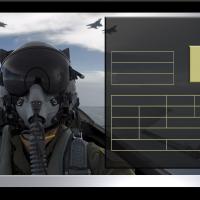
This mod includes custom Cold War Era themed menu screens and pilots. No other (Hangar, Loading or Campaign) screens or INI files are changed. You should unzip the file and preview the new screens before installing them. I recommend doing this as there are MANY alternate screens I have in there that you might like better.
If you choose to install these screens, I recommend that you back up your MENU, FLIGHT and PILOTDATA folders in the SF2 Mod folder you're installing this mod into. Just in case you want to go back to your original setup.
To install, simply unzip and copy the Flight and Menu folder to your StrikeFighter2 Europe Mod folder.
My Win97 folder was..(yours may be different)...
C:\Users\<your_id>\Saved Games\Thirdwire\StrikeFighter2 Europe\
Enjoy!

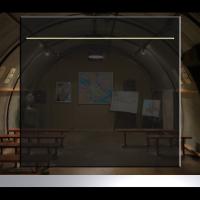 StrikeFighter2 Hi-Res 1024x768 Menu Screens
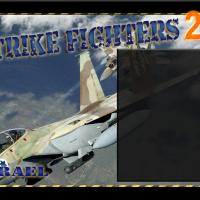 SF2 Israel Hi-Res 1024x768 Menu Screens
 SF2 Europe Hi-Res 1024x768 Menu Screens