


streakeagle
-
Posts
2,721 -
Joined
-
Last visited
-
Days Won
8
Content Type
Profiles
Forums
Gallery
Downloads
Store
Everything posted by streakeagle
-
http://hirevsims.com/01prod/prod01.htm A-10, F-15, F-16, and F-18 sticks and throttles. These sticks make Cougars look cheap ;) They even offer some sticks for helos and heavy aircraft. I hate to imagine the prices for these sticks.
-
Nice skin, as usual. Finally, I have a working link to your skins. You have been assimilated into my weblink page http://web.tampabay.rr.com/sflores1/SFP1Links.html
-
Hello, Here's what I have got going: Via Hyperlobby (in the Wings Over Vietnam lobby), I am leaving up a Wings Over Europe (merged with Wings Over Vietnam and patched to 08.30.06) dogfight server. I have a special post in this forum and at Third Wire forum on this setup. I also have a Hamachi network available with details in another post. This is actually more important than my "server". Once people learn to use Hamachi, it provides a reliable way to connect without having to fight firewalls and routers. So poeple can meet at Hyperlobby, then agree to join a Hamachi network and host/play anything they like :) For those who want to join my server but can't do so due to firewall/router issues, they can join it through my Hamachi network. The main reason for me to leave a server up is to provide a solid host for those that can't host themselves. With Hamachi, almost anyone can host with a minimum of effort. So the real purpose of my server now is to provide a good clean/patched install for people to try joining to verify that their install is correct. The problem with Hamachi is that it does not provide a way to find other players and any given network can only have 16 members at a time. I think I am going to start hanging out on the free CombatAce teamspeak server whenever I am in front of a PC. Maybe that can be the messenger hub for meeting people who want to play? So to get a good multiplayer group going: 1. As many people as possible need to pop in to Hyperlobby on a regular basis to find recruits. 2. Everybody needs to be on the same messenger so that we know when others are available to play. 3. Get everyone converted to Hamachi to eliminate networking issues and the need to deal with IP addresses. While I still love this sim and think it is best when played online, between my wife (7 months pregnant) and work, I simply have not had the time to devote to multiplayer. What free time I have had, I spent beta testing and lately making hi-res cockpits for the F-4. With a newborn baby coming up in December, I don't know when my schedule will ever stabilize enough to allow me to play online regularly. I still try to provide tech support to help others get going and every now and then, I actually get to play :)
-
Nice movie. I always forget to take footage when I am playing. I just had a pretty good co-op session the other night while helping some people learn how to connect and host. I have never gotten used to having a PC strong enough to run fraps. I should leave it on all the time since I already have a record toggle mapped into my joystick profile.
-
I found this on another forum and was wondering why it isn't posted here? http://forum.lockon.ru/showthread.php?t=18234 LOMAC Tools for 3DS MAX 7 LOMAC Tools is the tools used in ED for converting 3D models to the internal LOM format for LOMAC. It version worked with 3D MAX 7.0 only. CDDS studio for creating textures CDDS files. LOCKON Viewer for overview *.CMD and *.LOM models and check draw arguments. This is still a long way from being "open source" since I don't see a way to add new cockpits and flight models. But this is a huge step forward in that direction! Perhaps one day, LOMAC will be more like SFP1/WOV/WOE, i.e. able to accurately support a wide variety of flyable aircraft throughout various time frames. For those interested in what's going on, this seems to be the place to go: http://www.lockon-models.com/ As with SFP1/WOV/WOE, the French are making a strong showing already having Mirages imported into LOMAC:
-

Colorful links to SFP1/WOV/WOE websites
streakeagle replied to streakeagle's topic in General Discussion
I have added a few more links and deleted some line-breaks so that this page looks okay at any resolution from 640x480 to 1600x1200. The link order was optimized to make some kind of sense with 4 columns, which occurs at 1024x768. If you are using a higher resolution, you can manually reduce the width to get 4 columns if you want to see the links in the order I intended. At 1600x1200 with 4 columns, you can see all the links at once AND in the order I intended :) -
I am in the process of creating a links page for SFP1/WOV/WOE: http://web.tampabay.rr.com/sflores1/SFP1Links.html I have most if not all of the major sites plus quite a few of the obscure ones. This is a work in progress. I have several more I still need to add, but maybe someone knows others I am missing. I am not posting links to pure fansites. These are either major community sites and/or have downloadable mods of some sort. Simply having a blog and/or screenshots of your latest project is not enough to rate my purpose for providing links ;)
-
Now hosting WOE/WOV merged install at Hyperlobby
streakeagle replied to streakeagle's topic in General Discussion
In addition to Hyperlobby, I am now supporting Hamachi. This is free software that allows you to create a secure virtual private network (VPN) that allow computers to be connected through the internet as if they were on the same network. This eliminates many of the router/firewall problems that occur when attempting to use the built-in internet interface and/or Hyperlobby. First you need to download and install Hamachi: http://www.hamachi.cc/ During installation, there is a very good tutorial that will help you get it installed and running correctly. After that, you need to join my network. A very simple process: Step 1 Open Hamachi and click on the bottom left power button. After doing so, you should see something like this: Step 2 Click on the Create or Join Networks button: Step 3 Select Join Existing Network: Step 4 Type in my network name and password (streakserver1 and streakserver1): Step 5 Observe the people on the network and their names/addresses (you have successfully joined the virutal LAN): Once you are on a Hamachi network, you can use the ingame LAN interface to detect and join games (no need to worry about IP addresses!). I am not sure how firewalls/routers/internet service providers affect this, but so far, I have had no problems having people join my network and Doghouse has joined by both the conventional Hyperlobby method and the Hamachi method to the same server. Hamachi does have a limit. The free version only allows 16 people to join any single network. So I have to kick offline people out to let new people join. Right now I only have a few people who have joined, so that won't be a problem on my network until more people try it. The good news is that anyone can create their own Hamachi network and have up to 15 other people join it. So we need to form a chat group on MSN, Yahoo, AOL IM or whatever where unlimited numbers of people can meet, then create Hamachi networks as required to handle the number of people trying to play. To date, I have never seen more than 8 people online at one time which Hamachi already handles for free :) -
bump
-
I don't want to make a single large download, but I thought it would be good to include links to all of the packages in each thread: Streak Eagle's High Resolution F-4B Cockpit Version 1 From CombatACE: http://forum.combatace.com/index.php?autom...p;showfile=3094 From AVSIM: http://library.avsim.net/esearch.php?CatID...&DLID=89896 Streak Eagle's High Resolution F-4C Cockpit Version 1 From CombatACE: http://forum.combatace.com/index.php?autom...;showfile=3194# From AVSIM: http://library.avsim.net/esearch.php?CatID...&DLID=90889 Streak Eagle's High Resolution F-4D Cockpit Version 1 From CombatACE: http://forum.combatace.com/index.php?autom...p;showfile=3237 From AVSIM: http://library.avsim.net/esearch.php?CatID...&DLID=91364 Streak Eagle's High Resolution F-4J Cockpit Version 1 From CombatACE: http://forum.combatace.com/index.php?autom...;showfile=3125# From AVSIM: http://library.avsim.net/esearch.php?CatID...&DLID=90271 Click on these thumbnails for larger images of the F-4B Hi-res cockpit: Screenshots of F-4C, F-4D, and F-4J Hi-res cockpits (respectively): Credits: Batman1978 for providing Hi-res F-4D, F-4E, and F-4J cockpits that inspired me to make my own. For the record, I have not copied/pasted anything from Batman1978's files. The internet only has so many good photos covering various aspects of the F-4 cockpit, so I ended up finding and using a lot of the same photos Batman1978 used. I compiled various photos used to create the new textures via the internet. Source websites for photos include: http://www.topflightimaging.com/panels.html (F-4D-31-MC 66-7773 Front Instrument Panel) http://members.chello.nl/m.waterloo/f4b-panel.html (McDonnell Aircraft F-4H-1 (F-4B, F-4N) Phantom II main pilot's cockpit instrument panels) http://members.chello.nl/m.waterloo/f4c-panel.html (McDonnell USAF F-4C, F-4D and F-4E Phantom II aircraft cockpit layouts and instrument panels) http://members.chello.nl/m.waterloo/f4j-panel.html (McDonnell Douglas F-4J (F-4S) Phantom II cockpit instrument panel layouts) http://www.5053phantoms.com/photos/index.php (5057 Phantoms) http://www.aircraftresourcecenter.com/AWA1...Gcp/walk163.htm (Aircraft Resource Center F4-G Wild Weasel Cockpit) I did not get permission to use any of these images. If you are concerned about that sort of thing, these mods are not for you. I have been contacted by M. Waterloo via email. He has given me permission to use his images and even added CombatACE links to my cockpits at his website :)
-
I don't want to make a single large download, but I thought it would be good to include links to all of the packages in each thread: Streak Eagle's High Resolution F-4B Cockpit Version 1 From CombatACE: http://forum.combatace.com/index.php?autom...p;showfile=3094 From AVSIM: http://library.avsim.net/esearch.php?CatID...&DLID=89896 Streak Eagle's High Resolution F-4C Cockpit Version 1 From CombatACE: http://forum.combatace.com/index.php?autom...;showfile=3194# From AVSIM: http://library.avsim.net/esearch.php?CatID...&DLID=90889 Streak Eagle's High Resolution F-4D Cockpit Version 1 From CombatACE: http://forum.combatace.com/index.php?autom...p;showfile=3237 From AVSIM: http://library.avsim.net/esearch.php?CatID...&DLID=91364 Streak Eagle's High Resolution F-4J Cockpit Version 1 From CombatACE: http://forum.combatace.com/index.php?autom...;showfile=3125# From AVSIM: http://library.avsim.net/esearch.php?CatID...&DLID=90271 Click on these thumbnails for larger images of the F-4B Hi-res cockpit: Screenshots of F-4C, F-4D, and F-4J Hi-res cockpits (respectively): Credits: Batman1978 for providing Hi-res F-4D, F-4E, and F-4J cockpits that inspired me to make my own. For the record, I have not copied/pasted anything from Batman1978's files. The internet only has so many good photos covering various aspects of the F-4 cockpit, so I ended up finding and using a lot of the same photos Batman1978 used. I compiled various photos used to create the new textures via the internet. Source websites for photos include: http://www.topflightimaging.com/panels.html (F-4D-31-MC 66-7773 Front Instrument Panel) http://members.chello.nl/m.waterloo/f4b-panel.html (McDonnell Aircraft F-4H-1 (F-4B, F-4N) Phantom II main pilot's cockpit instrument panels) http://members.chello.nl/m.waterloo/f4c-panel.html (McDonnell USAF F-4C, F-4D and F-4E Phantom II aircraft cockpit layouts and instrument panels) http://members.chello.nl/m.waterloo/f4j-panel.html (McDonnell Douglas F-4J (F-4S) Phantom II cockpit instrument panel layouts) http://www.5053phantoms.com/photos/index.php (5057 Phantoms) http://www.aircraftresourcecenter.com/AWA1...Gcp/walk163.htm (Aircraft Resource Center F4-G Wild Weasel Cockpit) I did not get permission to use any of these images. If you are concerned about that sort of thing, these mods are not for you. I have been contacted by M. Waterloo via email. He has given me permission to use his images and even added CombatACE links to my cockpits at his website :)
-
I don't want to make a single large download, but I thought it would be good to include links to all of the packages in each thread: Streak Eagle's High Resolution F-4B Cockpit Version 1 From CombatACE: http://forum.combatace.com/index.php?autom...p;showfile=3094 From AVSIM: http://library.avsim.net/esearch.php?CatID...&DLID=89896 Streak Eagle's High Resolution F-4C Cockpit Version 1 From CombatACE: http://forum.combatace.com/index.php?autom...;showfile=3194# From AVSIM: http://library.avsim.net/esearch.php?CatID...&DLID=90889 Streak Eagle's High Resolution F-4D Cockpit Version 1 From CombatACE: http://forum.combatace.com/index.php?autom...p;showfile=3237 From AVSIM: http://library.avsim.net/esearch.php?CatID...&DLID=91364 Streak Eagle's High Resolution F-4J Cockpit Version 1 From CombatACE: http://forum.combatace.com/index.php?autom...;showfile=3125# From AVSIM: http://library.avsim.net/esearch.php?CatID...&DLID=90271 Click on these thumbnails for larger images of the F-4B Hi-res cockpit: Screenshots of F-4C, F-4D, and F-4J Hi-res cockpits (respectively): Credits: Batman1978 for providing Hi-res F-4D, F-4E, and F-4J cockpits that inspired me to make my own. For the record, I have not copied/pasted anything from Batman1978's files. The internet only has so many good photos covering various aspects of the F-4 cockpit, so I ended up finding and using a lot of the same photos Batman1978 used. I compiled various photos used to create the new textures via the internet. Source websites for photos include: http://www.topflightimaging.com/panels.html (F-4D-31-MC 66-7773 Front Instrument Panel) http://members.chello.nl/m.waterloo/f4b-panel.html (McDonnell Aircraft F-4H-1 (F-4B, F-4N) Phantom II main pilot's cockpit instrument panels) http://members.chello.nl/m.waterloo/f4c-panel.html (McDonnell USAF F-4C, F-4D and F-4E Phantom II aircraft cockpit layouts and instrument panels) http://members.chello.nl/m.waterloo/f4j-panel.html (McDonnell Douglas F-4J (F-4S) Phantom II cockpit instrument panel layouts) http://www.5053phantoms.com/photos/index.php (5057 Phantoms) http://www.aircraftresourcecenter.com/AWA1...Gcp/walk163.htm (Aircraft Resource Center F4-G Wild Weasel Cockpit) I did not get permission to use any of these images. If you are concerned about that sort of thing, these mods are not for you. I have been contacted by M. Waterloo via email. He has given me permission to use his images and even added CombatACE links to my cockpits at his website :)
-
Now hosting WOE/WOV merged install at Hyperlobby
streakeagle replied to streakeagle's topic in General Discussion
I have had multiple individuals successfully join this latest incarnation of my server at this point. As long as other people have a correct clean/patched install and no firewall/router problems, they can join. Now, let's see if anyone actually plays. To date, Wings Over Vietnam has gotten a better response than SFP1 or WOE. I actually see people playing daily when I host WOV. -
If only real F-16s had a left-handed conversion I am sure there are some real fighter pilots that adapt to flying right handed despite being left-handed. Wouldn't it be nice if the side panels were modular plug-in units whose side could be swapped? Given that everything is fly-by-wire now, they could even use a plug-n-play USB 2.0 interface With all the attention that has been given to ensuring equal access/opportunities based on sex, race, and disabilities, why not show a little more support for leftys? Your mod is way cool. It is a shame that the companies making these kinds of things are not so considerate.
-
I installed these and tried them out last night. Looked great and ran smooth with Wings Over Europe. DOOM 3 at 1600x1200x32 with all graphics settings maxed out looks great and runs ultra smooth. I haven't ever really played DOOM 3 (bought it for my wife), but it makes a great test app for ATi drivers since they have so much trouble with OpenGL. Having transitioned from a Pentium III with a 9800 Pro 128MB to an Athlon 64 with an x800XL 256MB to an x1800XT 512MB, DOOM 3 has gotten more and more interesting... might actually try to play it sometime ;)
-
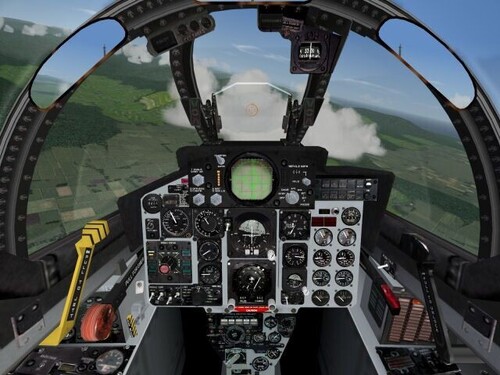
View File F-4D Hi-Res Cockpit V1 Continuing the series, this F-4D high resolution cockpit looks as good or better than my previous F-4B/C/J efforts. I could not get a good photo of the radar scope, so I did the best I could with what I had. Submitter streakeagle Submitted 09/20/2006 Category Jet Cockpits
-
1,652 downloads
Continuing the series, this F-4D high resolution cockpit looks as good or better than my previous F-4B/C/J efforts. I could not get a good photo of the radar scope, so I did the best I could with what I had. -
Hyperlobby does not support Wings Over Europe, but it does support Wings Over Vietnam. So, I copied the WOE.exe and renamed it WOV.exe. I then configured Hyperlobby to find the WOV.exe in the Wings Over Europe folder. While I have not yet had anybody join externally, tests from within my own LAN went well. I have a dogfight host up now with the year set to 1978. To ensure being able to join, you need to: Install WOV. Install WOV Service Pack v05.15.06 Install WOV Patch v08.30.06 Install WOE (check the option to merge WOV). Install WOE Patch v05.25.06 Install WOE Patch v08.30.06 Copy the WOE.exe in the Wings Over Europe folder Paste a copy into the same folder Rename the copy WOV.exe If you already have Hyperlobby and it is already set to open Wings Over Vietnam, then you will have to: "Disconnect" from Hyperlobby Select "Wings Over Vietnam" from the Hyperlobby Connect/Select list of games Press <CTRL><SHIFT> while clicking on "Connect" This opens a dialog box for setting the path to the WOV.exe, you must either manually type in the patch, or do a search and select the copy of WOV.exe in the Wings Over Europe folder. I cannot promise compatibility if you have any mods installed, especially the weapons pack. Follow the above procedure and it should work.
-
I did those very quickly and didn't have time to test them, so let me know if there are any problems. I am not worried about getting any credit. All I did was resize the gif files you provided to 512x512 squares, copy them into an existing tga file, mask out the background color, save the mask to the alpha channel, save the tga. For all its "complexity", one advantage to using PSP7 over Adobe Photoshop is that it can be bought dirt cheap from eBay :)
-
I used a vpn connection to get to my home PC and PSP7 from work :) Try these out. The decal tga files should be square and it is useful to have them in a binary dimension (512x512, 256x256, 128x128, etc). I made two versions: large (512x512) which are 1 MB in size and small (256x256) which are 256 kB in size. I think the smaller ones will be better to use, but try them both to see what works best for you. MarineFleiger_Decals.zip
-
If someone else doesn't beat me to it, I can do it for you. I am at work right now, but maybe sometime tonight or tomorrow I can make your decals. It doesn't take long.
-
Flying the Migs and How to get shot down by AAA
streakeagle replied to MAICO's topic in General Discussion
There is simply no other sim since Jane's Fighters Anthology that models this era so well. It is both fun and reasonably realistic. Each of the aircraft has a distinctive flight model that makes for interesting dogfights. If the AI was just a little smarter and the flight models just a little more realistic, this would almost be the perfect sim. Offline, I primarily fly various versions of the F-4. The F-4E has more power, maneuvering slats, and a built-in gun, which easily makes it my favorite variant for dogfighting. When I am online, I fly a wide variety of aircraft, but tend to fly the more difficult ones like the F-104, F-105, and F-100 to help out the newbies. -
I have extensive experience with making decals using Paint Shop Pro. Paint Shop Pro 7 handles tga files perfectly, but the technique for loading/viewing/editing/saving is somewhat cumbersome since the mask is not treated as a separate layer, yet has to be loaded and saved separately: Open tag using PSP7. Edit the color bitmap part if needed. Load mask (alpha channel) from the file. View and or edit mask. Edit the color bitmap part if needed.Save mask to the original alpha channel in the file. Hide mask. Edit the color bitmap part if needed. Save the file (with the mask hidden). Unfortunately, Paint Shop Pro 9 and Paint Shop Pro 10 changed how tga files were handled in such a way that when you save the file, it doesn't work right in the game. According to the FAQ at their website, this problem was fixed by a patch a long time ago for PSP9. In my experience, they didn't fix anything. So, to this day, I have to use PSP7 to save my tga files for SFP1 series decals. Sometimes, I need the features of PSP10. So I edit the tga in 10, save and close it, then open it with PSP7, load the mask, and save it per the above procedure. Apparently, Adobe Photoshop has none of these hassles.
-
Yeah, I saw that throttle! It turns out it is harder (nearly impossible) to get a real throttle quadrant. I found C-130 and F-100 throttles online, but nothing even close to the F-4 throttle. I am aware of the Cougar mods and how much they cost. Some people get lucky and it works out for them. Some go through multiple Cougars due to hardware failure problems and give up. For that kind of money, I would rather build my own since I really don't care for F-16 style joysticks and I have the skills and knowledge to do so. CH sticks have a much better reputation for quality and longevity, but I can't see paying $300 for a stick and throttle only to have an F-16 stick configuration and a throttle layout I don't really want. The X-36 is much closer to what I want and I already have one :) At one point I had a Top Gun Platinum which pretty much was a replica of the B-8. I loved the grip, button positions, and the fact that it was identical to the F-4 and F-15 sticks. However, the mechanicals were worthless. My main motivation for making a custom stick is a strong desire to replicate an F-4 cockpit. Unfortunately, what I want to do and what time, space, and money allow are two different things.
-
View File F-4C Hi-Res Cockpit V1 This is more than just a high resolution repaint of the stock F-4C cockpit. The instruments have been carefully calibrated. In the case of the Engine RPM and Temperature gauges, new functionality has been added. The smaller 0 thru 9 gauges are now fully functional. Submitter streakeagle Submitted 09/09/2006 Category Jet Cockpits