

streakeagle
-
Posts
2,721 -
Joined
-
Last visited
-
Days Won
8
Content Type
Profiles
Forums
Gallery
Downloads
Store
Everything posted by streakeagle
-
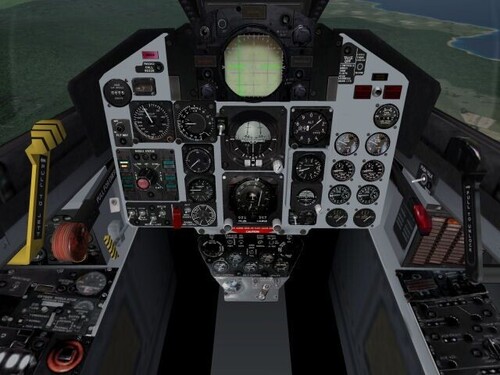
1,572 downloads
This is more than just a high resolution repaint of the stock F-4C cockpit. The instruments have been carefully calibrated. In the case of the Engine RPM and Temperature gauges, new functionality has been added. The smaller 0 thru 9 gauges are now fully functional. -
[Edit] I finally got my MC-2/B-8 stick grip. Despite using the stock number for an actual F-4 grip on eBay, it has the hand rest that was not present on F-4 grips. It is definitely used, but has been restored to a nearly new condition. I would have been happier without the hand rest, but the stick looks good and all the buttons work. Now I have to figure out how I am going to use it :) I have figured out how I am going to use it! I got lucky, a guy on eBay is parting out his F-4 cockpit collection. I can't afford to get the instrument panel, but look what I got: It comes with everything but the stick grip, including the $100 metal connector lug that my stick grip doesn't have. [/Edit] I didn't want to draw the X-52 Pro thread any further off topic, so I started this one The more I re-read other people's experiences with Cougars, the less I want one. Too many quality control issues to risk that much money. I am thinking about buying a B-8 stick grip to make my own realistic F-4 stick. The B-8 was used in many aircraft from the P-80 to the F-15A, so it is a good choice for playing Third Wire's Strike Fighters series games. If I decide to do that, I will probably use my X-45. If I make a mistake, no big deal since I mainly use my X-36. But if it works... the X-36 will get moved to the server and the X-45 will become primary. The stiff spring of the X-45 will be meaningless if I actually replicate the F-4 mechanical setup using metal piping and levers. The weight and leverage of the long stick will probably require supplemental springs to generate sufficient centering forces. If I wanted to go all-out, I could make the trim-hat 100% functional by connecting it to drive motors with fine worm-gears that would adjust the centering forces mechanically rather than via computer keys as on the real F-4, but I think I will be lazy and just map the hat switch to the pov hat, which also offers more flexibility if I don't want or need trim controls. I could use pneumatic pistons similar to the ones that hold open hatch-backs on cars to provide centering forces with a hydraulic feel when moving the stick... but once again, I am probably too lazy to do that initially. Apparently it is pretty easy to get a B-8 stick grip: Replicas with prices varying from $144 to $539 depending on the quality you want: http://www.aircraftspruce.com/menus/el/gripspistolstick.html Here is an actual PC joystick available: http://www.happcontrols.com/joysticks/95025100.htm A high-end military grade manufacturer: http://www.guardian-electric.com/html/b_8_control_grip.htm Not B-8s, but interesting industrial custom sticks: http://www.daco.co.uk/html/custom_built_controllers.htm Real ones for widely varying prices depending on condition (brand new is $235): http://www.warbird-parts.com/invent/postwar.htm The F-4 E-gress trainer (basically a complete cockpit on wheels for $2800!) is very tempting! But I don't have a place to put it and need the money for more important things including a baby boy due in December and finally getting my real pilot's license. Looking at these prices for just grips with switches (no electronics) makes the Cougar look like a bargain, but these are for real aircraft which means the switches should be very reliable unlike many Cougars. I am leaning toward the brand new military grip for $235 if I decide to do this.
-
I started work on an F-15 tutorial... but I am more focused on the F-4 right now. I want to finish the cockpits I started and then get back to finishing the new F-4B FM. The thread here was locked, but I added a basic F-15 radar post at TW: http://bbs.thirdwire.com/phpBB/viewtopic.php?t=2343
-
Aces High I ran well on just about any machine... but Aces High 2 cranked up the eye candy to try to compete with IL-2 as much as a MMOG could. Aces High 2 has been refined quite a bit and runs suprisingly well on my slower machines: P3 1.2GHz with Radeon 8500 128MB card can play it just fine with the settings at defaults... and that's at 1600x1200x32 with FSAAx2 and AFx16. However, if too many explosions, flak bursts, tracers, etc. are on the screen at one time, the CPU and its "slow" 133MHz bus/memory show their age.
-
You don't need to ask other people what they think, try it for yourself! 1. You can download Aces High 2 and play in the pay-for arenas for free for 2 weeks with absolutely no obligations. They do not try to use any tricks to get you credit card number and take your money. 2. After the two weeks is over, you can still play online for free with up to 7 other people (8 all together), but someone has to act as the host. From October 2000 to sometime around 2003 or 2004 I played Aces High extensively, but I got a real job in 2003 and got married that year too. What time I had left for sims I spent playing Operation Flashpoint with friends or flying F-4 Phantoms in Strike Fighters. I still keep up with the latest Aces High 2 patches. It works better than ever and is by far the best WW2 air combat sim in terms of flight model, gunnery, and damage. If they ever finish making Combat Tour or whatever they are calling it now, it will be the ultimate realistic campaign game as well. I might make some time to subscribe again when that comes out. I can't say enough about how good I think Aces High is. The only limit is that your fun depends on how the other people around you play. You can't make other people play the way you want to play.
-
I would watch engine temperatures. The data ini file includes a lot of detailed engine modeling. The engine gets hotter as speed increases. The engine has a temperature limit. If you take an F-104G up to altitude and leave afterburner on then you will ezperience the same thing. In the case of the F-104G, the engine has been programmed to follow real-world limits. Since the Talon is a fictional aircraft, there are no real-world limits to follow. The engine part of the data ini file probably contains some information copied/pasted from some other aircraf including the temperature limits ;)
-
I was at CompUSA this past weekend and played around with two of the joysticks on display: ThrustMaster Cougar and Saitek X-52. I have read many posts about the Cougar, so I know it has some problems with quality control and internal design including using old-style analog pots. However, it feels so solid. Perhaps it is worth the $250 even if I have to buy a kit to retrofit it with better sensors. The heavy spring does provide a lot of resistance, but in a way that permits smooth, precise operation (unlike my X-45 which I have modified to reduce spring tension for better precision control). The X-52 feels even lighter than the X-36. I like the X-36 better than the X-45 because of its lighter/smoother control feel, but perhaps the X-52 makes it too light? I wish I could fly with both sticks for a week and then decide which one I like better. The Cougar has the added bonus of being all-metal and an exact replica of a real stick... I just might get a Cougar, which I would have never even considered without having tried it out in the store. As for the X-52 Pro: I question the value of the toggle switches at the base of the stick. The whole point of buying the more expensive HOTAS is to keep your Hands On the Throttle And Stick!!!! If I wanted to reach for a switch, that is what the keyboard and num pad are for. That isn't a problem on the cheaper AV8TOR stick since one hand is already free. Normally, I would say more buttons is always better, but not if I am not going to use them and they increase the price ;)
-
I don't want to make a single large download, but I thought it would be good to include links to all of the packages in each thread: Streak Eagle's High Resolution F-4B Cockpit Version 1 From CombatACE: http://forum.combatace.com/index.php?autom...p;showfile=3094 From AVSIM: http://library.avsim.net/esearch.php?CatID...&DLID=89896 Streak Eagle's High Resolution F-4C Cockpit Version 1 From CombatACE: http://forum.combatace.com/index.php?autom...;showfile=3194# From AVSIM: http://library.avsim.net/esearch.php?CatID...&DLID=90889 Streak Eagle's High Resolution F-4D Cockpit Version 1 From CombatACE: http://forum.combatace.com/index.php?autom...p;showfile=3237 From AVSIM: http://library.avsim.net/esearch.php?CatID...&DLID=91364 Streak Eagle's High Resolution F-4J Cockpit Version 1 From CombatACE: http://forum.combatace.com/index.php?autom...;showfile=3125# From AVSIM: http://library.avsim.net/esearch.php?CatID...&DLID=90271 Click on these thumbnails for larger images of the F-4B Hi-res cockpit: Screenshots of F-4C, F-4D, and F-4J Hi-res cockpits (respectively): Credits: Batman1978 for providing Hi-res F-4D, F-4E, and F-4J cockpits that inspired me to make my own. For the record, I have not copied/pasted anything from Batman1978's files. The internet only has so many good photos covering various aspects of the F-4 cockpit, so I ended up finding and using a lot of the same photos Batman1978 used. I compiled various photos used to create the new textures via the internet. Source websites for photos include: http://www.topflightimaging.com/panels.html (F-4D-31-MC 66-7773 Front Instrument Panel) http://members.chello.nl/m.waterloo/f4b-panel.html (McDonnell Aircraft F-4H-1 (F-4B, F-4N) Phantom II main pilot's cockpit instrument panels) http://members.chello.nl/m.waterloo/f4c-panel.html (McDonnell USAF F-4C, F-4D and F-4E Phantom II aircraft cockpit layouts and instrument panels) http://members.chello.nl/m.waterloo/f4j-panel.html (McDonnell Douglas F-4J (F-4S) Phantom II cockpit instrument panel layouts) http://www.5053phantoms.com/photos/index.php (5057 Phantoms) http://www.aircraftresourcecenter.com/AWA1...Gcp/walk163.htm (Aircraft Resource Center F4-G Wild Weasel Cockpit) I did not get permission to use any of these images. If you are concerned about that sort of thing, these mods are not for you. I have been contacted by M. Waterloo via email. He has given me permission to use his images and even added CombatACE links to my cockpits at his website :)
-
View File F-4J Hi-Res Cockpit V1 Adaptation of my F-4B Hi-Res Cockpit to represent an F-4J. The stock F-4J cockpit is a mix bewteen the F-4B and early F-4J cockpits. In reality, the two are very similar except for the radar scope and radar warning receiver. So this release is really my F-4B cockpit with those two changes. Unfortunately, the 3d model uses the F-4B radar scope shape. The F-4J radar scope texture does not wrap onto the F-4B shape very well in some places. Submitter streakeagle Submitted 08/25/2006 Category Jet Cockpits
-
1,479 downloads
Adaptation of my F-4B Hi-Res Cockpit to represent an F-4J. The stock F-4J cockpit is a mix bewteen the F-4B and early F-4J cockpits. In reality, the two are very similar except for the radar scope and radar warning receiver. So this release is really my F-4B cockpit with those two changes. Unfortunately, the 3d model uses the F-4B radar scope shape. The F-4J radar scope texture does not wrap onto the F-4B shape very well in some places. -
Functionally, it looks similar to having a old MS Sidewinder Pro USB (which I have as a spare for travel and/or guests). Looks like a fairly useful stick without needing the space/weight of a full HOTAS setup. I will look for it in stores to get a feel for it. I used to give MS SW Pro USBs to my friends to try to get them to fly, but this looks like a great replacement.
-
One way to get around the decals per mesh limit is to combine several smaller decals into one larger (sometimes massive!) one... especially if they are all a fixed image that doesn't change with the aircraft number. But you can even do this with tail numbers if you don't mind have a large number of decals of a substantial size. If you download my A-1 Skyraider package from avsim.com you will find the included MiG Killer skin is a good example of the single large decal solution. I started with MarcFighter's excellent skin and reworked it as best as I could to increase the accuracy of the details while overcoming mapping limitations of the A-1 Skyraider model. Another work around is to paint some of the details onto the skin itself. This method is limited by the resolution of the skin and the distortion of the mapping. For instance, Sundowner makes very high resolution F-4 skins using few or no decals that are most impressive... however, the mapping does distort the national insignias.
-
Go here to see screenshots from the next SFP1/WOV/WOE patch: http://bbs.thirdwire.com/phpBB/viewtopic.php?t=2889
-
1. This forum requires you to be a member to follow your link. 2. This forum no longer accepts new members. Therefore, I have no idea what this topic is about
-
I might actually buy an X-52 if it looks like that ;) I still like the appearance and functionality of the X-36 USB best, but making a black X-52 is a big step back in the right direction. Style aside, what made the X-36 and its successors superior to the competition was providing comparable functionality (and to a lesser extent quality) for half the price. If this "X-52 Pro" is really just a black X-52 with metal knobs and they charge a lot more $ for what is purely a superficial change, I would be more inclined to buy the original for value or CH Products for quality. I love the idea of the Thrustmaster Cougar, but the internals did not match the price. I never understood why Saitek deviated from the all-black, realistic look since the majority of people spending the $ on this type of equipment tend to be the hard-core realism fanatics. Saitek sticks would also look a lot more realistic if they got rid of the "c" brace in front of the stick. What games other than realistic flight sims even need this kind of hardware? So why not make realistic sticks like CH Products and TM Cougar? It would really be nice if you could plug in the stick grip of the airplane you like as TM Cougar planned but never supported. I wish I had not thrown away my TM Top Gun Platinum sticks. I would love to adapt the grips from those to a Saitek base since they were the standard US grip from the F-4 and early F-15.
-
Your written English is good enough to be understood... which is more than I can say for many US citizens born and raised here. Besides, you don't need to know English to make great 3d models and share them with us :)
-
About time a Viggen hits the SFP1 game engine :)
-
View File F-4B Hi-Res Cockpit V1 Combination of the stock F-4J cockpit and higher resolution textures that provides a decent F-4B cockpit. Submitter streakeagle Submitted 08/15/2006 Category Jet Cockpits
-
879 downloads
Combination of the stock F-4J cockpit and higher resolution textures that provides a decent F-4B cockpit. -
<S> to Jug. I have met and talked with many pilots over the years, but never a U-2 pilot. It is an honor meet you if only in this virtual community.
-
I ended up in Atlanta and trapped for a while :(
-
They all have functional cockpits in multiplayer. You don't need to go online to fly them. Just select multiplayer. Host a co-op mission... Fly any aircraft on the drop down box. It is not an easter egg so much as a design feature to use the A-4 cockpit for any aircraft that doesn't have one. However, a better way is to find an allied aircraft with similar systems and assign it to be the cockpit. For instance, the F-4E cockpit is perfect for the MiG-23 since both have radar, radar homing missiles and guns. With a few edits, the F-4E avionics can be altered to reflect MiG-23 capabilities... However, in this case, a MiG-23 addon is available. You can either replace the stock MiG-23 with the addon or borrow the cockpit from the addon to use with the stock MiG-23. The open nature of the game's file system provides almost unlimited options. Of course most people just want to play the game, so for them user mods are the way to go rather than editing files on their own. I have my own preferences and prefer to customize every to my liking when I am creating an install with mods... but for multiplayer, it is usually easiest to keep everything stock so anybody can join without having to find out what the host has installed and duplicate it exactly.
-
The change was made because the MiGs (lacking functional cockpits) are not supposed to be flyable in single player ;) During beta testing, non-flyables were made flyable to make it easier to find 3d model and FM bugs, but the final release should only have the aircraft listed on the box in the flyable list.
-
There is no MiG-29 in WOE and MiGs are not supposed to be flyable in a stock install (except in multiplayer mode). MiGs and Sus have no 3d cockpits out of the box (they use a generic A-4 pit when you fly them in multiplayer). The aircraft folders can be easily modified to assign cockpits and permit flying the non-flyable aircraft in single player. Downloadable mods exist that do so for you. There are also cockpits available for some MiGs and the MiG-29 is an addon aircraft that is available for download.
-
The best way to control zoom is through buttons. I have the zoom keys mapped to virtual buttons on my X-36 and X-45 rotary knobs so that I can zoom in/out as if I was using the normal keys. This method works well enough for me: slow enough to get the level of zoom I want, fast enough to get there before I die ;)