

RAVEN
-
Posts
1,545 -
Joined
-
Last visited
-
Days Won
1
Content Type
Profiles
Forums
Gallery
Downloads
Store
Everything posted by RAVEN
-
View File Vampire Cockpit D.H 100 Cockpit For Pasko's "De Havilland Vampire FB.5" SFP1 WOV/WOE Patched 10/08 http://combatace.com/files/file/92-vampire-fb5-addon/ This is a mod of Wolf257's F4U-1 CockPit for use as a Vampire D.H 100 cockpit, I retextured Some of the gages and reworked the cockpit.ini for use in a jet, Recalibrated the engine and fuel gages. Although not 100% correct (till someone models one) It has a nice fit and a post WWII early Jet look. Tested with WOV/WOE Patched 10/8 For Installation Instructions see included Readme. Have fun! Raven 08/28/10 Submitter RAVEN Submitted 08/28/2010 Category Jet Cockpits
-
166 downloads
D.H 100 Cockpit For Pasko's "De Havilland Vampire FB.5" SFP1 WOV/WOE Patched 10/08 http://combatace.com/files/file/92-vampire-fb5-addon/ This is a mod of Wolf257's F4U-1 CockPit for use as a Vampire D.H 100 cockpit, I retextured Some of the gages and reworked the cockpit.ini for use in a jet, Recalibrated the engine and fuel gages. Although not 100% correct (till someone models one) It has a nice fit and a post WWII early Jet look. Tested with WOV/WOE Patched 10/8 For Installation Instructions see included Readme. Have fun! Raven 08/28/10 -
Loading screen missing after patching to Oct 2008
RAVEN replied to Ticket1's topic in General Discussion
I had to reload SFP1 And WOV to get to the cat files and extract the hangar screens and the A-4 decals. also I found some old F-4 F4SQTAIL's that I havent seen before (never use those squardons before) cool stuff! Raven -
You can open a .lod with Notepad,(Big LOD's open slowly Just wait for it) click Edit ,select "Find" Type in what your looking for (Like TGA or BMP or Canopy) Keep clicking till you find what you are looking for. Try IT Raven !!! Warning !!! Never try to Edit a .LOD with Notepad. It will !!! KILL IT !!!
-
If you open the one of the f-16 .lod's with notepad you can search for .tga or search for canopy and find the correct texture name,be careful not to make any changes. Just extract the .lod from the .cat ,search it( notepad you have to use "Find") then just deleat it. you can also find bmp's this way. Then just remane the .tga you want to use and drop in the (not shure) skin or f-16 folder. OK it Works in the F-16 folder for all the skins for that plane ,Just checked, (I used an A-6 to check.but same thing) Raven
-
View File Alphasim_SkyrayFix Alphasim Free Skyray texture fix SF/WOV/WOE Patched 10/08 http://www.easyfly.c...rike%20Fighters The Mod Fixes some of the texture bugs in the Alphasim Free Skyray. To install: Unzip the Alphasim_SkyrayFix.Zip and copy the texture files to the correct folders. First copy the 2 textures from the Add_Cockpit folder to the Cockpit folder(overwright,Say Yes) then copy the 8 textures from the Add_USNGray1 folder to the USNGray1 folder. Go Fly! Fixes : Addes textures to the external cockpit and jet exhaust. UnPainted surfaces in the external cockpit are unmaped. If you want to deleat all the unneeded files see full Readme. Credits- Model Alphasim Raven 8/15/10 Submitter RAVEN Submitted 08/16/2010 Category US Navy Aircraft
-
231 downloads
Alphasim Free Skyray texture fix SF/WOV/WOE Patched 10/08 http://www.easyfly.c...rike%20Fighters The Mod Fixes some of the texture bugs in the Alphasim Free Skyray. To install: Unzip the Alphasim_SkyrayFix.Zip and copy the texture files to the correct folders. First copy the 2 textures from the Add_Cockpit folder to the Cockpit folder(overwright,Say Yes) then copy the 8 textures from the Add_USNGray1 folder to the USNGray1 folder. Go Fly! Fixes : Addes textures to the external cockpit and jet exhaust. UnPainted surfaces in the external cockpit are unmaped. If you want to deleat all the unneeded files see full Readme. Credits- Model Alphasim Raven 8/15/10 -
Ok What can be done with the huge in game stock WOV/WOE A-6A 300 gal tanks? There about the size of the F-4 600 gal center tanks and they have a fin. Any suggestions (keep it clean) like other aircraft Or some kind of ground object? Raven
-
Decals on new aircraft textures won't work!
RAVEN replied to FlashGordon's topic in Mods/Skinning Discussion
Are you running WOV, Or WOE? Both have a problem with decal tga's, If a aircraft has less then the stock number of number decals (00 to 99) you will have no shows as the game cycles. You can add a numbers list, but it wont stop the no shows. Also is it just numbers? I have the FA 18 F and it shows fine. Where are you putting the decal .tga's? Raven -
View File [Fictional] Mig-28 [Fictional] Mig-28 (F-5E) WOE 1 Patched 10/08 This Mod Makes the [Fictional] Mig-28 a Separate Aircraft. "THIS IS NOT A COMPLEAT AIRCRAFT". First of all you need the "Mirage Factory" F-5E Tiger II http://www.column5.us/miragef.shtml Or http://combatace.com/files/file/5224-mirage-factory-f-5e-tiger-ii/ To install ------------------------------------------------------------------------- Install the F-5E (Self Installing).If you Don't have it already installed. 1- UnZip the Mig-28-(F5).zip to a convenient Location. 2- Create a folder named "Mig-28" in your Aircraft folder. 3- Open the F-5E folder and copy everything, (execpt Don't copy all the skin folders,Just the Black Skin) to the Mig-28 folder. 4- Open the Mig-28-(F5) folder, copy everything to the Mig-28 folder,tell it to overwright, Click Yes, Click Yes to the cockpit folder overwright. Go Fly Mod Notes -------------------------------------------------------------------- Data and Loadout.ini's Changed to use (In game) Soviet Weapons,drop tank and guns. Repainted the cockpit in MigGreen. Recalabrated and retextured most of the cockpit insterments. Recalabrated the fuel gages to use Soviet drop tanks. Changed cockpit lettering to Russian (some of the things would not translate so I left them) Added a simple weapons HUD and radar (uses Avionics70.dll) Hangar,loading and Loadout.bmp's Two skins, BareMetal (Brushed Aluminium) and ArticBlue. Credits ------------------------------------------------------------ F-5E - "Mirage Factory", Original Readmes included. Thanks Guy's TW - HUD,Radar parts and Game. Thanks TK Wrench - I used his "F-104S-ASA-M Mod" as a guide for the Mig-28 Avionics. Thanks Wrench Everything else myself. ------------------------------------------------------------ Tested only with WOE Patched 10/8 . This mod is Freeware and not to be sold. Raven 7/29/10 Have Fun Submitter RAVEN Submitted 07/30/2010 Category Soviet Union/Russian Aircraft
-
![More information about "[Fictional] Mig-28"](https://combatace.com/applications/downloads/interface/legacy/screenshot.php?path=/monthly_2026_04/no-screenshot.thumb.jpg.d5b1380b9daab27c42af74add045d2cc.jpg)
340 downloads
[Fictional] Mig-28 (F-5E) WOE 1 Patched 10/08 This Mod Makes the [Fictional] Mig-28 a Separate Aircraft. "THIS IS NOT A COMPLEAT AIRCRAFT". First of all you need the "Mirage Factory" F-5E Tiger II http://www.column5.us/miragef.shtml Or http://combatace.com/files/file/5224-mirage-factory-f-5e-tiger-ii/ To install ------------------------------------------------------------------------- Install the F-5E (Self Installing).If you Don't have it already installed. 1- UnZip the Mig-28-(F5).zip to a convenient Location. 2- Create a folder named "Mig-28" in your Aircraft folder. 3- Open the F-5E folder and copy everything, (execpt Don't copy all the skin folders,Just the Black Skin) to the Mig-28 folder. 4- Open the Mig-28-(F5) folder, copy everything to the Mig-28 folder,tell it to overwright, Click Yes, Click Yes to the cockpit folder overwright. Go Fly Mod Notes -------------------------------------------------------------------- Data and Loadout.ini's Changed to use (In game) Soviet Weapons,drop tank and guns. Repainted the cockpit in MigGreen. Recalabrated and retextured most of the cockpit insterments. Recalabrated the fuel gages to use Soviet drop tanks. Changed cockpit lettering to Russian (some of the things would not translate so I left them) Added a simple weapons HUD and radar (uses Avionics70.dll) Hangar,loading and Loadout.bmp's Two skins, BareMetal (Brushed Aluminium) and ArticBlue. Credits ------------------------------------------------------------ F-5E - "Mirage Factory", Original Readmes included. Thanks Guy's TW - HUD,Radar parts and Game. Thanks TK Wrench - I used his "F-104S-ASA-M Mod" as a guide for the Mig-28 Avionics. Thanks Wrench Everything else myself. ------------------------------------------------------------ Tested only with WOE Patched 10/8 . This mod is Freeware and not to be sold. Raven 7/29/10 Have Fun -
Look below Fast Reply,Next to post. "Use Full Editor" Then just attach file, Raven
-
-
Look in the (Aircraft ) _Data.ini In the weapons section for the weapon stations that the fuel tanks are on and look for a statement like this: (not from your aircraft) [LeftWingStati XXXXX] SystemType=WEAPON_STATION StationID=5 StationGroupID=3 StationType=EXTERNAL AttachmentPosition=-2.371,-1.691,-0.395 <-------The last numbers are the attachment hight negative ( -0.00) is down, -0.200 is higher . Play with it. AttachmentAngles=0.0,0.0,0.0 LoadLimit=1020.6 AllowedWeaponClass=BOMB,RP,CGR,FT,SAHM AttachmentType= FuelTankName=Tank_XXXX Raven
-
What D and F do you Have? The D that come with TW WOV has no external stores. Raven
-
Graphical errors with ATI video card
RAVEN replied to vonOben's topic in WOFF UE/PE - General Discussion
Looks Like your missing a Effects .tga file. -
IF SF2 has the same Aircraft with the same Cockpit folder in the A/C folder the .bmp's and .tga should (should??) work .I don't have SF2 to try it. Try it and let me know if it works. Raven
-
View File Hunter FGA9 Alt Pit Paint Third Wire WOE HunterFGA9 Cockpit Alternate Paint scheme. FGA9_Alt_Pit_Paint 7/10/10 WOE 1 Patched 10/8 Full instructions in the read me Raven Enjoy Submitter RAVEN Submitted 07/12/2010 Category Jet Cockpits
-
190 downloads
Third Wire WOE HunterFGA9 Cockpit Alternate Paint scheme. FGA9_Alt_Pit_Paint 7/10/10 WOE 1 Patched 10/8 Full instructions in the read me Raven Enjoy -
What Game ?What Version? SFI/WOE /WOV .WOI ????? Patched??? Start Here up to WOE Patched July 06 http://combatace.com...pack-03-jul-06/ ALSO Check the KB http://combatace.com...i-first-eagles/ Tell the Weapons/Gun Editors desktop shortcuts to run in win98/winMe win2000 mode Raven
-
View File MiG-19S Cockpit Repaint - Green This Mod is a cockpit repaint and small instrument upgrade (Mig-19S only) for Wrench’s “Early MiG Series Cockpit Upgrade/Repair Package for SF/SFG/WoV/WoE/WoI & SF2/SF2:V/SF2:E 6/5/09” You must have that Upgrade/Repair Package to use this one. http://combatace.com/files/file/9178-ordways-early-mig-pits-upgraderepair-package/ This mod is only been tested with the TW Mig-19S Upgraded with the package listed above. WOE Patched 10/8 Install instructions in the read me!! These files are Freeware and not to be sold. Raven Enjoy Submitter RAVEN Submitted 07/09/2010 Category Jet Cockpits
-
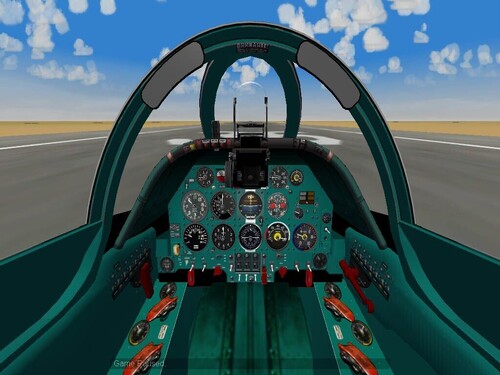
292 downloads
This Mod is a cockpit repaint and small instrument upgrade (Mig-19S only) for Wrench’s “Early MiG Series Cockpit Upgrade/Repair Package for SF/SFG/WoV/WoE/WoI & SF2/SF2:V/SF2:E 6/5/09” You must have that Upgrade/Repair Package to use this one. http://combatace.com/files/file/9178-ordways-early-mig-pits-upgraderepair-package/ This mod is only been tested with the TW Mig-19S Upgraded with the package listed above. WOE Patched 10/8 Install instructions in the read me!! These files are Freeware and not to be sold. Raven Enjoy -
[TailGear] MaxSteeringAngle=-35.0 Should be MaxSteeringAngle=35.0 Try that. Raven
-
The large instrument on the lower right marked with red and blue, What is it for? Raven
-
Found a blanke spot in the HUNTER9_PIT2.bmp, I will be uploading a fix soon. Raven