Epizikl
-
Posts
1,568 -
Joined
-
Last visited
-
Days Won
2
Content Type
Profiles
Forums
Gallery
Downloads
Store
Everything posted by Epizikl
-
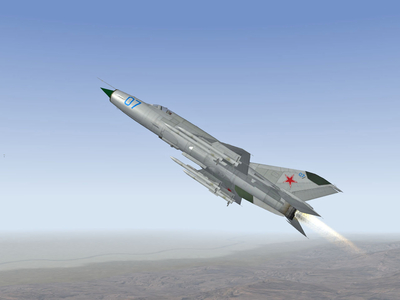
From the album: New Projects
Pictures of the work to equip the MiG-21-93 new modern weapons, particularly missiles R-77 -
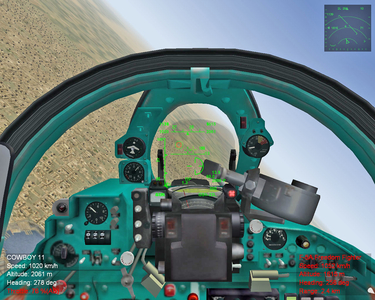
From the album: New Projects
Picture of the work on creation of avionics for the MiG-21I -
Hi!
Last time I wrote you about a problem with the MiG-27 ...
Written in Russian. and on the page forum posts you see only question marks ...
We have decided to write in English, because you no longer appears in the ICQ, the reason why I can not understand: so many things piled up, including just for you ...
Re inform:
MiG-27
In th...
-
Marcos! It's BTR-80, but not BTR-60 (!).
-
View File Hangar Loading Pack part 11 GUIDEBOOK ============================================================ To my dear and beloved MOTHER recently gone out of life! ============================================================ Boot screens for aircraft and helicopters: - Su-25K, -25SM, -30, -30MKI, -34, -35, -35BM, -37, -39, -47 - MiG-17F, -17PF, -23BN, -23M, -23ML, -27, -27D, -27ML, -29SMT - Yak-41 - An-12, -30 - Mi-8, -24P, -35M - Type 75, Typhoon, F-16C, JaguarGR, Lightning F6 Total 47 screens Designed for all versions of TW Installation: --------------- Choose one of the screens and put it in the appropriate directory, after deleting the names of superfluous characters (+ As a supplement attached a new image Loadout for the aircraft: - MiG-23B, -23BN, -27, -27D, -27K, -27M, -27ML Images may be one for all of these aircraft To set the correct directory, you must rename the file accordingly ----------------------------------------------------- I ask for their opinions and impressions about this work Submitter Epizikl Submitted 12/01/2009 Category Hangar / Menu / Load Screens
-

181 downloads
GUIDEBOOK ============================================================ To my dear and beloved MOTHER recently gone out of life! ============================================================ Boot screens for aircraft and helicopters: - Su-25K, -25SM, -30, -30MKI, -34, -35, -35BM, -37, -39, -47 - MiG-17F, -17PF, -23BN, -23M, -23ML, -27, -27D, -27ML, -29SMT - Yak-41 - An-12, -30 - Mi-8, -24P, -35M - Type 75, Typhoon, F-16C, JaguarGR, Lightning F6 Total 47 screens Designed for all versions of TW Installation: --------------- Choose one of the screens and put it in the appropriate directory, after deleting the names of superfluous characters (+ As a supplement attached a new image Loadout for the aircraft: - MiG-23B, -23BN, -27, -27D, -27K, -27M, -27ML Images may be one for all of these aircraft To set the correct directory, you must rename the file accordingly ----------------------------------------------------- I ask for their opinions and impressions about this work -
Yes, it is interesting ... But in this case to be a great and hard work ...
-
Excellent, X-RAY (!) I liked very much!
-
Very interesting machine! Like avionics! The model is made qualitatively! Works fine in SF2E. We would like the author made up for some shortcomings: not specified ID animations for the opening of the cabine and release rod receiving fuel.
-
How much I know, this mirror is for the instructor to the second cabin was easier to see the runway before the plane ...
-
I apologize for the inaccuracies (!) (Since this information has provided me) In the section for UB, UB Early, UM: (Press Shift +1) [Canopy1] SystemType = ANIMATION InputName = ANIMATION_1 DeploymentMethod = MANUAL AnimationTime = 3.5 AnimationID = 8 [Canopy2] SystemType = ANIMATION InputName = ANIMATION_2 DeploymentMethod = MANUAL AnimationTime = 3.5 AnimationID = 8 InputName = ANIMATION_1 for both cabs must specify the value "1": [Canopy1] SystemType = ANIMATION InputName = ANIMATION_1 DeploymentMethod = MANUAL AnimationTime = 3.5 AnimationID = 8 [Canopy2] SystemType = ANIMATION InputName = ANIMATION_1 DeploymentMethod = MANUAL AnimationTime = 3.5 AnimationID = 8
-
Concerning the sound of the engine - I would like to know which engine it is: the make and model engines. It was necessary to specify in the description to the file (!).
-
MiG-27K "Kayra" ... Work is nearing completion. The picture was taken Lindr2, he also holds and the bulk of the work.
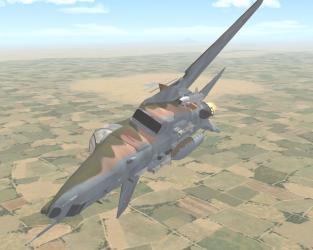
-
Su-27SK in battle ...
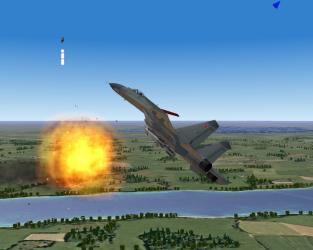
-
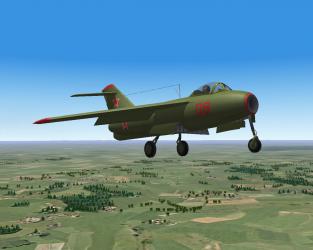
La-15 in the air ...
-
I join the congratulations (!) Good luck, good health and success (!)
-
Ðу, почему же... Работает Форум, Ñ…Ð¾Ñ‚Ñ Ð¸ не очень интенÑивно... Мы Ñ Lindr2 отрабатываем Ñерию МиГ-23 и МиГ-27 и Ñ‚.д. И диалог в оÑновном идет через ÐÑьку: вÑе модеры уже через нее общаютÑÑ, потому и Форум от лишнего флуда оÑвобожден. КÑтати, тебе нужна была модель УÐЗ-ика командирÑкого (?). Я где-то нарыл ее... Ртак же, у Ð¼ÐµÐ½Ñ Ð¿Ð¾ÑвилаÑÑŒ Ð½ÐµÐ¿Ð»Ð¾Ñ…Ð°Ñ Ð¼Ð¾Ð´ÐµÐ»ÑŒ БТР-90 (free) - еÑÑ‚ÑŒ мыÑль вÑтроить его в Ñим...
-
Hello, Andy (!) MiG-21bis is only SF2E: it uses the model of TW. In other versions of the series uses the model of the MiG-21MF, which apparently is not very different from the model of the MiG-21bis ... Will only add to the cabin (which can be easily found in the Download section): a cabin just for the MiG-21bis. To you it was easier to give your files *. ini - hope to collect a set of machines you get without much difficulty. MiG-21bis (ini).rar
-
mig21deep (!) Generally, you at least know that the loading screens to match the size of 1024 x 768 or multiple of it (!). As for the Hangar - so it applies to only one size of 1024 x 768. Do you have the same screen size of 1024 x 730 ... With much more to say here ... Not to mention the quality of skins, which are likely to have received an increase in skins 256 to 512 ... What quality skins suffered greatly.
-
View File Hangar Loading Pack part 9 Boot screens for aircraft: - MiG-21UM, -23UB, -23UM, -23B, -23BN, -23MLD, -31 - Su-27SK, -27SKM, -39, -47 - A-50 - IL-76 - Tu-22 - An-12, -26, -30 - 3M Total 41 screen. Some pre-existing screens have been fixed. Designed for all versions of TW. Installation: -------------- Choose one of the screens and put it in the appropriate directory, after deleting the names of superfluous characters (+ =) Submitter Epizikl Submitted 08/25/2009 Category Hangar / Menu / Load Screens
-
Пробовал... Выбор не широк... ОÑтавил на дефолте.
-
Gr.Viper (!) С момента напиÑÐ°Ð½Ð¸Ñ Ð¼Ð¾ÐµÐ³Ð¾ крайнего ÑÐ¾Ð¾Ð±Ñ‰ÐµÐ½Ð¸Ñ ÐºÐ¾Ðµ-что изменилоÑÑŒ, и ... в лучшую Ñторону... То ли Ñто Ñ‚Ð²Ð¾Ñ Ð·Ð°Ñлуга, то ли к Ñтому шли (хотÑ, и долго)... Рамочный фон Ñтал темнее, оÑталоÑÑŒ немного "замутить" общий фон, который оÑтаетÑÑ ÐµÑ‰Ðµ доÑтаточно Ñветлым и раздражительным Ð´Ð»Ñ Ð³Ð»Ð°Ð·... Ð’ новом дизайне уже нашел в Профиле вÑе ранее ÑущеÑтвовавшие опции. И оÑтальное Ñтало работать штатно... Ð’ общем, потихоньку привыкаем и оÑваиваемÑÑ...
-

112 downloads
Boot screens for aircraft: - MiG-21UM, -23UB, -23UM, -23B, -23BN, -23MLD, -31 - Su-27SK, -27SKM, -39, -47 - A-50 - IL-76 - Tu-22 - An-12, -26, -30 - 3M Total 41 screen. Some pre-existing screens have been fixed. Designed for all versions of TW. Installation: -------------- Choose one of the screens and put it in the appropriate directory, after deleting the names of superfluous characters (+