


JulioJunqueira
-
Posts
202 -
Joined
-
Last visited
-
Days Won
9
Content Type
Profiles
Forums
Gallery
Downloads
Store
Everything posted by JulioJunqueira
-
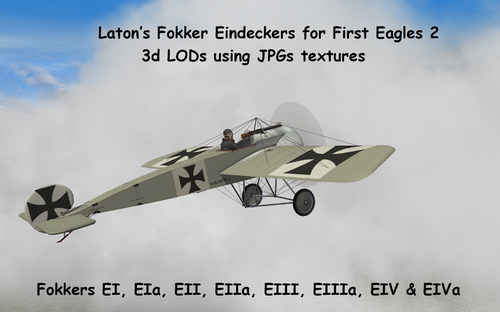
Version 1.0.0
105 downloads
Laton's Fokker Eindeckers for First Eagles 2 Andre (Laton) Simpson Fokkers EI, EIa, EII, EIIa, EIII, EIIIa, EIV & EIVa pack for First Eagles 2. This is a pack for Laton's Fokkers E, with 3D LODs setted to use jpg format. You still need all those Fokkers above installed in your FE 2 Aircraft main folder. This pack will only replace the original 3d LODs that still using BMP figures. Also, I Hexa edited the LODs files of Laton's Fokker EIIa that had wire wheels. I comverted them to wheel covers, as they were usually in combat areas. There is 4 optional (Vrt) used by Fokkers EI, EIa, EII, EIIa, EIV & EIVa at your choice. You will find them on the folder "OPTIONAL PROPELLERS" . (2 "Garuda" propellers, one "Integrale" propeller and one "Germania" propeller) To use one of them just rename it as "Vrt". I did, one new Spandau machine gun, one new Parabellum machine gun, Vrt, compass.jpg figures & a new Glass.tga textures. The Laton's Eindeckers 3d LODs are setted to use jpg files. So you will be able to use my new Spandau, Parabellum, Vrt and compass in jpg format figures together with Stephen1918's Fokkers cockpits using JPGs textures. __________________________________________________________________________________________________________ Installation instructions for First Eagles 2: ONLY FOR FE 2 USERS (Laton's Fokker E aircrafts 3d LODs using JPGs) First make a back-up or rename all your "original Laton's Fokker E 3d LODs". Make a back-up or rename all your COMPASS.BMP, SPANDAU.BMP, VRT.BMP, PARABELA.BMP, SPANDAU_BARREL.BMP and GlASS.TGA files. Then just drop or copy all the Fokker folders from mine Aircraft folder to your Aircraft folder. *ATTENTION* After this you must to convert all Fokker E "bmp" skin files that you are already have installed before to JPG format, using your favorite image editor. That's all. __________________________________________________________________________________________________________ Credits: - Julio Junqueira skin textures (JPG & TGA files) for Laton's Fokker Eindeckers. - Andre (Laton) Simpson for the Fokker Eindeckers 3D LODs. __________________________________________________________________________________________________________ - special thanks to Andre (Laton) Simpson for the excellent Eindeckers models. - special thanks to CombatAce.com hosting the files. __________________________________________________________________________________________________________ These textures are freeware; you are allowed to use it as you wish, but The names of all contributors listed here, must be added in any new released readmes. These textures may not in any way, be used in any payware additions. -
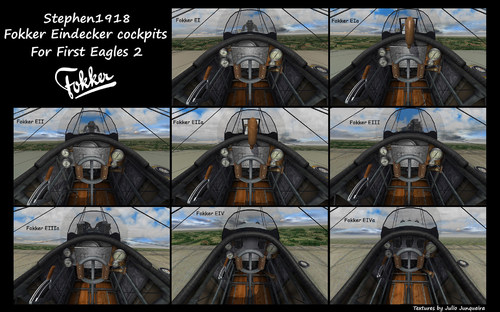
Version 1.0.0
56 downloads
Stephen1918 Fokker Eindecker cockpits for FE 2 Fokkers EI, EIa, EII, EIIa, EIII, EIIIa, EIV & EIVa cockpit pack for First Eagles 2. I did new textures and new painting approach for Stephen1918's Fokker E cockpits The size of the instruments were slightly increased for a better view of them. The cockpit 3D LODs are setted to use jpg files. You will find, a new Spandau machine gun, a new Parabellum machine gun, Vrt, compass.jpg figures & a new Glass.tga textures. There is 4 optional (Vrt) at your choice. You will find them on the folder "OPTIONAL PROPELLERS" . (2 "Garuda" propellers, one "Integrale" propeller and one "Germania" propeller) To use one of them just rename it as "Vrt". __________________________________________________________________________________________________________ I'm including also, here at CombatAce.com in a separated download only for FE 2 users with the Andre (Laton) Simpson's Fokker E 3d LODs, setted to use jpg files. So you will be able to use my new Spandau, Parabellum, Vrt and compass in jpg format figures together with Stephen1918 cockpit using JPGs textures. __________________________________________________________________________________________________________ Inside the pack you will find 3 folders for optional cockpit leather colors (Black & brown) for all these Fokkers above. To use one of them just rename one of your choice as: - BROWN LEATHER-FokECockpit.jpg rename it as FokECockpit.jpg - BLACK LEATHER-FokECockpit.jpg rename it as FokECockpit.jpg __________________________________________________________________________________________________________ Installation instructions for First Eagles 2: ONLY FOR FE 2 USERS. (Stephen1918's cockpit 3d LODs USING JPGs) First make a back-up or rename your "original cockpit folder". This is just in case you wish return with your former cockpit Textures and 3d LODs later. Then just drop or copy all the Fokker folders from mine Aircraft folder to your Aircraft folder. That's all. _________________________________________________________________________________________________________ *OPTIONAL* I slightly modded my MinPitchFront for a little wide cockpit views (see the screenshots). If you wish to use my MinPitchFront edition ini, Open your COCKPIT.ini and make these following editions: [CockpitSeat001] MinPitchFront=-80 <----------------- you must to add this valor. This is not mandatory. All cockpit files will work normally without this edition as well That's all. __________________________________________________________________________________________________________ Credits: - Julio Junqueira skin textures (JPG & TGA files) for Stephen1918's Fokker Eindecker cockpits. - Stephen1918 for the Fokker Eindecker Cockpit 3D LODs & ini files. __________________________________________________________________________________________________________ - special thanks to Stephen1918 for the excellent Fokker E cockpit models. - special thanks to CombatAce.com hosting the files. __________________________________________________________________________________________________________ These textures are freeware; you are allowed to use it as you wish, but The names of all contributors listed here, must be added in any new released readmes. These textures may not in any way, be used in any payware additions.- 1 review
-
- 7
-

-

-
 Fantastic! Very well detailed figures. Thanks a lot GKABS.
-
 View File Kesselbrut & russouk2004 ME 109 COCKPIT JABO for SF 2 Kesselbrut & russouk2004 Me 109 cockpit textures pack for Strike Fighters 2 (WW2 modded games). I finished a pack for Kesselbrut & russouk2004 Me 109 cockpit, with new textures and new painting approach. I worked in one edition that russouk2004 did in this cockpit to represent a Me 109 "Jabo" versions with the "ZSK 244 A-2/Zünderschaltkasten" (ignition switch box for bombs). This is a switch box, more realistic for 109E/F/G/K versions, but you of course, are free to use wherever you wish. The size of some instruments was slightly increased and TGA figures as well, for a better view of them. The cockpit 3D LODs are setted to use jpg files. I'm including also, 5 optional textures for the pilot's legs (Ger_legs). You will find it in the folder (OPTIONAL LEGS). To use one of them just rename the file at your choice to ----> Ger_legs. __________________________________________________________________________________________________________ Installation instructions Strike Fighters 2: First make a back-up or rename your "original cockpit folder". This is just in case you wish return with your former cockpit later. Then just drop or copy my folder "cockpit" in your Bf 109 aircraft folder of your choice. __________________________________________________________________________________________________________ *OPTIONAL* I slightly modded my MinPitchFront & my GunsightMilSize for a better cockpit and Gunsight views (see the screenshots). If you wish to use my MinPitchFront & GunsightMilSize edition ini, Open your Bf-109 cockpit data.ini and make these following editions: [GunsightFront] GunsightMilSize=125 <----------------- you must to add this valor. [CockpitSeat001] MinPitchFront=-57 <----------------- you must to add this valor. This is not mandatory. All cockpit files will work normally without this edition as well That's all. __________________________________________________________________________________________________________ Credits: - Julio Junqueira skin textures (JPG & TGA files) for Me 109 cockpit. - Kesselbrut & russouk2004 for the Cockpit 3D LODs. __________________________________________________________________________________________________________ - Thanks to Kesselbrut & russouk2004 for the excellent Me 109 cockpit model. - special thanks to CombatAce.com hosting the files. __________________________________________________________________________________________________________ These textures are freeware; you are allowed to use it as you wish, but The names of all contributors listed here, must be added in any new released readmes. These textures may not in any way, be used in any payware additions. __________________________________________________________________________________________________________ Submitter JulioJunqueira Submitted 10/31/2022 Category Prop Cockpits
-
View File Kesselbrut ME 109 COCKPIT RLM 66 for SF 2 Kesselbrut Me 109 cockpit textures pack for Strike Fighters 2 (WW2 modded games). I finished a pack for Kesselbrut's Me 109 cockpit, with new textures and new painting approach. The size of some instruments was slightly increased and TGA figures as well, for a better view of them. The cockpit 3D LODs are setted to use jpg files. I'm including also, 5 optional textures for the pilot's legs (Ger_legs). You will find it in the folder (OPTIONAL LEGS). To use one of them just rename the file at your choice to ----> Ger_legs. __________________________________________________________________________________________________________ Installation instructions for Strike Fighters 2: First make a back-up or rename your "original cockpit folder". This is just in case you wish return with your former cockpit later. Then just drop or copy my folder "cockpit" in your Bf 109 aircraft folder of your choice. __________________________________________________________________________________________________________ *OPTIONAL* I slightly modded my MinPitchFront & my GunsightMilSize for a better cockpit and Gunsight views (see the screenshots). If you wish to use my MinPitchFront & GunsightMilSize edition ini, Open your Bf-109 cockpit data.ini and make these following editions: [GunsightFront] GunsightMilSize=125 <----------------- you must to add this valor. [CockpitSeat001] MinPitchFront=-57 <----------------- you must to add this valor. This is not mandatory. All cockpit files will work normally without this edition as well That's all. __________________________________________________________________________________________________________ Credits: - Julio Junqueira skin textures (JPG & TGA files) for Me 109 cockpit. - Kesselbrut for the Cockpit 3D LODs. __________________________________________________________________________________________________________ - Thanks to Kesselbrut for the excellent Me 109 cockpit model. - special thanks to CombatAce.com hosting the files. __________________________________________________________________________________________________________ These textures are freeware; you are allowed to use it as you wish, but The names of all contributors listed here, must be added in any new released readmes. These textures may not in any way, be used in any payware additions. __________________________________________________________________________________________________________ Submitter JulioJunqueira Submitted 10/31/2022 Category Prop Cockpits
-
- 2
-
-
View File Kesselbrut ME 109 COCKPIT RLM 63 For SF 2 Kesselbrut Me 109 cockpit textures pack for Strike Fighters 2 (WW2 modded games). I finished a pack for Kesselbrut's Me 109 cockpit, with new textures and new painting approach. Releasing, optional textures for early Me 109 cockpit. The first Me 109s (B/C/D and early Es versions) had their interiors painted with the RLM 63 (grüngrau) which was later replaced by the RLM 66 (schwarzgrau). This option could be, very useful for the Me 109 made by Monty CZ. The size of some instruments was slightly increased and TGA figures as well, for a better view of them. The cockpit 3D LODs are setted to use jpg files. I'm including also, 5 optional textures for the pilot's legs (Ger_legs). You will find it in the folder (OPTIONAL LEGS). To use one of them just rename the file at your choice to ----> Ger_legs. __________________________________________________________________________________________________________ Installation instructions for Strike Fighters 2: First make a back-up or rename your "original cockpit folder". This is just in case you wish return with your former cockpit later. Then just drop or copy my folder "cockpit" in your Bf 109 aircraft folder of your choice. __________________________________________________________________________________________________________ *OPTIONAL* I slightly modded my MinPitchFront & my GunsightMilSize for a better cockpit and Gunsight views (see the screenshots). If you wish to use my MinPitchFront & GunsightMilSize edition ini, Open your Bf-109 cockpit data.ini and make these following editions: [GunsightFront] GunsightMilSize=125 <----------------- you must to add this valor. [CockpitSeat001] MinPitchFront=-57 <----------------- you must to add this valor. This is not mandatory. All cockpit files will work normally without this edition as well That's all. __________________________________________________________________________________________________________ Credits: - Julio Junqueira skin textures (JPG & TGA files) for Me 109 cockpit. - Kesselbrut for the Cockpit 3D LODs. __________________________________________________________________________________________________________ - Thanks to Kesselbrut for the excellent Me 109 cockpit model. - special thanks to CombatAce.com hosting the files. __________________________________________________________________________________________________________ These textures are freeware; you are allowed to use it as you wish, but The names of all contributors listed here, must be added in any new released readmes. These textures may not in any way, be used in any payware additions. __________________________________________________________________________________________________________ Submitter JulioJunqueira Submitted 10/31/2022 Category Prop Cockpits
-
- 2
-
-
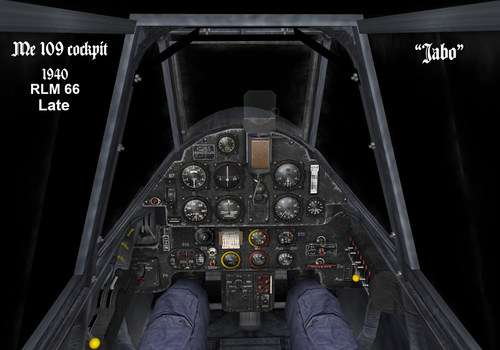
Version 1.0.0
77 downloads
Kesselbrut & russouk2004 Me 109 cockpit textures pack for Strike Fighters 2 (WW2 modded games). I finished a pack for Kesselbrut & russouk2004 Me 109 cockpit, with new textures and new painting approach. I worked in one edition that russouk2004 did in this cockpit to represent a Me 109 "Jabo" versions with the "ZSK 244 A-2/Zünderschaltkasten" (ignition switch box for bombs). This is a switch box, more realistic for 109E/F/G/K versions, but you of course, are free to use wherever you wish. The size of some instruments was slightly increased and TGA figures as well, for a better view of them. The cockpit 3D LODs are setted to use jpg files. I'm including also, 5 optional textures for the pilot's legs (Ger_legs). You will find it in the folder (OPTIONAL LEGS). To use one of them just rename the file at your choice to ----> Ger_legs. __________________________________________________________________________________________________________ Installation instructions Strike Fighters 2: First make a back-up or rename your "original cockpit folder". This is just in case you wish return with your former cockpit later. Then just drop or copy my folder "cockpit" in your Bf 109 aircraft folder of your choice. __________________________________________________________________________________________________________ *OPTIONAL* I slightly modded my MinPitchFront & my GunsightMilSize for a better cockpit and Gunsight views (see the screenshots). If you wish to use my MinPitchFront & GunsightMilSize edition ini, Open your Bf-109 cockpit data.ini and make these following editions: [GunsightFront] GunsightMilSize=125 <----------------- you must to add this valor. [CockpitSeat001] MinPitchFront=-57 <----------------- you must to add this valor. This is not mandatory. All cockpit files will work normally without this edition as well That's all. __________________________________________________________________________________________________________ Credits: - Julio Junqueira skin textures (JPG & TGA files) for Me 109 cockpit. - Kesselbrut & russouk2004 for the Cockpit 3D LODs. __________________________________________________________________________________________________________ - Thanks to Kesselbrut & russouk2004 for the excellent Me 109 cockpit model. - special thanks to CombatAce.com hosting the files. __________________________________________________________________________________________________________ These textures are freeware; you are allowed to use it as you wish, but The names of all contributors listed here, must be added in any new released readmes. These textures may not in any way, be used in any payware additions. __________________________________________________________________________________________________________ -

Version 1.0.0
65 downloads
Kesselbrut Me 109 cockpit textures pack for Strike Fighters 2 (WW2 modded games). I finished a pack for Kesselbrut's Me 109 cockpit, with new textures and new painting approach. The size of some instruments was slightly increased and TGA figures as well, for a better view of them. The cockpit 3D LODs are setted to use jpg files. I'm including also, 5 optional textures for the pilot's legs (Ger_legs). You will find it in the folder (OPTIONAL LEGS). To use one of them just rename the file at your choice to ----> Ger_legs. __________________________________________________________________________________________________________ Installation instructions for Strike Fighters 2: First make a back-up or rename your "original cockpit folder". This is just in case you wish return with your former cockpit later. Then just drop or copy my folder "cockpit" in your Bf 109 aircraft folder of your choice. __________________________________________________________________________________________________________ *OPTIONAL* I slightly modded my MinPitchFront & my GunsightMilSize for a better cockpit and Gunsight views (see the screenshots). If you wish to use my MinPitchFront & GunsightMilSize edition ini, Open your Bf-109 cockpit data.ini and make these following editions: [GunsightFront] GunsightMilSize=125 <----------------- you must to add this valor. [CockpitSeat001] MinPitchFront=-57 <----------------- you must to add this valor. This is not mandatory. All cockpit files will work normally without this edition as well That's all. __________________________________________________________________________________________________________ Credits: - Julio Junqueira skin textures (JPG & TGA files) for Me 109 cockpit. - Kesselbrut for the Cockpit 3D LODs. __________________________________________________________________________________________________________ - Thanks to Kesselbrut for the excellent Me 109 cockpit model. - special thanks to CombatAce.com hosting the files. __________________________________________________________________________________________________________ These textures are freeware; you are allowed to use it as you wish, but The names of all contributors listed here, must be added in any new released readmes. These textures may not in any way, be used in any payware additions. __________________________________________________________________________________________________________ -

Version 1.0.0
65 downloads
Kesselbrut Me 109 cockpit textures pack for Strike Fighters 2 (WW2 modded games). I finished a pack for Kesselbrut's Me 109 cockpit, with new textures and new painting approach. Releasing, optional textures for early Me 109 cockpit. The first Me 109s (B/C/D and early Es versions) had their interiors painted with the RLM 63 (grüngrau) which was later replaced by the RLM 66 (schwarzgrau). This option could be, very useful for the Me 109 made by Monty CZ. The size of some instruments was slightly increased and TGA figures as well, for a better view of them. The cockpit 3D LODs are setted to use jpg files. I'm including also, 5 optional textures for the pilot's legs (Ger_legs). You will find it in the folder (OPTIONAL LEGS). To use one of them just rename the file at your choice to ----> Ger_legs. __________________________________________________________________________________________________________ Installation instructions for Strike Fighters 2: First make a back-up or rename your "original cockpit folder". This is just in case you wish return with your former cockpit later. Then just drop or copy my folder "cockpit" in your Bf 109 aircraft folder of your choice. __________________________________________________________________________________________________________ *OPTIONAL* I slightly modded my MinPitchFront & my GunsightMilSize for a better cockpit and Gunsight views (see the screenshots). If you wish to use my MinPitchFront & GunsightMilSize edition ini, Open your Bf-109 cockpit data.ini and make these following editions: [GunsightFront] GunsightMilSize=125 <----------------- you must to add this valor. [CockpitSeat001] MinPitchFront=-57 <----------------- you must to add this valor. This is not mandatory. All cockpit files will work normally without this edition as well That's all. __________________________________________________________________________________________________________ Credits: - Julio Junqueira skin textures (JPG & TGA files) for Me 109 cockpit. - Kesselbrut for the Cockpit 3D LODs. __________________________________________________________________________________________________________ - Thanks to Kesselbrut for the excellent Me 109 cockpit model. - special thanks to CombatAce.com hosting the files. __________________________________________________________________________________________________________ These textures are freeware; you are allowed to use it as you wish, but The names of all contributors listed here, must be added in any new released readmes. These textures may not in any way, be used in any payware additions. __________________________________________________________________________________________________________ -
View File ESCADRILLE 75 NIEUPORT 24 skin pack for FE 2 Nieuport 24 skins of Escadrille 75 for EmID Nieuport N24 First Eagles 2 __________________________________________________________________________________________________________ ** What you will find in this Nieuport 24 skin Pack: - A full set of skins & decals to Nieuport 24s used by Escadrille 75. - A full squadron (Escadrille 75) with 100 decal serial numbers. - A special skin folder focusing on Slt William Hérisson a french Ace with 11 victories. - 2 New optional hangar screens for Nieuport 24 (N24) in 1920x1200 size. You will find this in the "HANGAR SCREEN" folder. To use it, you must drop or copy the jpg file in your N24 aircraft main folder, next, edit your N24.ini file and add this line: [AircraftData] HangarScreen=ESC 75-HANGARSCREEN 01.jpg <------ add this line to use the first option. [AircraftData] HangarScreen=ESC 75-HANGARSCREEN 02.jpg <------ add this line to use the second option. __________________________________________________________________________________________________________ Historical Sources: - Albin Denis website: http://albindenis.free.fr/Site_escadrille/page_centaine.htm __________________________________________________________________________________________________________ INSTALLATION INSTRUCTIONS: FE2 INSTALLATION (SKIN) - Drop or copy the folder "N24" from mine "Aircraft" folder to your "Aircraft" folder. (DECALS) - Drop or copy the folder "N24" from mine "decals" folder to your "decals" folder. *ATTENTION* In order to work properly on your loadout menu option, this following lines, must to be COPIED into your "N24".ini file. [TextureSetXXX] Directory=ESC 75 Name=Escadrille 75 Nation=FRANCE Squadron= Specular=1.800000 Glossiness=1.800000 Reflection=0.000000 [TextureSetXXX] Directory=ESC 75a Name=Slt William Hérisson Nation=FRANCE Squadron= Specular=1.800000 Glossiness=1.800000 Reflection=0.000000 Replace the (XXX) in the [TextureSetXXX] top line, with the appropriate number following your "N24.ini" file order for others skins that you have already installed before. That's all. __________________________________________________________________________________________________________ Credits: - Julio Junqueira texture skins & decals markings for Nieuport 24 and hangar screens. __________________________________________________________________________________________________________ - Thanks to EmlD for the excellent Nieuport 24 model. - special thanks to CombatAce.com hosting the files. __________________________________________________________________________________________________________ These textures are freeware; you are allowed to use it as you wish, but The names of all contributors listed here, must be added in any new released readmes. These textures may not in any way, be used in any payware additions. __________________________________________________________________________________________________________ Submitter JulioJunqueira Submitted 10/24/2022 Category Nieuport Skins
- 1 reply
-
- 2
-
-
View File ESCADRILLE 65 NIEUPORT 24bis skin pack for FE 2 Nieuport 24bis skins of Escadrille 65 for EmID N24bis First Eagles 2 __________________________________________________________________________________________________________ This is a skin pack, representing Nieuports 24bis used by Escadrille 65. Some serial numbers are historicals, others are not. __________________________________________________________________________________________________________ Historical Sources: - Albin Denis website: http://albindenis.free.fr/Site_escadrille/page_centaine.htm __________________________________________________________________________________________________________ ** What you will find in this Nieuport N24bis skin Pack: - A full set of skins & decals to Nieuport N24bis used by Escadrille 65. - A full squadron (Escadrille 65) with 100 decal serial numbers and squadron markings, including the Nieuport 24bis flown by the French Ace Charles Nungesser. - 3 New optional hangar screens for Nieuport 24bis (N24bis) in 1920x1200 size. You will find this in the "HANGAR SCREEN" folder. To use it, you must drop or copy the jpg file in your N24bis aircraft main folder, next, edit your N24bis.ini file. and add this line: [AircraftData] HangarScreen=ESC 65-HANGARSCREEN 01.jpg <------ add this line to use the first option. [AircraftData] HangarScreen=ESC 65-HANGARSCREEN 02.jpg <------ add this line to use the second option. [AircraftData] HangarScreen=ESC 65-HANGARSCREEN 03.jpg <------ add this line to use the third option. __________________________________________________________________________________________________________ INSTALLATION INSTRUCTIONS: FE2 INSTALLATION (SKIN) - Drop or copy the folder "N24bis" from mine "Aircraft" folder to your "Aircraft" folder. (DECALS) - Drop or copy the folder "N24bis" from mine "decals" folder to your "decals" folder. *ATTENTION* In order to work properly on your loadout menu option, this following lines, must to be COPIED into your "N24bis".ini file. [TextureSetXXX] Directory=ESC 65 Name=ESC 65 Nation=FRANCE Squadron=65ESC Specular=1.800000 Glossiness=1.800000 Reflection=0.000000 Replace the (XXX) in the [TextureSetXXX] top line, with the appropriate number following your "N24bis.ini" file order for others skins that you have already installed before. That's all. __________________________________________________________________________________________________________ Credits: - Julio Junqueira texture skins & decals markings for Nieuport 24bis and hangar screens. __________________________________________________________________________________________________________ - Thanks to EmlD for the excellent Nieuport 24bis model. - special thanks to CombatAce.com hosting the files. __________________________________________________________________________________________________________ These textures are freeware; you are allowed to use it as you wish, but The names of all contributors listed here, must be added in any new released readmes. These textures may not in any way, be used in any payware additions. __________________________________________________________________________________________________________ Submitter JulioJunqueira Submitted 10/24/2022 Category Nieuport Skins
-
- 1
-
-
View File ESCADRILLE 3 NIEUPORT 24 skin pack for FE 2 Nieuport 24 skins mID Nieuport N24 First Eagles 2of Escadrille 3 for E __________________________________________________________________________________________________________ ** What you will find in this Nieuport 24 skin Pack: - A full set of skins & decals to Nieuport 24s used by Escadrille 3. - A full squadron (Escadrille 3) with 100 decal serial numbers. - 2 New optional hangar screens for Nieuport 24 (N24) in 1920x1200 size. You will find this in the "HANGAR SCREEN" folder. To use it, you must drop or copy the jpg file in your N24 aircraft main folder, next, edit your N24.ini file and add this line: [AircraftData] HangarScreen=ESC 3 HANGARSCREEN 01.jpg <------ add this line to use the first option. [AircraftData] HangarScreen=ESC 3 HANGARSCREEN 02.jpg <------ add this line to use the second option. __________________________________________________________________________________________________________ Historical Sources: - Albin Denis website: http://albindenis.free.fr/Site_escadrille/page_centaine.htm __________________________________________________________________________________________________________ INSTALLATION INSTRUCTIONS: FE2 INSTALLATION (SKIN) - Drop or copy the folder "N24" from mine "Aircraft" folder to your "Aircraft" folder. (DECALS) - Drop or copy the folder "N24" from mine "decals" folder to your "decals" folder. *ATTENTION* In order to work properly on your loadout menu option, this following lines, must to be COPIED into your "N24".ini file. [TextureSetXXX] Directory=ESC 3 Name=Escadrille 3 Nation=FRANCE Squadron=3ESC Specular=1.800000 Glossiness=1.800000 Reflection=0.000000 Replace the (XXX) in the [TextureSetXXX] top line, with the appropriate number following your "N24.ini" file order for others skins that you have already installed before. That's all. __________________________________________________________________________________________________________ Credits: - Julio Junqueira texture skins & decals markings for Nieuport 24 and hangar screens. __________________________________________________________________________________________________________ - Thanks to EmlD for the excellent Nieuport 24 model. - special thanks to CombatAce.com hosting the files. __________________________________________________________________________________________________________ These textures are freeware; you are allowed to use it as you wish, but The names of all contributors listed here, must be added in any new released readmes. These textures may not in any way, be used in any payware additions. __________________________________________________________________________________________________________ Submitter JulioJunqueira Submitted 10/24/2022 Category Nieuport Skins
-
- 1
-
-
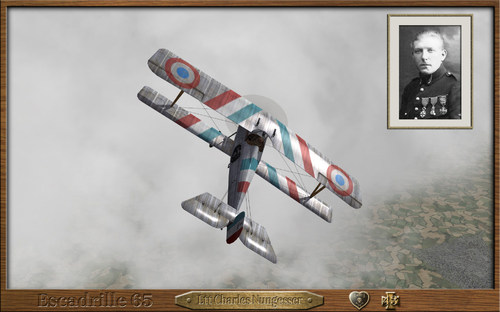
Version 1.0.0
26 downloads
Nieuport 24bis skins of Escadrille 65 for EmID N24bis First Eagles 2 __________________________________________________________________________________________________________ This is a skin pack, representing Nieuports 24bis used by Escadrille 65. Some serial numbers are historicals, others are not. __________________________________________________________________________________________________________ Historical Sources: - Albin Denis website: http://albindenis.free.fr/Site_escadrille/page_centaine.htm __________________________________________________________________________________________________________ ** What you will find in this Nieuport N24bis skin Pack: - A full set of skins & decals to Nieuport N24bis used by Escadrille 65. - A full squadron (Escadrille 65) with 100 decal serial numbers and squadron markings, including the Nieuport 24bis flown by the French Ace Charles Nungesser. - 3 New optional hangar screens for Nieuport 24bis (N24bis) in 1920x1200 size. You will find this in the "HANGAR SCREEN" folder. To use it, you must drop or copy the jpg file in your N24bis aircraft main folder, next, edit your N24bis.ini file. and add this line: [AircraftData] HangarScreen=ESC 65-HANGARSCREEN 01.jpg <------ add this line to use the first option. [AircraftData] HangarScreen=ESC 65-HANGARSCREEN 02.jpg <------ add this line to use the second option. [AircraftData] HangarScreen=ESC 65-HANGARSCREEN 03.jpg <------ add this line to use the third option. __________________________________________________________________________________________________________ INSTALLATION INSTRUCTIONS: FE2 INSTALLATION (SKIN) - Drop or copy the folder "N24bis" from mine "Aircraft" folder to your "Aircraft" folder. (DECALS) - Drop or copy the folder "N24bis" from mine "decals" folder to your "decals" folder. *ATTENTION* In order to work properly on your loadout menu option, this following lines, must to be COPIED into your "N24bis".ini file. [TextureSetXXX] Directory=ESC 65 Name=ESC 65 Nation=FRANCE Squadron=65ESC Specular=1.800000 Glossiness=1.800000 Reflection=0.000000 Replace the (XXX) in the [TextureSetXXX] top line, with the appropriate number following your "N24bis.ini" file order for others skins that you have already installed before. That's all. __________________________________________________________________________________________________________ Credits: - Julio Junqueira texture skins & decals markings for Nieuport 24bis and hangar screens. __________________________________________________________________________________________________________ - Thanks to EmlD for the excellent Nieuport 24bis model. - special thanks to CombatAce.com hosting the files. __________________________________________________________________________________________________________ These textures are freeware; you are allowed to use it as you wish, but The names of all contributors listed here, must be added in any new released readmes. These textures may not in any way, be used in any payware additions. __________________________________________________________________________________________________________- 1 review
-
- 4
-
-
-
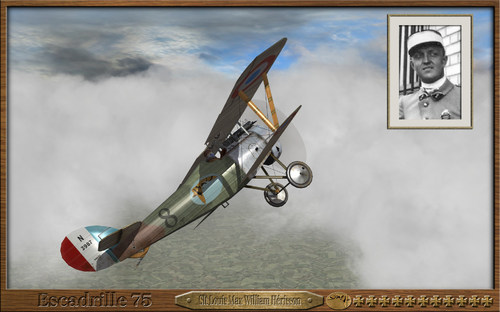
Version 1.0.0
19 downloads
Nieuport 24 skins of Escadrille 75 for EmID Nieuport N24 First Eagles 2 __________________________________________________________________________________________________________ ** What you will find in this Nieuport 24 skin Pack: - A full set of skins & decals to Nieuport 24s used by Escadrille 75. - A full squadron (Escadrille 75) with 100 decal serial numbers. - A special skin folder focusing on Slt William Hérisson a french Ace with 11 victories. - 2 New optional hangar screens for Nieuport 24 (N24) in 1920x1200 size. You will find this in the "HANGAR SCREEN" folder. To use it, you must drop or copy the jpg file in your N24 aircraft main folder, next, edit your N24.ini file and add this line: [AircraftData] HangarScreen=ESC 75-HANGARSCREEN 01.jpg <------ add this line to use the first option. [AircraftData] HangarScreen=ESC 75-HANGARSCREEN 02.jpg <------ add this line to use the second option. __________________________________________________________________________________________________________ Historical Sources: - Albin Denis website: http://albindenis.free.fr/Site_escadrille/page_centaine.htm __________________________________________________________________________________________________________ INSTALLATION INSTRUCTIONS: FE2 INSTALLATION (SKIN) - Drop or copy the folder "N24" from mine "Aircraft" folder to your "Aircraft" folder. (DECALS) - Drop or copy the folder "N24" from mine "decals" folder to your "decals" folder. *ATTENTION* In order to work properly on your loadout menu option, this following lines, must to be COPIED into your "N24".ini file. [TextureSetXXX] Directory=ESC 75 Name=Escadrille 75 Nation=FRANCE Squadron= Specular=1.800000 Glossiness=1.800000 Reflection=0.000000 [TextureSetXXX] Directory=ESC 75a Name=Slt William Hérisson Nation=FRANCE Squadron= Specular=1.800000 Glossiness=1.800000 Reflection=0.000000 Replace the (XXX) in the [TextureSetXXX] top line, with the appropriate number following your "N24.ini" file order for others skins that you have already installed before. That's all. __________________________________________________________________________________________________________ Credits: - Julio Junqueira texture skins & decals markings for Nieuport 24 and hangar screens. __________________________________________________________________________________________________________ - Thanks to EmlD for the excellent Nieuport 24 model. - special thanks to CombatAce.com hosting the files. __________________________________________________________________________________________________________ These textures are freeware; you are allowed to use it as you wish, but The names of all contributors listed here, must be added in any new released readmes. These textures may not in any way, be used in any payware additions. __________________________________________________________________________________________________________- 1 review
-
- 6
-
-
-
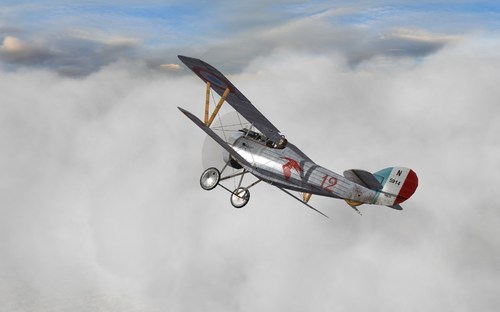
Version 1.0.0
20 downloads
Nieuport 24 skins mID Nieuport N24 First Eagles 2of Escadrille 3 for E __________________________________________________________________________________________________________ ** What you will find in this Nieuport 24 skin Pack: - A full set of skins & decals to Nieuport 24s used by Escadrille 3. - A full squadron (Escadrille 3) with 100 decal serial numbers. - 2 New optional hangar screens for Nieuport 24 (N24) in 1920x1200 size. You will find this in the "HANGAR SCREEN" folder. To use it, you must drop or copy the jpg file in your N24 aircraft main folder, next, edit your N24.ini file and add this line: [AircraftData] HangarScreen=ESC 3 HANGARSCREEN 01.jpg <------ add this line to use the first option. [AircraftData] HangarScreen=ESC 3 HANGARSCREEN 02.jpg <------ add this line to use the second option. __________________________________________________________________________________________________________ Historical Sources: - Albin Denis website: http://albindenis.free.fr/Site_escadrille/page_centaine.htm __________________________________________________________________________________________________________ INSTALLATION INSTRUCTIONS: FE2 INSTALLATION (SKIN) - Drop or copy the folder "N24" from mine "Aircraft" folder to your "Aircraft" folder. (DECALS) - Drop or copy the folder "N24" from mine "decals" folder to your "decals" folder. *ATTENTION* In order to work properly on your loadout menu option, this following lines, must to be COPIED into your "N24".ini file. [TextureSetXXX] Directory=ESC 3 Name=Escadrille 3 Nation=FRANCE Squadron=3ESC Specular=1.800000 Glossiness=1.800000 Reflection=0.000000 Replace the (XXX) in the [TextureSetXXX] top line, with the appropriate number following your "N24.ini" file order for others skins that you have already installed before. That's all. __________________________________________________________________________________________________________ Credits: - Julio Junqueira texture skins & decals markings for Nieuport 24 and hangar screens. __________________________________________________________________________________________________________ - Thanks to EmlD for the excellent Nieuport 24 model. - special thanks to CombatAce.com hosting the files. __________________________________________________________________________________________________________ These textures are freeware; you are allowed to use it as you wish, but The names of all contributors listed here, must be added in any new released readmes. These textures may not in any way, be used in any payware additions. __________________________________________________________________________________________________________ -
ESCADRILLE 87 NIEUPORT 24bis skin pack for FE 2
JulioJunqueira commented on JulioJunqueira's file in Nieuport Skins
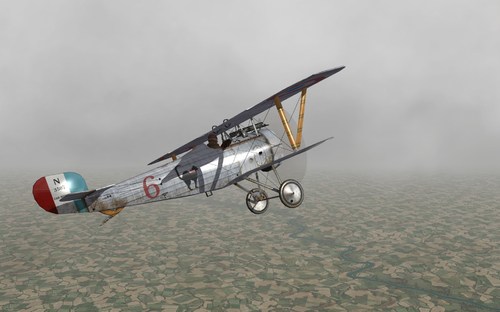 Hi Nippy Yeah, this is a west front squad My bad, I didn't write the Link correctly here the correct links http://albindenis.free.fr http://albindenis.free.fr/Site_escadrille/page_centaine.htm http://albindenis.free.fr/Site_escadrille/page_escadrilles_1_a_500.htm http://albindenis.free.fr/Site_escadrille/escadrille087.htm
-
View File ESCADRILLE 87 NIEUPORT 24bis skin pack for FE 2 Nieuport 24bis skins of Escadrille 87 for EmID N24bis First Eagles 2 __________________________________________________________________________________________________________ This is a skin pack, representing Nieuports 24bis used by Escadrille 87 "Les Chats Noir". Some serial numbers are historicals, others are not. __________________________________________________________________________________________________________ Historical Sources: - Albin Denis website: http://albindenis.free.fr/Site_escadrille/page_escadrilles_1_a_500.htm __________________________________________________________________________________________________________ ** What you will find in this Nieuport N24bis skin Pack: - A full set of skins & decals to Nieuport N24bis used by Escadrille 87. - A full squadron (Escadrille 87) with 100 decal serial numbers and squadron markings. - 3 New optional hangar screens for Nieuport 24bis (N24bis) in 1920x1200 size. You will find this in the "HANGAR SCREEN" folder. To use it, you must drop or copy the jpg file in your N24bis aircraft main folder, next, edit your N24bis.ini file. and add this line: [AircraftData] HangarScreen=ESC 87-HANGARSCREEN 01.jpg <------ add this line to use the first option. [AircraftData] HangarScreen=ESC 87-HANGARSCREEN 02.jpg <------ add this line to use the second option. __________________________________________________________________________________________________________ INSTALLATION INSTRUCTIONS: FE2 INSTALLATION (SKIN) - Drop or copy the folder "N24bis" from mine "Aircraft" folder to your "Aircraft" folder. (DECALS) - Drop or copy the folder "N24bis" from mine "decals" folder to your "decals" folder. *ATTENTION* In order to work properly on your loadout menu option, this following lines, must to be COPIED into your "N24bis".ini file. [TextureSetXXX] Directory=ESC 87 (Silver Dope) Name=Escadrille 87 Nation=FRANCE Squadron=87ESC Specular=1.800000 Glossiness=1.800000 Reflection=0.000000 Replace the (XXX) in the [TextureSetXXX] top line, with the appropriate number following your "N24bis.ini" file order for others skins that you have already installed before. That's all. __________________________________________________________________________________________________________ Credits: - Julio Junqueira texture skins & decals markings for Nieuport 24bis and hangar screens. __________________________________________________________________________________________________________ - Thanks to EmlD for the excellent Nieuport 24bis model. - special thanks to CombatAce.com hosting the files. __________________________________________________________________________________________________________ These textures are freeware; you are allowed to use it as you wish, but The names of all contributors listed here, must be added in any new released readmes. These textures may not in any way, be used in any payware additions. __________________________________________________________________________________________________________ Submitter JulioJunqueira Submitted 10/14/2022 Category Nieuport Skins
-
- 1
-
-
View File ESCADRILLE 87 NIEUPORT 27 skin pack for FE 2 Nieuport 27 skins of Escadrille 87 for EmID N27_FAS First Eagles 2 __________________________________________________________________________________________________________ This is a skin pack, representing most of the Nieuports 27 used by Escadrille 87 "Les Chats Noir". Some serial numbers are historicals, others are not. __________________________________________________________________________________________________________ Historical Sources: - Albin Denis website: http://albindenis.free.fr/Site_escadrille/page_escadrilles_1_a_500.htm __________________________________________________________________________________________________________ ** What you will find in this Nieuport N27_FAS skin Pack: - A full set of skins & decals to Nieuport N27_FAS used by Escadrille 87. - A full squadron (Escadrille 87) with 100 decal serial numbers including the Nieport 27 flown by William Wellman and other by René d'Estainville. - 3 New optional hangar screens for Nieuport 27 (N27_FAS) in 1920x1200 size. You will find this in the "HANGAR SCREEN" folder. To use it, you must drop or copy the jpg file in your N27_FAS aircraft main folder, next, edit your N27_FAS.ini file. and add this line: [AircraftData] HangarScreen=ESC 87-HANGARSCREEN 01.jpg <------ add this line to use the first option. [AircraftData] HangarScreen=ESC 87-HANGARSCREEN 02.jpg <------ add this line to use the second option. [AircraftData] HangarScreen=ESC 87-HANGARSCREEN 03.jpg <------ add this line to use the third option. __________________________________________________________________________________________________________ INSTALLATION INSTRUCTIONS: FE2 INSTALLATION (SKIN) - Drop or copy the folder "N27_FAS" from mine "Aircraft" folder to your "Aircraft" folder. (DECALS) - Drop or copy the folder "N27_FAS" from mine "decals" folder to your "decals" folder. *ATTENTION* In order to work properly on your loadout menu option, this following lines, must to be COPIED into your "N27_FAS".ini file. [TextureSetXXX] Directory=ESC 87 Name=Escadrille 87 (Camo) Nation=FRANCE Squadron=87ESC Specular=1.800000 Glossiness=1.800000 Reflection=0.000000 [TextureSetXXX] Directory=ESC 87 (Silver Dope) Name=ESC 87 (Silver Dope) Nation=FRANCE Squadron=87ESC Specular=1.800000 Glossiness=1.800000 Reflection=0.000000 Replace the (XXX) in the [TextureSetXXX] top line, with the appropriate number following your "N27_FAS.ini" file order for others skins that you have already installed before. That's all. __________________________________________________________________________________________________________ Credits: - Julio Junqueira texture skins & decals markings for Nieuport 27 and hangar screens. __________________________________________________________________________________________________________ - Thanks to EmlD for the excellent Nieuport 27 model. - special thanks to CombatAce.com hosting the files. __________________________________________________________________________________________________________ These textures are freeware; you are allowed to use it as you wish, but The names of all contributors listed here, must be added in any new released readmes. These textures may not in any way, be used in any payware additions. __________________________________________________________________________________________________________ Submitter JulioJunqueira Submitted 10/14/2022 Category Nieuport Skins
-
- 1
-
-
View File ESCADRILLE 87 NIEUPORT 24 skin pack for FE 2 Nieuport 24 skins of Escadrille 87 for EmID Nieuport N24 First Eagles 2 __________________________________________________________________________________________________________ ** What you will find in this Nieuport 24 skin Pack: - A full set of skins & decals to Nieuport 24s used by Escadrille 87 "Les Chats Noir". - Two types of paint patterns for the Nieuports used by Escadrille 87, one in silver-dope and other in french pattern camouflage. This enables a mix of different types when you fly single missions. - A full squadron (Escadrille 87) with 100 decal serial numbers. - 3 New optional hangar screens for Nieuport 24 (N24) in 1920x1200 size. You will find this in the "HANGAR SCREEN" folder. To use it, you must drop or copy the jpg file in your N24 aircraft main folder, next, edit your N24.ini file. and add this line: [AircraftData] HangarScreen=ESC 87-HANGARSCREEN 01.jpg <------ add this line to use the first option. [AircraftData] HangarScreen=ESC 87-HANGARSCREEN 02.jpg <------ add this line to use the second option. [AircraftData] HangarScreen=ESC 87-HANGARSCREEN 03.jpg <------ add this line to use the third option. __________________________________________________________________________________________________________ Historical Sources: - Albin Denis website:http://albindenis.free.fr/Site_escadrille/page_escadrilles_1_a_500.htm __________________________________________________________________________________________________________ INSTALLATION INSTRUCTIONS: FE2 INSTALLATION (SKIN) - Drop or copy the folder "N24" from mine "Aircraft" folder to your "Aircraft" folder. (DECALS) - Drop or copy the folder "N24" from mine "decals" folder to your "decals" folder. *ATTENTION* In order to work properly on your loadout menu option, this following lines, must to be COPIED into your "N24".ini file. [TextureSetXXX] Directory=ESC 87 (Silver Dope) Name=Escadrille 87 (Silver Dope) Nation=FRANCE Specular=1.800000 Glossiness=1.800000 Reflection=0.000000 Squadron=87ESC [TextureSetXXX] Directory=ESC 87 Name=Escadrille 87 Nation=FRANCE Specular=1.800000 Glossiness=1.800000 Reflection=0.000000 Squadron=87ESC Replace the (XXX) in the [TextureSetXXX] top line, with the appropriate number following your "N24.ini" file order for others skins that you have already installed before. That's all. __________________________________________________________________________________________________________ Credits: - Julio Junqueira texture skins & decals markings for Nieuport 24 and hangar screens. __________________________________________________________________________________________________________ - Thanks to EmlD for the excellent Nieuport 24 model. - special thanks to CombatAce.com hosting the files. __________________________________________________________________________________________________________ These textures are freeware; you are allowed to use it as you wish, but The names of all contributors listed here, must be added in any new released readmes. These textures may not in any way, be used in any payware additions. __________________________________________________________________________________________________________ Submitter JulioJunqueira Submitted 10/14/2022 Category Nieuport Skins
-
- 1
-
-
Great news!
-
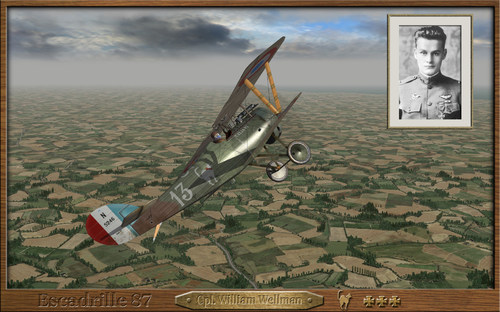
Version 1.0.0
22 downloads
Nieuport 27 skins of Escadrille 87 for EmID N27_FAS First Eagles 2 __________________________________________________________________________________________________________ This is a skin pack, representing most of the Nieuports 27 used by Escadrille 87 "Les Chats Noir". Some serial numbers are historicals, others are not. __________________________________________________________________________________________________________ Historical Sources: - Albin Denis website: http://albindenis.free.fr/Site_escadrille/page_escadrilles_1_a_500.htm __________________________________________________________________________________________________________ ** What you will find in this Nieuport N27_FAS skin Pack: - A full set of skins & decals to Nieuport N27_FAS used by Escadrille 87. - A full squadron (Escadrille 87) with 100 decal serial numbers including the Nieport 27 flown by William Wellman and other by René d'Estainville. - 3 New optional hangar screens for Nieuport 27 (N27_FAS) in 1920x1200 size. You will find this in the "HANGAR SCREEN" folder. To use it, you must drop or copy the jpg file in your N27_FAS aircraft main folder, next, edit your N27_FAS.ini file. and add this line: [AircraftData] HangarScreen=ESC 87-HANGARSCREEN 01.jpg <------ add this line to use the first option. [AircraftData] HangarScreen=ESC 87-HANGARSCREEN 02.jpg <------ add this line to use the second option. [AircraftData] HangarScreen=ESC 87-HANGARSCREEN 03.jpg <------ add this line to use the third option. __________________________________________________________________________________________________________ INSTALLATION INSTRUCTIONS: FE2 INSTALLATION (SKIN) - Drop or copy the folder "N27_FAS" from mine "Aircraft" folder to your "Aircraft" folder. (DECALS) - Drop or copy the folder "N27_FAS" from mine "decals" folder to your "decals" folder. *ATTENTION* In order to work properly on your loadout menu option, this following lines, must to be COPIED into your "N27_FAS".ini file. [TextureSetXXX] Directory=ESC 87 Name=Escadrille 87 (Camo) Nation=FRANCE Squadron=87ESC Specular=1.800000 Glossiness=1.800000 Reflection=0.000000 [TextureSetXXX] Directory=ESC 87 (Silver Dope) Name=ESC 87 (Silver Dope) Nation=FRANCE Squadron=87ESC Specular=1.800000 Glossiness=1.800000 Reflection=0.000000 Replace the (XXX) in the [TextureSetXXX] top line, with the appropriate number following your "N27_FAS.ini" file order for others skins that you have already installed before. That's all. __________________________________________________________________________________________________________ Credits: - Julio Junqueira texture skins & decals markings for Nieuport 27 and hangar screens. __________________________________________________________________________________________________________ - Thanks to EmlD for the excellent Nieuport 27 model. - special thanks to CombatAce.com hosting the files. __________________________________________________________________________________________________________ These textures are freeware; you are allowed to use it as you wish, but The names of all contributors listed here, must be added in any new released readmes. These textures may not in any way, be used in any payware additions. __________________________________________________________________________________________________________- 1 review
-
- 4
-
-
-
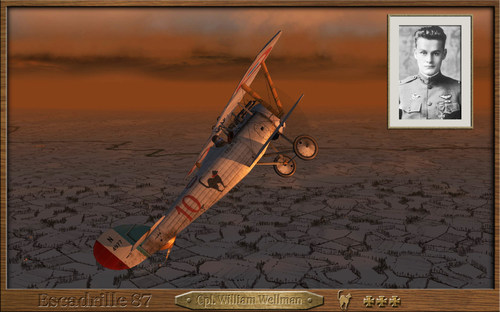
Version 1.0.0
25 downloads
Nieuport 24 skins of Escadrille 87 for EmID Nieuport N24 First Eagles 2 __________________________________________________________________________________________________________ ** What you will find in this Nieuport 24 skin Pack: - A full set of skins & decals to Nieuport 24s used by Escadrille 87 "Les Chats Noir". - Two types of paint patterns for the Nieuports used by Escadrille 87, one in silver-dope and other in french pattern camouflage. This enables a mix of different types when you fly single missions. - A full squadron (Escadrille 87) with 100 decal serial numbers. - 3 New optional hangar screens for Nieuport 24 (N24) in 1920x1200 size. You will find this in the "HANGAR SCREEN" folder. To use it, you must drop or copy the jpg file in your N24 aircraft main folder, next, edit your N24.ini file. and add this line: [AircraftData] HangarScreen=ESC 87-HANGARSCREEN 01.jpg <------ add this line to use the first option. [AircraftData] HangarScreen=ESC 87-HANGARSCREEN 02.jpg <------ add this line to use the second option. [AircraftData] HangarScreen=ESC 87-HANGARSCREEN 03.jpg <------ add this line to use the third option. __________________________________________________________________________________________________________ Historical Sources: - Albin Denis website:http://albindenis.free.fr/Site_escadrille/page_escadrilles_1_a_500.htm __________________________________________________________________________________________________________ INSTALLATION INSTRUCTIONS: FE2 INSTALLATION (SKIN) - Drop or copy the folder "N24" from mine "Aircraft" folder to your "Aircraft" folder. (DECALS) - Drop or copy the folder "N24" from mine "decals" folder to your "decals" folder. *ATTENTION* In order to work properly on your loadout menu option, this following lines, must to be COPIED into your "N24".ini file. [TextureSetXXX] Directory=ESC 87 (Silver Dope) Name=Escadrille 87 (Silver Dope) Nation=FRANCE Specular=1.800000 Glossiness=1.800000 Reflection=0.000000 Squadron=87ESC [TextureSetXXX] Directory=ESC 87 Name=Escadrille 87 Nation=FRANCE Specular=1.800000 Glossiness=1.800000 Reflection=0.000000 Squadron=87ESC Replace the (XXX) in the [TextureSetXXX] top line, with the appropriate number following your "N24.ini" file order for others skins that you have already installed before. That's all. __________________________________________________________________________________________________________ Credits: - Julio Junqueira texture skins & decals markings for Nieuport 24 and hangar screens. __________________________________________________________________________________________________________ - Thanks to EmlD for the excellent Nieuport 24 model. - special thanks to CombatAce.com hosting the files. __________________________________________________________________________________________________________ These textures are freeware; you are allowed to use it as you wish, but The names of all contributors listed here, must be added in any new released readmes. These textures may not in any way, be used in any payware additions. __________________________________________________________________________________________________________- 1 review
-
- 4
-
-
-
Version 1.0.0
23 downloads
Nieuport 24bis skins of Escadrille 87 for EmID N24bis First Eagles 2 __________________________________________________________________________________________________________ This is a skin pack, representing Nieuports 24bis used by Escadrille 87 "Les Chats Noir". Some serial numbers are historicals, others are not. __________________________________________________________________________________________________________ Historical Sources: - Albin Denis website: http://albindenis.free.fr/Site_escadrille/page_escadrilles_1_a_500.htm __________________________________________________________________________________________________________ ** What you will find in this Nieuport N24bis skin Pack: - A full set of skins & decals to Nieuport N24bis used by Escadrille 87. - A full squadron (Escadrille 87) with 100 decal serial numbers and squadron markings. - 3 New optional hangar screens for Nieuport 24bis (N24bis) in 1920x1200 size. You will find this in the "HANGAR SCREEN" folder. To use it, you must drop or copy the jpg file in your N24bis aircraft main folder, next, edit your N24bis.ini file. and add this line: [AircraftData] HangarScreen=ESC 87-HANGARSCREEN 01.jpg <------ add this line to use the first option. [AircraftData] HangarScreen=ESC 87-HANGARSCREEN 02.jpg <------ add this line to use the second option. __________________________________________________________________________________________________________ INSTALLATION INSTRUCTIONS: FE2 INSTALLATION (SKIN) - Drop or copy the folder "N24bis" from mine "Aircraft" folder to your "Aircraft" folder. (DECALS) - Drop or copy the folder "N24bis" from mine "decals" folder to your "decals" folder. *ATTENTION* In order to work properly on your loadout menu option, this following lines, must to be COPIED into your "N24bis".ini file. [TextureSetXXX] Directory=ESC 87 (Silver Dope) Name=Escadrille 87 Nation=FRANCE Squadron=87ESC Specular=1.800000 Glossiness=1.800000 Reflection=0.000000 Replace the (XXX) in the [TextureSetXXX] top line, with the appropriate number following your "N24bis.ini" file order for others skins that you have already installed before. That's all. __________________________________________________________________________________________________________ Credits: - Julio Junqueira texture skins & decals markings for Nieuport 24bis and hangar screens. __________________________________________________________________________________________________________ - Thanks to EmlD for the excellent Nieuport 24bis model. - special thanks to CombatAce.com hosting the files. __________________________________________________________________________________________________________ These textures are freeware; you are allowed to use it as you wish, but The names of all contributors listed here, must be added in any new released readmes. These textures may not in any way, be used in any payware additions. __________________________________________________________________________________________________________ -
 This will be a great addition to the Thirdwire Simulators immersion. Thank you!
-
View File ESCADRILLE 561 NIEUPORT 27 skin pack for FE 2 Nieuport 27 skins of Escadrille 561 for EmID N27_FAS First Eagles 2 __________________________________________________________________________________________________________ This is a skin pack, representing most of the Nieuports 27 used by Escadrille 561 on Venice, Italy from 1917 to 1918. To be used with the campaign "Armchair Aces Over Italy" by Ojcar. Many Escadrille 561 pilots, kept thier personal markings even as they switched to different types of Nieuports and SPADs. When the Nieuport model featured different interpretations of markings, I added it as a new option on the decals. So you will find some repeated pilot names to represent these versions. While all markings are historical, some are unrelated to the Nieuport type. I decided to put them in, for greater diversification and greatest fun. If you don't want to use them, just delete or rename them from the decal folder. Many serial numbers are historicals, others are not. You will get better profit of these skins with the campaign "Armchair Aces Over Italy" by Ojcar. If you do not have this campaign, you could find it here. https://combatace.com/files/file/17169-armchair-aces-over-italy/ __________________________________________________________________________________________________________ Historical Notes: Escadrille N.561 was a French squadron dedicated to defending Venice, Italy from aerial attack. Stemming from a six plane detachment assigned to Venice's defense on 15 August 1915, after its foundation in June 1916, Escadrille 561 would defend Venice until 1 January 1918. Detached then to support the French X Armee during its sojourn in Italy, the squadron remained on the peninsula after the X Armee had returned to France. By war's end, Escadrille 561 was credited with destroying 12 enemy aircraft and four observation balloons. The Escadrille 561, produced only one Ace, Sergeant André Robert Lévy credited with six aerial victories. The squadron flew most of the manufactured Nieuports (10, 11, 12, 16, 17, 21, 23, 24 and 27) and a small number of Sopwith 1A2, SPAD VII, SPAD XI & SPAD XIII. __________________________________________________________________________________________________________ Historical Sources: - Aéro-Journal n°39, L'Escadrille de Venise, entre guerre et dolce vita, David Méchin. - Albin Denis website: http://albindenis.fr __________________________________________________________________________________________________________ ** What you will find in this Nieuport N27_FAS skin Pack: - A full set of skins & decals to Nieuport N27_FAS used by Escadrille 561. - A full squadron (Escadrille 561) with 100 decal serial numbers and 22 pilot personal markings. - 6 New optional hangar screens for Nieuport 27 (N27_FAS) in 1920x1200 size. You will find this in the "HANGAR SCREEN" folder. To use it, you must drop or copy the jpg file in your N27_FAS aircraft main folder, next, edit your N27_FAS.ini file. and add this line: [AircraftData] HangarScreen=ESC 561-HANGARSCREEN 01.jpg <------ add this line to use the first option. [AircraftData] HangarScreen=ESC 561-HANGARSCREEN 02.jpg <------ add this line to use the second option. [AircraftData] HangarScreen=ESC 561-HANGARSCREEN 03.jpg <------ add this line to use the third option. [AircraftData] HangarScreen=ESC 561-HANGARSCREEN 04.jpg <------ add this line to use the fourth option. [AircraftData] HangarScreen=ESC 561-HANGARSCREEN 05.jpg <------ add this line to use the fifth option. [AircraftData] HangarScreen=ESC 561-HANGARSCREEN 06.jpg <------ add this line to use the sixth option. __________________________________________________________________________________________________________ INSTALLATION INSTRUCTIONS: FE2 INSTALLATION (SKIN) - Drop or copy the folder "N27_FAS" from mine "Aircraft" folder to your "Aircraft" folder. (DECALS) - Drop or copy the folder "N27_FAS" from mine "decals" folder to your "decals" folder. *ATTENTION* In order to work properly on your loadout menu option, this following lines, must to be COPIED into your "N27_FAS".ini file. [TextureSetXXX] Directory=ESC 561 Name=ESCadrille 561 Nation=FRANCE Squadron=561ESC Specular=1.800000 Glossiness=1.800000 Reflection=0.000000 [TextureSetXXX] Directory=ESC 561b Name=ESC 561 (Silver dope) Nation=FRANCE Squadron=561ESC Specular=1.800000 Glossiness=1.800000 Reflection=0.000000 [TextureSetXXX] Directory=ESC 561c Name=ESC 561 (Light camo) Nation=FRANCE Squadron=561ESC Specular=1.800000 Glossiness=1.800000 Reflection=0.000000 Replace the (XXX) in the [TextureSetXXX] top line, with the appropriate number following your "N27_FAS.ini" file order for others skins that you have already installed before. That's all. __________________________________________________________________________________________________________ Credits: - Julio Junqueira texture skins & decals markings for Nieuport 27 and hangar screens. __________________________________________________________________________________________________________ - Thanks to EmlD for the excellent Nieuport 27 model. - special thanks to CombatAce.com hosting the files. __________________________________________________________________________________________________________ These textures are freeware; you are allowed to use it as you wish, but The names of all contributors listed here, must be added in any new released readmes. These textures may not in any way, be used in any payware additions. __________________________________________________________________________________________________________ Submitter JulioJunqueira Submitted 09/26/2022 Category Nieuport Skins
-
- 1
-