Flanker562
-
Posts
12,044 -
Joined
-
Last visited
-
Days Won
63
Content Type
Profiles
Forums
Gallery
Downloads
Store
Everything posted by Flanker562
-

Yep I Did Do This...
Flanker562 replied to Dave's topic in Thirdwire: Strike Fighters 2 Series - General Discussion
Iron Eagle... OLD and the continuity errors always screw it up, but that was then... -
Starting to slip in my old age... anyway on my "hiatus" I really shouldn't be modding but overall when you realize that your old skin needs tweaking, you do so as well... it doesn't look right you gotta fix it.
-
View File Ka-50 HMLA-167 Early [Fictional] Ka-50 USMC HMLA-167 Early Just another What If camo pattern for the Ka-50, showing the camouflage pattern used by the USMC in the 1980s prior to the change to the two-tone grey camouflage that is on AH-1W Cobras today. To install this skin simply cut and paste the “us marines 4” folder in your DCSWorld\Bazar\Liveries\Ka-50 folder. In the Payload Editor select “HMLA-167 Early” and go fly. Submitter EricJ Submitted 12/21/2014 Category Misc/AI Aircraft Skins
-
![More information about "Ka-50 HMLA-167 Early [Fictional]"](https://combatace.com/applications/downloads/interface/legacy/screenshot.php?path=/monthly_12_2014/thumb-801767ed3c5b5a03ab2683014ad54394-hmla-167early.jpg)
13 downloads
Ka-50 USMC HMLA-167 Early Just another What If camo pattern for the Ka-50, showing the camouflage pattern used by the USMC in the 1980s prior to the change to the two-tone grey camouflage that is on AH-1W Cobras today. To install this skin simply cut and paste the “us marines 4” folder in your DCSWorld\Bazar\Liveries\Ka-50 folder. In the Payload Editor select “HMLA-167 Early” and go fly. -
Thanks! All I have to do now is upload it as I moved that roundel up more so it looks better.
-
JTAC Manual?
Flanker562 replied to Flanker562's topic in Digital Combat Simulator Series General Discussion
- Refined Efficient use of your bombas - Alibi, added some Multiplayer stuff in Appendix 2. -
JTAC Manual?
Flanker562 replied to Flanker562's topic in Digital Combat Simulator Series General Discussion
DCS-JFO-JTAC-Pilot-Guide - Expanded Urban Warfare section in the JFO/JTAC section - Playtime - Miscellaneous Section - Expanded Maverick/Vikhr gunnery due to practice, focusing more on the Vikhr. - Moved Using your Cool TGP for ISR to the pilot's section (more appropriate) - Spelling and some grammar fixes. -
Now that I'm taking a hiatus (a bit anyway for a week or so) from A3 I managed to finish the USMC Skin: And if you've noticed I've never applied (the only exception was the inside of the engines for the A-10A/C. Reason being as while in some instances baked shadows on a skin sometimes complement the object, most of the time I just don't believe in them as real world aircraft don't have baked shadows so I remove them due to that fact. Also I don't add baked shadows because to me it defeats the purpose of a company spending thousands of dollars (just a handy monetary unit) to render shadows in the game or simulation, and then applying baked shadows, which to me defeats the purpose of using shadowing anyway. But as such if somebody was actually curious why I don't add them to skins as it's simply unnatural (baked shadows).
-
More progress:
-
Decided to go the Ka-50 route, working off some rust but coming along nicely so far:
-
SF2_Ada_Rafale.7z
Flanker562 replied to JAT81500's topic in Thirdwire: Strike Fighters 2 Series - File Announcements
About damn time...! Congrats will definitely download this! -
JTAC Manual?
Flanker562 replied to Flanker562's topic in Digital Combat Simulator Series General Discussion
- Expanded "Before we Begin" - Multiple JDAM - Efficient use of your bombas -
JTAC Manual?
Flanker562 replied to Flanker562's topic in Digital Combat Simulator Series General Discussion
- Before we Begin - Changed it from "Maverick Gunnery" to "Maverick/Vikhr Gunnery (A-10A/Su-25T). Been spending some time with the Su-25T and starting to get a basic hang of it. - Added more Mission Editor stuff, will get to the Multiplayer portion as well. -
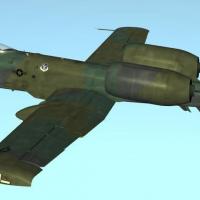
View File A-10A FT 75-308 FT 75-308 This skin represents an A-10A from the 75th Fighter Squadron, 23rd Fighter Group (“Flying Tigers”) in an European 1 scheme. To install this skin simply cut and paste the “FT 75-308” folder in your DCSWorld\Bazar\Liveries\A-10A or if preferred, A-10C folder. In the Payload Editor select “23rd FG, 75th FS, Pope AFB” and go fly. Disclaimer: The original supplied artwork was used to trace the outline of the Shark Mouth. Submitter EricJ Submitted 12/17/2014 Category A-10A/C Skins
-
27 downloads
FT 75-308 This skin represents an A-10A from the 75th Fighter Squadron, 23rd Fighter Group (“Flying Tigers”) in an European 1 scheme. To install this skin simply cut and paste the “FT 75-308” folder in your DCSWorld\Bazar\Liveries\A-10A or if preferred, A-10C folder. In the Payload Editor select “23rd FG, 75th FS, Pope AFB” and go fly. Disclaimer: The original supplied artwork was used to trace the outline of the Shark Mouth. -
JTAC Manual?
Flanker562 replied to Flanker562's topic in Digital Combat Simulator Series General Discussion
- Added Appendix 2, which goes over basic mission creation. If its needed I can add some targets as well as a download for the created mission. -
Bf109K4, the uber plane!
Flanker562 replied to streakeagle's topic in Digital Combat Simulator Series General Discussion
Nice vid! -
And looking complete. I need to tweak the tails so the checker is aligned better but overall she's good to go: Oh yeah, disclaimer: Yes I used the original textures supplied with the simulation to trace the shark mouth.
-
Added the 23rd FG Insignia and the TAC badges. From Airliners.net I found out it's from the 75th FS out of Pope, AFB so I'll roll with that:
-
Lol all good man
-
Finally got off my lazy butt and did this one. I've always liked the Shark Mouthed Hogs: Example is from Pope AFB (which the aircraft is from) as I just don't like the default grey one. Well done mind you but I like Euro better than Two-Tone grey.
-
Tor Huntin
Flanker562 replied to Flanker562's topic in Digital Combat Simulator Series General Discussion
http://562.50megs.com/DCS/Tracks/BaitNKill1212.zip Required Module: A-10C Tor Huntin Version 1.2.12 Me: A-10C with 6 x AGM-65D, 1 x ALQ-184, TGP Opposition: Tor set on Excellent Takeaways: Figuring out the CMSP does wonders for you when you load a jammer, unlike the FC3 E key, it's all automatic and you'll see that in the track. Since DCS defaults to the next skin there's no worry about playback issues either. But in the long run long-distance Maverick shooting practice pays off in the C as it makes you more comfortable with the locking system as well as proficient when under the threat of the Tor. Unlike 1.2.10 or even 1.2.11 the Tor fires one missile instead of a few, which is good but also bad. Good because it lowers the chance of intercept and bad because if it shoots it down, you have seven more to go as well. Personally I would recommend sticking with the A program but everybody has their preference and set to AUTO. Reason being that you can worry about making the shot and the CMSP does all the rest as well as being prepared for an incoming missile since I drifted into the threat radius but thankfully not too far in, but it was far enough for me to get out of there as well and setup for another run should I not lock, which happened the first time when I tried for a shot. -
Mission Editor Tutorial
Flanker562 replied to 169th_Ice's topic in Digital Combat Simulator Series Mission/Campaign Building
Three buttons above the check mark if I understand correctly. Also setting multiple flights as "Client" also in single-player or offline mode, allow you to fly one of the aircraft. For some of my training missions I have at the minimum of two of each aircraft, so if I want to hop in an A-10A I can do so, or a C, etc. -
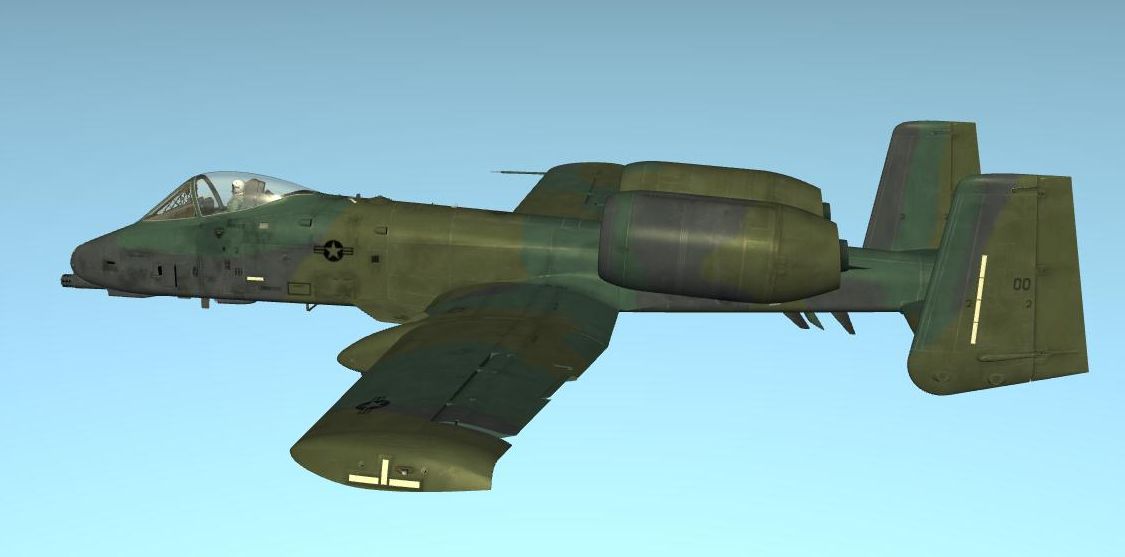
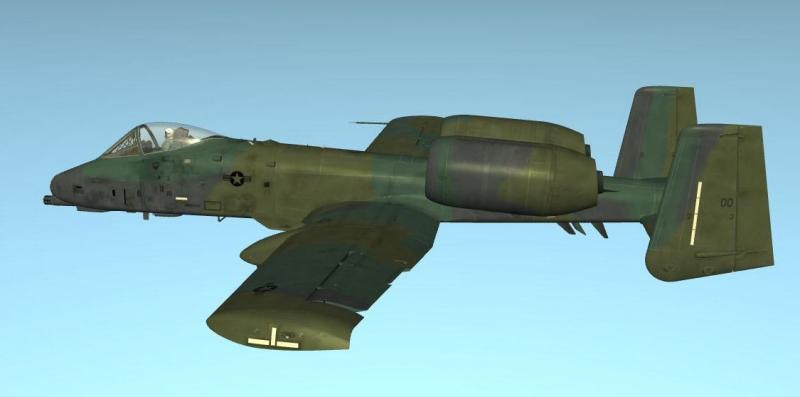
A-10A JAWS No.2 Skin
Flanker562 posted a topic in Digital Combat Simulator Series File Announcements
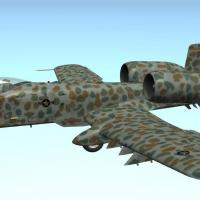
View File A-10A JAWS No.2 Skin JAWS 75-260 This is one of the other schemes of the JAWS (Joint Attack Weapons System) program. For installation simply drop this in your DCSWorld\Bazar\Liveries\A-10A or A-10C folders, open the simulation and in the Payload Window, select “JAWS Skin No.2” and go fly. EricJ on the SimHQ Forums EricJ562 (Steam ID) http://www.facebook.com/EricJ56 flanker56@hotmail.com I also write Military Science Fiction books, if interested you can check them out here: http://www.amazon.com/Eric-Johnson/e/B003NQA7QK/?_encoding=UTF8&camp=213733&creative=393193&linkCode=shr&tag=hupa08e-20&linkId=KLGFFABHB5ZLOXPS Eric Johnson, 2014 Submitter EricJ Submitted 12/13/2014 Category A-10A/C Skins -
36 downloads
JAWS 75-260 This is one of the other schemes of the JAWS (Joint Attack Weapons System) program. For installation simply drop this in your DCSWorld\Bazar\Liveries\A-10A or A-10C folders, open the simulation and in the Payload Window, select “JAWS Skin No.2” and go fly. EricJ on the SimHQ Forums EricJ562 (Steam ID) http://www.facebook.com/EricJ56 flanker56@hotmail.com I also write Military Science Fiction books, if interested you can check them out here: http://www.amazon.com/Eric-Johnson/e/B003NQA7QK/?_encoding=UTF8&camp=213733&creative=393193&linkCode=shr&tag=hupa08e-20&linkId=KLGFFABHB5ZLOXPS Eric Johnson, 2014