

Stephen1918
-
Posts
1,204 -
Joined
-
Last visited
-
Days Won
19
Content Type
Profiles
Forums
Gallery
Downloads
Store
Everything posted by Stephen1918
-
I figured out the problem, I still think it was mostly a memory issue. When I added the Nieuport to my FE1, I started seeing things like this: It took me a while to figure it out because I had to wait for the game to use one of my planes as an enemy plane. Eventually I realized that this plane is using the skin from the Nieuport for the engine cover, but using the correct skin everywhere else. I have been using the same names for the texture folders for all my planes, and some of the skins (like "Fuselage") have been the same in all the planes. When I added the Nieuport (along with all my other planes) it seemed to overwhelm the computer and it grabbed the wrong skin. I was able to fix the problem by simply renaming the folders - "LC3Texture1" instead of "Texture1" - I also had to change the ini file for the plane to point to the new directory name. That solved the problem. Starting with the Nieuport, I will make unique names for the skins and Texture folders. Here it is fixed:


-
It happened 2 or 3 times today. I didn't think to get a screen shot. Now I can't make it happen again. Maybe it's a memory issue, I do have an older computer. I'll post a shot if it happens again. Yes, all my planes have multiple LODs. But I didn't notice the problem until I got closer so I don't know if it's happening to all the versions. If anyone else experiences this problem, please get a screen shot and post it.
-
I've been testing the Nieuport 10 and I came across this weird glitch with the skins. When I fly the plane, everything is fine. But when the game uses one of my planes as an enemy, some of the skins are messed up. I'll see white patches on parts of the plane. It seems like some of the skins are not aligned correctly. It only appears on some of the parts, the rest of the plane seems to be OK. This only seems to be happening with my planes and only when the game uses my plane as an enemy. Has anyone else come across this? Stephen1918
-
Thanks. The drawings section contains some really detailed drawings of the mechanical components. I always find that inspiring.
-
I know what you mean, it seems like they were always experimenting with the planes. There is quite a bit of variation in all the planes I've looked at so far. It can be frustrating sometimes to build a plane, but it also leaves a little room for fudging, as long as it's believable. I try to make my planes accurate, but I have exercised a little "artistic license" in all of them.
-
Here's the latest version of the 12. I've added the windows in the upper wing, trimmed down the vent (fillet) behind the cowling, and changed the area around the cockpits. I still can't get the Etévé ring to sit flush like it should, but this is believable.


-
I see what you mean, and I agree, that part is too long. I'm assuming it was a vent for the cowling, so I've left the bottom open. I'll try and trim it down. As for the fuselage, the picture I showed was an early model, and they probably changed it pretty fast. Looking at my resources, I see that most of them did not have the curved deck between the cockpits, although one or two did. I guess I just spotted it a incorparated it because it made the Etévé ring look better. I'll see what I can do. (But I'll leave it the way it is if I can't come up with anything better.) Thanks for pointing these things out. Stephen1918
-
Thanks for your comments 33Lima. I don't know what you mean by: "The little fillet behind the cowling each side ..." I had to compromise on the Etévé mount and that affected the fuselage a little. In real life, the vertical bars on the Etévé moved back and forth as the gun was raised. I couldn't get the game to animate the gun mount so I fudged it. I made the "u" bar a little longer so it wouldn't disconnect from the vertical bars too much when the gun is raised. That meant I had to make the base stick out more than it should. And that intersected the fuselage when the gun turned, so I had to raise it up. This photo of a Nieuport 12 is from Windsock and it shows a deck between the two cockpits. With the Etévé mount, this was removed to mount the ring. I sort of crossed the two to make mine work. It's the best I can do. I have planned for windows in the upper wing, but I haven't made them yet. There's a lot of potential for variations, but I'll finish these two first... Thanks for your observations, and let me know what you mean by "the fillet" Stephen1918

-
I appreciate your help Ojcar. It will be a while before the Nieuports are ready, I haven't even animated the control surfaces yet.
-
I hope you mean that in a good way!
-
Nice work on the dragons! I also like the "used" look you've given to the metal parts. How soon before we can fly it? :)
-
Since the planes are so similar, I'm going back and forth and working on them simultaneously. The 10 is a single seater with a Lewis gun on the upper deck. The 12 is a two seater with a gun on the top and an Etévé ring mount for the Lewis gun in the back. I had to fudge a little on the Etévé mount to make it look right when it moved. The Scarff ring would have been easier to make, but it hadn't been invented yet. Tell me what you think. The 10: The 12: The gun mount:


-
A video of FM problems w Alb C.III and Lloyd
Stephen1918 replied to quack74's topic in General Discussion
Quack74 - I'm glad to see that you got the problem solved, it had me totally stumped. Ojcar - I glad to hear that your dog is doing better. I hope he makes a speedy recovery. -
I'm working on the Nieuport 10/12 right now. I hope to have that done by the end of August. Then I think I'd like to do a pusher - a Vickers, Caudron, Farman, or Voisin would all be interesting to build. There are so many good suggestions I wish I could work faster... Stephen1918 (Yeah, I know the Caudron isn't a pusher, but it has a similar frame structure.)
-
A video of FM problems w Alb C.III and Lloyd
Stephen1918 replied to quack74's topic in General Discussion
I've been learning about FMs, mostly by comparing the Data.ini's of a variety of planes. I noticed that the Albatros D.III that came with FE1 doesn't have any section for AIData in the data file, but the plane can still be flown by the AI. That tells me that there are default settings somewhere else in the game. The problem you're having occurs when the AI is controlling the plane. Try removing the AIData completely (comment those lines out, but don't delete them) and see if there is still a problem. If the problem goes away, then we know that it's in the AIData - if the problem is still there, then we know that it's something else. If the problem is in the AIData, then uncomment the lines in small batches and play the game. When the problem comes back then we'll know which lines are causing the problem. Stephen1918 -
The Lloyd and the Albatros are the ones with a loadout and with a gunner. I don't know how that could be affecting the AI take-offs. Is anyone else having a problem getting the AI to make my Lloyd and Albatros take off?
-
I don't know how to get the video to play directly from Combat Ace, but I must say the it is sweet! How did you capture video from the game? Stephen1918
-
I uploaded the Albatros C.III this morning. This is my second 2 seater and includes more user options than my other planes so far. (Sinbad is also working on a skin for this plane.) My thanks to Ojcar for making the FM, to Nix for making the engine sound, and to Sinbad, Whiteknight06604, and Wrench for help with the details. Stephen1918


-
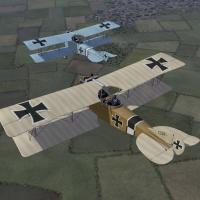
View File Albatros C.III The Albatros C.III was a general purpose two-seat plane and was based on the C.I and C.II models. An improved tail structure made it more agile than its predecessors and it was produced in large numbers. The plane was armed with a Parabellum machine gun mounted on a pivot in the rear cockpit along with a synchronized machine gun mounted beside the engine. The C.III was used for reconnaissance, aerial photography, and light bombing. The gun ring had limited movement, especially in the vertical direction, which I have tried to reproduce in my model. I have included two loadouts, one for four 12.5 kilo bombs carried internally, and another for six 12.5 kilo bombs carried externally under the wings. I have also included three skinning options - an unpainted standard wood and linen, a light blue paint, and a green paint. All of these are pretty basic so I have included my skinning templates for those who want make their own skins. This plane uses the national markings that come with First Eagles, so you can change nationalities to fly for Bulgaria or the Turks. I have included decals for serial numbers and for personal markings. These will be applied randomly. Some of the personal markings include crosses, I don't know if that would be appropriate if you're flying for the Ottoman Empire. Historical Notes: The serial numbers are fictious, but in the correct range for the 1916 Albatros C.III. The personal markings are completely fictious, but I think reasonable for German markings early in the war. I have not found an example of the Albatros C.III in green paint, but many German planes on the Eastern Front were painted green later in the war, so the color is not unrealistic. If historical accuracy is important to you, you can delete the offending files. Credits: My thanks to Ojcar for making the excellent data.INI file for this plane. My thanks to Nix for making the realistic engine sound file for the Mercedes 6 cylinder engine. Thanks also to Sinbad, Whitekinght06604, and Wrench who provided me with valuable resouces and information for the cockpit details. Installation instructions: For FE1: Unzip the file and move the folder named "AlbatrosC3" into the FirstEagles/Objects/Airplanes folder. You also need to move the sound file "mercedes160m2.wav" into the FirstEagles/Sounds folder. For FE2: Unzip the file and move the folder named "AlbatrosC3" into the FirstEagles/Objects/Airplanes folder. Then in the FirstEagles/Objects/Decals folder, create a new folder named "AlbatrosC3". Move the folder named "D" from the Airplanes/AlbatrosC3 folder into the Decals/AlbatrosC3 folder you just made. You also need to move the sound file "mercedes160m2.wav" into the FirstEagles/Sounds folder. March 12, 2012 - Uploaded a new version with an improved FM by ojcar. Submitter Stephen1918 Submitted 08/01/2011 Category Albatros
-
- 1
-

-
Version v2
821 downloads
The Albatros C.III was a general purpose two-seat plane and was based on the C.I and C.II models. An improved tail structure made it more agile than its predecessors and it was produced in large numbers. The plane was armed with a Parabellum machine gun mounted on a pivot in the rear cockpit along with a synchronized machine gun mounted beside the engine. The C.III was used for reconnaissance, aerial photography, and light bombing. The gun ring had limited movement, especially in the vertical direction, which I have tried to reproduce in my model. I have included two loadouts, one for four 12.5 kilo bombs carried internally, and another for six 12.5 kilo bombs carried externally under the wings. I have also included three skinning options - an unpainted standard wood and linen, a light blue paint, and a green paint. All of these are pretty basic so I have included my skinning templates for those who want make their own skins. This plane uses the national markings that come with First Eagles, so you can change nationalities to fly for Bulgaria or the Turks. I have included decals for serial numbers and for personal markings. These will be applied randomly. Some of the personal markings include crosses, I don't know if that would be appropriate if you're flying for the Ottoman Empire. Historical Notes: The serial numbers are fictious, but in the correct range for the 1916 Albatros C.III. The personal markings are completely fictious, but I think reasonable for German markings early in the war. I have not found an example of the Albatros C.III in green paint, but many German planes on the Eastern Front were painted green later in the war, so the color is not unrealistic. If historical accuracy is important to you, you can delete the offending files. Credits: My thanks to Ojcar for making the excellent data.INI file for this plane. My thanks to Nix for making the realistic engine sound file for the Mercedes 6 cylinder engine. Thanks also to Sinbad, Whitekinght06604, and Wrench who provided me with valuable resouces and information for the cockpit details. Installation instructions: For FE1: Unzip the file and move the folder named "AlbatrosC3" into the FirstEagles/Objects/Airplanes folder. You also need to move the sound file "mercedes160m2.wav" into the FirstEagles/Sounds folder. For FE2: Unzip the file and move the folder named "AlbatrosC3" into the FirstEagles/Objects/Airplanes folder. Then in the FirstEagles/Objects/Decals folder, create a new folder named "AlbatrosC3". Move the folder named "D" from the Airplanes/AlbatrosC3 folder into the Decals/AlbatrosC3 folder you just made. You also need to move the sound file "mercedes160m2.wav" into the FirstEagles/Sounds folder. March 12, 2012 - Uploaded a new version with an improved FM by ojcar. -
I agree with the others, it's probably your computer. I have an older computer and when I try to run FE1 at "Unlimited" graphics setting it hangs at 80% and never goes beyond that (I've waited for as long as 15 minutes before rebooting the computer). When I run at "High" it hangs for a long time at 80% but eventually finishes, and then runs slow when there are shadows on the plane, but runs fine when I back off a bit. I usually run the game in "Medium". Stephen1918
-
These are both great airplanes. I really like the LVG and will put it on my list...
-
That's an inspiring story and the DH5 is an interesting looking plane. I will definitely put it on the list. I can't promise when (and if another modder wants to do it sooner, that would be OK too.) The FM for a plane with a reverse stagger to the wings might be a challenge. (@Nix - HoHoHo.) Stephen1918
-
The next one will probably be the Nieuport 10, since it was asked for. Then I'll need to slow down, I've made six planes (not counting the Albatros) since the beginning of May. I can't keep up this pace. But don't worry, I'll keep making planes, just not as fast. The skinners need to catch up anyway The Anatra is on my list, after the Nieuport. Stephen
-
Thanks for the photos, Whiteknight, these will be a great help!