

Stephen1918
-
Posts
1,199 -
Joined
-
Last visited
-
Days Won
19
Content Type
Profiles
Forums
Gallery
Downloads
Store
Everything posted by Stephen1918
-
This looks interesting, I'm going to enjoy playing with this.
-
These are really nice! I am also looking forward to flying them.
-

FE2 locks up accessing Loadout screen...
Stephen1918 replied to 33LIMA's topic in General Discussion
I'm starting to have memory problems with my install of First Eagles. I created a folder named "Hide" inside my airplanes folder. I can drag plane folders into that if I don't want to use them (the game just doesn't "see" them.) It's faster than uninstalling and reinstalling the planes. You might try that, one plane at a time, until you find the offending plane. -
I joined Combat Ace one year ago today. Time does fly when you're having fun, and it's been great fun so far! Thanks guys, for making me welcome.
-
Sorry about that. I have uploaded a corrected version. The ini files for both planes named the plane as the 250hp, so in the game they both have the same name. You can easily correct this with any text editor. In the file named "AircoDH4_375.ini" change the AircraftFullName to read "AircraftFullName=Airco DH4 375hp" I apologize for the inconvenience.
-
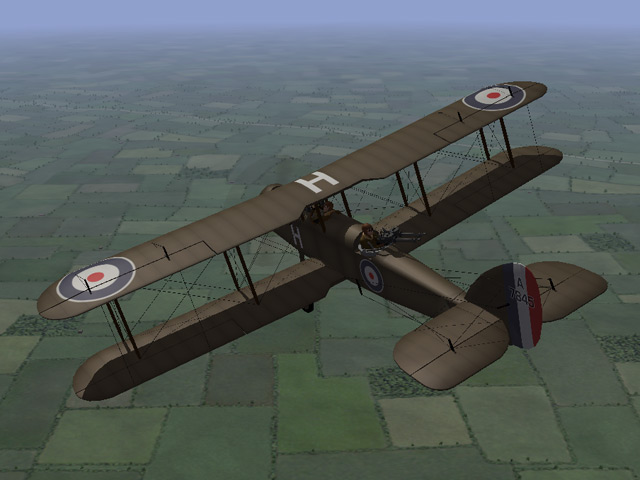
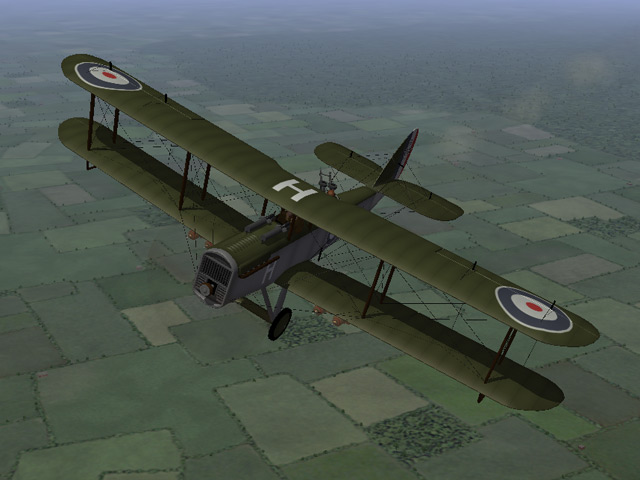
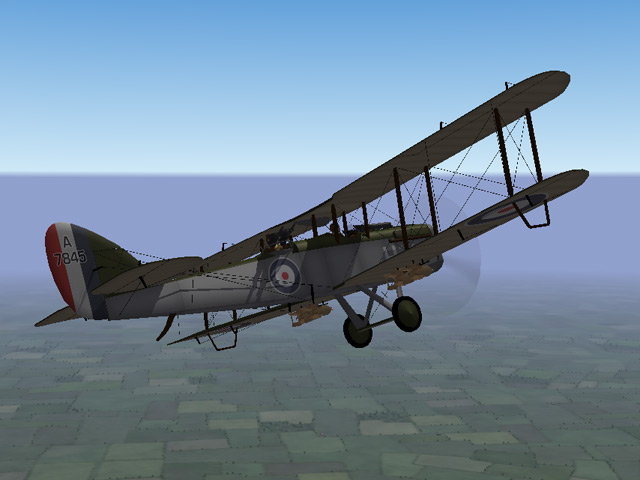
First of all, I have updated both the DH9 and the DH9a. Ojcar has made new data files which improve the plane's handling on take off, and improve the flight characteristics a bit. The new versions are available now. Secondly. I have uploaded a DH4 - 2 pack. I know that we already have a DH4 on Capun's site, but the difference from the DH9a was so minor that I went ahead and made a new version. Ojcar made two data files for the plane, one with a 250hp engine, and one with a 375hp engine. So I uploaded this as a two pack, they're actually identical except for the data files. My thanks to ojcar for the FMs, and to Sinbad for the resources.

-
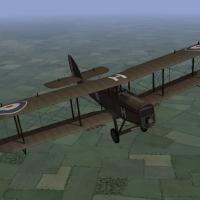
View File Airco DH4 - 2 pack Although best known in its role as a bomber, the Airco DH4 was intended to be a general purpose airplane and was used for recon and ground support as well. Early versions were powered by a 250hp Eagle engine. Later versions were powered with a 375hp Eagle engine, which made them very effective bombers. The biggest problem with the DH4 was the gas tank placed between the pilot and gunner, which made communication between the two almost impossible. I have uploaded two versions of the DH4 - Ojcar has created two FMs for the plane, one with the early 250hp engine, and one with the later 375hp engine. Both planes have two skins, a brown and an olive color. Both use the letter decals that come with First Eagles (which you can set in the loadout screen) and a set of serial numbers which will be applied randomly. There are also loadouts for light, medium, and heavy bomb loads. The skins, decals, and loadouts are interchangeable for the two planes. The skins are rather generic, I have included my skinning templates for those who wish to make better skins. Credits My thanks to Ojcar for once again making two excellent data files for the DH4. My thanks also to Sinbad for providing a great deal of resource information for this plane. Installation Instructions The two versions can be installed separately or both together. For FE1 - Unzip the file and move the folders named "AircoDH4_250" and "AircoDH4_375" into the FirstEagles/Objects/Airplanes folder. For FE2 - Unzip the file and move the folders named "AircoDH4_250" and "AircoDH4_375" into the FirstEagles/Objects/Airplanes folder. Then in the FirstEagles/Objects/Decals folder, create new folders named "AircoDH4_250" and "AircoDH4_375". Move the folders named "D" from the Airplanes/AircoDH4 folders into the corresponding Decals/AircoDH4 folder you just made. Submitter Stephen1918 Submitted 04/06/2012 Category Other Entente Aircraft
-
Version v1
538 downloads
Although best known in its role as a bomber, the Airco DH4 was intended to be a general purpose airplane and was used for recon and ground support as well. Early versions were powered by a 250hp Eagle engine. Later versions were powered with a 375hp Eagle engine, which made them very effective bombers. The biggest problem with the DH4 was the gas tank placed between the pilot and gunner, which made communication between the two almost impossible. I have uploaded two versions of the DH4 - Ojcar has created two FMs for the plane, one with the early 250hp engine, and one with the later 375hp engine. Both planes have two skins, a brown and an olive color. Both use the letter decals that come with First Eagles (which you can set in the loadout screen) and a set of serial numbers which will be applied randomly. There are also loadouts for light, medium, and heavy bomb loads. The skins, decals, and loadouts are interchangeable for the two planes. The skins are rather generic, I have included my skinning templates for those who wish to make better skins. Credits My thanks to Ojcar for once again making two excellent data files for the DH4. My thanks also to Sinbad for providing a great deal of resource information for this plane. Installation Instructions The two versions can be installed separately or both together. For FE1 - Unzip the file and move the folders named "AircoDH4_250" and "AircoDH4_375" into the FirstEagles/Objects/Airplanes folder. For FE2 - Unzip the file and move the folders named "AircoDH4_250" and "AircoDH4_375" into the FirstEagles/Objects/Airplanes folder. Then in the FirstEagles/Objects/Decals folder, create new folders named "AircoDH4_250" and "AircoDH4_375". Move the folders named "D" from the Airplanes/AircoDH4 folders into the corresponding Decals/AircoDH4 folder you just made. -
A lot of airplanes in WWI, especially those with inline engines, like the DH9 and 9a, developed quite a bit of torque on take off and landing. I've read that Camel pilots had to use quite a bit of rudder, or even ailerons on take off, and many crashed before they learned the maneuver. That's why so many planes, like the DH's, have skids at the end of the lower wings. In the picture of the LVG that 33Lima posted you can see a little air at the aileron, he's obviously giving a very small amount of yaw to the plane on takeoff. And if you look at the control wire at the base of the rudder, he may be turning a bit to the right as well. I'm guessing this is to counter the torque caused by the engine. I am still flying in Easy mode, so I don't have this problem
-
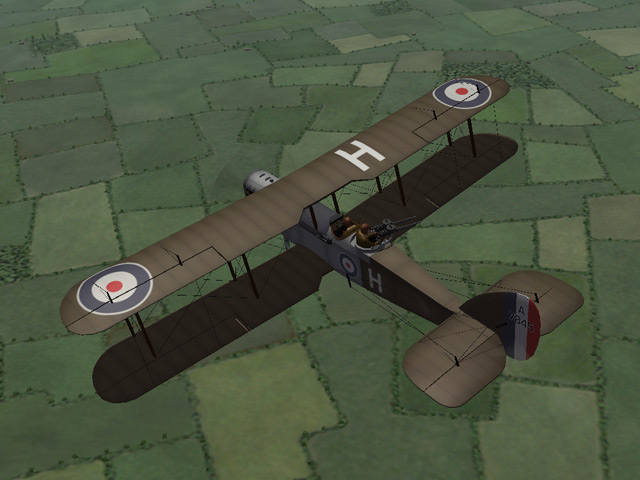
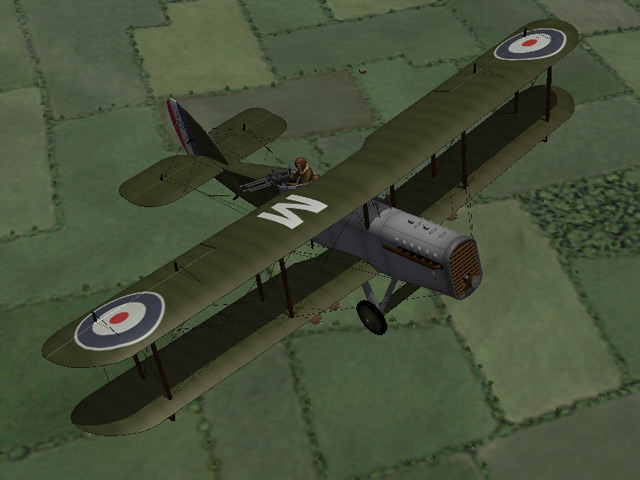
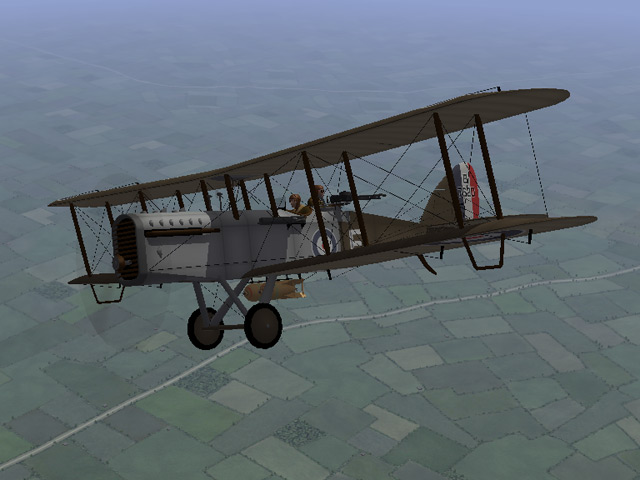
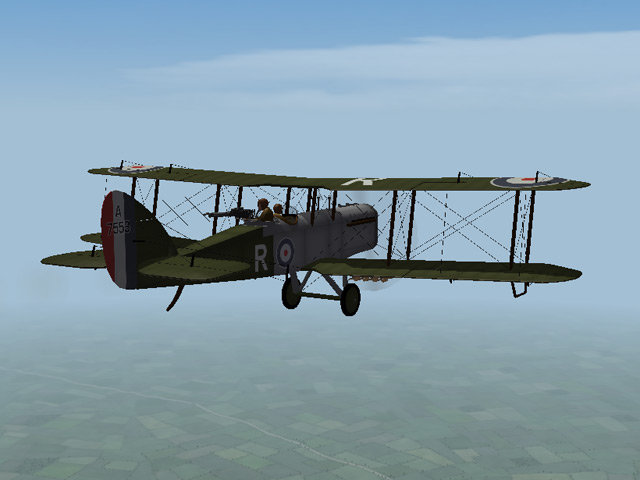
The Ninak has been uploaded. The only real difference between the DH9 and DH9a is the fuselage and cockpit, so it went pretty fast. Ojcar has made an FM with the 400hp Liberty engine. This bird can fly. My thanks to ojcar for his data work, and to Sinbad for a ton of resources for the 9a.
-
View File Airco DH9a "Ninak" The Airco DH9a, called the "Ninak" ("nine a") was introduced in June 1918 to replace the underpowered DH9. The 400hp Liberty engine required changes to the front of the fuselage, otherwise the plane was pretty much the same as the DH9. Although it was introduced late in the war, the DH9a did see service during the war, and was used extensively afterwards. I have included two skins, a brown and an olive color. Both use the letter decals that come with First Eagles (which you can set in the loadout screen) and I have included a set of serial numbers which will be applied randomly. There are also loadouts for light, medium, and heavy bomb loads. The skins are rather generic, I have included my skinning templates for those who wish to make better skins. Credits My thanks to Ojcar for once again making an excellent data file for the DH9a. My thanks also to Sinbad for providing a great deal of resource information for this plane. Installation Instructions For FE1 - Unzip the file and move the folder named "AircoDH9a" into the FirstEagles/Objects/Airplanes folder. For FE2 - Unzip the file and move the folder named "AircoDH9a" into the FirstEagles/Objects/Airplanes folder. Then in the FirstEagles/Objects/Decals folder, create a new folder named "AircoDH9a". Move the folder named "D" from the Airplanes/AircoDH9a folder into the Decals/AircoDH9a folder you just made. April 5, 2012 - Replaced data file with new version to fix problem with take offs and landings and making the plane fly better. Submitter Stephen1918 Submitted 04/03/2012 Category Other Entente Aircraft
-

Version v1
440 downloads
The Airco DH9a, called the "Ninak" ("nine a") was introduced in June 1918 to replace the underpowered DH9. The 400hp Liberty engine required changes to the front of the fuselage, otherwise the plane was pretty much the same as the DH9. Although it was introduced late in the war, the DH9a did see service during the war, and was used extensively afterwards. I have included two skins, a brown and an olive color. Both use the letter decals that come with First Eagles (which you can set in the loadout screen) and I have included a set of serial numbers which will be applied randomly. There are also loadouts for light, medium, and heavy bomb loads. The skins are rather generic, I have included my skinning templates for those who wish to make better skins. Credits My thanks to Ojcar for once again making an excellent data file for the DH9a. My thanks also to Sinbad for providing a great deal of resource information for this plane. Installation Instructions For FE1 - Unzip the file and move the folder named "AircoDH9a" into the FirstEagles/Objects/Airplanes folder. For FE2 - Unzip the file and move the folder named "AircoDH9a" into the FirstEagles/Objects/Airplanes folder. Then in the FirstEagles/Objects/Decals folder, create a new folder named "AircoDH9a". Move the folder named "D" from the Airplanes/AircoDH9a folder into the Decals/AircoDH9a folder you just made. April 5, 2012 - Replaced data file with new version to fix problem with take offs and landings and making the plane fly better. -
trotski00: Have you changed your weapons data file? If loadouts are working for some planes and not others, it could be that the game isn't always finding the weapon. If you have a weapondate.ini file in your Objects folder, try moving it out and playing the game. If the stock planes get their loadouts back, then you know the problem was in the weapons data.
-
I love the photo album shot! Nicely done!
-
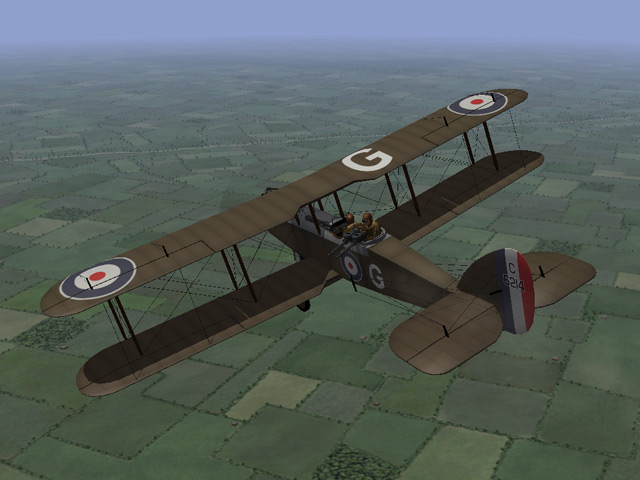
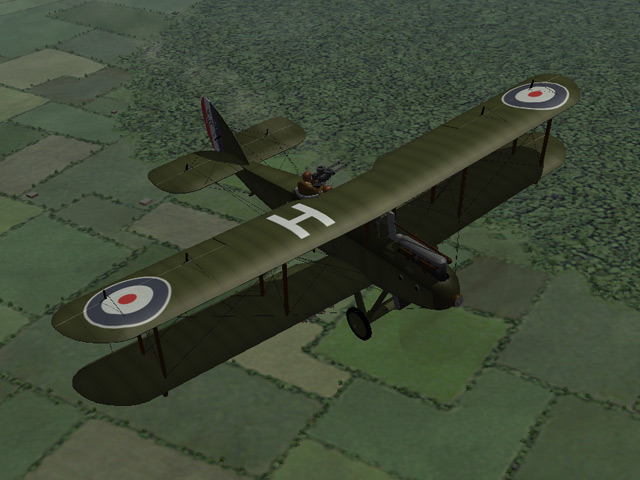
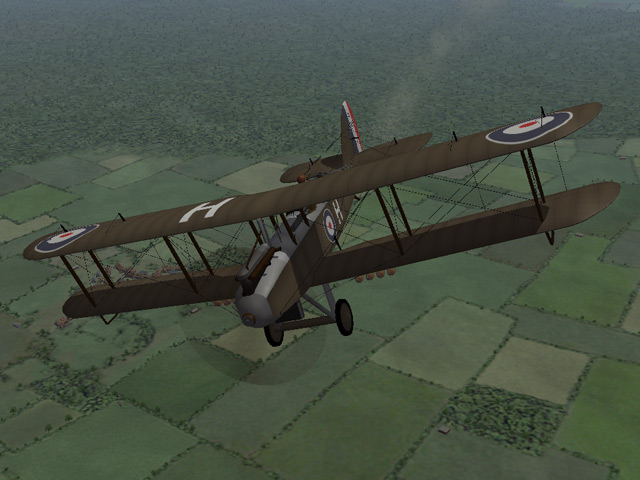
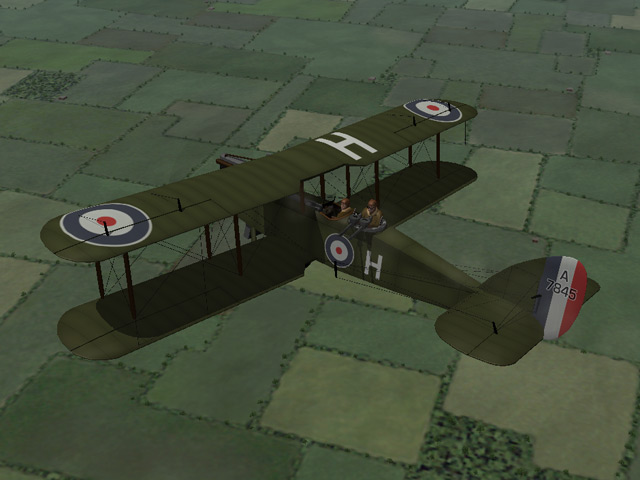
I have uploaded the Airco DH9. The file includes two skins and three bomb loadouts. Although plagued with engine troubles, the DH9 was actually a good bomber, as long as it didn't have to face too many enemy fighters. So it served with better success on the Eastern and Palestinian Fronts than it did on the Western Front. I have a DH9a and a DH4 in progress and will be uploading them soon. My thanks to my friend ojcar for great data file, and to sinbad for all his help with resources for building this plane.
-
View File Airco DH9 The Airco DH9 was introduced early in 1918 as an intended replacement for the DH4. The pilot was seated closer to the gunner in the DH9 and an internal bomb compartment was provided. However, because of the DH9's low performance and unreliable engine, the DH4 remained the better bomber until the DH9a was introduced a few months later. Nevertheless, the DH9 did operate with better success on the Eastern and Palestinian fronts where it faced fewer enemy fighters. I have included two skins, a brown and an olive color. Both use the letter decals that come with First Eagles (which you can set in the loadout screen) and I have included a set of serial numbers which will be applied randomly. There are also loadouts for light, medium, and heavy bomb loads. The skins are rather generic, I have included my skinning templates for those who wish to make better skins. Credits My thanks to Ojcar for once again making an excellent data file for the DH9. My thanks also to Sinbad for providing a great deal of resource information for this plane. Installation Instructions For FE1 - Unzip the file and move the folder named "AircoDH9" into the FirstEagles/Objects/Airplanes folder. For FE2 - Unzip the file and move the folder named "AircoDH9" into the FirstEagles/Objects/Airplanes folder. Then in the FirstEagles/Objects/Decals folder, create a new folder named "AircoDH9". Move the folder named "D" from the Airplanes/AircoDH9 folder into the Decals/AircoDH9 folder you just made. April 5, 2012 - Replaced data file with new version to fix problem with take offs and landings and to make the plane fly better. Submitter Stephen1918 Submitted 03/31/2012 Category Other Entente Aircraft
-
Version v1
470 downloads
The Airco DH9 was introduced early in 1918 as an intended replacement for the DH4. The pilot was seated closer to the gunner in the DH9 and an internal bomb compartment was provided. However, because of the DH9's low performance and unreliable engine, the DH4 remained the better bomber until the DH9a was introduced a few months later. Nevertheless, the DH9 did operate with better success on the Eastern and Palestinian fronts where it faced fewer enemy fighters. I have included two skins, a brown and an olive color. Both use the letter decals that come with First Eagles (which you can set in the loadout screen) and I have included a set of serial numbers which will be applied randomly. There are also loadouts for light, medium, and heavy bomb loads. The skins are rather generic, I have included my skinning templates for those who wish to make better skins. Credits My thanks to Ojcar for once again making an excellent data file for the DH9. My thanks also to Sinbad for providing a great deal of resource information for this plane. Installation Instructions For FE1 - Unzip the file and move the folder named "AircoDH9" into the FirstEagles/Objects/Airplanes folder. For FE2 - Unzip the file and move the folder named "AircoDH9" into the FirstEagles/Objects/Airplanes folder. Then in the FirstEagles/Objects/Decals folder, create a new folder named "AircoDH9". Move the folder named "D" from the Airplanes/AircoDH9 folder into the Decals/AircoDH9 folder you just made. April 5, 2012 - Replaced data file with new version to fix problem with take offs and landings and to make the plane fly better. -
Trotski00 and I have been exchanging messages for about a week. I've been trying to coach him through adding grenades to the AnatraDS. I even made a new _data.ini with weapons stations, a _loadout.in, and a new ini file for the plane. I'm wondering if his version is heavily modded and if that's somehow causing the problem he's having. I have attached a zip file with the files I made. Can somebody try these out on their computer and see if they work? They work fine on my FE1. Your help would be appreciated. AnatraGrenades.zip
-
These are beautiful skins. I look forward to flying them.
-
Does it always happen to the same tiles or does it move around? I don't have a very powerful computer and I have noticed something like from time to time, especially when I'm using High graphics mode. The tiles have a flat blue for the water, and the game applies another texture on top of the water. You're seeing a place where the texture is missing and only the tile material is showing. In addition to this, I'll sometimes see that very distant buildings will be white, and then show the correct colors as you get closer. I'm assuming that it's a memory or processor speed issue.
-
33LIMA - I really enjoy your action reports. They bring the game to life for me and I'm always inspired to fly another mission or two. Ojcar - Thanks for Armchair Aces, I find myself flying the missions instead of doing other things, like making new airplanes... :) I'm looking forward to future installments.
-
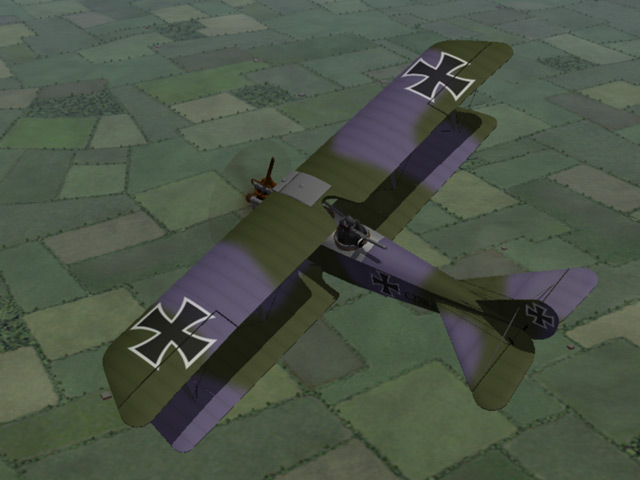
View File Rumpler C.I The Rumpler C.I was a general purpose two-seat plane first produced in 1915. It was used on all fronts and served throughout the war. My model is armed with a Parabellum machine gun on a Schneider Ring in the rear cockpit along with a synchronized Spandau mounted on the left side the engine. I have included two loadouts, one for eight 11 kilo bombs carried under the wings, and another for two 50 kilo bombs carried under the fuselage. I have also included three skinning options - A plain linen and a light blue paint representing early models, and a green/mauve camouflage for later in the war. I have included my templates for those who want to make additional skins. This plane uses the national markings that come with First Eagles, so you can change nationalities to fly for Austria, Bulgaria or the Turks. I have included decals for serial numbers and, on the linen and light blue skins, for flight letters. You can choose the letter in the loadout screen. The numbers will be applied randomly. Historical Notes: The serial numbers are fictitious, but in the correct range for the Rumpler C.I. I don't know if the flight letters are realistic. The plane looked too naked, and I saw one photo of a Rumpler with a letter "J" on the side, so I allowed my imagination to take over. Credits: My thanks again to Ojcar for making the excellent FM file for this plane. Also, my thanks to Nix for making the realistic engine sound file for the Mercedes 6 cylinder engine. (This is the same sound file used with the Albatros C.III so you may already have it.) Installation instructions: For FE1: Unzip the file and move the folder named "RumplerC1" into the FirstEagles/Objects/Airplanes folder. You also need to move the sound file "mercedes160m2.wav" into the FirstEagles/Sounds folder. For FE2: Unzip the file and move the folder named "RumplerC1" into the FirstEagles/Objects/Airplanes folder. Then in the FirstEagles/Objects/Decals folder, create a new folder named "RumplerC1". Move the folder named "D" from your Airplanes/RumplerC1 folder into the Decals/RumplerC1 folder you just made. You also need to move the sound file "mercedes160m2.wav" into the FirstEagles/Sounds folder. Submitter Stephen1918 Submitted 03/13/2012 Category Other Central Powers Aircraft
- 1 reply
-
- 1
-

-
I have uploaded a new version of the Albatros C.III. It's waiting for administrative review. While working on the Rumpler, ojcar made some changes to the Albatros C.III FM. The new FM is a little slower, but the plane climbs a little better and is harder to stall. With the new FM, this plane is now friendlier when flying in hard mode. I also made some very minor changes to the skins, I mostly just toned down the green, which I think was a little too bright.
-
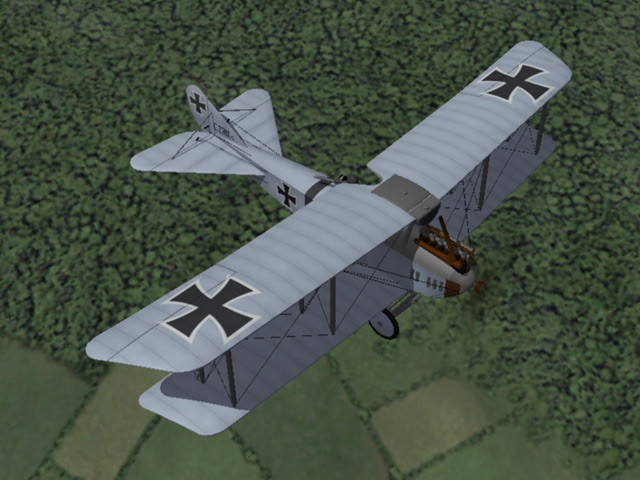
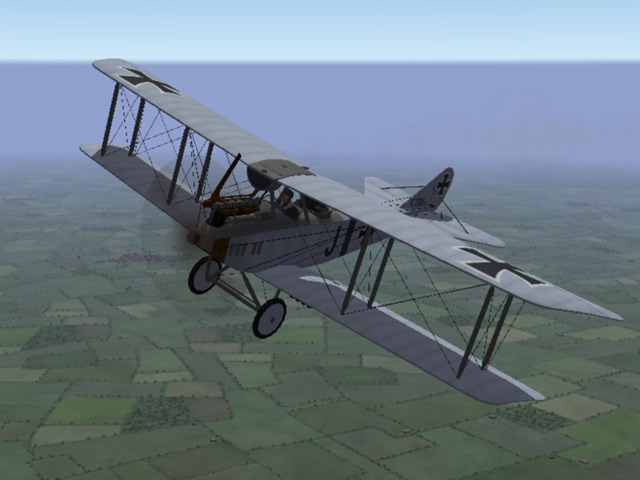
I've uploaded the Rumpler C.I , it's awaiting administrative review. This plane was used on all the fronts for most of the war. The download includes two skins, one for the early years and one for later. It also includes two loadouts for bombs. Ojcar has made a great FM for the Rumpler, it bogs down a little when carrying bombs (it had a 160hp engine) but performs very well as a recon/fighter. I have also included a sound file, made by Nix, for the 160hp Mercedes engine. My thanks to Ojcar and Nix for their help.

-
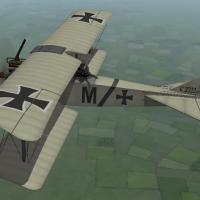
Version v2.1
752 downloads
The Rumpler C.I was a general purpose two-seat plane first produced in 1915. It was used on all fronts and served throughout the war. My model is armed with a Parabellum machine gun on a Schneider Ring in the rear cockpit along with a synchronized Spandau mounted on the left side the engine. I have included two loadouts, one for eight 11 kilo bombs carried under the wings, and another for two 50 kilo bombs carried under the fuselage. I have also included three skinning options - A plain linen and a light blue paint representing early models, and a green/mauve camouflage for later in the war. I have included my templates for those who want to make additional skins. This plane uses the national markings that come with First Eagles, so you can change nationalities to fly for Austria, Bulgaria or the Turks. I have included decals for serial numbers and, on the linen and light blue skins, for flight letters. You can choose the letter in the loadout screen. The numbers will be applied randomly. Historical Notes: The serial numbers are fictitious, but in the correct range for the Rumpler C.I. I don't know if the flight letters are realistic. The plane looked too naked, and I saw one photo of a Rumpler with a letter "J" on the side, so I allowed my imagination to take over. Credits: My thanks again to Ojcar for making the excellent FM file for this plane. Also, my thanks to Nix for making the realistic engine sound file for the Mercedes 6 cylinder engine. (This is the same sound file used with the Albatros C.III so you may already have it.) Installation instructions: For FE1: Unzip the file and move the folder named "RumplerC1" into the FirstEagles/Objects/Airplanes folder. You also need to move the sound file "mercedes160m2.wav" into the FirstEagles/Sounds folder. For FE2: Unzip the file and move the folder named "RumplerC1" into the FirstEagles/Objects/Airplanes folder. Then in the FirstEagles/Objects/Decals folder, create a new folder named "RumplerC1". Move the folder named "D" from your Airplanes/RumplerC1 folder into the Decals/RumplerC1 folder you just made. You also need to move the sound file "mercedes160m2.wav" into the FirstEagles/Sounds folder.