


MigBuster
-
Posts
9,165 -
Joined
-
Last visited
-
Days Won
27
Content Type
Profiles
Forums
Gallery
Downloads
Store
Everything posted by MigBuster
-
Problems with Latest weapons pack and some addons...
MigBuster replied to MKSheppard's topic in General Discussion
Yes this is to do with the individual planes themselves. To get them in the game depends on nation, date, attachment type and and type of weapon as you have found out above. -
tbh the missions involving clearing enemy AAA are very difficult in hard HUD mode to the point of painful. You can use padlock or the zoom in function to get an idea of where they are - also the ground radar if you have one - you soon get to see that the dots are not completely meaningless. For static large targets you can follow your waypoints and the map. I compromised in the end by using the normal hud but removing all the displays and making the red box 1x1 in size. IRL they may have had help from the ground so features like these make up for that.
-
There are no reflections in the F16 pits from what I can see - this depends on how the model was created I would say - Im not sure what needs changing but its nothing to do with your system or install.
-
[Help me]Where could I download Deuces's WOV tileset ?
MigBuster replied to PPPBEEBEE's topic in General Discussion
I have Firefox too and it works ok for me It may be your settings or your firewall. I am behind a router and use these settings: Tools -> Options ->connection settings and check "Auto detect proxy settings for this network" If you are at home then check this out. "pinging" uses different methods to how a browser connects to a server so its not a definitive way to tell regards -
The F16 pit is still a beta and has not been finished I believe. I think the CCIP does this in all the planes even the stock WOE ones - though if someone could confirm that. The F16 does not have struts at the front of its canopy - if you look around to a 6 oclock view you will see the struts at the rear. For the burner - open up F-16A_data.ini in notepad and use the find function to find the [engine] section which will be near the bottom. Check the following lines say this and change them if not: AfterburnerNodeName=afterburner AfterburnerEmitterName=AfterburnerEmitter It assumes that you have installed a modified sound file into your sound folder specifically for the F16. btw the ground radar does not work with the pit either yet
-
F-5C "Dirty" USAF Skoshi Project - Repainted
MigBuster replied to MigBuster's topic in File Announcements
Well I am honoured and I am really glad you like the skin :) I give my total respect to your friend - he must have been a good pilot to get chosen for that project - and he got to fly the only plane that could turn with the Mig 17 from what I have read. Yes us dreamers can only marvel at what real combat pilots had to go through! -
F-5C "Dirty" USAF Skoshi Project - Repainted
MigBuster replied to MigBuster's topic in File Announcements
I will take a look and see what I can do. -
MissileObject.dll causing an error
MigBuster replied to serverandenforcer's topic in General Discussion
I think that error is to do with the version of direct X you have. If you are patched up to the latest version of the game then download the latest version of Direct X from Microsofts web site. Even though you may already have Direct X 9c there are later versions of it required for the game. The link at the bottom of this page should send you to the right place (its the same for each game in the series): http://www.thirdwire.com/downloads_wov.htm -
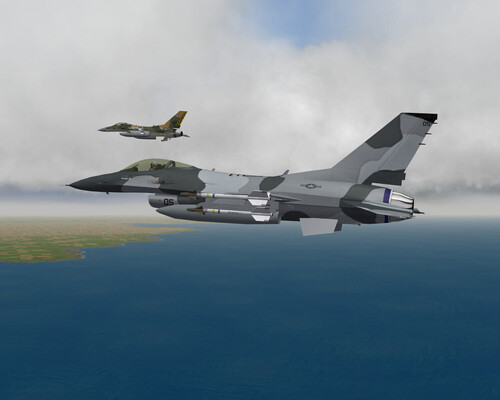
View File F-16A/N Aggressor Snow Camoflage This is a skin for the F-16A Aggressor,and F-16N Aggressor US Navy aircraft. Although there are a few of these about this has a new pattern based on photos in the F-16.net database - In particular: http://www.f-16.net/gallery_item40592.html http://www.f-16.net/gallery_item40595.html In real life its only the F-16A but as the template fits it may as well go on the N as well :) I just like the colour scheme basically! size: 1024x1024 Tested on: F-16A Aggressor (folder:F-16A_USN) F-16N Aggressor (folder:F-16N) Please read the readme file to ensure the decals are installed properly. Many thanks to all involved in the F-16 project (Viper team) and for the templates. Also for the NSAWC3 skin author which gave me ideas for the wing lines Only tested in SFG but should also work in WoE/WOV/SFP1 Press the button below to download this skin and save it to your Desktop. Submitter MigBuster Submitted 08/26/2006 Category Fictional/What If Skins
-
259 downloads
This is a skin for the F-16A Aggressor,and F-16N Aggressor US Navy aircraft. Although there are a few of these about this has a new pattern based on photos in the F-16.net database - In particular: http://www.f-16.net/gallery_item40592.html http://www.f-16.net/gallery_item40595.html In real life its only the F-16A but as the template fits it may as well go on the N as well :) I just like the colour scheme basically! size: 1024x1024 Tested on: F-16A Aggressor (folder:F-16A_USN) F-16N Aggressor (folder:F-16N) Please read the readme file to ensure the decals are installed properly. Many thanks to all involved in the F-16 project (Viper team) and for the templates. Also for the NSAWC3 skin author which gave me ideas for the wing lines Only tested in SFG but should also work in WoE/WOV/SFP1 Press the button below to download this skin and save it to your Desktop. -
MissileObject.dll causing an error
MigBuster replied to serverandenforcer's topic in General Discussion
I have only seen this when I have been using an older version of the Weapons Editor to add weapons. To check this go into the "weapons" folder and cut the file "Weapondata.DAT" and paste it somewhere safe. Then run the game and see if its okay. If it does run now - you will notice that the new weapons probably are not in the game anymore but at least we know what the problem is. You basically have to use the weaponeditor included in the latest weapon pack - (run under Windows 98 mode) if you use Win XP to open up weapondata.INI and save it which will create a new working weapondata.dat file. hope this makes sense - if not come back. there is loads of info about this on the WOE/WOV knowledge base on this site - -
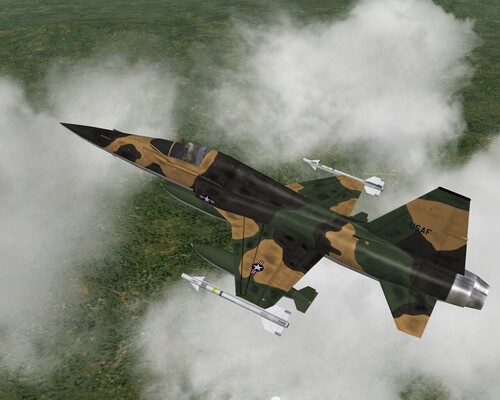
View File F-5C "Dirty" USAF Skoshi Project - Repainted Update ----2nd August 2008 - This has been replaced by http://forum.combatace.com/index.php?autoc...p;showfile=7066 Submitter MigBuster Submitted 08/20/2006 Category F-5 Freedom Fighter Skins
-
537 downloads
Update ----2nd August 2008 - This has been replaced by http://forum.combatace.com/index.php?autoc...p;showfile=7066 -
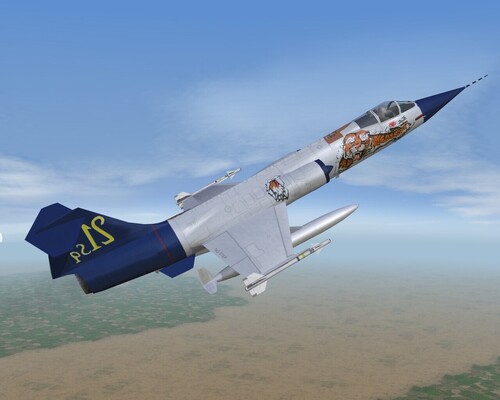
View File F-104S The Last Starfighter - repainted Repaint of the skin "The Last Starfighter" for Ajunaidr's F-104S Starfighter. (512x512) Press the button below to download this skin and save it to your Desktop. Only tested in WoV and SFG but should also work in WoE Many thanks to Ajunaidr for the fantastic modelling skills! See the Readme file before installing. regards MigBuster30 - 18th August 2006 Submitter MigBuster Submitted 08/18/2006 Category F-100/F-101/F-102/F-104/F-105/F-106 Skins
-
174 downloads
Repaint of the skin "The Last Starfighter" for Ajunaidr's F-104S Starfighter. (512x512) Press the button below to download this skin and save it to your Desktop. Only tested in WoV and SFG but should also work in WoE Many thanks to Ajunaidr for the fantastic modelling skills! See the Readme file before installing. regards MigBuster30 - 18th August 2006 -
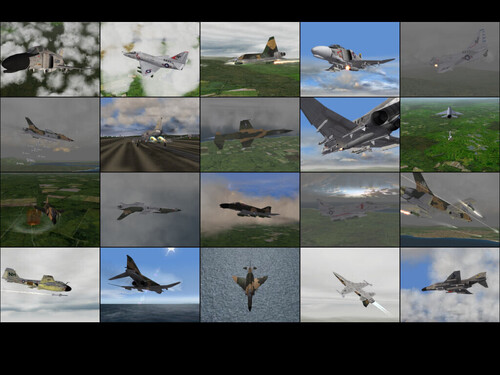
View File Alternative Loading Screens Pack - 10 Alternative Loading Screens Pack 10 Single Generic Loading screens for Wings Over Vietnam For people who only use one general loading screen. Screens are in the resolution of 1280 x 1024 (5:4 ratio) and they can be used in SFP1/SFG/WOV/WOE. See the README.txt file when you have downloaded them. Many thanks to the creators of the fine 3D models and scenery mods! cheers MigBuster30 22-07-2006 Submitter MigBuster Submitted 07/22/2006 Category SF/WO* Hanger/Menu/Loadout
-
230 downloads
Alternative Loading Screens Pack 10 Single Generic Loading screens for Wings Over Vietnam For people who only use one general loading screen. Screens are in the resolution of 1280 x 1024 (5:4 ratio) and they can be used in SFP1/SFG/WOV/WOE. See the README.txt file when you have downloaded them. Many thanks to the creators of the fine 3D models and scenery mods! cheers MigBuster30 22-07-2006