


MigBuster
-
Posts
9,165 -
Joined
-
Last visited
-
Days Won
27
Content Type
Profiles
Forums
Gallery
Downloads
Store
Everything posted by MigBuster
-
The F-16 Block 10 update has a cockpit that uses avionics70.dll with the CCIP etc - so I ported that into my block 30. copy the cockpit folder, the avionics.ini and cockpit.ini files over and point the f-16c_b30.ini to them and also change avionics60dll=avionics70.dll Dont write over the existing files in the b30 folder - rename them to cockpit_OLD or something. The A7E HUD was updated about a month ago - search on the simhq forums - there is a post about it. dunno about the others
-
Ha - Ive been pressing that key for 3 years in the hope that maybe....just....1 day!! I dont think the feature has been implemented yet - someone correct me if im wrong - one of the many original SF features TK has yet to sort out. So if you need help in the future....well run, fight, ram, or Eject.
-
Some great looking high res pics there - Surprised to see a static B1
-
Checkout the Thirdwire series Strike Fighters/Wings Over Vietnam / WIngs over Europe. There are thousands of free mods on this site in the downloads section - including countless Planes to skin. If you were to choose Wings Over Vietnam - you are still in a close combat situation - mainly because the missiles are cr*p - but its an entirely new way of fighting compared to WW2. The avionics are simple - and its a relatively easy game to get into - and once you have been playing it for a while its something you can just play when you have a 15 mins :) check out www.simhq.com forums also to see whats going on: http://www.simhq.com/simhq3/sims/boards/bb...ubb=forum;f=145simhq
-
In a campaign only certain weapons are available depending on what difficulty you have set the game up to be and what squadron you choose. This can be changed if you wish by altering the particular campaign ini file - but to do this you would need to read the knowledge base on this site. Having only certain weapons to choose from makes things more of a challenge! regards
-
Could be how WIndows has set your Keyboard up - have you tried going into Options-> controls and remapping the key to another -unused one - or a joystick button - then try that as for bombs not showing up - what the actual 3d models? Unless you have changed the aircrafts loadout.ini file they should be fine. Are you using a 3rd party plane downloaded from this site by any chance?
-
The only way to tell for sure i guess is have a program on your pc that logs every single file change so your could check it - or ask Thirdwire :) If you have extracted any files from the CAT files and changed them and they are missing after you apply the patch its a good bet they have been changed! - so in this case i would mod them again from the new version in the CAT file. In the case of the recent patch which was small - I just installed it over my modded versions - and took out the sea and terrain mods from the terrain folder - to try out the new sea. Then i just put back some of the bits i wanted. I to have basic fresh installs that i just patch and then copy over - but I will only do this if a large patch comes out like SP4 - its annoying having to install so many mods again :(
-
Would have thought that card would be fine tbh right click anywhere on your desktop and select 'properties' to bring up 'Display Properties' Select the "settings" tab Click on the "advanced" button Select the "Monitor" tab Make sure it recognises your monitor type make / model Then select the geforce 5200 FX tab or what ever its called Note down the "ForceWare version" if its under 84.21 then its time to download the latest drivers from nvidia and try them - making sure you uninstall the existing ones - the 'add / remove programs' in the 'control panel' should have "NVIDIA DRIVERS" in there somewhere. Hope fully you should have your existing drivers on the disk that came with the card if you need to reinstall them again.
-
assuming you set the correct aspect angle for the resolution - do you know what type / make of graphics card you have? If you have XP go to: Start->AllPrograms ->accesories->System Tools ->System Information when the system information loads up down the left hand side expand "Components" by clicking on the + sign, to the left of it, then select "Display"
-
What monitor do you have and whats the native resolution (if its an LCD)? In the grahics settings make sure you also select the correct "Display Aspect Ratio" for your monitor as well as the "Display Resolution". If that is correct then make sure you have the correct graphics drivers for your card - as in check the manufacturers website - and get the latest version if poss. Because its happening to other games it is likely to be your graphics card. Also check whether your card is able to support WOE.
-
The person that did the flight model can help - I think the author of the model is RussoUK2002 who moderates at simhq.com sometimes.
-
"Plea for help" a voice that comes from China
MigBuster replied to CHN-Angel's topic in General Discussion
I would say that the MX440 is the problem. This card despite it being called a "Geforce 4" is more in line with the actual Geforce 2 and you will find that some modern games - like "Heroes of the Pacific" make a point of not supporting it. Unfortunately the only way around this is to get a newer graphics card. -
Thought this was a feature - I quite like it - but then again I dont fly any bombers! :tomato2:
-
"Plea for help" a voice that comes from China
MigBuster replied to CHN-Angel's topic in General Discussion
Hi CHN From what I can tell - you have downloaded a few planes and put them into WOE. But with the F16 F18 and F14 the screen becomes unsteady - is that right? Does this happen only when you load up the above planes? What do you mean by Unsteady? - Does the whole screen become unsteady or only part of it? Do you get any error messages? Have you installed the latest patches/updates to WOE? Have you got the latest graphics drivers installed for your graphics card? -
Random crashes with no pattern could signify a game file or graphics driver problem If it was me i would be checking out the graphics drivers - and if no joy reinstalling the game from scratch - backing up any mods you want to keep of course - and then installing the latest Direct X and SP4. Of course check the PC for any spyware / viruses - or any processes trying to start when you are running the game.
-
Your PC is more than good enough to run the game - assuming you defrag it and run chkdisk on it when you need to. If all your other planes work then try downloading the Block 10 again and remove the Block 10 you have currently - in case a file has been moved or something is corrupt.
-
I have the Block 10 and it works okay for me in SF with Service Pack 4. Do you get any error messages and what is the exact wording? At what point does it crash the game? the loading screen? the weapons screen? Bear in mind that WOV only goes to 1973 and so if you want to use the block 10 (1979) in that then you need to change the game dates in WOV if you havnt done so already. I assume the other planes still work okay? ps - make sure the nation is set to USAF in the data.ini file
-
Hi Mur, No I havnt really messed around with the avionics that much - I suspect you would need several files from the F16 cockpit and then make the relevent changes to the F14's avionics / data/ and cockpit ini files - so its not that straightforward. It may be worth your while mailing the author of the F14 to see if the HUD is being updated already - I know the A7E hud has just been modifed to late 70's standards: http://www.simhq.com/simhq3/sims/boards/bb...;f=145;t=004792 Perhaps they can also give you advice! If you want to have a go yourself - then start with the knowledgebase on this site and search the forums. Also search the forums at simhq - including the archive sections - there is so much information there! Some things to note: Only work on a backup copy of the F14 so it doesnt matter if you mess things up You need to ask permission from the owners of the model files
-
It is possible - if you look at some of the modern planes (F18, F16) for download on this site they have modern Head Up displays like the Top Gun one from the 1980's. If you are playing WoV with stock planes before 1972 then none of them really had advanced Head up Displays and radars that worked like that. As far as i know no one has bothered modding a 1960's plane with advanced avionics - mainly because I suppose they want to keep some realism in the game. Also setting the Hard HUD to be like that would make it an EASY HUD really. regards
-
View File F-16A Block 15 - Venezuelan Air Force (FAV) This file is not broken anymore! 21-10-2006 whoops TWS mode re-added V1.2 - updated on 20-10-2006 New Early F-16 Cockpit added - Many humbling thanks to the Mirage Factory for their great work. Gun sight angle changed RPM analogue dial ratio changed NATO loadout file changed - AIM-7's can not go on the outer underwing stations! Flaps now automated V1.1 - Updated on 28-9-2006 Changes made: Internal fuel load decreased Empty weight increased wingtip vortices removed The F-16A Block 15 for the FAV - or Venezuelan Air force in service from 1982 to present. Strike Fighters / WOV / WOE Service Pack 4 only. Install Instructions included for the extra weapons and white fuel tanks - also how to put Venezuela in the game as an enemy or freindly. 2 x FAV skins included (1024x1024) Many thanks to the Viper team who put this excellent F-16 project together in the first place and also for allowing me to modify it. Known Issues 1. The Ground Radar does not work due to use of the advanced avionics DLL - a known issue that Thirdwire are looking into. 2. The cheek station for the Litening pod is not implemented on this model PS: This mod is not supported by anyone: If you have any problems with the install instructions then please ask for help on the forums at either www.simhq.com or www.Combatace.com. Here you can also search previous posts – where you will find answers to nearly everything! MigBuster30/Coolhand29 10-9-2006 Submitter MigBuster Submitted 09/10/2006 Category F-16 Fighting Falcon / F-2A
-
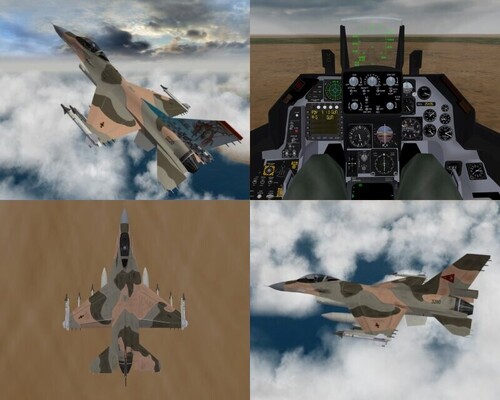
1,635 downloads
This file is not broken anymore! 21-10-2006 whoops TWS mode re-added V1.2 - updated on 20-10-2006 New Early F-16 Cockpit added - Many humbling thanks to the Mirage Factory for their great work. Gun sight angle changed RPM analogue dial ratio changed NATO loadout file changed - AIM-7's can not go on the outer underwing stations! Flaps now automated V1.1 - Updated on 28-9-2006 Changes made: Internal fuel load decreased Empty weight increased wingtip vortices removed The F-16A Block 15 for the FAV - or Venezuelan Air force in service from 1982 to present. Strike Fighters / WOV / WOE Service Pack 4 only. Install Instructions included for the extra weapons and white fuel tanks - also how to put Venezuela in the game as an enemy or freindly. 2 x FAV skins included (1024x1024) Many thanks to the Viper team who put this excellent F-16 project together in the first place and also for allowing me to modify it. Known Issues 1. The Ground Radar does not work due to use of the advanced avionics DLL - a known issue that Thirdwire are looking into. 2. The cheek station for the Litening pod is not implemented on this model PS: This mod is not supported by anyone: If you have any problems with the install instructions then please ask for help on the forums at either www.simhq.com or www.Combatace.com. Here you can also search previous posts – where you will find answers to nearly everything! MigBuster30/Coolhand29 10-9-2006 -
A real life crocodile dundee / tarzan - got close to so many dangerous animals which made for some great TV. Like anything with those risks involved there is a high probababilty of harm - guess his luck run out. seemed like a great bloke though!
-
1. Wings over Europe is the latest in the series and was released this year yes. 2. None of the games have the F14 in off the shelf - it is a third party Mod - you need to download it from the downloads section here or from www.column5.us. It should work in any game of the series - you will find that about 95% of the mods work ok in SFP1/SFG/WOV and WOE because they all use the same engine. 3. SFG was released later in europe, includes 3 more campaigns and has a lot more placed ground objects. The C130 and F104 were removed from this game due to copyright issues - but could be added later anyway by downloads from Thirdwires site. 4.Each download should come with a readme file. Usually you download the plane and drag the folder with the files to the objects/aircraft folder. Adding weapons can be more tricky - but its really not difficult if you persist. Read the knowledgebase on this site and also search the simhq.com forum also regarding any questions - everything you need to know can be found by searching :)
-
1. Copy the text below fully between the dashed lines - DO NOT include the dashed lines though! 2. Paste it into Notepad and save it as a file called HUDDATA.INI (it must be called exactly that!!) 3. Move the file into your "Flight" folder (ie StrikeFightersGold\Flight)- MAKING SURE you do not over write any files in there already. If you already have a file called Huddata.ini then rename it to huddataOLD.ini Start the game and if you dont like the results remove the file from the flight folder and all will be back to normal. ------- [Debug] DisplayDebug=FALSE TextFontName=Arial TextSize=9 [infoDisplay] BackgroundImage=TextBackground.tga BottomLeftPosition=0.01,0.985 BottomRightPosition=0.99,0.985 DisplayWidth=0.0 VerticalBorder=0.0015 HorizontalBorder=0.008 EnemyTargetColor=0.0,0.0,0.0,0.0 FriendlyTargetColor=0.0,0.0,0.0,0.0 UnknownTargetColor=0.0,0.0,0.0,0.0 WaypointColor=0.0,0.0,0.0,0.0 TextFile=HUDText.str NormalColor=0.0,0.0,0.0,0.0 WarningColor1=0.0,0.0,0.0,0.0 WarningColor2=0.0,0.0,0.0,0.0 AGLAltStart=609.6 AGLAltWarning=152.4 [Display001] DisplayType=DIRECTOR ObjectType=TARGET_ENEMY ConeSize=1 BoxSize=1 BoxType=SQUARE BoxColor=1.0,0.0,0.0,0.75 ConeModelName=redcone [Display002] DisplayType=DIRECTOR ObjectType=TARGET_FRIENDLY ConeSize=1 BoxSize=1 BoxType=SQUARE BoxColor=0.0,0.0,1.0,0.75 ConeModelName=bluecone [Display003] DisplayType=DIRECTOR ObjectType=NEXT_WAYPOINT ConeSize=0 BoxSize=0 BoxType=TRIANGLE BoxColor=0.0,0.0,0.0,0.0 ConeModelName=whitecone [Display004] DisplayType=RADAR PosX=0.865 PosY=0.015 Width=0.0 Height=0.0 Alpha=0.60 InitTime=2.0 [Display005] DisplayType=DIRECTOR ObjectType=RADAR_TARGET ConeSize=1 BoxSize=1 BoxType=DIAMOND BoxColor=1.0,1.0,0.0,0.75 ConeModelName= ---------------