
Erik
-
Posts
7,265 -
Joined
-
Days Won
43
Content Type
Profiles
Forums
Gallery
Downloads
Store
Everything posted by Erik
-

Unable to upload pictures
Erik replied to stingray77's topic in Site Support / Bug Reports / Suggestions
Go here to: Manage Attachments If you use the gallery to create your own album you can upload all the images you want there and link them into your post using the supplied BBC code available after upload. Then you won't have to worry about your attachment space. FYI Erik -
Some might say that what can be perceived as an oversight is also the genius to the ThirdWire series. The extreme mod'ability is what makes it highly desirable to the degree that this entire community rallies behind it.
-
New Forum Software - Error Reports
Erik replied to Erik's topic in Site Support / Bug Reports / Suggestions
>> RESOLVED << -
OT A little Joke for you all
Erik replied to UK_Widowmaker's topic in WOFF UE/PE - General Discussion
-
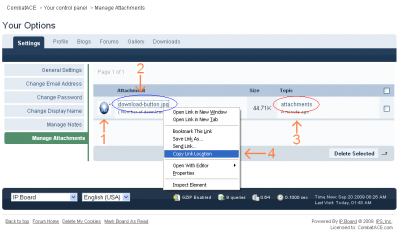
To be crystal clear. Go here to manage your files: Manage Attachments You'll see a page that looks like this: 1. Shown as #1 in the image above is a thumbnail for easy reference if you have a lot of images uploaded in your attachment manager and they are not named for easy reference this will help you know what is what. 2. Circled in blue and shown as #2 is the LINK to the file's physical location on the site. A) You can click on the link (shown by #2) to take you to the file then copy the URL from your browser. B) You can right click the link (shown by #2) and select "Copy Link Location" as #4 shows you (browser enabled option only). C) You can right click the link (shown by #2) and use whatever option you have to copy the link which may include viewing the "Properties" of the page element (read: link) which should include a physical URL (read: link) that you can copy and paste to your clipboard. D) You can download or view the file by clicking the link (shown by #2) and then re-upload/re-attach it as you see best. E) You can delete the file by selecting the check box on the far right (not numbered) and then clicking on "Delete Selected" at the bottom of the list (not numbered). 3. Use the link circled in red and shown as #3 if you want to view the topic, personal message, or original location that the file was used in or attached to. The link provided as shown in #3 will take you there. 4. My way of right clicking an element on a page and copying the link URL to my clipboard.
-
My suggestions would still apply. 1. Create a topic in the multiplayer forum. Call it whatever you think is appropriate. (example: Our Multi-Player Files) 2. In that new topic you create you can list the stuff that's needed and include it in the topic. Suggestions: A) If you have multiple files that will be needed put them in a compressed archive file (rar / zip / 7zip) B) If you are including someone's work other than your own make sure you a readme.txt document giving them credit and a link to the original file. C) You should always include installation instructions. POST EXAMPLE: Here are the files you will need for CrateRobber's game on Wednesday. Go get this file: ::LINK:: All the files you need are included in this file. Please view the readme.txt included inside for installation and file credits. Here is the file you need for DrunkenDodger's fly-in on Saturday. Get the scenery file here: ::LINK:: Here is the teamspeak configuration text file to get you set up and ready for voice communication. Get the file here: ::LINK:: Here is a really helpful post on how to configure your machine for multiplayer. View the discussion here: ::LINK:: ----------------------------------------------- I think you get where I'm going with this. Once you've created the topic it will have everything the guys need and you can point them to that topic when you need to. Since it's your topic you can edit it anytime you want in the future to make changes, etc. Obviously before you make the post you'll want to get everything put together and uploaded then you'll have the links you need to include into your post. As for someone's work being included I would simply get permission from the author. If that isn't possible and the file is public then make sure you include a readme document in the compressed archive that gives them proper credit and where the file is available (link). Most "reasonable" people find this acceptable procedure. (read: use my file, it's for public distribution, if you place it somewhere else for upload be sure to credit me for my hard work and give the people my site address as a courtesy for using my stuff). That's pretty much it. Hope that makes sense.

-
I'm not sure I'm following you on this. Let's look at the file you uploaded to the download section in the OFF category. I want to show you this file you uploaded. Please visit this link. U-Boats Support for this file can be found here. Support Forum ------------------ The above is using the insert link function in the board software it looks like this: ------------------ The links I used are: A) http://forum.combatace.com/index.php?app=downloads&showfile=9794 B) http://forum.combatace.com/index.php?showtopic=46590 ------------------- You'll notice that even if I just drop the links into a post, reply, PM, or just about anywhere the actual "unprett-i-fied" links still work. ------------------- Please let me know if I'm missing something. E
-
You don't want to do that. The gallery will dump the file because it's recognized as a file that's not in its proper format. My recommendation is to link back to the post with the file and create a post with those links to the files you've attached / uploaded for easy reference and update-ability by you. -OR- You can upload the file to the download section, that is what it's for. Not everything thing there is "model" related. E
-
GR ... I think what Barnstorm is getting at specifically is directly related to the OFF Forums. For everyone else the main board index (what you spoke about) is what everyone sees when they get to the boards. For the OFF guys most of them have or use a link that opens just their specific forum on the boards. If you never ventured outside that forum you'd never know the rest of CA existed. That's why I referred the issue to the OFF Moderators as they maintain the attributes, posts, and direction of the group in the OFF Forum. What I may do is start a help topic in the help section on how to report, where to report, what to report when things go wrong. This way anyone looking for help will have a link to the specific area to post problems concerning the site. E
-
Walk softly grasshopper but do not tear the rice paper.
-
That's a tough one ... So you don't think just having this bug/suggestion forum is enough? I really hesitate peppering the site with links for site issues which might suggest that what's taken place over the last week (read: forum software upgrade) happens all the time and more importantly would happen when I'm not here. Generally I make the changes and updates and check to make sure things are working and move on. Sometimes I miss some stuff which is what happened with the OFF Forums and oh by the way it wasn't just OFF it was a global issue I just never drilled down far enough to see it, my apologies. I'd like to say that once the software is up and running we clip along at a fine pace. The last major overhaul like this happened two years ago but we ran smooth after the upgrade. Mind you there are still things to do and I'm working as fast and as "top down important" as possible, and I'm confident we're going to end up with a rock solid configuration with nothing left half-baked or undone. To answer your question about where stuff like the OFF forums being down should be reported. Right here in the bug/suggestion forum, that's what it's for. Now if the OFF guys need to develop an SOP for their specific section that would be totally up to them on how best to facilitate a SOP. Hope that helps and thanks for the suggestion I'll keep it on my list and if something pops up that says "hey that's where this belongs" I'll get it implemented. E
-
New Forum Software - Error Reports
Erik replied to Erik's topic in Site Support / Bug Reports / Suggestions
>> RESOLVED << -
Double upload, My Fault
Erik replied to Silverbolt's topic in Site Support / Bug Reports / Suggestions
no problem, fixed -
New Forum Software - Error Reports
Erik replied to Erik's topic in Site Support / Bug Reports / Suggestions
It appears it's happening in the CA_Original Skin Set. It does not appear in a couple others I checked so it's definately a skin related issue. I've got some debugging set as well so errors will print to screen for some other stuff I'm working on which is why the error appeared. Thanks for the report, always helpful. E -
I'm not the CA Hive Commander Anymore?
Erik replied to Silverbolt's topic in Site Support / Bug Reports / Suggestions
well we can bring them back but you guys will have to convince Fates. lol -
... and this whole time I thought we were talking about a hard drive. woulda'known
-
If it didn't eject cleanly then it's still thinking it's connected to the MAC or at least that's what it's expecting. Putting it back on the MAC it was plugged into prior to it going down have any affect? I had an older drive similar that had issues like that and it required a reset which dropped all my data but brought the disk back to life. I'm sure you've gone through all the support related topics here? Mobile Drive
-
That would have to be done by hand since this software doesn't allow personalized edits by the community members. I checked into that before actually making a mess out of the ranking system yesterday. So in a short answer, yes it's doable, but I'd have to do it and my time right now probably better spent with the remaining issues from the conversion. However, I may throw in a couple freebie changes for a little participation. Keep a watch on the boards. :) E
-
Are you sure it's the flashdrive? Have you put it into another computer or even back on the MAC? If you can narrow down the problem a bit more it would helpful as it's probably something simple.
-
I believe what we should be doing is "unapproving" the file which hides it from downloading but does not remove it from the system. If you are the file owner (submitter) then you should receive a PM here with why the file was unapproved and what edits are needed. You can then just make the edits to the file, re-upload, upload a missing screen shot whatever is missing and once that's done responding to the PM will be fastest way to get the file back online. There shouldn't be any offense taken by these actions as they are designed to benefit the community instead of mass producing a bunch of files to the public that are incomplete, don't have installation instructions, or a readme file. I believe we are saving hundreds if not thousands of hours of countless frustration by not subjecting the community to faulty packaging which is what this boils down to. I think when you stand back and look at the entire picture and not just the fact that a "single" file was removed it will make sense and it then becomes an easy thing to support. Imagine waiting an hour to get something downloaded and you're itching to go weapons hot and then *crash* your new mod has no install instructions or direction on how or where to get help if there's a problem. E
-
FSInsider - SP2 / Accelerator Notes You may want to take a look here. I know lots of people who have similar issues and it's usually because they've patched to SP2 then try to install the Accelerator. Read the above link for more information. E
-
Yup that's all it is. There are member tags (ranks) for members who have post counts up into the 15,000 range. You OFF'ers blew away the curve on posting and I had to raise the mark a tad bit. Member groups aka the badges that show you as "new, junior, valued, senior, elite" have not changed and those will increment as normal. So to paraphrase - Ranks (based on post count) give you the title (tag) below your name. Groups (also based on post count) give you additional features, access, rights, and storage. >> Edit << Tags aka ranks are gone for the time being, they are too confusing. That's it from the fray .... good luck!
-
Nawww I take my punches like everyone else around here and actually enjoy the humor even if I'm at the receiving end of it. Trouble is I failed kindergarten twice way back when I was a wee one so I never quite figured out how to play fair.
-
Since the conversion over to the new board software I've been adding new features nightly. One of those new features has a minor problem which I'll have to fix tomorrow, until then I've reverted the boards back to a kind of standard installation without some of the newly added stuff I've put in. I'll get back to modding up the boards tomorrow until then everything should be back to normal and if there is a problem please document it here so I can look at it tomorrow. Thanks. E
-
Are you sure? They are working fine here, on another computer viewing as a guest, and my phone. --- CAN NOT REPLICATE ---