


swambast
-
Posts
661 -
Joined
-
Last visited
-
Days Won
13
Content Type
Profiles
Forums
Gallery
Downloads
Store
Everything posted by swambast
-
Understood Gerwin, yes that is not what I would need - actually it would be VietnamSea July 2013 which were the latest, let me see what info I can pull together for you, thanks again for your help.
-
Thanks everyone - Gerwin since you already have the lists compiled, hate to ask, but would it be possible to create a text file listing now that has: Only and all of the Vietnam .LOD related files is one text file (e.g., without any .bmp, .ini, etc. and that combines all the .LODs from the other CAT Files into one "master list")?
-
Awesome - thanks a lot, I'll give this a try and this should be incredibly helpful...
-
Gerwin and Mue, thanks both for the tag team support. @Mue, isn't there a way you can just point CATExtractor to a base folder that already has just the .CAT files in there? From the looks of it, would I have to install the entire game and patch it, etc. to use your program? I say that since it is specifically coded for the "Strike FIghters 2 Installation Directory" and just needed some clarification.
-
Gerwin, that is a great start and should be very helpful - THANK YOU! Do you happen to have or could obtain listings specifically for the Vietnam CATS which includes the list of protected .LODs by chance? And just in case, is it possible to get the listings without the file size info - literally a straight sequential dump of just the file names?
-
Thanks Wrench and Sundowner! I'm not interested in the actual .LODs themselves. Just literally a text listing of .lods that would be found in each directory. Sundowner, that sounds like exactly what I need - I'll keep looking as I was almost certain someone had dumped out and listed the contents at one point. Not sure if it's exactly going to be what I need, but I can picture that post in my head and thought it was in the knowledge base...time to search again!
-
I thought I might have saw this one time in the Knowledge Base but I can't seem to find what I'm looking for, or it doesn't exist. Anyway, do we have a "master list" of all .LOD files that would be found in each of the respective directories for Vietnam CATs; for example: \Terrains\VietnamSea \Objects \Objects\GroundObject etc. I know some of them are protected, but I would think one could reference the earlier versions or we might have a list of what .LODs were later locked away. Thanks for any insight.
-
Thanks for the replies. Sounds like there's a few conflicting theories out there. If anyone is interested in helping me with a series of test scenarios, please PM me, thanks.
-
Yakarov, that really helps - thank you very much for your quick reply and explanation!
-
Yakarov, thanks - much appreciated! I'm trying to optimize some mesh/textures... The challenge I'm also having is identifying which ones I could collapse and smooth into a single mesh element without affecting something like cockpit functions defined in the _data.ini Therefore, is the only way to ensure I don't screw something up would be to consult the _data.ini and ensure those elements are not selected and their hierarchy maintained?
-
Hey 3d Max Gurus - what techniques are you using to identify and select all mesh objects that share a common texture?
-
Is there a max limit of entries in the XXX_Types.ini files?
swambast replied to NIELS's topic in General Discussion
Yes, of course it does Niels...it can do both (e.g., renumber target entries and target types). -
Does anyone know how priority is given between similar .ini entries. Specifically, let's say one has MaxVisibleDist=12000.0 defined in the _Types.ini file. But within the object's separate .ini file, let's say the MaxVisibleDist=8000.0 What entry is used? Which one takes priority?
-
Is there a max limit of entries in the XXX_Types.ini files?
swambast replied to NIELS's topic in General Discussion
Niels, I have created an arsenal of helpful tools for this series, some private and some public. Anyway, I thought the limit for target limitations was also 999. But more importantly perhaps for you, is that I have a development tool with a built-in targets.ini renumbering function. Feel free to PM me your file and perhaps it will save you a tremendous amount of time and effort...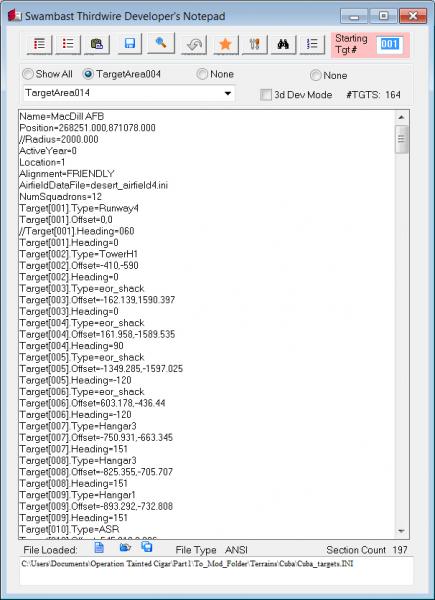
-
Ummm...while I applaud performance enhancement efforts, I'm struggling a bit with this proposed solution. That looks to me like a DirectX 9 dynamic link library file...combined with an ENB post-processing file. So of course reverting back to DirectX9 and is going to help with performance, but you do realize you're giving up bump mapping, speculars, etc. under the Gen2 engine, right? Unless I'm misinterpreting something, which could be the case and I'm all ears... Edit: WOW, this is for the Gen1 engine series, not even sure who's left playing that - but anyway, might be better to move this post to that forum rather than SF2 forum?
-
KJ, thanks for the update - but where specifically would the check be for the generic guns using for example tracer.tga??? Also, I noticed in your tag line you're the "Ground Object Data.INI Guru" - give me a PM when you get a chance as I have something that I think might be extremely interesting and helpful to a modder like yourself...
-
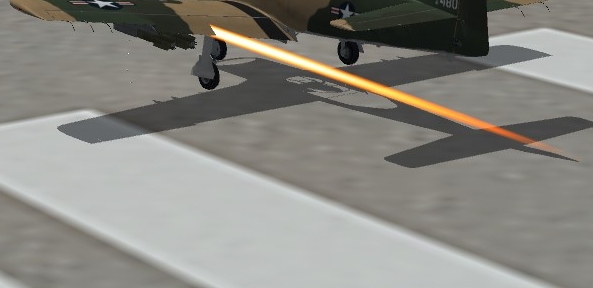
Hi all, must have messed something up in my modding efforts. I have these unwanted, long "laser beam" tracers on most of my guns. Pretty sure it's related to TRACER.tga. But can someone help me remember what is the fix to reduce the tracer tail length (think it might be an .ini tweak?). Right now when the aircraft is firing, the tracers literally appear behind the wings, like in this example screenshot. Thanks for any guidance!
-
Hi there, Can someone please refresh my memory regarding the sequencing requirements for Aircraft or Ground Mission entries in a mission file? For example - would both of these scenarios/entries be acceptable? Or must they absolutely be in strict numerical sequence order like in Scenario A only? Scenario A: [GroundMission001] [GroundMission002] [GroundMission003] [GroundMission004] [GroundMission005] Scenario B: [GroundMission001] [GroundMission003] [GroundMission002] [GroundMission005] [GroundMission004] Thanks for any insight!
-
Geary, are you really sure it's off - and not just the notifications/settings turned off? Did you disable it using the security policy editor and ensure it's actually disabled? Also, try to move the program to the root, like C: drive and try to manually register the .dlls using regsvr/regsvr32.
-
Hi Geary, man I remember running into tons of issues just like that on a Windows 7 build...even emailed Mue and no luck, etc. I finally figured out the fix, but honestly don't recall all the steps. Anyway, it was something to the effect of UAC blocking permissions. So I thought I did something like created a shortcut on the desktop, go to compatibility mode and check "Run this program as an administrator" AND check "Run this program in compatibility mode for Windows XP Service Pack 3". You'll have to play around with some of those settings as well perhaps, maybe try disabling visual themes, etc. Anyway, I am absolutely POSITIVE some variation of that the solution worked for me...!
-
Hi Quack, just a refresher that you had asked about this previously in this thread and I suggested implementing this feature to Mue prior to that. Anyway, the answer is - that feature doesn't currently exist today. I know I had been collaborating with Mue and also sent him a proposed features list with detailed requirements including priority rankings. However, he has been busy with some real life demands, so I am absolutely confident he has this on his list and we had ranked this one highest of priorities. I'm hoping once he frees up he'll get back to it, so for the time being we'll need to be patient and optimistic that another revision will be here in the near future!
-
How about a community exporter?
swambast replied to daddyairplanes's topic in Mods & Skinning Discussion
What he said... In my opinion, too many "I wants..." and lack of taking more ownership to get the desired results or at least coming together to rally around a smaller, "common", achievable goal where members can put aside their differences at least for a while... -
Quack, that is absolutely a masterpiece - best "train/rail area" I've ever seen in this sim - well done!
-
Dels, that is looking awesome... I love the attention to details and this is going to be one magnificent release, absolutely can't wait...thanks for keeping at it!
-
Weapon Effect / Behavior - Create a "Consistent" Impact Effect?
swambast replied to swambast's topic in General Discussion
Hmmm, revisiting this challenge - I think more of what I'm after is actually editing the weapon’s _data.ini entry as opposed to the aircraft stations. So on that note, I did hunt and search, but I didn’t come up with anything in the knowledgebase... I'm looking for some details and explanations regarding weapon _data.ini entries (e.g., EffectClassName, DragAreaMultiplier, WarheadType, GuidanceType, Accuracy, etc.). Is there something I’ve missed in the knowledgebase or another post that describes what each of the entries do? I was surprised I couldn’t find anything but must be overlooking something!

