dsawan
-
Posts
3,269 -
Joined
-
Last visited
-
Days Won
1
Content Type
Profiles
Forums
Gallery
Downloads
Store
Everything posted by dsawan
-
Hmm, could have sworn they stayed open when on autopliot before when lining up for a bomb run. Will have to try and see.
-
Hi, guys. realize this is a beta bird but having crash to desktop with version 1.6 in SFP 4.1 or the original strike fighters. Beta 1.5 was working with this but when i put 1.6 it crashes to desktop. Did like readme says. Anyone else have this? thx.
-
Hi, I am having probs with bomb bay doors on planes. This is after the recent patches for sept 2008 for wov and woe. They open and then close right away. They won;t remain open. Any fic for this? thx.
-
I too am havinf this prob. Fixed the rotors but the hueys still blow up on the runway. Has anyone found a way to fix? tried one of the Hinds and no prob there. thx.
-
whatever, homy, he he . thx again.
-
Go get her,gents, she's in the dwld section here.
-
Great, thanks Kevin.
-
ya forgot me for originally posting this in a separate thread, he he. thanks to all involved !
-
Fast cardo, i tried that no go.Mab,I deleted the old one. i took the new one from the safe folder for the new patches and copied it over the old one. ie ven tried taking the WOI one since it works and putting it in wov's control fodler to no effect.
-
Hi, dave. No, nothing like that. i deleted my old control.ini as it was overwritten by the new one from the sept patch. i tried to see if there was another contol.ini in some other part of the game folder conflicting with the new one but did not see any. My WOI install works fine though. i dont know why it wont let me remap anything. The autopilot is always set to A in the game options. One more thing, When i ran the patches, the update readme which states what was chgd said patch updte failed or something similar on these different areas. Someone in this thread emntioned the update readme saying something similar. Could this have anything to do with it. i have run the patches a few times and they were not corrupted from dwlding.
-
Hi, guys. i tried the advice above and the controls are still warped. tried renaming and the readme but no go. I just dont want to have to do a clean install over again as it is time consuming. the only orb I have is just the controls, everything else works fine. When i did the patches, I didwhat someone mentioned in knowledgebase which was to take the WOV and WOE app exe and copy into a empty folder and run the patch which shows all the folders and files. The I install manually. I have done this for each update released by TW with no probs. Just this one for some reason. Also, when I check the controls in the game, the autoplit tab is lsited as A all the time yet I have to change the other controls. Is there another way to fix? thx. I would like to add also, that when I executed the patch to a safe place folder with the WOV exe and WOE respectivley, Ilooked into the folder controls and put the new default ini into the modded controls folder and overwrote the old one. It just seems like it wont save the new mappings or wont let you map new controls. i realize the beneftis of a clean install but I have done this with every thirdwire patch and someone did mention this method in the knowledgebase. I did find from the knowledge base so this is how i installed patches.: Procedure 2 (Author: Spook 27) I do this with SFP1/WoV and IL2FB/AEP/PF and LOMAC and FS9 - Make a Spare empty folder next to your Original Sim and name it accordingly eg: Wings Over Vietnam_Shunt and put into it a copy of your WoV.exe (or whatever else it is your are patching). When you execute the patch direct the install to the spare empty folder. The patch will see the correct .exe and then create all subfolders and add the new files. You can then examine the files that are added and see where they all go. You are free to drag 'em individually across to the real sim folder and see what it is that the new files replace, giving you the choice of what to use. It may be stating the obvious, but I would never let anything get directly at my highly modified Sims, all of which are many Gigs in size, too big to back up without another PC! As indicated this works for all of the above.
-
I would like to add also, that when I executed the patch to a safe place folder with the WOV exe and WOE respectivley, Ilooked into the folder controls and put the new default ini into the modded controls folder and overwrote the old one. It just seems like it wont save the new mappings or wont let you map new controls. i realize the beneftis of a clean install but I have done this with every thirdwire patch and someone did mention this method in the knowledgebase. I did find from the knowledge base so this is how i installed patches.: Procedure 2 (Author: Spook 27) I do this with SFP1/WoV and IL2FB/AEP/PF and LOMAC and FS9 - Make a Spare empty folder next to your Original Sim and name it accordingly eg: Wings Over Vietnam_Shunt and put into it a copy of your WoV.exe (or whatever else it is your are patching). When you execute the patch direct the install to the spare empty folder. The patch will see the correct .exe and then create all subfolders and add the new files. You can then examine the files that are added and see where they all go. You are free to drag 'em individually across to the real sim folder and see what it is that the new files replace, giving you the choice of what to use. It may be stating the obvious, but I would never let anything get directly at my highly modified Sims, all of which are many Gigs in size, too big to back up without another PC! As indicated this works for all of the above.
-
Hi, guys. i tried the advice above and the controls are still warped. tried renaming and the readme but no go. I just dont want to have to do a clean install over again as it is time consuming. the only orb I have is just the controls, everything else works fine. When i did the patches, I didwhat someone mentioned in knowledgebase which was to take the WOV and WOE app exe and copy into a empty folder and run the patch which shows all the folders and files. The I install manually. I have done this for each update released by TW with no probs. Just this one for some reason. Also, when I check the controls in the game, the autoplit tab is lsited as A all the time yet I have to change the other controls. Is there another way to fix? thx.
-
We got Death Star!We got Death Star!We got Death Star!
-
Hi, guys. i am having a problem with the WOV and WOE installs. My controls is acting weird or not normal. My WOI install is working fine. Installed the patches and cannot map out the controls. Also, the default control has different assignments from before. For ex, autopilot key is now the navigational lights key, When I go to chg and hit accept, it still says A is for autopilot when it isnt playing the game. Also, weapons controls are screwed. Any time i map it out to my liking, it does not work. i tried vopying woi control to the other 2 installs and no go. Woi works though. Anyone else having prob? Is there a fix? thx
-
Hi, guys. i am having a problem with the WOV and WOE installs. My controls is acting weird or not normal. My WOI install is working fine. Installed the patches and cannot map out the controls. Also, the default control has different assignments from before. For ex, autopilot key is now the navigational lights key, When I go to chg and hit accept, it still says A is for autopilot when it isnt playing the game. Also, weapons controls are screwed. Any time i map it out to my liking, it does not work. i tried vopying woi control to the other 2 installs and no go. Woi works though. Anyone else having prob? Is there a fix? thx.
-
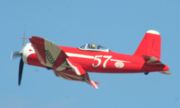
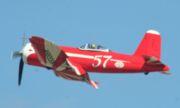
Did not know that these versions were produced. Super Corsair variants Main article: F2G Corsair The F2G-1 and F2G-2 were significantly different aircraft, fitted with the Pratt & Whitney R-4360 Wasp Major 4-row 28-cylinder "corncob" radial engine and teardrop (bubble) canopy, as a specialized interceptor against Japanese suicide Kamikaze attacks. The difference between the -1 and -2 variants was that the -1 featured a manual folding wing and 14ft. Propellers, while the F2G-2 aircraft had hydraulic operated folding wings, 13ft. propellers and carrier arresting hooks for carrier use [105]. As World War II was drawing to a close, development problems emerged that led to the abandonment of further work on the F2G series.[106] While only 10 were built, several F2Gs went on to racing success after the war, winning the Thompson trophy races in 1947 and 1949. http://en.wikipedia.org/wiki/F4U_Corsair
-
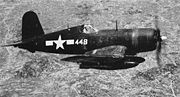
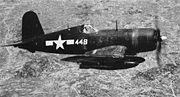
Hi, has anyone done a photo-recon corsair for SF or thinking of doing one? I found this on the wiki trgarding them. They were rare and wonder what they would have looked like and loadout they would have had. See here: F4U-4P: As with the -1P, a rare photoreconnaissance variant F4U-1P: A rare photo reconnaissance variant http://en.wikipedia.org/wiki/F4U_Corsair
-
Hi, pappy, any eta on a release. thanks.
-
Any chance on a ww2 version in future.
-
Hmmm. those lights look like from an episode in the 1978 battlestar galactica episode. cant think of the name but count ibly played by patrick mcnee was in it and it was a two episode affair. Where can this be dowloaded?
-
By woi , you mean wings over israel? Yes, please convert if possivle to this sim by thirdwire. many of my friends would appreciate it. thx again.
-
have to differ with you as they got 10 of them and repaired several from shuttle missions. See the wiki link and scroll down. Never used for front-line service. probably testing and evaluation. Makes for a good what if, he he. http://en.wikipedia.org/wiki/P-51
-
You bet thers interest, please release soon. thx.
-
Thx for reply, Balitka. Looks good. Tjx, Kevin for the p-39 skins. i was tryn to figure out how to add the Russian star insignia to existing skins for lend-lease planes we already have but those p-39 skins above look good. they were useful for ground attack the p-39 and 400. I hope you can do some p-51 a,bc and d russian skins also in adition to the b-25.