


Fubar512
-
Posts
8,418 -
Joined
-
Last visited
-
Days Won
42
Content Type
Profiles
Forums
Gallery
Downloads
Store
Everything posted by Fubar512
-
Proximity Fuses?
Fubar512 replied to tn_prvteye's topic in Thirdwire: Strike Fighters 1 Series - General Discussion
You can set the warhead type for "area dispersal" to simulate a fragmenting warhead, but I have not tested this...it may result in unrealistic damage potential. -
Proximity Fuses?
Fubar512 replied to tn_prvteye's topic in Thirdwire: Strike Fighters 1 Series - General Discussion
There is a Shrapnel callout in the missileobject.ini, but it's only for visual effects. -
Bomb Bay - B-52
Fubar512 replied to Basher11's topic in Thirdwire: Strike Fighters 1 Series - General Discussion
Again, did you give the B-52s a target to attack? -
Bomb Bay - B-52
Fubar512 replied to Basher11's topic in Thirdwire: Strike Fighters 1 Series - General Discussion
Is this on a scripted, or, on a randomly-generated mission? If it's the former, you need to assign the proper "action" to the AI, or they'll just overfly the objective. -
I picked a helluva day.....
Fubar512 replied to Fubar512's topic in Thirdwire: Strike Fighters 1 Series - General Discussion
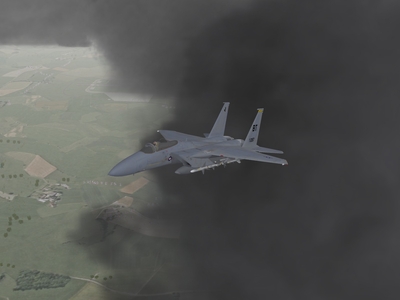
Yes, real, fill up your shorts when it catches you off guard, lightning. The issue with the "fog" is the effect as the aircraft goes through the cloud layer...not the clouds. Jug, Thanks for sharing your experiences. I want to ensure that this effect is as authentic as possible. The only time I witnessed lightning from the air, was on a flight from Houston to Newark. The storm cells were well off in the distance, and our pilot was of course, trying to get around them. Still, it was a neat light show from 30,000 feet and 50 or so miles away! Simulating lightning is not easy in this series. You need to position it so it's random, yet you cannot have 30-40 bolts coming down at once...lol I'm using a lightning bolt tga that appears for less than a twentieth of a second, and the same flash effect that I use with nukes. The issue is again one of being able to see it through the clouds and cloud layer "fog". Sometimes you cannot see it, but the game "hiccups" for a split-second when it occurs, so I know it's happening somewhere in the SF virtual world. -
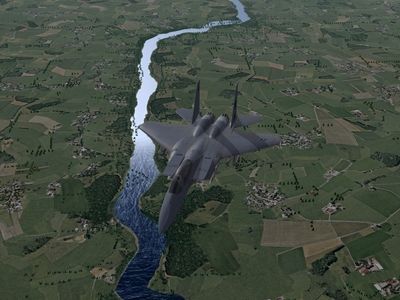
Sorry, but shader effects view distance is hardcoded into the series, just as are the tree and building "pop up" distances. Because the water/sea tgas are being referenced in the ini as having a high level of reflectivity, the line of demarcation where the shader fx becomes visible is unfortunately quite evident. The shaders make the surface somewhat "less" reflective . Just look at the river surface in the image I posted and you'll understand.
-
I picked a helluva day.....
Fubar512 replied to Fubar512's topic in Thirdwire: Strike Fighters 1 Series - General Discussion
LOL..still working on the lightning, and the "fog" transparency issue. The default overcast and inclement cloud decks needed some updating, so I did this: http://forum.combatace.com/index.php?autoc...si&img=5586 -
I picked a helluva day to try flying...
-
-
It's up now: http://forum.combatace.com/index.php?showtopic=27281
-
View File EF-2000 EF-2000 Typhoon Submitter Bongodriver Submitted 04/05/2008 Category 4th/5th Generation Fighters
-
Uploaded and approved!
-
Working on it, Erik. I keep getting this message: The following errors were found: One of the fields you completed had more data than is allowed. I've tried truncating the file name.
-
The Water FX as they appear in WoE, using the data edits that I've posted.
-
-
Try it now.
-
Just drop the attached file into your terrain folder, and make sure that you have the terrain (or water effects in WoI) at the highest settings. If you already have a waternormal.bmp in there, rename it so you can go back to it just in case you do not like the effect. Feel free to experiment with it. These are the settings that I'm using in WoV ( in the Vietnamsea_data.ini): [WaterTextureMaterial] UseEffectShader=TRUE EffectShaderName=WaterEffect.fx DepthBufferCheck=TRUE DepthBufferWrite=FALSE RenderedInOrder=TRUE AlphaTestEnabled=TRUE CullMode=CLOCKWISE LightEnabled=TRUE SpecularEnabled=TRUE EmissiveEnabled=FALSE FogEnabled=TRUE AmbientColor=1.000000,1.000000,1.000000,1.000000 DiffuseColor=1.000000,1.000000,1.000000,1.000000 SpecularColor=1.500000,1.500000,1.500000,1.000000 SpecularPower=5.000000 Reflectivity=1.00000 Transparency=0.95000 ZBufferOffset=2.000000 ZBufferOffset=4.000000 BlendOp=BLEND_SRC_ALPHA NumTextureStages=2 TextureStage[01].TextureName=vietnamS1.TGA; <---in WoE, use GERMANYS1.TGA TextureStage[01].MipMap=TRUE TextureStage[01].FilterEnabled=TRUE TextureStage[01].StageColorOp=TEXTURE_MODULATE_DIFFUSE TextureStage[01].StageAlphaOp=TEXTURE TextureStage[02].TextureName=vietnamS1.TGA; <---in WoE, use GERMANYS1.TGA TextureStage[02].MipMap=TRUE TextureStage[02].FilterEnabled=TRUE TextureStage[02].ReflectionMapping=TRUE TextureStage[02].StageColorOp=TEXTURE_BLEND_TEXTURE_ALPHA TextureStage[02].StageAlphaOp=DIFFUSE
-
Here's a quick and dirty video of the "enhanced" shader effects in action. I'm still tweaking and refining it, and bear in mind that I'm using an ATI Radeon (which has pixelation issues with ThirdWire's shaders). Is it worth it it? Watch the video and judge for yourselves: http://forum.combatace.com/index.php?autoc...si&img=5582
-
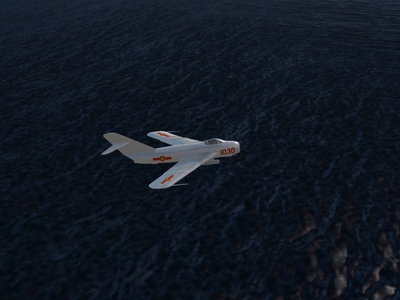
512x512 pixel "WaterNormal" bitmap in WoV (in conjunction with with Brain32's terrain tiles):
-
-
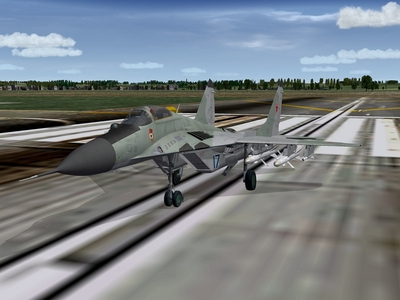
NEED HELP...MIG-29A
Fubar512 replied to Przybysz's topic in Thirdwire: Strike Fighters 1 Series - Mods/Skinning Discussion
Oh no, you mean that we've got to wait a whole twwwoooooo weeks for this? Life just is just soooo unfair!!!!! -
-
-
No, the finer it is, (the denser, the more detailed, the higher resolution the tiles are), the closer it is to giving you a proper sense of speed at low level. It's meant for WoE, and it requires WoE's Germany CE terrain files to work properly (.cat, target.ini files, etc.).
-
In a word, no. Short of using a denser terrain, which only effects the sense of speed at low level, or (assuming you're running the sim in Windows XP and have the shaders on), by using a noisenormal.bmp with a decidedly more aggressive texture, you will not achieve that "feel of speed" you're seeking. I suggest you try Brain32's GermanyCE terrain, which includes CA_Stary's excellent tree and object pack. It helps a lot.