


Wrench
-
Posts
28,315 -
Joined
-
Last visited
-
Days Won
188
Content Type
Profiles
Forums
Gallery
Downloads
Store
Everything posted by Wrench
-
I don't have any problem with the Tigers, Blintez or any of the Shermans. (other than, like you, having to redo all the inis caused by Patch3) What's your folder structure look like? example: GroundObjects/TigerII/all the inis, bmps and etc (remember, the ini must match the folder name ie: TigerII.ini) also, double check the nations in the data ini. The German stuff should say (this from the Tiger II) [MissionData] NationName=Nazi Germany <-- this here line ServiceStartYear=1942 ServiceEndYear=1945 GroundObjectRole=TANK of course the main ini, like this (note: I've labeld both Blintz truck to differentiate them) [GroundObjectData] ObjectFullName=Blitz Truck (Canvas Covered) ObjectDataFile=BlitzCanvas_DATA.INI [GroundObjectData] ObjectFullName=Blitz Truck (Open) ObjectDataFile=BlitzOpen_data.ini The Shermans may say "USARMY", change that to USAF (never did find a listing for USARMY, you could also use USMC) And don't forget to have the WW2 Nations.ini in the Flight folder There was a lod problem on the original release of the Blintz truck, but Geo fixed that a long while back. You'll also probably want at least 3 WW2 installs: ETO (with EAW2 map, BoB map) PTO (there's like 5 + maps) MTO (well, one cheap modern Lybia conversion by me -- Western Desert and Tunsia/Med still in works) "Is it worth the trouble" you ask --- you answered your own question -- DAMN RIGHT IT IS!!! If you need any more help, gimme a shout. Hope that helps! Wrench Kevin Stein ps: yes, you can just delete all the modern jet folders...it won't effect the game in any way, shape or form pps: you'll also find boatloads of WW2 stuff for the SF/WoV/WoE series here and at my site
-
Don't forget to add the Laserdesinator "SystemName=" to the aircraft, probably in the [Nose] section of the data ini ie: SystemName{***}=LaserDesignator (where the *** are the next number in sequence) Worked perfect on the F19, Mud Hen, Mig27D, etc. Wrench Kevin Stein
-
View File WW2 Axis Red Range mod WW2 Axis Bombing Red Range for SF, WoV & WoE This is a modification of several inis, and adding objects to give The Red Range a World War 2 flavor, for the Axis Powers. This modificaton has been thoughly tested in SF and WoE, but not WoV. You shouldn't have any problems though, by making sure you 'cat file' pointer is pointed to the correct terrain cat. (see the Knowledge Base here at CA, or the newest Range readmes) Many of these WW2 items have been borrowed from other maps, most specificlly Edwards superb PTO and EuroWW2. Others were scattered about, like the train station and factory place. I'd like to express thanks to the Map Builders for their tireless work, hope I mentioned everyone!!! You'll need the original Red Range installed to make this mod to, as the terrain iteself is not changed. This is an object and ini mod, not a full terrain. You'll also have a NEW movements ini; now you can perform Armed Recon missions. PLEASE read the enclosed readme for full, detailed instructions as to how to install. Although this mod can be used in any install, it is designed with WW2 =ONLY= in mind. Most of these mods, however, can easily be added to any other Range terrain (specifically, the movements ini and the new target areas). = NOTE: one of the 3 new objects is a Nazi flag. If you live in a country where it is illeagle to show the swastika, you can change the pointer in the targets.ini to remove or switch flags. To this end, I've provided an alternative flag. It has already been added to the types ini, so all you need to change is the targets pointer, see full instructions in the readme. Now, no excuses... get out there and practice!! With thanks to Deuces for creating the Range and Red Range, and to Major Lee for pointing the way for the flags. and all the other terrain and object builders! Happy Hunting! Wrench Kevin Stein Submitter Wrench Submitted 02/20/2007 Category Terrains
-
How right, listing the files needed to back. That's superb customer care!!! Wonder if it fixes the problem with add on terrains? (desert, suez, whatever) Better backup my targets and types inis...don't wan to loose the German Secret Sound Project :) Wrench Kevin Stein
-
That's done in case you don't already have the 'newer' files loaded in. Once you've added them, you don't need to again, unless something new is added, and that'll be stated in the read me. Wrench Kevin Stein
-

290 downloads
WW2 Axis Bombing Red Range for SF, WoV & WoE This is a modification of several inis, and adding objects to give The Red Range a World War 2 flavor, for the Axis Powers. This modificaton has been thoughly tested in SF and WoE, but not WoV. You shouldn't have any problems though, by making sure you 'cat file' pointer is pointed to the correct terrain cat. (see the Knowledge Base here at CA, or the newest Range readmes) Many of these WW2 items have been borrowed from other maps, most specificlly Edwards superb PTO and EuroWW2. Others were scattered about, like the train station and factory place. I'd like to express thanks to the Map Builders for their tireless work, hope I mentioned everyone!!! You'll need the original Red Range installed to make this mod to, as the terrain iteself is not changed. This is an object and ini mod, not a full terrain. You'll also have a NEW movements ini; now you can perform Armed Recon missions. PLEASE read the enclosed readme for full, detailed instructions as to how to install. Although this mod can be used in any install, it is designed with WW2 =ONLY= in mind. Most of these mods, however, can easily be added to any other Range terrain (specifically, the movements ini and the new target areas). = NOTE: one of the 3 new objects is a Nazi flag. If you live in a country where it is illeagle to show the swastika, you can change the pointer in the targets.ini to remove or switch flags. To this end, I've provided an alternative flag. It has already been added to the types ini, so all you need to change is the targets pointer, see full instructions in the readme. Now, no excuses... get out there and practice!! With thanks to Deuces for creating the Range and Red Range, and to Major Lee for pointing the way for the flags. and all the other terrain and object builders! Happy Hunting! Wrench Kevin Stein -
View File WW2 Allied Bombing Range WW2 Allied Bombing Range for SF, WoV & WoE This is a modification of several inis, and adding objects to give The Range a World War 2 flavor, for the Allies. This modificaton has been thoughly tested in SF and WoE, but not WoV. You shouldn't have any problems though, by making sure you 'cat file' pointer is pointed to the correct terrain cat. (see the Knowledge Base here at CA, or the newest Range readmes) Many of these WW2 items have been borrowed from other maps, most specificlly Edwards superb PTO and EuroWW2. Others were scattered about, like the train station and factory place. I'd like to express thanks to the Map Builders for their tireless work, hope I mentioned everyone ... I can fully understand the frustrations in placing objects now, after working on this and several other maps. You'll need the original Range installed to make this mod to, as the terrain iteself is not changed. This is an object and ini mod, not a full terrain. You'll also have a NEW movements ini; now you can perform Armed Recon missions. PLEASE read the enclosed readme for full, detailed instructions as to how to install. Although this mod can be used in any install, it is designed with WW2 =ONLY= in mind. Most of these mods, however, can easily be added to any other Range terrain (specifically, the movements ini and the new target areas). Now, no excuses... get out ther and practice!! Wrench Kevin Stein edit: updated readme, with proper credits Submitter Wrench Submitted 02/18/2007 Category Terrains
-
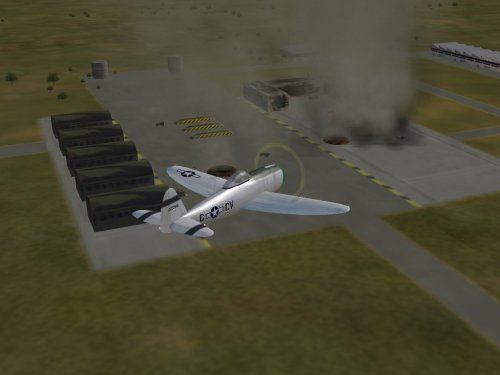
426 downloads
WW2 Allied Bombing Range for SF, WoV & WoE This is a modification of several inis, and adding objects to give The Range a World War 2 flavor, for the Allies. This modificaton has been thoughly tested in SF and WoE, but not WoV. You shouldn't have any problems though, by making sure you 'cat file' pointer is pointed to the correct terrain cat. (see the Knowledge Base here at CA, or the newest Range readmes) Many of these WW2 items have been borrowed from other maps, most specificlly Edwards superb PTO and EuroWW2. Others were scattered about, like the train station and factory place. I'd like to express thanks to the Map Builders for their tireless work, hope I mentioned everyone ... I can fully understand the frustrations in placing objects now, after working on this and several other maps. You'll need the original Range installed to make this mod to, as the terrain iteself is not changed. This is an object and ini mod, not a full terrain. You'll also have a NEW movements ini; now you can perform Armed Recon missions. PLEASE read the enclosed readme for full, detailed instructions as to how to install. Although this mod can be used in any install, it is designed with WW2 =ONLY= in mind. Most of these mods, however, can easily be added to any other Range terrain (specifically, the movements ini and the new target areas). Now, no excuses... get out ther and practice!! Wrench Kevin Stein edit: updated readme, with proper credits -
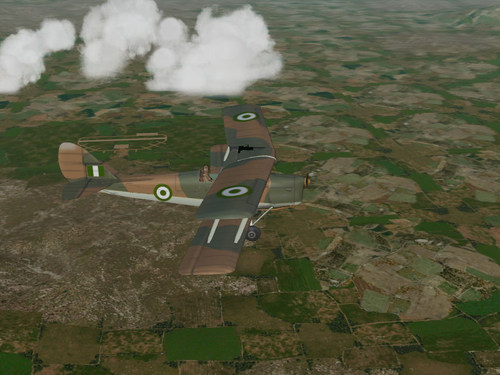
View File Nigerian Air Force Tiger Moth Nigerian Air Force Tiger Moth skin for SF, WoV, WoE This is a re-skin of RussoUK's excellent little Tiger Moth into those used (???) by the Nigerian Air Force, in their never ending battle for freedom against the aggressors from it's evil neighbor, Togo (also reccomended is the weapons modification pak for the Moth available both here at CA and my site) This little gem stems from the never ending, good natured ribbing amongst many of us that follow El Presedentie-for-Life, Sparkomatic. I'd actually made, and finished this, over a year ago, and promptly forgot about it. But with renewed intrest in the Nigerian money-schemes (as posted at C5s), I realized it was time for it's release. Defend the Honor of our Beloved Country!! Wrench Kevin Stein Submitter Wrench Submitted 02/17/2007 Category Pre War Aircraft
-
Version 1
374 downloads
Nigerian Air Force Tiger Moth skin for SF, WoV, WoE This is a re-skin of RussoUK's excellent little Tiger Moth into those used (???) by the Nigerian Air Force, in their never ending battle for freedom against the aggressors from it's evil neighbor, Togo (also reccomended is the weapons modification pak for the Moth available both here at CA and my site) This little gem stems from the never ending, good natured ribbing amongst many of us that follow El Presedentie-for-Life, Sparkomatic. I'd actually made, and finished this, over a year ago, and promptly forgot about it. But with renewed intrest in the Nigerian money-schemes (as posted at C5s), I realized it was time for it's release. Defend the Honor of our Beloved Country!! Wrench Kevin Stein -
View File MTO Bf-109G10, JG77 Messerschmitt Bf-109G10 skin upgrade & ini tweeks for SF, WoV & WoE WW2 MTO Installs: This is a rebadging of original Bf-109G10, JG77 skin by Gramps, with basically, new individual number decals added. With thanks to Gramps for permission to modify. This skin represents Bf-109G10s from JG77 in the 42/43 time frame in Western Desert/Sicily/Italy; you know, the general MTO area. I make absolutely NO claims to historical accuracy Includes inis to upgrade data, cockpit and loadout. Also included is a NEW MTO 109 loading screen, never before released. Full instructions in the enclosed readme! Happy Landings! Wrench Kevin Stein Submitter Wrench Submitted 02/17/2007 Category Axis/BF-109/ME-109/Ju-87
-
View File MTO Bf-109G10 JG53 Messerschmitt Bf-109G10 skin upgrade & ini tweeks for SF, WoV & WoE WW2 Installs: This is a rebadging of original Bf-109G10, JG53 skin by Gramps, with basically, new individual number decals added. With thanks to Gramps for permission to modify. This skin represents Bf-109G10s from JG53 in the 42/43 time frame in Western Desert/Sicily/Italy; you know, the general MTO area. I make absolutely NO claims to historical accuracy Includes inis to upgrade data, cockpit and loadout. Also included is a NEW MTO 109 loading screen, never before released. Full instructions in the enclosed readme! Happy Landings! Wrench Kevin Stein Submitter Wrench Submitted 02/17/2007 Category Axis/BF-109/ME-109/Ju-87
-
View File MTO Fw-190 JG52 Focke Wulf Fw-190 skin upgrade & ini tweeks for SF, WoV & WoE WW2 Installs: This is a rebadging of the original Fw-190, JG52 skin by Gramps, with basically, new individual number decals added. With thanks to Gramps for permission to modify. This skin represents Fw-190A5 from JG52 in the 42/43 time frame in Western Desert/Sicily/Italy; you know, the general MTO area. I make absolutely NO claims to historical accuracy; I have too little knowledge of Luftwaffe camo & markings, and I'm sure there are much more educated folks out there on the subject. So, accept this as a simple, easy replacement with limited accuracy Also includes updated data, cockpit and loadout inis, with a new gunsight tga. Fixed damge tga are included. Happy Hunting! Wrench Kevin Stein Submitter Wrench Submitted 02/17/2007 Category Fw-190
-
View File MTO Fw-190, JG2 Focke Wulf Fw-190 skin upgrade & ini tweeks for SF, WoV & WoE WW2 MTO Installs: This is a rebadging of original Fw-190, JG2 skin by Gramps, with basically, new individual number decals added. With thanks to Gramps for permission to modify Includes updated data, cockpit and loadout inis, along with a new gunsight. This mod is very similiar to the ETO versions recently released, excepting this is designed for MTO style installs. Full detailed instructions in the enclosed read me, so please read it!! Happy Hunting! Wrench Kevin Stein Submitter Wrench Submitted 02/17/2007 Category Fw-190
-
193 downloads
Messerschmitt Bf-109G10 skin upgrade & ini tweeks for SF, WoV & WoE WW2 MTO Installs: This is a rebadging of original Bf-109G10, JG77 skin by Gramps, with basically, new individual number decals added. With thanks to Gramps for permission to modify. This skin represents Bf-109G10s from JG77 in the 42/43 time frame in Western Desert/Sicily/Italy; you know, the general MTO area. I make absolutely NO claims to historical accuracy Includes inis to upgrade data, cockpit and loadout. Also included is a NEW MTO 109 loading screen, never before released. Full instructions in the enclosed readme! Happy Landings! Wrench Kevin Stein -
119 downloads
Messerschmitt Bf-109G10 skin upgrade & ini tweeks for SF, WoV & WoE WW2 Installs: This is a rebadging of original Bf-109G10, JG53 skin by Gramps, with basically, new individual number decals added. With thanks to Gramps for permission to modify. This skin represents Bf-109G10s from JG53 in the 42/43 time frame in Western Desert/Sicily/Italy; you know, the general MTO area. I make absolutely NO claims to historical accuracy Includes inis to upgrade data, cockpit and loadout. Also included is a NEW MTO 109 loading screen, never before released. Full instructions in the enclosed readme! Happy Landings! Wrench Kevin Stein -
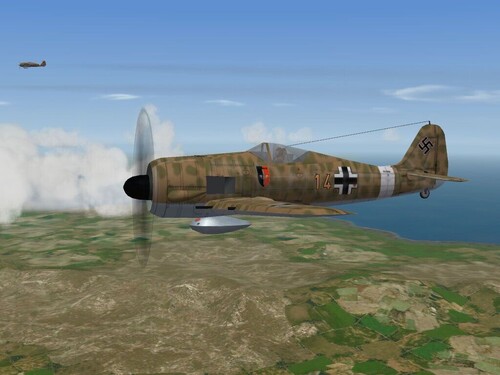
166 downloads
Focke Wulf Fw-190 skin upgrade & ini tweeks for SF, WoV & WoE WW2 Installs: This is a rebadging of the original Fw-190, JG52 skin by Gramps, with basically, new individual number decals added. With thanks to Gramps for permission to modify. This skin represents Fw-190A5 from JG52 in the 42/43 time frame in Western Desert/Sicily/Italy; you know, the general MTO area. I make absolutely NO claims to historical accuracy; I have too little knowledge of Luftwaffe camo & markings, and I'm sure there are much more educated folks out there on the subject. So, accept this as a simple, easy replacement with limited accuracy Also includes updated data, cockpit and loadout inis, with a new gunsight tga. Fixed damge tga are included. Happy Hunting! Wrench Kevin Stein -
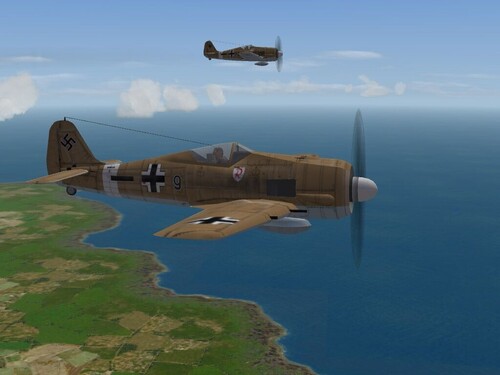
150 downloads
Focke Wulf Fw-190 skin upgrade & ini tweeks for SF, WoV & WoE WW2 MTO Installs: This is a rebadging of original Fw-190, JG2 skin by Gramps, with basically, new individual number decals added. With thanks to Gramps for permission to modify Includes updated data, cockpit and loadout inis, along with a new gunsight. This mod is very similiar to the ETO versions recently released, excepting this is designed for MTO style installs. Full detailed instructions in the enclosed read me, so please read it!! Happy Hunting! Wrench Kevin Stein -
View File Damage Tga Pack 3 WW2 And Later Aircraft Damage textures for SF/WoV/WoE 1/06/06 Greetings Pilots! This is the Third of several packages that address an omission from many of the 3rd party aircraft available. Particularly, those birds from the World War 2 and later era. All the stock player-flyable 3rd Wire aircraft come with damage tgas (with some exceptions), that show the holes in the skin when the airplanes get shot up. This is particularly needed in the 2nd World War era, as we've all seen the photos of planes looking like Swiss cheese. So, I've decieded, amongst all my myriad other projects, to fill this gap as best I can. A full list of the aircraft is in the enclosed read me PLEASE read the enclosed readme, it has full instructions for installing. Happy Hunting! Wrench Kevin Stein Submitter Wrench Submitted 02/16/2007 Category Effect Mods
-
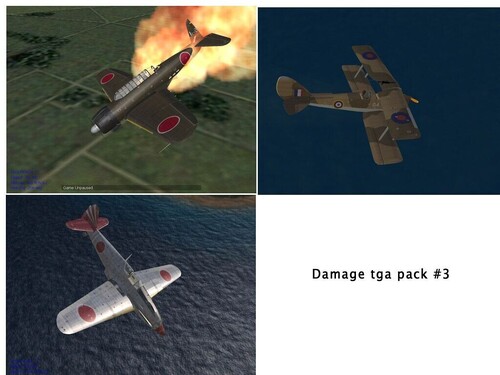
301 downloads
WW2 And Later Aircraft Damage textures for SF/WoV/WoE 1/06/06 Greetings Pilots! This is the Third of several packages that address an omission from many of the 3rd party aircraft available. Particularly, those birds from the World War 2 and later era. All the stock player-flyable 3rd Wire aircraft come with damage tgas (with some exceptions), that show the holes in the skin when the airplanes get shot up. This is particularly needed in the 2nd World War era, as we've all seen the photos of planes looking like Swiss cheese. So, I've decieded, amongst all my myriad other projects, to fill this gap as best I can. A full list of the aircraft is in the enclosed read me PLEASE read the enclosed readme, it has full instructions for installing. Happy Hunting! Wrench Kevin Stein -
I've got the 2 little puppies just about done, but as they're based off your work, I'm a needing to get your OK before release. 109F, JG26 109F, JG27 They're basically your desert skins, rebadged and redecaled; even got 3 of the 4 stab marking working on whichever one it is.. It's the same ini and skin tweek as I did for the ETO 109s. Just want to check with you before doing anything. If not, I can just redo the skin, but I'm super lazy, and would rather not. I also might want to re-do you 109E skin as well, but that's for another time. thanks in advance, Wrench Kevin Stein ps: anyone have any interest in something like this??? W
-
From the readme in every add on pilot, also posted on the "Pappy's Pilots" page at my site And that takes care of that!!! :yes: happy landings!! Wrench Kevin Stein
-
It's very cool! I love having something totally different, being the inventor of the whole "What If.." genre for the SF series! I've already dialed in all the lights, added landing lights, and "fixed" the reversed decal problem (for the < kommadore marking). It was a super easy fix, as I recently ran into the same problem whilst trying to update the MTO JG27 109F 1) open ALL the luftnum decals in you favorite graphics program (PS, PSP, Gimp, as long as it won't mess with the alpha channel) 2) Flip the image HORIZONTALLY -- this will reverse it. a}"Save As.." and add the letter R when asked to ie: 'luftnumR***.tga', *** = whatever the number is. This will make the < face front. 3) Edit the decal ini to read; in our example below is the JG1, other would be the same: [Decal014] MeshName=Fuselage DecalLevel=2 DecalFacing=RIGHT FilenameFormat=PII/JGI/D/luftnumR <-- this here, changed Position=-1.2,0.25 Scale=0.7 DecalMaxLOD=3 (you can see that I also renamed the "decals" folder down to "D", this will shorten the path) Do this for all the other decals, for the other JG's as well. The only unfortunate thing is, you wind up with double the decals in each folder. For us with giant HDs, it's not a problem. But it sure does make it look better!! This is basically that same thing I used on the 633 Sqdn Mossie skin, and several of the last sets I've just released. It's a cheat, but it works superbly!! Can't do a thing about the R4M rack, but I'll keep trying. It just looks "off", and there's no real place to put it, due to the length of the main gear leggs, and alerion placement. But I'm NOT giving up!!! Want to add lights? (and you all know how much I hated electrical work when I was fixing cars.....) Open the PII_DATA.INI and scroll down to the relevant sections.... ( where the {} is really the square bracket) adding missing taillight: in the {Tail} section, add SystemName{002}=Taillight In RightWing add: SystemName{004}=RightLandingLight In LeftWing add: SystemName{004}=LeftLandingLight add the following OVER the exisiting light callouts: [LeftPositionLight] SystemType=LIGHT Position=-4.89,-0.35,0.42 LightSrcOffset=-0.0,0.00,0.00 Color=0.88,0.25,0.25 Brightness=0.03 LightSrcRange=0.5 CanFlash=FALSE [RightPositionLight] SystemType=LIGHT Position=4.85,-0.35,0.42 LightSrcOffset=0.00,0.00,0.00 Color=0.25,0.88,0.25 Brightness=0.03 LightSrcRange=0.5 CanFlash=FALSE [TailLight] SystemType=LIGHT Position=0.0,-5.50,0.75 LightSrcOffset=0.00,0.00,0.00 Color=0.88,0.88,0.88 Brightness=0.04 LightSrcRange=0.3 CanFlash=FALSE [LeftLandingLight] SystemType=LIGHT Position=-1.20,0.6,-0.12 LightSrcOffset=2.6046,49.0560,3.50 Color=0.98,0.98,0.98 Brightness=0.10 LightSrcRange=150.0 LightRange=45.0 CanFlash=FALSE IsLandingLight=TRUE [RightLandingLight] SystemType=LIGHT Position=1.20,0.6,-0.12 LightSrcOffset=2.6046,49.0560,3.50 Color=0.98,0.98,0.98 Brightness=0.10 LightSrcRange=150.0 LightRange=45.0 CanFlash=FALSE IsLandingLight=TRUE This'll put the landing lights in the main gear wells. I'm assuming a retracting landing light, like the Mustang's. Since it's all guesswork, what the hell, right?? I also changed the gunsight to a Revi 16 that I have the tga's for, from the PappaRomeo EAW gunsight pak. You can get that tga in the Fw-190A8R2 upgrade pak at my site, or here at CA. Open the PII_cockpit ini, and copy/paste the following OVER the existing gunsight section: HasGunsight=TRUE GunsightMilSize=65 GunsightName=LWRevi16B_GUNSIGHT.tga LeadComputing=FALSE MaxDepression=0 DefaultDepression=0 I've not researched German gunsights, so I don't know if any of them were lead computing. If so, I'll post the fix. And Timmy, thanks again for creating it!!! Wrench Kevin Stein
-
http://forum.combatace.com/index.php?autom...ode=sst&id=4057 File Name: MTO Desert Camo Me-262File Submitter: Wrench File Submitted: 13 Feb 2007 File Category: ME-262 Fictional SWOTL 2 skin for the Me-262. Represents JG77 in the 1945 + time frame. Includes cockpit inin and new gunsight tga. It should be noted that there are 2 skins in this pak: 1 with swastika, 1 withOUT swastika, for those in countries that do not allow it. Please read the readme for more information, and detailed install instructions. Good Hunting! Wrench Kevin Stein Click here to download this file
-
Something like The Range would be cool. Wasn't there an old game (DOS days) that was like that? One airfield only, for each side?? On a side note, anyone know why NONE of the aftermarket terrains will work in FE, even if you bring the desert.cat (or any other cat for that matter) with it?? Wrench Kevin Stein