


eburger68
-
Posts
1,150 -
Joined
-
Last visited
-
Days Won
2
Content Type
Profiles
Forums
Gallery
Downloads
Store
Everything posted by eburger68
-
SF2 Falklands '82 - Fixes & Updates
eburger68 replied to eburger68's topic in Mission & Campaign Building Discussion
Folks: I have refreshed this beta update package with a few new fixes/updates. Fixed/added in this "refresh" are: - upgrades for the Lynx and Sea King (new cockpits, avionics, and other misc things) - minor fixes for the campaigns - front line fix for British ships ending up on the wrong side in campaigns - change of alignment for Port Howard in TARGETS.INI - a few other extremely minor tweaks Download link is the same as before: https://netfiles.uiu..._Update_Beta.7z A complete list of fixes and updates is inlcuded in the ReadMe, as are installation instructions. Before applying this update pack you hould replace your old Weapons folder with this newer, updated one (if you haven't already done so): https://netfiles.uiu...F82_Weapons.rar As before, this update does contain some "optional" installs in a separate directory. Eric Howes -
NATO Fighters IV+: Post-Dec2009 Update Pack # 4
eburger68 replied to Dave's topic in File Announcements
Agaphe: If you installed the previously upoaded version of Update 4, you should be fine. Eric Howes -
SF2V / WOV Air & Ground Expansion Packs
eburger68 replied to eburger68's topic in Mission & Campaign Building Discussion
Folks: The update files for both versions of the Expansion Pack have been refreshed again: WOV April 2011 Update: http://combatace.com/topic/53706-wov-air-ground-war-expansion-pack-gold-apr-2011-update/page__view__getnewpost SF2V April 2011 Update: http://combatace.com/topic/52002-sf2v-air-ground-war-expansion-pack-v20-apr-2011-update/page__view__getnewpost Eric Howes -
WOV Air & Ground War Expansion Pack Gold - Jan 2012 Update
eburger68 replied to eburger68's topic in File Announcements
Folks: This update file has been refreshed again. The April 2011 update (ignore the photo, which for some reason didn't get updated) contains the following changes: MISC UPDATES & ADDITIONS - minor updates & tweaks to Rolling Thunder, Linebacker II, & Easter Offensive campaigns - added medals pack for North & South Vietnam - adjusted Altitude data in MissionControl.INI - updated & expanded SquadronList.INI - added new cockpit textures for F-111A - added USMCGrey3 texture for F-4B_Late - added field-mod bomb racks for Canberra B.20 - added new engine sound for AC-119s - minor tweaks/updates to several other aircraft - added dummy SA-2D missile to ZiL-157 SA-2 Trailer - added Canberra bomb rack, weapons for Hueys, & other misc. weapon fixes - minor fixes/updates for both VietnamSEA & SouthVietnam terrains NEW AIRCRAFT - F-4G Phantom II (VF-213, USN) - UH-1B Huey Gunship - UH-1D Huey Eric Howes -
SF2V Air & Ground War Expansion Pack v2.0 - Sep. 2014 Update
eburger68 replied to eburger68's topic in File Announcements
Folks: This update file has been refreshed again. The April 2011 update contains the following changes: MISC UPDATES & ADDITIONS - minor updates & tweaks to Rolling Thunder, Linebacker II, Easter Offensive, & Steel Tiger campaigns - added medals pack for North & South Vietnam - adjusted Altitude data in MissionControl.INI - updated & expanded SquadronList.INI - added new cockpit textures for F-111A - tweaked textures for F-4B - added USMCGrey3 texture for F-4B_67 - added field-mod bomb racks for Canberra B.20 (both 3rdWire & ajundair versions) - added new engine sound for AC-119s - minor tweaks/updates to several other aircraft - changed gun targeting on NVA tanks from AIR_AND_GROUND to GROUND - added dummy SA-2D missile to ZiL-157 SA-2 Trailer - added FAB-50, Canberra bomb rack, and weapons for Hueys - minor fixes/updates for both VietnamSEA & SouthVietnam terrains NEW AIRCRAFT - F-4G Phantom II (VF-213, USN) - UH-1B Huey Gunship - UH-1D Huey Eric Howes -
SF2V Air & Ground War Expansion Pack v2.0 - Sep. 2014 Update
eburger68 replied to eburger68's topic in File Announcements
dtmdragon: The update is being refreshed -- new file waiting to be approved. Eric Howes -
Emp_Palpatine: The tanks and engine sounds are known bugs. We have an update coming out shortly that fixes those problems. As for the guns, I'm not aware of a problem there -- that's a stock aircraft and we haven't made any changes to the guns from the default. Do the guns on the F-84F work in SF2E? Eric Howes
-
Folks: I took another look at the Mirage 5F weapon stations, and I've figured out a way to enforce the year restrictions on the different IRMs without allowing players to mistakenly load multiple weapons on the outside pylons. See the attached RAR, which contains two new INIs for the Mirage 5F and three new custom IRMs for the 5F's IRM stations. Basically, I collapsed the two sets of IRM stations into one, restricted them with the SpecificStationCode, created three new IRMs with that SpecificStationCode, then specified the Magics to be loaded in the Loadout.INI. For years prior to 1975 the only available IRM for the game to grab will be the custom AIM-9B (whereas in my earlier testing it was grabbing other, inappropriate IRMs for pre-1975 years, not the -9B). Eric Howes M5F_Alt.rar
-
ianh755: The problem is that if you group all three stations (which is what I originally did), the game starts doing funny things, like ignoring the year restrictions on some of the stations. As a result, you start getting the wrong IRMs loaded through the default loadouts. Eric Howes
-
Emp_Palpatine: It looks like you used a custom loadout for the Mirage 5F and added two different weapons to the outside wing pylons. The way the weapons stations are constructed, the game will let you do that, but the result is what you see -- two weapons on the same point. The solution is to not load two weapons on the same point when customizing loadouts (the default loadouts don't do this). I could re-construct the weapons stations so that the game wouldn't let you do that, but it would result in the wrong IRMs being loaded per time period. Eric Howes
-
SF2V Air & Ground War Expansion Pack v2.0 - VPAF Add-on
eburger68 replied to eburger68's topic in File Announcements
Commandant Wireman: Read the ReadMe. It has all the ideas you need for unlocking the PF. Eric Howes -
Stary: Could you post the EnviromentSystem.INI that you're using? Also, just to confirm, you're patched to Jan2011, not Dec2010, yes? Thanks, Eric Howes
-
Stary: No, the clouds and overcast layer were sufficiently separated that you saw that kind of ugliness only once in a very long while. Now it occurs with every mission flown with Overcast weather. Eric Howes
-
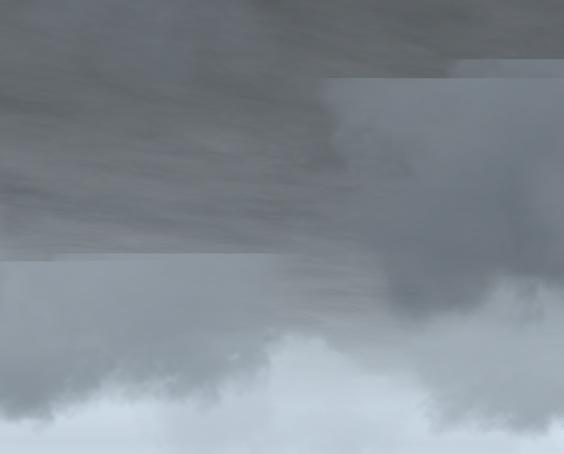
Folks: Here's what I'm referring to as the "clouds/cloud layer" issue with Overcast weather. This is the "solution" to the "tree/clouds" issue. Eric Howes
-
Yes, it does appear that Fubar is correct -- TK finally did what he threatened to do late last year. The result is that what started as a visual annoyance (the tree/clouds issue) has now spawned a "solution" from 3rdWire that utterly wrecks the sky/clouds environment in the SF2V Expansion Pack, which was one of the nicer features of that mod. The Overcast weather in particular looks like crap. Gone are the haze and low hanging clouds that gave that particular weather condition an ominous look and feel. It's been replaced with clouds bumping into the lower overcast layer in rather ugly fashion. So, instead of a "trees/clouds" issue, we now have a "clouds/cloud layer" issue. This is a non-solution. Eric Howes
-
SF2V Air & Ground War Expansion Pack v2.0 - VPAF Add-on
eburger68 replied to eburger68's topic in File Announcements
JD: I'm no expert on the logs in this game, about which there have been many discussions over the years. I do know that it is possible to get A/G kills without scoring direct hits when dropping bombs. Presumably the blast, if the bombs impact near enough to the target, will take it out. As for your other questions, I'll defer to others who spend more time than I going over mission logs -- I give them only a cursory examination in most cases. Eric Howes -
Heretic: I would suggest continuing to fly various campaigns and aircraft. If you encounter other anomalies or outright crashes, post the details here so that we can attempt to reproduce them. Maybe some detail will emerge that points to the culprit. Eric Howes
-
Heretic: I just tried the '62 and '68 with the units you mention, and I simply cannot reproduce the behavior you're describing. The 613th TFS F-100D unit worked just fine -- no crashes. I also checked the .INIs, and there doen't appear to be any problem with the entries for that unit. I also tried the first selectable units in the '62 campaign for the USAF F-100A, the F-100C, and the F-100D. In each case I was assigned the correct USAF aircraft, not an RDAF version. Also, when playing a few campaign missions I notice plenty of friendly air units in the skies from various nationalities performing a variety of air-to-air and air-to-ground missions. Eric Howes
-
SF2V / WOV Air & Ground Expansion Packs
eburger68 replied to eburger68's topic in Mission & Campaign Building Discussion
Stingray77: The music works only with campaigns. As for the radar, I don't see anything wrong with it. Eric Howes -
Wodin: There are B-52 squadrons and they do work. If you haven't seen any it could be because there are simply so many U.S. air units that the game hasn't tasked you with any BUF escort missions. Eric Howes
-
Wodin: The difficulty here is you're getting what appear to be random crashes with both terrains. There's really nothing much here for me to go on. Moreover, I haven't heard from anyone else with crashes such as you've described. Is there any common element to your crashes? Are you always flying the same aircraft? What about weather conditions? Single missions or campaigns? What I would suggest is a reinstall the base Expansion Pack (from teh four 7zip files). Don't apply any of the updates. Just fly with that for a day or so. Then start adding parts of the Feb. 2011 patch one by one. First, everything from the \Flight, \Menu, \Effects, \Sounds, and \PilotData folders. Then the terrain updates. Then the Weapon and Gun updates. Then the GroundObject updates. Then the Aircraft updates. Finally, the campaigns. After each partial update, play for a day or so to see if the crashes come back. What we're looking for is the point at which the crashing starts happening again. Eric Howes
-
Wodin: Do you have the February 2011 update installed? That update fixes all CTDs that I know about. Eric Howes
-
NATO Fighters IV+: Post-Dec2009 Update Pack # 4
eburger68 replied to Dave's topic in File Announcements
JJava: The easiest way to fix that problem is to simply remove the ability of tanks to fire at air targets. For each tank in \Objects\GroundObject, open the DATA.INI. Then under the sections DetectSystem & WeaponSystem, change TargetType=AIR_AND_GROUND to TargetType=GROUND. To restrict the tanks to firing at air targets only with their machineguns, we could implement Gunners, but that will take a little time and testing. Eric Howes -
Wodin: Check the ReadMe, which has instructions for adjusting the color of tracers to suit your preferences. Eric Howes
-
NATO Fighters IV+: Post-Dec2009 Update Pack # 4
eburger68 replied to Dave's topic in File Announcements
Peter: Thanks, we'll see if we can figure it out. Looks like the target area simply needs to be repositioned slightly. If you see it again in a mission, please save the mission to disk and post it. Eric Howes