
gerwin
-
Posts
829 -
Joined
-
Last visited
-
Days Won
9
Content Type
Profiles
Forums
Gallery
Downloads
Store
Everything posted by gerwin
-
Does the Weapons Pack - 03 Jul 06 works on WOI?
gerwin replied to jklv's topic in General Discussion
That weapons pack will mess up your WOI installation: http://www.simhq.com/_air11/air_345d.html use this instead (haven't tried it myself though): Mirage Factory Weapons Pack for Wings Over Israel -
I might have a suspicion of the cause: When waiting for my bank-to-paypal credit transfer to buy WOI. I stumled opun a 90MB game rip of the game on the web (hard to avoid if you google "wings over israel"). Curious me tried it, and it is messed up like described above. I know what the actual problem is, but hey lets keep it a secret.
-
The photoshop path tool, I just tried it and it indeed works well for lines as you can later decide the thickness. thanks for the tip. For me I am afraid it doesn't really sound appealing. I like my skins to be in the same style and resolution as the default ones, and therefore I re-use as much of it as possible.
-
Well I cannot currently post at the thirdwire forums... guess I wont bother the good man. Just complain here a bit ;)
-
Just checked out the first two WOI skin templates at thirdwire.com and I noticed the "lines and rivets" layers are not seperate, as with earlier releases. As far as I can see there is not much added value compared to the bitmaps in the game itself. I know there is the 3d studio max unfolded layer and a legend but I hardly use these anyways... Any Ideas?
-
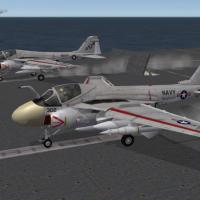
309 downloads
Gull Grey A-6 Intruder Skin for Third-Wire model V1.1 Update by Gerwin 6-4-2008..2-5-2008 DESCRIPTION: I noticed the Navy Aircraft skins in WOV have been skinned quite consistend in color and style ...except for the A-6A that is. This skin seems to be a more blue-ish grey and the weathering is rather thick and black. I tried to overhaul the original existing skin to better fit between the other aircraft: The Base colors are now exactly the same as the F-8 and A-7. The weathering was toned down and various details have been adjusted. Also I replaced the style of the nose cone and the fuselage air-brakes. On itself the white and yellow nose cones and the white/grey airbrakes represent real-life appearance, yet I do not know in which squadrons and in what combination they actually appeared. This skin does not include custom decals. UPDATE: In version 1.1 I weathered the skin in a way that is consistent with the other navy aircraft. The insides of the jet intakes have been recolored. The grey/white transitions have been slightly relocated. The white bottom is lighter now. The red color under the flaps does not shine trough so much now. INSTALLATION: Copy the included folder with contents to the folder that contains the A-6 files, for example: WOV\Objects\Aircraft\A-6A When in the game select the skin in the loadout screen. If you prefer the white nose cone you have to rename: A-6_Texture5.bmp to A-6_Texture5_yellownose.bmp A-6_Texture5_whitenose.bmp to A-6_Texture5.bmp THANKS TO: Third Wire for the Strike Fighters Based Games JSF_Aggie for the recolored nose cone parts -
View File Gull Grey A-6 Intruder Skin for Third-Wire model V1.1 Gull Grey A-6 Intruder Skin for Third-Wire model V1.1 Update by Gerwin 6-4-2008..2-5-2008 DESCRIPTION: I noticed the Navy Aircraft skins in WOV have been skinned quite consistend in color and style ...except for the A-6A that is. This skin seems to be a more blue-ish grey and the weathering is rather thick and black. I tried to overhaul the original existing skin to better fit between the other aircraft: The Base colors are now exactly the same as the F-8 and A-7. The weathering was toned down and various details have been adjusted. Also I replaced the style of the nose cone and the fuselage air-brakes. On itself the white and yellow nose cones and the white/grey airbrakes represent real-life appearance, yet I do not know in which squadrons and in what combination they actually appeared. This skin does not include custom decals. UPDATE: In version 1.1 I weathered the skin in a way that is consistent with the other navy aircraft. The insides of the jet intakes have been recolored. The grey/white transitions have been slightly relocated. The white bottom is lighter now. The red color under the flaps does not shine trough so much now. INSTALLATION: Copy the included folder with contents to the folder that contains the A-6 files, for example: WOV\Objects\Aircraft\A-6A When in the game select the skin in the loadout screen. If you prefer the white nose cone you have to rename: A-6_Texture5.bmp to A-6_Texture5_yellownose.bmp A-6_Texture5_whitenose.bmp to A-6_Texture5.bmp THANKS TO: Third Wire for the Strike Fighters Based Games JSF_Aggie for the recolored nose cone parts Submitter gerwin Submitted 05/02/2008 Category A-6/EA-6 Intruder Skins
-
File Name: MiG-21MF/bis WOI-Style Silver Skin File Submitter: gerwin File Submitted: 1 May 2008 File Updated: 4 May 2008 File Category: Mig-21 MiG-21MF/bis WOI-Style Silver Skin (for Third Wire model) Posted by Gerwin 1-5-2008 UPDATE 1.1: Added orange lines around the canopy. DESCRIPTION: With Wings over Isreal the 'MiG-17/19/21 + Su-7 + Il-28' series of enemy aircraft have received higher resolution skins with some subtile weathering effects. All aircraft have either one or more desert camo skins and one silver skin... Except the MiG-21MF and bis which have no silver skin available. Using parts of the sand camo MF skins and parts of other MiG-21 variants I compiled a silver skin for the MiG-21MF. It can also be used (as TW does) for the MiG-21 bis. The decals and numbers configuration files included are a copy of the default soviet configuration. TIP FOR WINGS OVER EUROPE USERS: You can copy the WOI silver skins of the 'MiG-17/19/21 + Su-7 + Il-28' to each matching WOE aircraft. This will give you sharp and consistent skins for all adversary fighters. INSTALLATION: Copy the included folder with contents to the folder that contains the MiG-21MF files, for example: WOI\Objects\Aircraft\MiG-21MF When in the game select the skin in the loadout screen. THANKS TO: Third Wire for the Strike Fighters Based Games, including the MiG-21MF model and skins. Click here to download this file
-
Hey I know that skin, I posted it ;) (Mostly ThirdWires Art though.) anyway: nice picture! small tip: give the aircraft some space before the nose, or center it more.
-
I am also quite new to the SF series, but it really interests me for the past months. It is good that there are now several titles available you can merge into a single install that gives a variety approaching Jane's ATF/USNF/FA games. Whilst in the core flight and combat dynamics it far surpasses them. Here's my wishlist nonetheless, duplicating some points mentioned earlier, and maybe even mentioning something I just failed to notice. - More detailed briefings. - More detailed campaign status information. - Visually Destroyed grounded aircraft in WOI (now they just dissappear). - Airfield Transfer Mission type, and maybe some other types. - Carrier Deck objects, Some Carrier support ships. - Native Helicopter support. - An easier/more visual mission editor. - Cat archiver, and a better extractor, or change to zip format like Quake 3+. - Keyboard shortcuts in Menu. - Object/Aircraft reference option in the main menu, with 3D previews. - More optimized game logic for SAM's and WarShips tracking and firing etc. (slowdowns). - The single mission generator to use the Secondary Skin folders for AI flights. - The single mission generator to only use nations defined in the terrain's nations.ini for AI flights. (no UK aircraft over vietnam etc.) - A TW quality MiG-25. and some more emphasis on Adversary aircraft in general. PS. awacs sound fine, but I am afraid some nations/times will be left with nothing to communicate with?
-
I did succesfully place the static C-130 Hercules from capun on an airfield, when I tried it some weeks ago. I noticed the C-130 sinking halfway into the ground when placed to far from the center of the airfield (but still on a paved area). Maybe you are having that same issue?
-
Attached. VIETNAMSEA_DATA.zip
-
From a post by Dueces at the SimHQ forums I copied these addresses, the files where still up some days ago when I tried them. I personally find the hills looking a bit to brown to go for a vietnam jungle, so I use the default tiles again... The tree mod I am very happy with, as I think it gives the right balance between looks and FPS IMHO. But you need to adjust the vietnamsea_data.ini file that is included because it is outdated. I will attach an updated one later.
-
Gull Grey A-6 Intruder Skin for Third-Wire model
gerwin replied to gerwin's topic in File Announcements
glad to hear there is a need for the skin! The WoV A-6A model itself is quite nice as far as I can tell. Only the canopy glass should bulge out a little more. I don't see much external differences between this model and an A-6E version (without TRAM). So it could serve neatly for that version as well (giving it some chaff an flare). -
Generic Hill Scheme F-4E+F-4G Phantom II Skin for TW+MF model
gerwin replied to gerwin's topic in File Announcements
Forgot one entry in the Credits, I took weathering and slimers from: Luftwaffe F-4F/ICE skin repaint by Bosco Hsuean, 11 Feb 2004. (http://www.column5.us/) -

391 downloads
Generic Hill Scheme F-4E+F-4G Phantom II Skin for TW+MF model Update by Gerwin 6-4-2008 DESCRIPTION: Wanting a good hill scheme Phantom II, I ended up using the Mirage Factory F-4G 'Late' Skin. Over time I made the following modifications: -Scaled the skin down to the default resolution 512x512. -Replaced certain skin parts with the default texture, such as the exhaust. -Overlayed a subtile weathering layer. raised blue saturation. -Fixed the numbering decals for the tail. -Erased the insignia from the skins and replaced them with decals. -Overlayed the default panel lines on the fuselage, tail and nose. -Adjusted various details. -Made an F-4E suitable variant (different slimers, nose gun etc). Regarding the F-4E tail codes: they are somewhat a copy of the F-4G codes. I am a bit uncertain on the historical accuracy of this. INSTALLATION: For the F-4G skin you need to have the Mirage Factory F-4G model installed. you can find it at http://www.column5.us Copy the included folder with contents to the folder that contains the F-4 files, for example: WOE\Objects\Aircraft\F-4E When in the game select the skin in the loadout screen. THANKS TO: Third Wire for the Strike Fighters Based Games. Mirage Factory for the F-4G modification, and base F-4G late skin (credited to Sundowner). -
View File Generic Hill Scheme F-4E+F-4G Phantom II Skin for TW+MF model Generic Hill Scheme F-4E+F-4G Phantom II Skin for TW+MF model Update by Gerwin 6-4-2008 DESCRIPTION: Wanting a good hill scheme Phantom II, I ended up using the Mirage Factory F-4G 'Late' Skin. Over time I made the following modifications: -Scaled the skin down to the default resolution 512x512. -Replaced certain skin parts with the default texture, such as the exhaust. -Overlayed a subtile weathering layer. raised blue saturation. -Fixed the numbering decals for the tail. -Erased the insignia from the skins and replaced them with decals. -Overlayed the default panel lines on the fuselage, tail and nose. -Adjusted various details. -Made an F-4E suitable variant (different slimers, nose gun etc). Regarding the F-4E tail codes: they are somewhat a copy of the F-4G codes. I am a bit uncertain on the historical accuracy of this. INSTALLATION: For the F-4G skin you need to have the Mirage Factory F-4G model installed. you can find it at http://www.column5.us Copy the included folder with contents to the folder that contains the F-4 files, for example: WOE\Objects\Aircraft\F-4E When in the game select the skin in the loadout screen. THANKS TO: Third Wire for the Strike Fighters Based Games. Mirage Factory for the F-4G modification, and base F-4G late skin (credited to Sundowner). Submitter gerwin Submitted 04/06/2008 Category F-4 Phantom II Skins
-
File Name: Gull Grey A-6 Intruder Skin for Third-Wire model File Submitter: gerwin File Submitted: 6 Apr 2008 File Category: A-6/EA-6 Gull Grey A-6 Intruder Skin for Third-Wire model Update by Gerwin 6-4-2008 DESCRIPTION: I noticed the Navy Aircraft skins in WOV have been skinned quite consistend in color and style ...except for the A-6A that is. This skin seems to be a more blue-ish grey and the weathering is rather thick and black. I tried to overhaul the original existing skin to better fit between the other aircraft: The Base colors are now exactly the same as the F-8 and A-7. The weathering was toned down and various details have been adjusted. Also I replaced the style of the nose cone and the fuselage air-brakes. On itself the white and yellow nose cones and the white/grey airbrakes represent real-life appearance, yet I do not know in which squadrons and in what combination they actually appeared. This skin does not include custom decals. INSTALLATION: Copy the included folder with contents to the folder that contains the A-6 files, for example: WOV\Objects\Aircraft\A-6A When in the game select the skin in the loadout screen. If you prefer the yellow nose cone you have to rename: A-6_Texture5.bmp to A-6_Texture5_whitenose.bmp A-6_Texture5_yellownose.bmp to A-6_Texture5.bmp THANKS TO: Third Wire for the Strike Fighters Based Games JSF_Aggie for the recolored nose cone parts Click here to download this file
-
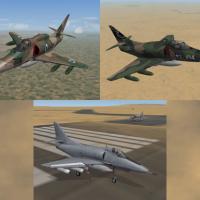
573 downloads
A-4 Skyhawk updated Skin Pack for Third-Wire model 1) IAF (Israel) 'Ahit' skin, for A4-F (original work by Markfighters and Sundowner) 2) USMC Camo skin, for A4-E (original work by mitch) 3) USN Low Vis skin, for A4-E (original work by column5) Update by Gerwin 25-3-2008 DESCRIPTION: Third Wire did an excellent job on the A-4F skin, both in regard to detail as to weathering. There are also some interesting user skins for the Skyhawk series offered on the internet, including the three described above. Yet I noticed the skins lacking on certain areas: -gun fume stains -weathering effects -properly aligned camo pattern and other alignments -panel details -overall texture brightness/saturation -usage of decals -colors of certain areas So here are the updated skins, most work was done on the Ahit (which now uses WOI colors), and the Camo scheme (many obvious errors, I have no photo references of this scheme). The low vis scheme was only slightly adjusted/weathered. NOTE: These skins will not adjust aircraft data, only the nation and the appearance. INSTALLATION: Copy the included folder with contents to the folder that contains the A-4 files, for example: WOE\Objects\Aircraft\A-4E When in the game select the skin in the loadout screen. THANKS TO: Third Wire for the Strike Fighters Based Games, Markfighters Sundowner Mitch Column5 -
View File A-4 Skyhawk updated Skin Pack for Third-Wire model A-4 Skyhawk updated Skin Pack for Third-Wire model 1) IAF (Israel) 'Ahit' skin, for A4-F (original work by Markfighters and Sundowner) 2) USMC Camo skin, for A4-E (original work by mitch) 3) USN Low Vis skin, for A4-E (original work by column5) Update by Gerwin 25-3-2008 DESCRIPTION: Third Wire did an excellent job on the A-4F skin, both in regard to detail as to weathering. There are also some interesting user skins for the Skyhawk series offered on the internet, including the three described above. Yet I noticed the skins lacking on certain areas: -gun fume stains -weathering effects -properly aligned camo pattern and other alignments -panel details -overall texture brightness/saturation -usage of decals -colors of certain areas So here are the updated skins, most work was done on the Ahit (which now uses WOI colors), and the Camo scheme (many obvious errors, I have no photo references of this scheme). The low vis scheme was only slightly adjusted/weathered. NOTE: These skins will not adjust aircraft data, only the nation and the appearance. INSTALLATION: Copy the included folder with contents to the folder that contains the A-4 files, for example: WOE\Objects\Aircraft\A-4E When in the game select the skin in the loadout screen. THANKS TO: Third Wire for the Strike Fighters Based Games, Markfighters Sundowner Mitch Column5 Submitter gerwin Submitted 03/25/2008 Category A-4 Skyhawk Skins
-
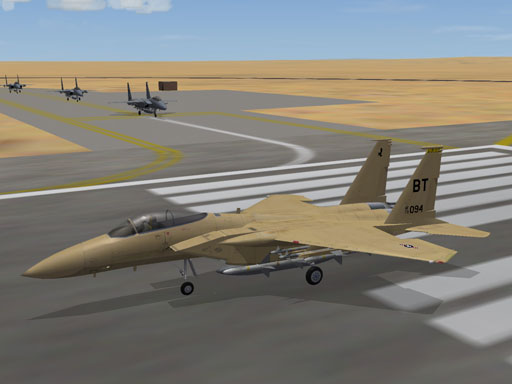
Sand/Desert F-15a Skin (fictional) for third-wire model
gerwin replied to gerwin's topic in File Announcements
Good to see you have use for it, and interesting to see it in action on the WOI terrain. -
I understood that, it was not a comment to say the skin is wrong, not at all.. just my personal taste.
-
It looks nice indeed on that image! Silver skins always make me think: the diffulty with silver is that it is not a texture like others but more like a mirror-reflection-effect.
-
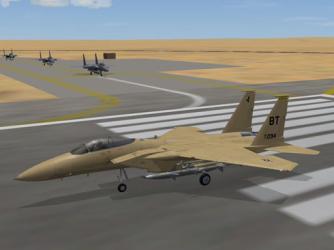
Yes I have seen it but am not to fond of the pinkish appearance. My try is finished for now and it is pending for approval, attached a preview.
-
238 downloads
Sand/Desert F-15a Skin (fictional) for third-wire model By Gerwin 17-3-2008 DESCRIPTION: The stock f-15a seems to be showcase aircraft of Wings over Europe, and as it is it looks very good. Unfortunately there are very few alternative skins for this model. Using the templates from third-wire I started a not to ambitious plan to change the skin from a grey/blue one to a sand colored one. Although quite some tuning was required to give it a sand color with the appropriate red/yellow saturation. As already stated this paintscheme is fictional. Also it might need some additional study which parts at the exhaust are normally painted and which remain bare metal. The decals and number configurations have not been changed. INSTALLATION: Copy the included folder with contents to the folder that contains the F-15a files, for example: WOE\Objects\Aircraft\F-15A When in the game select the skin in the loadout screen. THANKS TO: Third Wire for the Strike Fighters Based Games, including the F-15a model and templates