


Brain32
-
Posts
3,005 -
Joined
-
Last visited
-
Days Won
12
Content Type
Profiles
Forums
Gallery
Downloads
Store
Everything posted by Brain32
-
In that case - bring it on. P.S: Spilling some more info or even screenshots(of anything, even a picture of the icon on desktop would be cool lol) could be a good idea
-
Many 90's games had a pretty good budget it's just that they didn't have the technology to put out the stuff we see today, so you have no reason not to believe that. As for the other things, it's his business and it worked so far It's just strange about this particular issue that he obviously had to spend time which equals money to reduce and lock out this feature and quite honestly I can't see how did he figure out this would be a good investment
-
The thing with this is...I mean the part I have problem with is. He can set the default game to be completely safe of any kind of errors and that is very sound, but why limiting the people that use extractors to extract and edit much deeper parts of the game. Nobody can hold him responsible for that, and quite honestly many of us are expirienced enough with the game we could still make a mod that can lock the game and crash it or cause serious bugs, he would have to cut the modding part of the game completely to be apsolutely sure that wouldn't happen. It's a bit silly...as if car manufacturer welded the hood so nobody can install Nos in it and blow up the engine, some things are simply not covered by warranty and that's all... Basically what I want to say is, the in-game interface should serve the purpose of keeping the game at safe levels, if you do anything beyond that, sorry that's on your own risk. And that's why I don't understand all this locking up/hard coding stuff...
-
LOL I had to google it, that thing came out 3 years before my birth lol
-
I had the same problem with some of the stuff I did but I came around. I'd save the main max file from which I export lod's and then make another copy of it and just trashed it to bake textures. In the game I would use the previously exported lod and the newly baked textures
-
Hmmm allegedly it's adjustable by horizon distance but I tried even some crazy stuff and it didn't seem so at all. I've set horizon distance to 500 000 lol I could see airfield structures and other 3D objects like I was a Superman ...but the *.TOD based trees and objects were still rendering at like 500m away from me Why is this like that I do not know, I don't think this is a good solution by TK
-
I'm treating the IL-2: CoD as a 2012-2013 release
-
Spitfire MkXVI - classic lines of the standard 9-er plus bubble canopy giving it a bit more modern look, I love it. Check it out: http://en.wikipedia.org/wiki/File:Supermarine_Spitfire_Mk_XVI_edit4_ver2.jpg Didn't link it as a picture as it's 3,000 × 1,895
-
Hey Stary did you notice new entries in the flightengine.ini? What used to be before: [FarSceneClip] FarClipDistance=80000.0 NearClipDistance=3000.0 [NormalSceneClip] FarClipDistance=14000.0 NearClipDistance=249.9 [NearSceneClip] FarClipDistance=250.0 NearClipDistance=0.45 Is now... [backgroundSceneClip] FarClipDistance=80000.0 NearClipDistance=3000.0 [ForegroundSceneClip] FarClipDistance=14000.0 NearClipDistance=0.45 [insideSceneClip] FarClipDistance=250.0 NearClipDistance=0.01 Now while new naming may not mean anything at all the entries for the latter two are so different I wasn't sure how to modify them lol
-
Custom loadouts
Brain32 replied to Brain32's topic in Basic Aircraft Modding (INI, Skins, Weapon Hardpoints)
That's exactly what you can do with this, ofcourse you have to pre-enter the loadouts in your loadout.ini's. It works for all flights, you can change both friendly and enemy flights loadouts like that -
Hi guys! I've been tampering with something, and although I haven't been around here as much as I used to, I'm pretty sure this wasn't covered before. To finally get to the point and spare you the drama about me having less free time and yadda,yadda,yadda...you know how you have loadouts sorted into: RECON, AirToAir, Strike,SEAD etc? Of course you do, well now thx to the mission editor you can add more like this: 1. First of course you edit your "beloved" loadout.ini for example just adding this: [Custom01] Loadout[01].WeaponType= Loadout[01].Quantity=1 Loadout[16].WeaponType=AIM-120A Loadout[16].Quantity=1 Loadout[17].WeaponType=AIM-120A Loadout[17].Quantity=1 Loadout[18].WeaponType=AIM-120A Loadout[18].Quantity=1 Loadout[19].WeaponType=AIM-120A Loadout[19].Quantity=1 Loadout[24].WeaponType=AIM-120A Loadout[24].Quantity=1 Loadout[25].WeaponType=AIM-120A Loadout[25].Quantity=1 Save it and go off into the game, now don't just set a quick mission and fly messing again with your loadouts but enter mission editor and check this out dudes: It's there And it sure works I quad-checked it and as you can see you can add many of them, so if you have more than one favorite loadout it's now very easy to use it in-game. So there you go, if you already knew this then...why didn't anybody told me?!!!
-
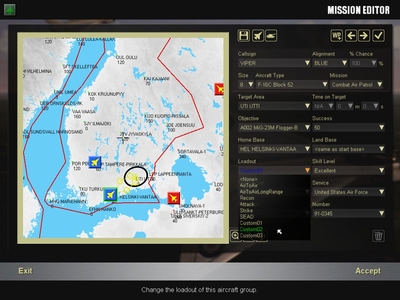 for loadout tutorial...
© me and whoever else mith find use of it xD
-
Strange, my has decals showing up normally but not those like on the first picture
-
Decals, many, many, many decals(com. E. Lassard TM)
-
Is it just me or is objectdata002.cat unreadable, protected? Hmm all that and obviously some kind of connection to the internet makes me assume a few things... Not saying anything, not implying anything but...
-
Forcing AA in graphics card control panel does not work either?
-
That's cool. Btw DanW this patch is really cool
-
Hierarchy is easy stuff, animations are still a PIA for me, and mapping is suicidal
-
Speaking of Jesus and sense of humor this one is my favourite:
-
Happy Easter guys
-
I have it adjusted: "You can ask all you want but don't whine about the answer!"
-
Nicer than CoD, and with more FPS Seriously now, it looks awsome
-
Yeah but EF2000 same as F-18 manages that function via clever use of light functions.
-
Don't know, never even been anywhere near England. However I know they made the terrain with help of imagery from 1940's, how accurately they did it - I don't know. I've never been out of the Continent

