mue
-
Posts
419 -
Joined
-
Last visited
-
Days Won
8
Content Type
Profiles
Forums
Gallery
Downloads
Store
Everything posted by mue
-
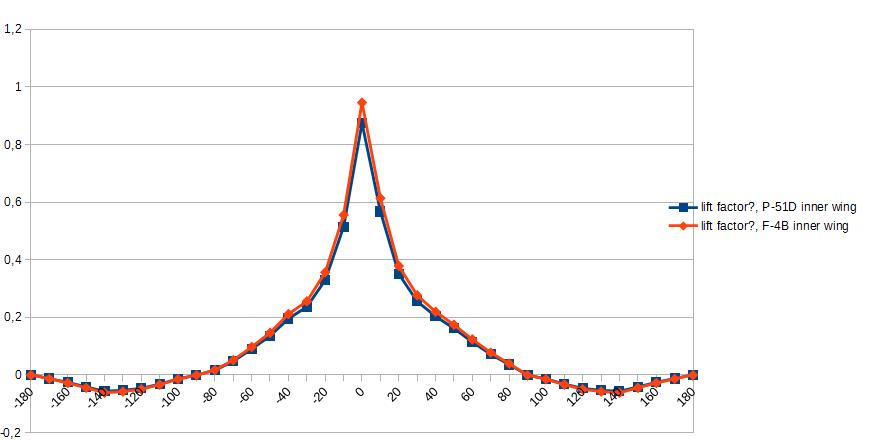
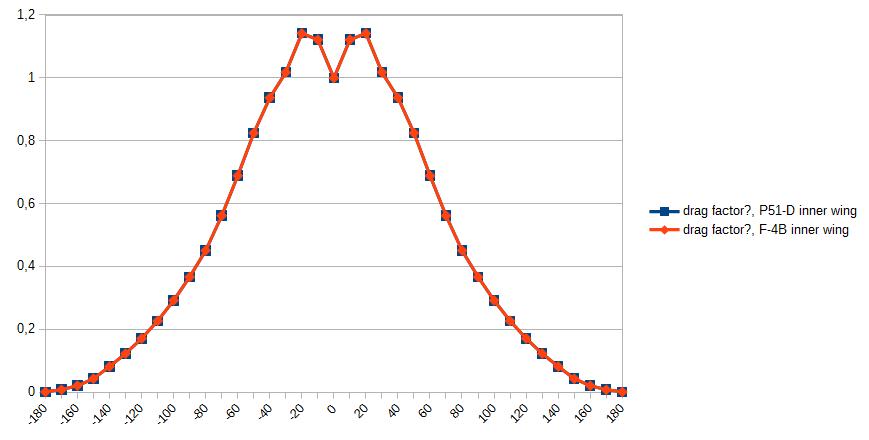
Currently I'm trying to reverse engineer the SF2 flight model. I stumbled over the stall tables. Does anyone know how the stall tables (StallLiftTable, StallDragTable and StallXacShiftTable) work? As an example here are the StallLiftTable and StallDragTable from the P-51D and F-4B inner wings: I assume the abscissa is alpha and the ordinates are factors for some lift or drag coefficients. Correct? What are the lift and drag coefficients? CLmax for lift and StallDrag for drag? But the drag table looks odd. I would have assumed that at alpha = -90 degree and +90 degree the drag factor would have its maximum. When are these tables used? If alpha > AlphaDepart?
-
Thanks for the link. Unfortunately "Chord=" is not described there. I already searched my TW forum archives, but didn't found anything.
-
I know the definition of chord. I wanted to know what the chord values in the aircraft_data.ini means. As far as I understand for the pitch moment calculation the ReferenceChord value is used. TK wrote: Therefore in my opinion the extra chord values don't make any sense. What am I missing here?
-
Question for the FM experts: What does the chord value in the wing sections of the aircraft_data.ini mean? How is it used in the FM?
-
Here we go again...these wish lists pop up regularly every 1-2 years... Let's face it: TK won't expand SF2. Even if he does he has his own vision and wouldn't consider these wishes. Therefore, if you want new features, you have to do it yourself! Multiple options here: Extending the SF2 game engine: Because of non-access to source code, you have to "hack" the binary. -> In my opinion not viable. Waiting for the release of the source code. -> Will never happen! Write you own combat flight simulator: From scratch. -> Too much of an effort! Use/modify existing (open) source code. -> A little less effort than 2.1.) I'm a big fan of the open source flight simulator FlightGear. It has already the following features: world wide terrain weather FDM engines multiplayer rudimentary combat support via addons (e.g. Bombable,...) ultra flexible It's only missing some minor things as game play, dynamic campaign, AI, .... Anyway, I'm currently experimenting with converting SF2 aircraft to be usable in FlightGear. Maybe thats a start...
-
Of course is a 32-bit version possible. But as I wrote I have to find the prebuilt dependency library package for 32-bit (unless I build those libraries myself). Maybe I can find them somewhere. BTW. Do you know that you can run most 32-bit programs without problems on 64-bit Windows? Most likely you don't need a 32-bit Windows to run your old 32-bit programs.
-
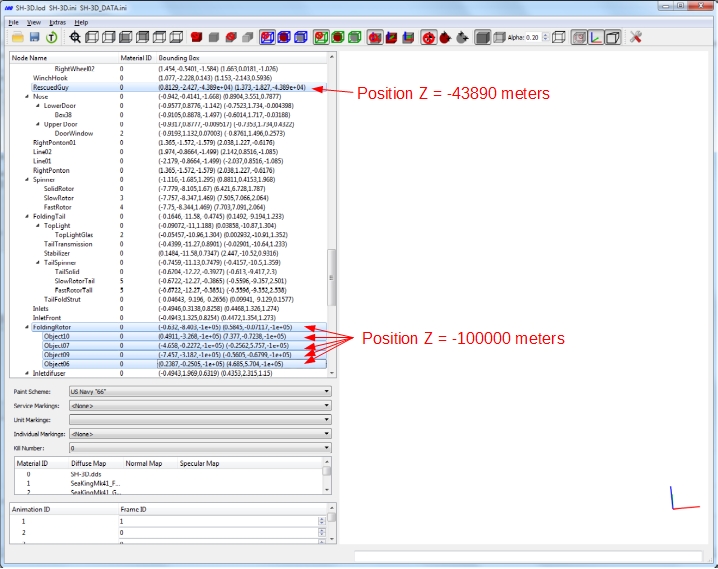
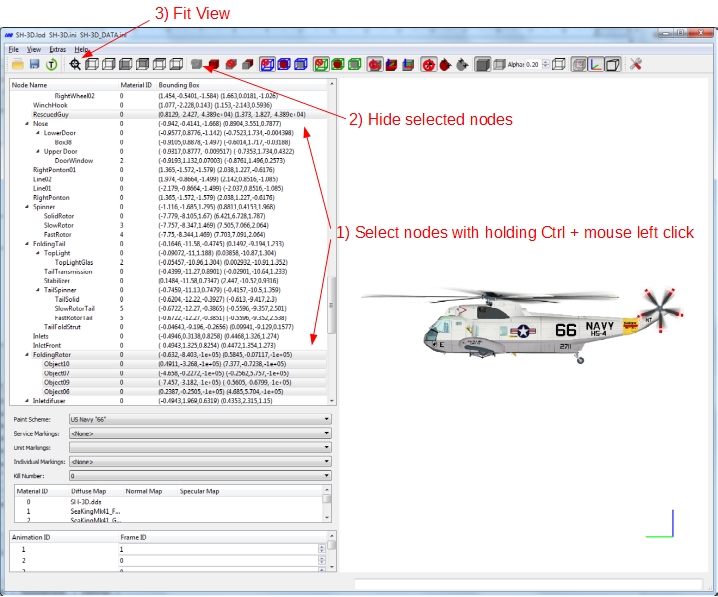
Yes, that model is special. It contains nodes (meshes) that are located 44000 and 100000 meters from the main part: The LODViewer tries to show all nodes at once and therefore zooms way out. If you want to see the helicopter you have to hide those "special" nodes and then click "Fit View": If you want to see the "RescuedGuy" node you have to select that node, hide the unselected nodes and then click "Fit View".
-
Version 0.6.2 was uploaded. Changelog: Version 0.6.2 -corrected reading of ANSI files with non-ASCII characters -caseinsensitive handling of node names (e.g. for showing collision, pivot points or bounding boxes of selected nodes) -disabled mip maps. I hope this resolves the performance issues with hires (4K and above) textures. If not you can use the new option Settings->Display->"Limit Texture Resolution" to limit the (internal) texture resolution.
-
Yes, currently only 64-bit support: Even though I compile the OpenSceneGraph library myself, I rely on the prebuild dependency packages for OSG. Those I only found as x64 version. And to compile the dependency packages myself, I didn't find the time and motivation yet. I need the 64-bit OpenSceneGraph library anyway for a FlightGear related project. I didn't thought, that 32-bit Desktop-OS is still a thing.
-
Will be fixed in the next version. That means the "Use Vertex buffer objects" option doesn't help? Does the slowdown happen also with stock objects? Do you use 4K textures?
-
I didn't know that there is also a decal system for ground objects. After a first glance, it seems it only works with ships? It uses the *_names.ini (that contains [ShipXXX) entries) instead of numbers.lst. Is this correct? Are there other types besides ships? Until I implement the ground object decal system, you can view the hull numbers with this workaround: copy a NUMBERS.LST file that contains sufficient numbers, e.g. I used F-4B\USMCGREY1\NUMBERS.LST (contains numbers 0 - 99) into the texture folder. Then you can select the hull number via Individual Markings.
-
Version 0.6.1 was uploaded. Changelog: Version 0.6.1 -added decal texture file loading fallback: If numbered texture file is not found, it’ll then look for unnumbered file. -added option for using vertex buffer objects (Extra->Settings->Display->Use Vertex Buffer Objects) Maybe "Use Vertex Buffer Objects" helps with the performance problem some users have experienced with Version 0.6.0. Beware! Enabling this option while simultaneously "Write OSG log file" is enabled, writes A LOT to osg_logfile.txt. -bugfix: "Write Info File" didn't work in Version 0.6.0 -bugfix: Couldn't save UV Mapping as jpg file
-
For modeling you can also use blender (open source). There is an LOD exporter for blender: https://combatace.com/files/file/16747-lod-exporter-for-blender/
-
Could both of you please (re)create log files with the "write osg log file" option already enabled at program start (just restart LODViewer with this option enabled). Some information will only be written to the log file at program start. If the log option is enabled only after the program start, then that information are missing in the logfile.
-
I don't think "it's just your PC", since other users also have problems with the LODViewer. Unfortunatelly, I have no clue what the cause of the problems is, because I don't see it on my computers. I have a request: please enable OSG logging (Extras->Settings->Debugging->Write OSG log file). It writes a logfile "osg_logfile.txt" in the lodviewer.exes directory. restart the LODViewer load the Marauder if the "osg_logfile.txt" is written, please send it to me. Thank you! Maybe the logfile gives me some pointers.
-
I tested this package. I don't see any freezes or crashes
-
I downloaded and tested this Mirage F-1EQ . Because of the 4K Textures my development system (Windows 7 with an old 8800 GTS 512) struggles. It gives me a slide show. But it doesn't crashed. On another computer with a GTX 660 I have no problem.
-
I forgot to say: I have to thank you guys for the bug reports. It's really helpful. Because of lack of time (and maybe motivation ) I don't test all possible cases. Therefore I'm really grateful to you for testing my (buggy) software.
-
My understanding of the decal system is as follows: The texture file name is defined by Filenameformat. Depending on DecalLevel either the nation id (if DecalLevel=0) or squadron id (if DecalLevel=1) or serial number index (if DecalLevel=2) or kill number (if DecalLevel=3) is appended to the texture file name. The game (and the LODViewer) then tries to load this texture file. But the game has a fallback behavior, that the LODViewer has not (yet): if the game doesn't find the texture file with the numbers at the end, it then tries to load the texture file defined solely by Filenameformat (without the numbers at the end). Therefore I think the modded decals (DecalLevel=0) doesn't show in the LODViewer, because they doesn't end with the nation id number and the LODViewer misses the fallback behavior of the game, that would load the texture file without the numbers at the end. I will add the fallback behavior in the next update.
-
I assume you serial number texture filenames have numbers at the end (e.g wingnum001.tga)?
-
Does your mod decal files (Decal Level 0) contain the nation number (e.g. INSIGNIA002.tga)? See my post above.
-
Regarding the DecalLevel=0 problem, can you please check if this is the cause of the problem: The current version of the LODViewer expects as texture file name the "full" name including the nation ID (e.g. "INSIGNIA002.TGA"). The LODViewer currently does NOT look for "INSIGNIA.TGA" as fallback.
-
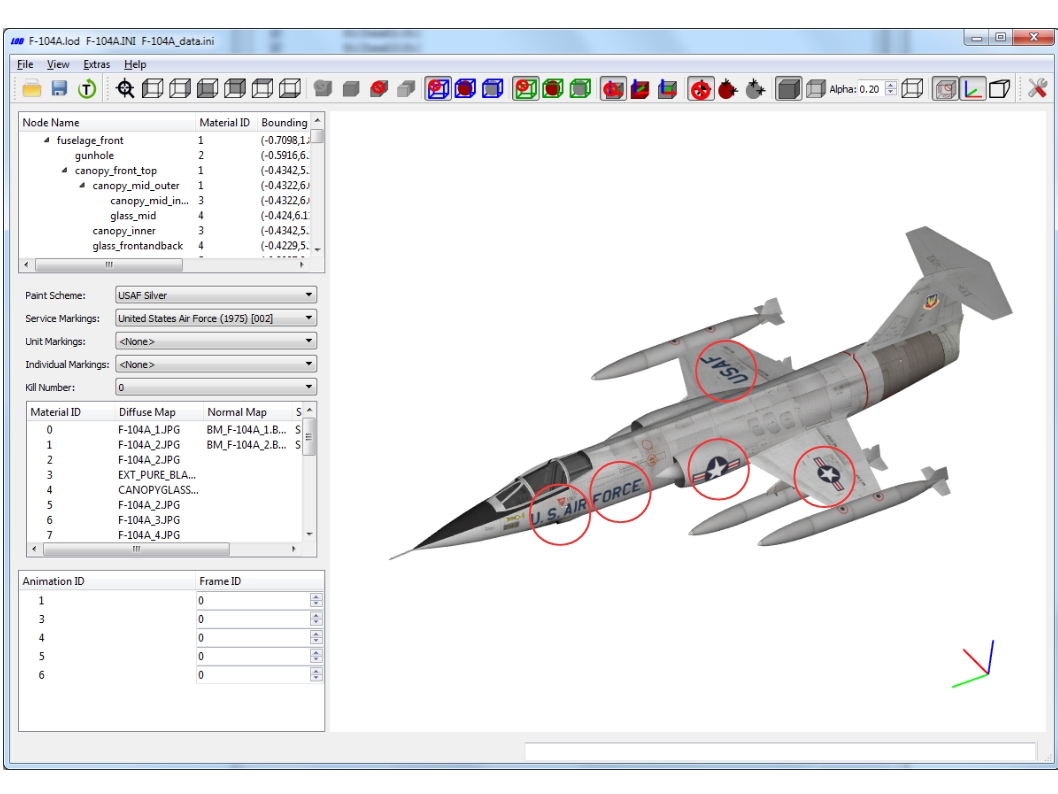
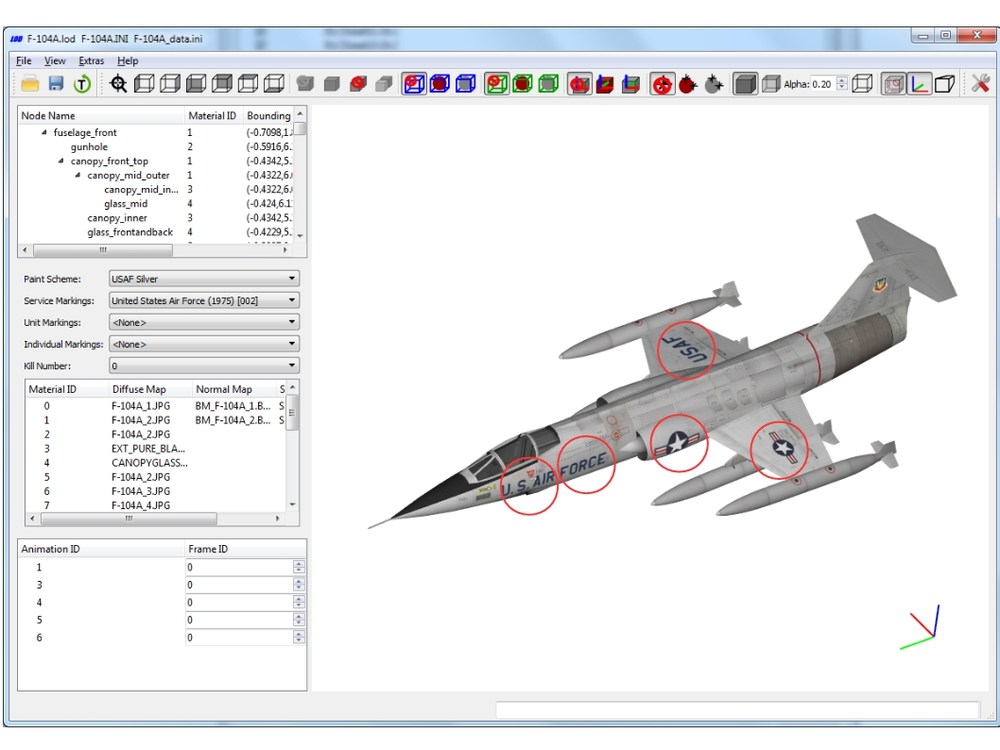
I tested it with more then ten different stock aircraft. No CTDs. No problems with showing decals with DecalLevel=0. Until now, I can not reproduce the bugs Here, as an example the F-104A (marked with red circles are the decals with DecalLevel=0): Could you please give me the name of the stock aircraft or the download link of the mod aircraft, that you have problems with. Thanks!
-
Should work. Can you send me or give me a link of the aircraft, where it doesn't work? Do you get the CTD with all aircrafts?
-
I created and added the "reversed" LOD files. The reversed LOD files are named *_Rev.lod Italian Euro Pilot +Rev.7z RAF Euro Pilot Oxy +Rev.7z