Righteous26
-
Posts
110 -
Joined
-
Last visited
-
Days Won
1
Content Type
Profiles
Forums
Gallery
Downloads
Store
Everything posted by Righteous26
-
All engine and gun sounds dissapearing (Fixed)
Righteous26 replied to macmacmacmoc's topic in General Discussion
Try adding the sounds to your soundlist.ini file. -
All four of the pylons are articulated. This appears to be some sort of maintenance test. The pylons have a limited range of motion while the wheels are on the ground and the squat switch is engaged. The squat switch can be overridden by the SQT ORIDE switch in the right rear avionics bay. It can not be overridden from the cockpit. Either pilot can slave the gun to his head.
-
Harm missile flight path and F-5 aggressor pack
Righteous26 replied to DEVIL11's topic in Mods & Skinning Discussion
Terminal popup is for sea skimming anti-ship missiles. It allows the missile to plunge through the deck and provides a terminal evasive maneuver to defeat point defense systems. I would caution against using popup on other types of missiles as the missile could fly into the ground enroute to the target. -
What A-7D goes with what install?
Righteous26 replied to daddyairplanes's topic in General Discussion
It may be much easier on you to place the "Tested on a Full 5 Merged Install" disclaimer on the download page and readme file. The worst thing that is likely to happen to a user who selects a variant for which they have no lod is a CTD. -
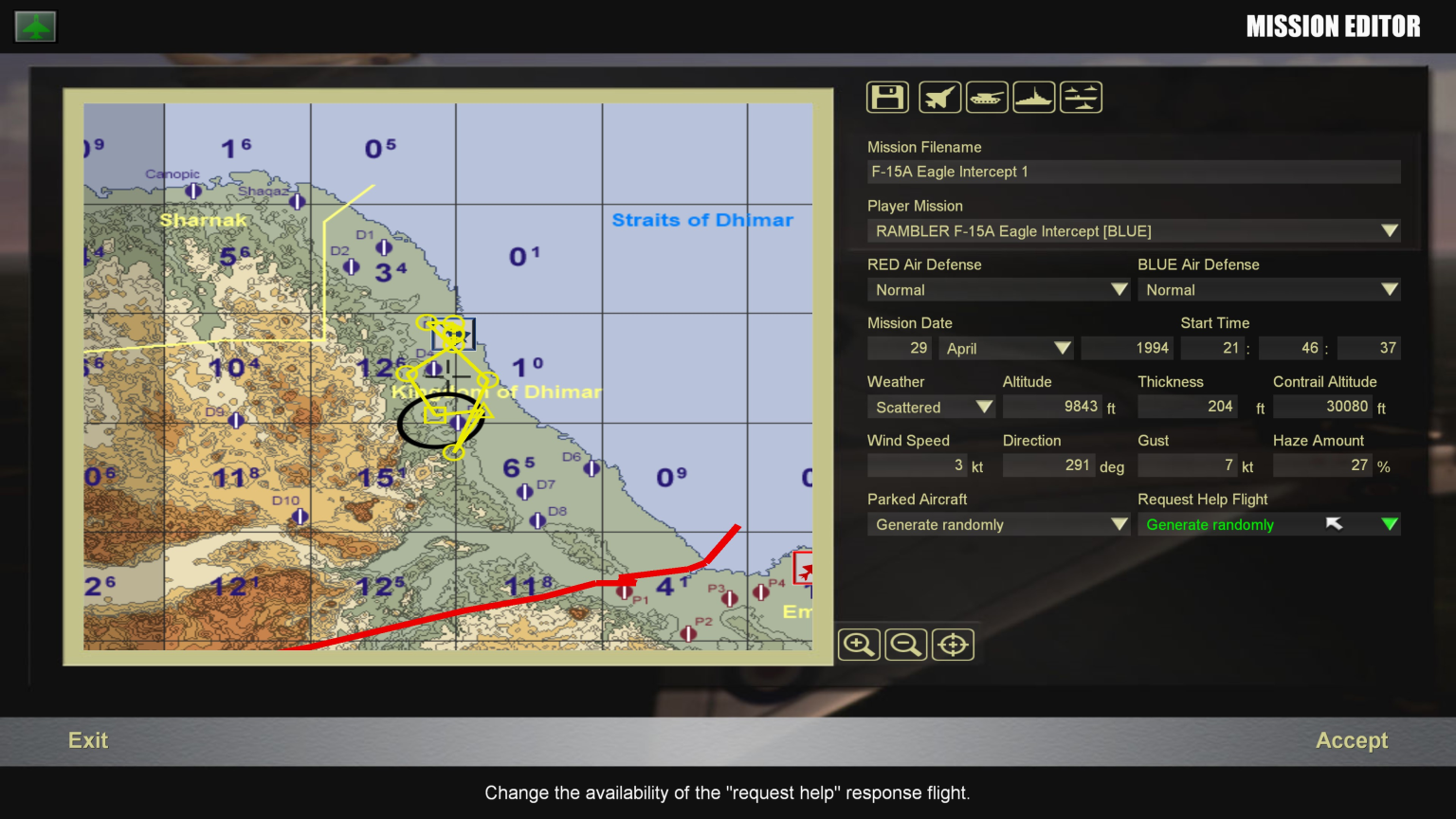
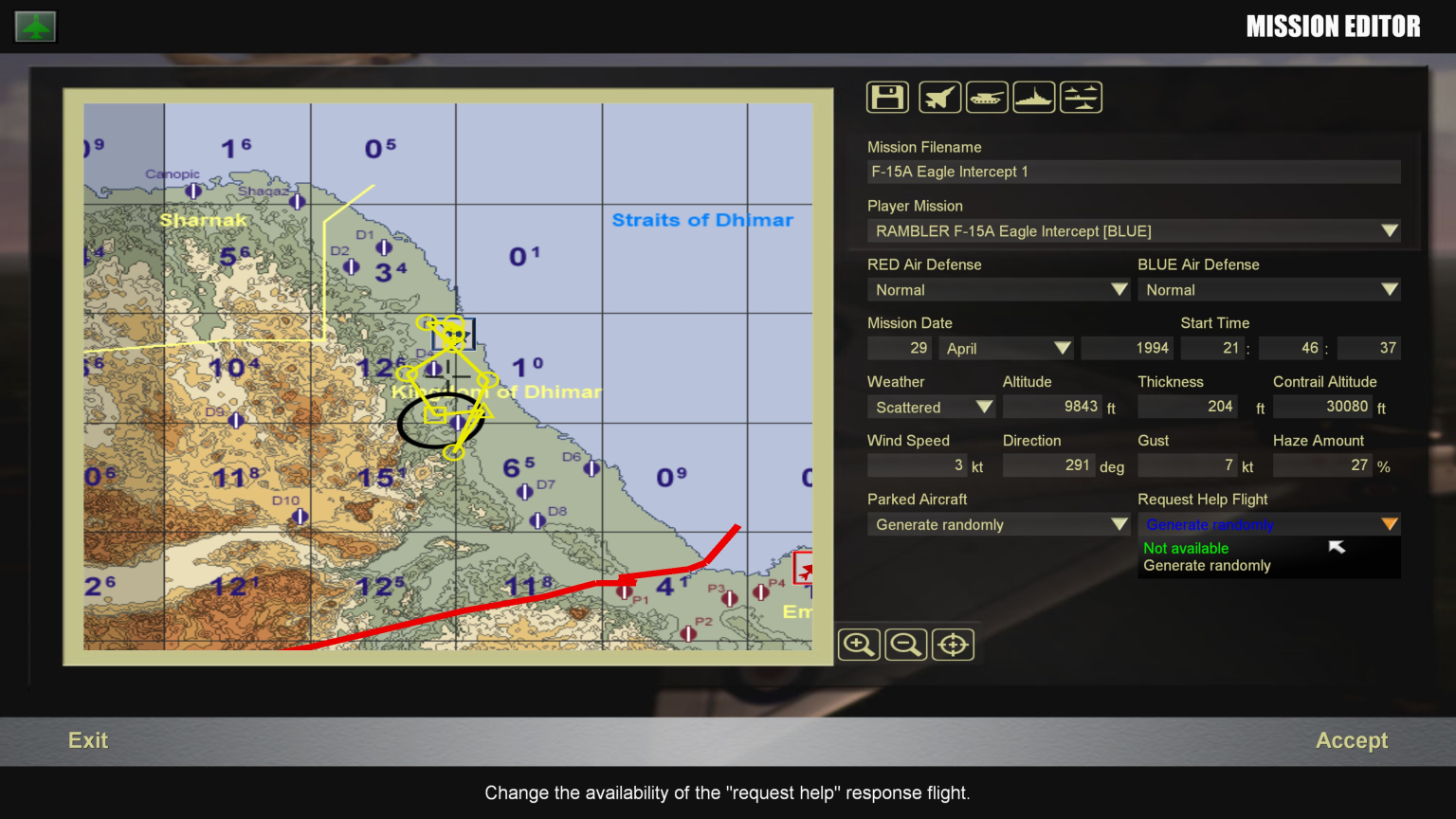
There appear to be only two options for generating a help flight in the Mission Editor. They are Not Available and Generate Randomly. It does not appear that you can change the type available. See the attached pictures. If you need help with the interceptors then do as the person above suggests and assign an escort to your flight. You can also have a sweep mission go in before you get to the target.
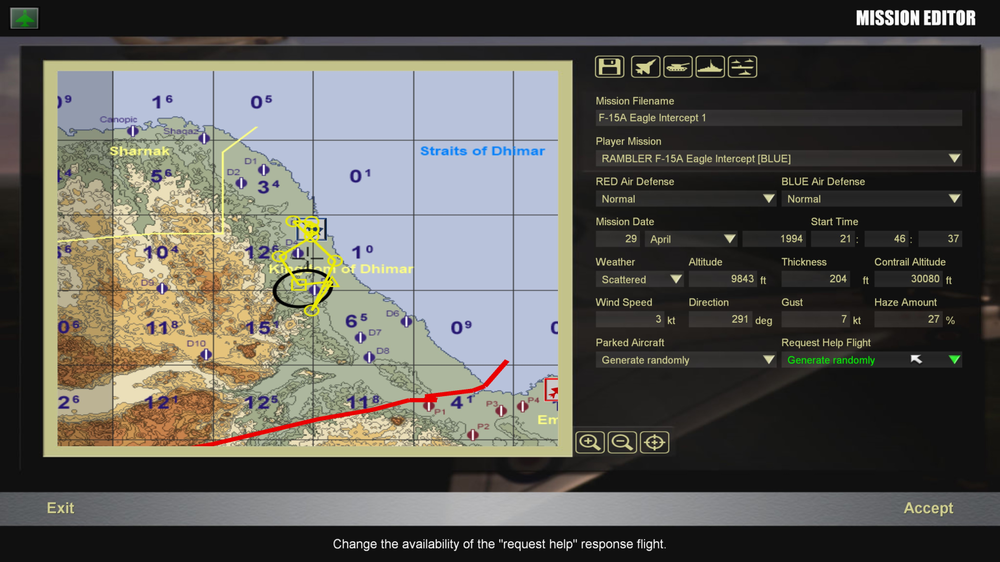
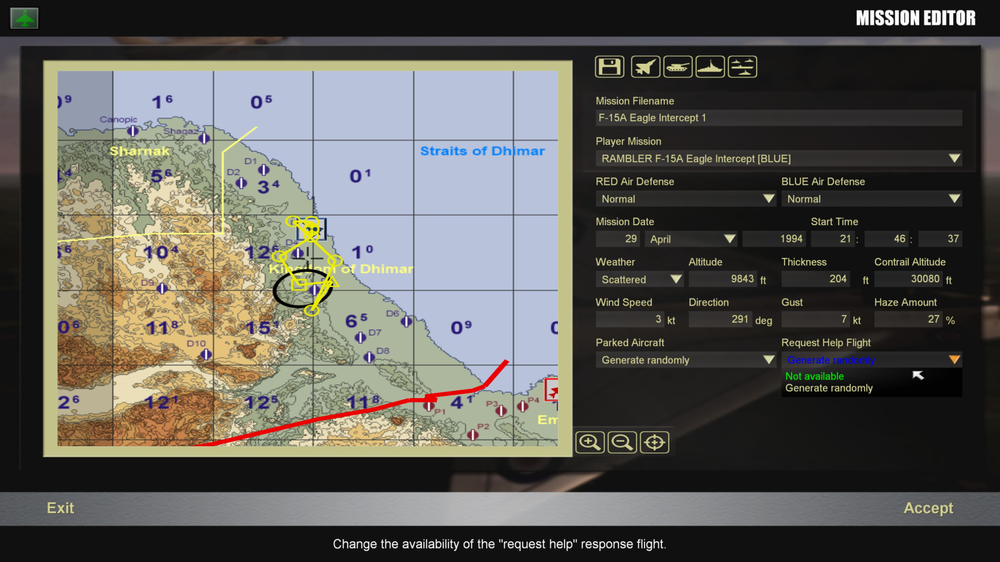
-
It may be faster to copy the entire Effects folder and not let it overwrite existing files.
-
The sound names make no difference for the visuals. They determine only what you hear when the missile launches and is active if your view is set to the missile or you are close to the launcher when it fires. You can set the other sound names to "Missile" and the same sound will play on loop while the missile is active regardless of what phase of flight it is in. Check your Effects folder for the following files: LargeMissileFireEffect.ini MissileFireEffect.ini LargeSAMTrailEffect.ini You may have to reload the Effects folder from the weapons pack you used for the SA-5 to get all the effects in the proper folder. The ini files call up other files such as fx files and tga files (pictures with transparencies) to create the effects you see on screen.
-
Check the missile data file. Look for the following in the last several lines of data. BoosterEffectName=LargeMissileFireEffect //This is the effect at launch BoosterSoundName=SA-2 BoosterNodeName=booster BoosterPosition=0.000000,-6.590000,0.000000 SustainerDuration=10.000000 SustainerAccel=3.8 SustainerEffectName=MissileFireEffect //This is the effect when the sustainer motor is firing SustainerSoundName= SustainerPosition=0.000000,-4.050000,0.000000 InFlightEffectName=LargeSAMTrailEffect //This is the effect when the missile is in flight and neither the booster nor sustainer are firing InFlightSoundName=MissileEngine ReleaseAnimationID=-1 EODisplayFlags=0 CEP=0.000000 If any of these are blank then nothing shows.
-
Some aircraft such as certain A-4 and A-7 variants have this. Look for a small green light that reads "IN RANGE" or something similar.
-
This module is failing: Faulting module path: E:\ThirdWire\Strike Fighters 2\Objects\AircraftObject.DLL
-
They are both MEDIUM. The IraqWA_Targets files shows 17 airbases using airfield7 and 11 using airfield8. I checked the IraqWA_Types file and got the following: [TargetType292] Name=Runway7 FullName=Runway ModelName=airfield7.LOD TargetType=MEDIUM_RUNWAY ActiveYear=0 TargetValue=1000 UseGroundObject=FALSE DamagePoint=100.0 ArmorValue=0.0 ArmorType=0 RepairRate=20.0 StartDetectChance=100 StartIdentifiedChance=50 IncreaseDetectChanceKey=10 MaxVisibleDist=30000.0 ZBufferOffset=6.000000 FlatObject=TRUE DamagedModel= DestroyedEffect= DestroyedModel= SecondaryChance=0 [TargetType293] Name=Runway8 FullName=Runway ModelName=airfield8.LOD TargetType=MEDIUM_RUNWAY ActiveYear=0 TargetValue=500 UseGroundObject=FALSE DamagePoint=100.0 ArmorValue=0.0 ArmorType=0 RepairRate=20.0 StartDetectChance=100 StartIdentifiedChance=50 IncreaseDetectChanceKey=10 MaxVisibleDist=30000.0 ZBufferOffset=6.000000 FlatObject=TRUE DamagedModel= DestroyedEffect= DestroyedModel= SecondaryChance=0
-
This was the initial post. He said the crash happens when he orders his wingmen to attack. He is well past the takeoff point by this time. Perhaps you should pay more attention to the OP and not your unfounded assumptions. This has nothing to do with airfield size or aircraft selection. He made that clear. That's why I suggested taking the CAP chance out to see what happens.
-
I looked at several benchmarks for both chips and they were 10% different when performing timed tasks. I have also noted that SF2 does not take advantage of the advanced chips. Increasing power does not seem to help here as the OP has an i7 and is still experiencing this problem. The campaign manager also determines missions using the war goals listed near the top of the _data file. You should check that out. It's not just the chance given to the squadron. In this case they are all 90 anyway so any mission type should have the same chance. As you are defensive at the start of the campaign you will be on defensive missions like defensive CAS and CAP. You should start that campaign with a defensive CAS mission if you play as Mercenary and change no other options. I started it ten times yesterday and a defensive CAS mission to Najafi or Mosak came up every time. A CAP mission came up second as I intentionally failed the first mission. I was then able to replicate the problem. It happened twice. The first time was when a MiG-21 fired an AA-2D at a friendly and the second was when I fired an AIM-9N at a MiG-23BN coming off its attack run on some friendly tanks. The game just crashes to the desktop. Setting the CAP mission chance for [AIRUNIT008] to 0 in the _data file may help this. The CAP missions should not come up anymore. You still have not spelled Occam correctly. It's Occam, Ockham or Ocham. A razor is a small blade that is used for precise cuts. Given the intent of Occam's Razor is to be as precise as possible with as little effort as possible a razor is more appropriate.
-
Is the CAP mission the first or second mission you flew? If it is the second, were you successful on the first?
-
It's called Occam's Razor. I said the processing difference does not matter for SF2 as it can't take advantage of it. Besides a lot of benchmarks put i5 and i7 performance at about a 10% difference even when performing timed tasks.
-
I doubt SF2 spends much processing time in the space between an i5 and an i7. It's not designed to use either chip to its maximum performance. Hence, you won't see an increase in performance. SF2 is not a high end game requiring that sort of horsepower. Please note I claimed it happens only rarely and I can't replicate the issue even now.
-
Not at all. I have all settings maxed out and it has not happened for months. It is rare, but I can see that the CPU bogs down in certain instances because the game is slowing down and it's not just the graphics. The engine is having problems keeping up with everything. It sorts itself out most of the time but it has crashed sometimes as well. I moved it to an SSD and that seemed to help. My CPU is an i5 8700 at 2.8GHz with 16GB RAM and the video card is an RTX 3060 with 8GB VRAM. The SF2 textures and shaders aren't taxing either of these cards. Hence, it's not a graphics issue.
-
Strange, I run it on Windows 10 x64 and I have had what he describes happen. The CPU clearly bogs down if too many entities are active and the game will crash. I have plenty of RAM, VRAM and no corrupted files. Some of these campaigns are clearly more than the game was designed to handle.
-
It depends on what it has to load. There could be more units in that campaign. That means more in the air at one time.
-
The base game does not appear to be written for modern multicore processors. When you merge and order your wingmen to engage the computer does the same with nearby enemies. This increase in loading on the CPU can cause a crash. SF2 likely can not use the full power of your CPU. I have had similar problems. You may try moving the game to an SSD or a drive connected to your motherboard if it is on a USB drive. The increased data transfer rates may help.
-
To amplify this I have taken all the AAMs I use in the game and consolidated them with the best models and textures I could find. I also adjusted the data files to change the ranges to better match the available data. Several of the weapons available here seem to be above the maximum resolution and number of vertices the game engine can handle so you are not likely to improve much.
-
Yes, you can add things like this on the flight line and move the equipment between aircraft. In the US Navy they have aircraft called "strike birds" that are in such bad shape by the end of a cruise that they take functional parts from these aircraft for use on aircraft that can be made mission capable. The US Army does the same thing and calls it "controlled exchange" or "CAN" in the maintenance records. You absolutely can move sensors, armament, computers, MPDs, ASE, engines, wire bundles and just about any black box or electronic device to another aircraft. It may be frowned upon officially, but the units do it to meet mission especially when they are at the end of a deployment and parts are in short supply. You must record it in the maintenance logs of all affected aircraft however, as the parts are often serial numbered and accounted for by SN and aircraft tail number. If a squadron is going to war then they will likely get the best kit available even if it means taking it from another unit. Further, the units leaving theater leave some equipment behind so there is a supply of spares in theater.
-
It would be reasonable to assume that any aircraft in SF2 would have the countermeasures installed as all the aircraft simulated are in an operational theater with an active war ongoing. The US military will swap mission essential equipment from vehicles leaving a theater to those entering it and will prioritize units going to a theater over those not scheduled for deployment.
-
Just because the item does not appear in the manual until a given date does not mean that it was not in use earlier. If you note page 8-4 reads "Change 4" at the bottom and page 8-5 reads "Change 7" next to the page numbers. These pages were added to the manual at different times after 1975 and then released as one comprehensive package in 1979. Unfortunately, any interim changes in panel position, if any, are lost. The installation of the control panels was likely an ad hoc affair if a unit did not get the technical support representatives from the equipment manufacturer and there was no USAF guidance for where the panels should be placed. Hence, there may have been several configurations depending on when the panels were installed. Further, some units would receive the equipment for installation on the flight line and others would have it installed during depot level maintenance or overhaul. The manual reflects the official requirements for the placement of the panels as of its publication. It is likely not the only configuration that was approved or used as these change over time.
-
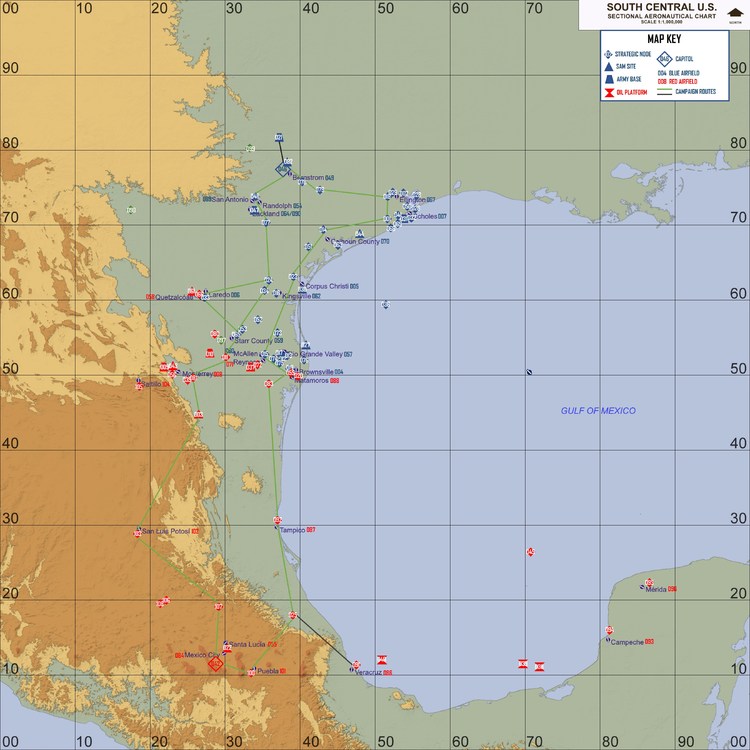
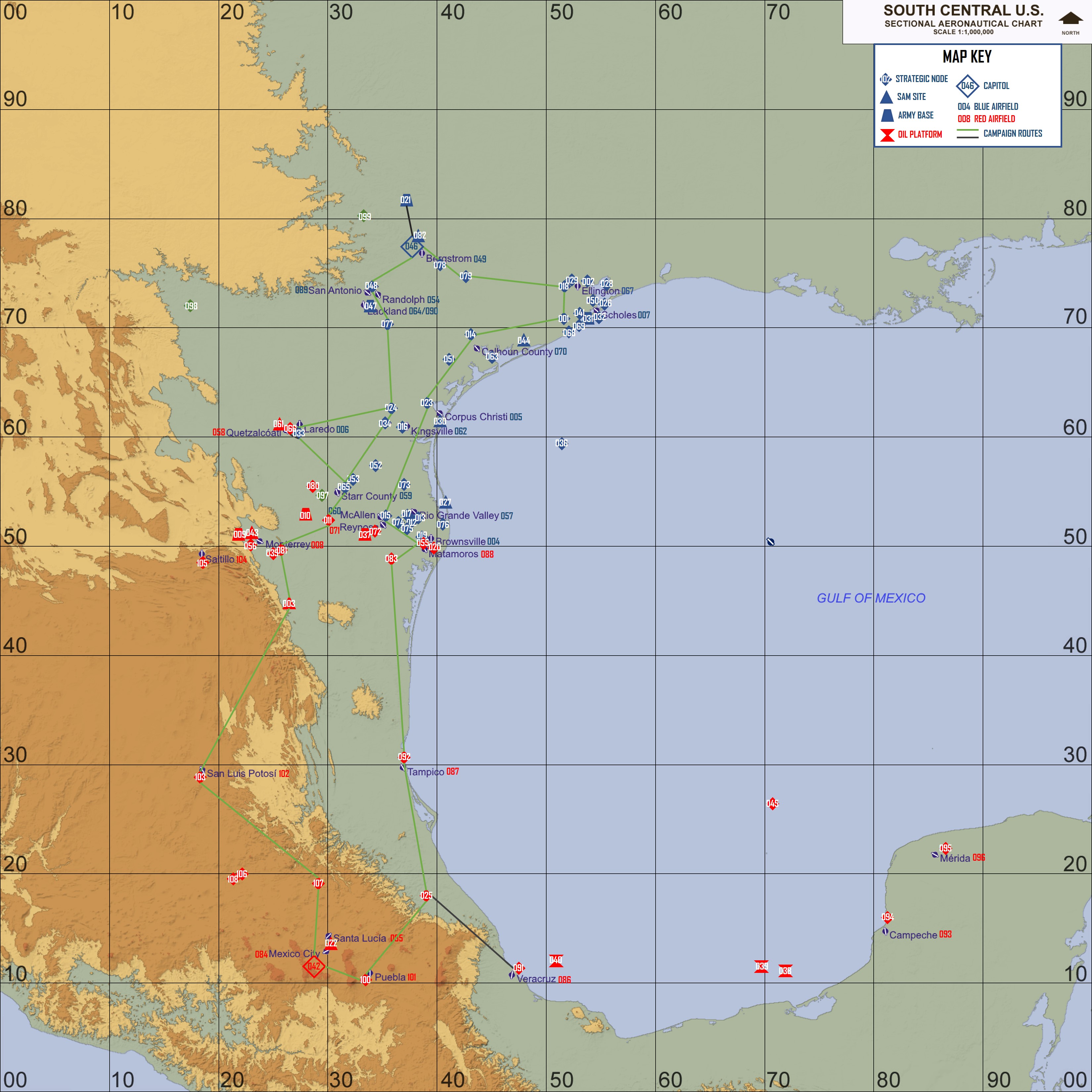
Here is a campaign movement file I made for the TexasASC terrain. The attached picture shows the routes. The units appear to be moving properly between the nodes. However, the frontline trace becomes a mess after the first day or so and loops back on itself. TexasASCCampaign.txt