Oil Refinery Strike:
Is a mission for WOE_Desert Storm Terrain
12 B-52H fly a strike mission on As Shabakah Oil Refinery
Installation instructions:
Copy and overwrite DS_Targets.ini file in Your WOE_DS terrain folder.
Copy mission file in Your WOE_mission folder.
I got inspired by Ajudnair and Jean-Baptiste Mouillet excellent third party mystère IV. Not only their skin was beautiful but also realistic.
It can be seen here: http://combatace.com/files/file/784-mystere-iva/
For those who use Thirwire's Mystere IV, like me, i decided to make a skin of the same style, taking Paulopanz' beautiful E/C28 nice skin as base.
Most of the work was done on the free open source program: GIMP
Small skin presentation on youtube:
Feel free to comment or request.
P.S:
For those who only have the non-flyable mystere IV, you can find flight models
for Mystère, super Mystère, Vautour and Ouragan there, thank Paulopanz again:
http://combatace.com/files/file/10127-five-planes-for-six-days/
Installation:
Just put the "objects" folder to your game repertory. Have fun.
here there's the missing file VietnamSEA_targets.ini to put in Your WOE_Terrain_VietnamSEA terrain.
F-111 in SEA
Missions for WOE
Operation Linebacker I\Linebacker II were the following operational employment of the USAF’s F-111
fighter-bomber in SEA, which took place in September, 1972.These operations may be simulated
as a mission game using WOE VietnamSEA terrain.
Operation Linebacker I\Linebacker II September, 1972 – January, 1973
Background:
In September, 1972 detachment 1 of the 474th TFS, 428th TFS, 429th TFS, 430th TFS
fighter-bombers flew to Takhli RTAFB in Thailand.
Installation instructions:
Copy and overvrite VietnamSEA_targets.in in your WOE_Terrain_VietnamSEA folder
Copy all missions in Your WOE_mission Folder.

I did this work hoping to motivate people to present a re-worked F-16C cockpit.
This mod enables WOI users to enjoy their MF F-16As with the stock hi-rez TW cockpit.
The stock TW F-16A in WOI unfortunately lacks TWS capability (Note: Apparently I was wrong, it was indeed without TWS in the very first batches), while MF F-16As lacked ground map capability due to a mixture of avionics60 lines in an avionics70dll file (Note: As I was informed, it was later corrected).
Furthermore, TMF avionics are more representative of Blk1/5/10s, instead TW are a bit stronger, more representative of Blk 15 avionics.
I re-worked the avionics.ini to present something as close to reality as I could, based on the stock WOI cockpit.
V1.1 Changes:
TWS Capability deleted from Blk 10 Avionics
TV Capability restored in Blk 15 Avionics
If you want to use MF TV filter instead of the TW, change this line from
TextureStage[01].TextureName=GreenTVFilter.bmp
;TextureStage[01].TextureName=cockpit\GreenTVFilter.bmp
TextureStage[01].MipMap=FALSE
to
;TextureStage[01].TextureName=GreenTVFilter.bmp
TextureStage[01].TextureName=cockpit\GreenTVFilter.bmp
TextureStage[01].MipMap=TRUE
NOTE: Not 100% sure when Maverick capability was certified for F-16s. It seems to me that it was a retrofit in a later date for Blk1/5/10 aircraft.
INSTALLATION INSTRUCTIONS:
1) Download, extract and place into respective folders. They will overwrite the previous ones. Remember to keep back ups just in case...
2) Change this line
CockpitDataFile=
from
CockpitDataFile=F-16A_cockpit.ini
to
CockpitDataFile=F-16A_NETZ_COCKPIT.ini
NOTE: Do not, I repeat DO NOT delete the already installed cockpit, since I use many TGAs from the MF cockpit. It won't work properly without it.
ADDED BONUS: Modified MF F-16A OCU DATA file with F100-220E engine.
I want to thank TW & MF and every person that contributed to the community.
If an individual deserves credit, please notify me.
REMEMBER THIS IS A FREEWARE!
New Bofors 40 mm L70 Antiaircraft gun, using the 3D from Kesselbruth's Bofors 40mm L60 Antiaircraft gun. New version with radar and new gundata to make it useful for NF4+ and SF2V/WOV air and ground expansion pack (normal difficult for russian aaa guns).
Also, alternate Bofors L60 Antiaircraft gun and alternate Cold War Antiaircraft guns GUNDATA.INI, simulating Shrapnel. This alternate data is lighter than NF4+ and SF2V/WOV air and ground expansion pack (normal difficult for russian aaa guns), but heavier than the out of the box Thirdwire AAA.
Please, read the Readme.
Good flying to Red mudmovers!
Thank you, Kesselbruth, for your wonderful work, and all Thirwire
Community (the best modding community ever).
Be free to use or mod these files in any freeware mod.
Decal update for my J-11 CR.42
//Knug
An apparent incompatibility between SF2 and SF1 is that the in series two mods often there are files (.ini) encoded with Unicode format.
A common occurrence when downgrading a mod from SF2 to SF1 is therefore having to convert (save as..) a big amount of .ini files from Unicode to Ansi, a procedure which is time consuming and annoying.
Included is a one-click system to convert any amount of files from Unicode to Ansi.
It can be very useful when downgrading mods form SF2 -> SF1 series
Installation:
Simply unpack and store in your HD root the directories Files_Ansi and Files_unicode. By default I am using this path: C:\converter\files_unicode (you might want to change it accordingly to your needs by modifying ansioso.bat
Use:
Make backups of files.
A-From the folder where they belong, copy in the Files_unicode folder the files (mostly they will be .ini) that you want to convert.
B_run ansioso.bat
C-In the directory Files_Ansi you should have the files with the same name but converted to ANSI format
D-Copy them back where they belong, allowing overwrite
NOTE: Ansioso.bat and stringconverter.exe MUST stay in the same folder.
Also, files'names will stay the same. B careful in copying and moving them from folder to folder.
Discaimer
I downloaded stringconverter.exe from a freeware website. I haven't programmed it , all the merits go to unknown programmer. In the same forum I ve found the batch file which I adpated to the specific needs.

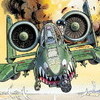
 Oil Refinery Strike:
 I got inspired by Ajudnair and Jean-Baptiste Mouillet excellent third party mystère IV. Not only their skin was beautiful but also realistic.
 F-111 in SEA
 New Bofors 40 mm L70 Antiaircraft gun, using the 3D from Kesselbruth's Bofors 40mm L60 Antiaircraft gun. New version with radar and new gundata to make it useful for NF4+ and SF2V/WOV air and ground expansion pack (normal difficult for russian aaa guns).