Jump to content

SF/WO* Object Mods

Sub Category  

Non-aircraft add-ons and modifications

    1. << "I spotted an afterburner plume at twenty miles." >>
       
      This is the only quote I recall from a Vietnam War air combat book I read back in hi~school and I forgot the title and author. The author spotted the afterburner at night, against the stars if I recall, and said it was a MiG-21. They (F-4 crew) locked it up and downed it with a Sparrow.
       
      The VOLCANO MOD attempts to address, or bring attention to, a long missing feature in all combat jetsims: long distance visibility of afterburners especially at night. To do this, we oversize the afterburners as the sim, along with every jetsim it seems, does not model the brightness intensity of afterburner plumes. The same philosophy was used in sizing the recent 3D Rocket Exhaust effects, making larger flame plumes optional for missiles on a sliding scale of selectable effects sizes.
       
      With the smaller of two oversized afterburner systems here, I can just see a MiG-21's pixel sized R-13 afterburner flickering from a little over 20 miles using 30 degree field of view (FOV) and 1280x1024 screen resolution. I believe that higher resolution would allow longer visible distance for any given FOV. The full size screenshot shows very late twilight F-106 AI squadron takeoff to the South, using the smaller size afterburner system. The yellow arrows point to aircraft in full afterburner following the AI leader.
       
      The VOLCANO MOD uses specific engine names in aircraft DATA files. Any engine afterburner can be done at any time with a simple calculation. A list of engines currently modelled here and simple formulae for calculating their afterburner data are in the instruction file. These are some of the engines that will be of use in a mythological strategic strike/intercept campaign (Siberian Sky), and include engines that were used, or could be used, by Strategic Air Command (SAC) and manned Soviet Air Defense (IA-PVO) from the 1940s to the 1960s.
       
      ThirdWire thread discussing grafix for classical era strategic air warfare: Volcanos erupt on page 3 ~> http://bbs.thirdwire.com/phpBB/viewtopic.php?t=4964
       
      "VOLCANO" was a name used by one or two of our Old Timer SF simmers some time ago who poked fun at an early experimental closeup cameo screenshot that I poasted (it looked pretty bad). The name stuck.
       
       
      v1.01--------------------------------------
      *** ADDED TO INSTRUCTION FILE, but the replacement Zip file does not seem to upload here. So...
       
      Grafix position of the afterburner may need to be changed to taste. This is done by changing the vector ExhaustPosition=[x,y,z], where...
      -x is left, x is right.
      -y is back, y is forward.
      -z is down, z is up.
      The numbers are in meters. I prefer the burner flame as close to the nozzle as possible, but without interacting to cause flickering of nozzle/flame.
      --------------------------------------
      496 0
    2. T-64 package
      ***********
       
      This package contains the versions
      T-64A
      T-64B
      T-64BV
       
       
      The T-64 was the first panzer of a new generation. He featured a lot of new technology like autoloader, multilayer armour, smoothbore gun etc. long before western panzers could counter it.
      His weakpoint were the engine and the running gear.
       
      Because the T-64 looked very similar to the T-72 i used the WOE stock T-72 to make the T-64. I modified the texture and the data.ini
       
      *********************************
      INSTALLATION
       
      Simply unzip all files into your /objects/GroundObject folder
       
      Thats it.
      *************************************
       
      T-64 package is FREEWARE. COMMERCIAL USE IS NOT ALLOWED.
       
      *************************************
       
      Hope you enjoy it
       
       
      Michael (Gepard)
       
      Made in Germany
      November2008
      573 0
    3. NOTE THIS IS A WORK IN PROGRESS!!
       
      Here is a small collection of "blue" airfields I have built for use in the TW series (specifically SFP1 and the WoX series).
       
      This project is a collection of my thoughts along with other folk’s talent. It is not perfect and I am working to improve them all the time.
       
      ****************************************************
       
      Credit goes to the following:
       
      The creator's of the CA forum. It has provided me a lot of ideas, some which have been realized.
       
      I have used the work of the individuals below in this project.
       
      Comrpnt - His airfield light program inspired me to attempt lighting up these airfields.
      http://forum.combatace.com/index.php?autoc...p;showfile=6863
       
      CA_Stary for the Generic hangars pack
      http://forum.combatace.com/index.php?autoc...p;showfile=7221
       
      Gepard for use of the New Airbases for SFP1 / WOE v. 2.0
      http://forum.combatace.com/index.php?autoc...p;showfile=5078
       
      wingwiner for the Tactical Control Centre and Gas Station
      http://forum.combatace.com/index.php?autoc...p;showfile=4989
       
      wingwiner for the Control TowerH1
      http://forum.combatace.com/index.php?autoc...p;showfile=4168
       
      Mitch's "Factory Place"
      http://wrench1smog.com/wrench3.html
       
      The Wrench
       
      I don't think I missed anyone but If I did please let me know.
       
      *****************************************************
       
      What's included:
       
      AIRFIELD_HAGARRS.ini (used for lighting the airfield)
      AIRFIELD_IBERIA.ini
      AIRFIELD_METRO.ini
       
      Hagarrs Airbase.txt (add this to your XXX_targets.ini listing)
      Iberia Airbase.txt
      Metro Airport.txt
       
      *****************************************************
       
      Installation:
       
      You will need the objects listed in the credits to populate the airfields.
       
      Just drop the AIRFIELD_XXXX.ini into the terrain folder where you plan to use the airfields. This will light the airfield.
       
      Copy and paste the ***.txt into the ***_target.ini folder, making sure to number the target accordingly.
       
      Go fly and enjoy.
       
      Questions / comments / concerns please contact me here at Combat Ace.
       
      As I subscribe to the freeware policy at Combat Ace, this is a FREEWARE product.
       
      KRFRGE
       
      March 2009
       
       
      14 Apr 09 - Fixed the A/C lineup
      280 0
    4. WOI Panzer Pack
       
      This package includes modded versions of TK's panzers of WOI plus a T-34/85 and the israeli version of the T-55.
      All of this tanks i gave additionally to the gun an coaxial MG and in some cases Flak MG.
      All tanks are now able to defend themself against engaging planes, so that tank butchering now becomes more challenging for the pilots.
       
      ************************************************
      INSTALLATION
       
      Unzip all files into your objects/groundobjects folder.
       
      Thats it.
       
      ***********************************************
      Credits:
      All honour for the stock tank models goes to TK
      For the T-34 i want to say thank you to Pasko.
      ***********************************************
       
      You will need a weapon pack to make the soviet vehicles able to fire their coaxial MG and the T-34's to fire their gun.
      Or you add following lines into you gundata.ini file. Make sure to exchange the xx with the correct sequence number.
       
      [GunData0xx]
      TypeName=7.62mm_PKB
      FullName=PanzerMG PK
      Caliber=7.620000
      ROF=900.000000
      MuzzleVel=935.000000
      AmmoWt=0.009730
      WarheadWt=0.000000
      Reliability=97.000000
      Accuracy=80.000000
      AddLight=FALSE
      MaxLightRange=1000.000000
      FireColor=0.150000,0.150000,0.150000
      GunFireEffect=LmgFireEffect
      GunFireSound=50cal
      EffectClassName=LmgEffects
      EffectTime=0.100000
      TracerTexture=Tracer.tga
      TracerSize=0.120000
      TracerDistFactor=0.002000
      TracerLength=0.015000
      MaxVisibleDist=4000.000000
      MaxStreakVisibleDist=1000.000000
      TimeFuzed=FALSE
       
      [GunData0xx]
      TypeName=85MM_ZIS-S-53
      FullName=85mm Kanone
      Caliber=85.000000
      ROF=8.000000
      MuzzleVel=1042.000000
      AmmoWt=5.040000
      WarheadWt=0.000000
      Reliability=100.000000
      Accuracy=75.000000
      AddLight=TRUE
      MaxLightRange=1200.000000
      FireColor=0.500000,0.450000,0.320000
      GunFireEffect=TankGunFireEffect
      GunFireSound=AAA
      EffectClassName=TankGunEffects
      EffectTime=0.100000
      TracerTexture=Tracer2.tga
      TracerSize=0.200000
      TracerDistFactor=0.002000
      TracerLength=0.018000
      MaxVisibleDist=6000.000000
      MaxStreakVisibleDist=1000.000000
      TimeFuzed=FALSE
       
       
      *************************************************
      Hope you enjoy it.
       
      Michael (Gepard)
      528 0
    5. T-55AM Panzer of ZAHAL
       
      In the 6-Days War of 1967 Israel captured a lot of syrian and egyptian T-55. This panzers were used in the israeli Army (ZAHAL) up to the 70th and proved as good and reliable combat vehicles.
      During the Yom-Kippur-War the israeli T-55 formed the spearhead of Sharons counter offensive to cross the Suez Canal. In combat with egyptian T-55 the israeli T-55 proved superior due better crew training.
       
      ************************************************
      INSTALLATION
       
      Unzip all files into your objects/groundobjects folder.
       
      Thats it.
       
      ***********************************************
      This is a mod of TK's WOI stock T-55. The mod is freeware. Commercial use is not allowed.
      ***********************************************
       
      Hope you enjoy it.
       
      Michael (Gepard)
      342 0
    6. Infantry Squad with Smoke
       
      First credit goes to Kesselbrut for his Infatry squad files.
       
      Secondly Papa Goat for his "Pop Smoke" idea.
       
      I expanded on Papa Goat's idea of using a single soldier with smoke. I basically took the stock US_Squad and Soviet_Squad by modifing the X_Squad_data.ini file to have the smoke deployed.
       
      These squads will "throw" fire their smoke at any ground object designated "ENEMY". That way the squad still can fire its normal assortment of weapons and still mark enemy targets.
       
      I have tested this on random generated CAS missions in SFP1 and WOV. Anytime a squad is generated during a mission, each squad will deploy their smoke at the nearest enemy target.
       
      Mind you, it's not perfect but I think it gives a great effect.
       
      I've only built one smoke color for the Soviets. The US squad can select from 4 colors Red, Green, Violet (Purple) and Yellow. You have to manually select the color you want them to use by removing the "//" in the data entry line.
       
      Installation:
       
      1. Make a back up of the original squads just in case you don't like this mod.
      2. Add the two squads to the GroundObject folder.
      3. Drop the effects into your EFFECTS folder.
      4. Add the bulletobject data to the BULLETOBJECT file.
      5. Add the gundata to the GUNDATA file, open the guneditor and click on one weapon, then click SAVE.
       
      Comments are always welcome. I subscribe to the FREEWARE Policy at Combat Ace.
       
      KRFRGE Jan 2010
      335 0
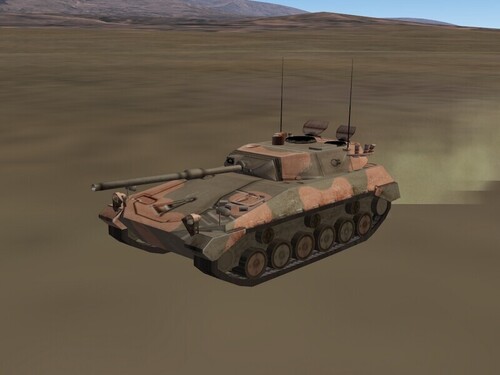
    7. Here are some skins for the Modern Darwin map. The M113
      and M163 are in Australian Army camo and the M35A2 is in
      Australian Army late 80's camo.
      73 0
    8. Canon fictional for SPF-1 and Wox
       
      Unzip files and put the folder inside the folder GroundObject and good luck
      enjoy it
       
      --------------------------------------------------------------------------------------------------------------
       
       
      Canon Ficcional para SPF-1 y WoX
       
      Descomprimir Archivos, y poner las carpetas dentro de la carpeta GroundObject y buena suerte
      que lo disfruten
      50 0
    9. Canon fictional for SPF-1 and Wox
       
      Unzip files and put the folder inside the folder GroundObject and good luck
      enjoy it
       
      -----------------------------------------------------------------------------------------------------------------------------------------------------------------------
       
      Canon Ficcional para SPF-1 y WoX
       
      Descomprimir Archivos, y poner las carpetas dentro de la carpeta GroundObject y buena suerte
      que lo disfruten
      52 1
    10. This is a missing redhouse.lod file ( and textures ) for Redhouse building model. If You already have my Barracks pack, download it and copy to your terrain folder.
      52 0
×
×
  • Create New...

Important Information

By using this site, you agree to our Terms of Use, Privacy Policy, and We have placed cookies on your device to help make this website better. You can adjust your cookie settings, otherwise we'll assume you're okay to continue..