


BUFF
-
Posts
1,970 -
Joined
-
Last visited
Content Type
Profiles
Forums
Gallery
Downloads
Store
Everything posted by BUFF
-
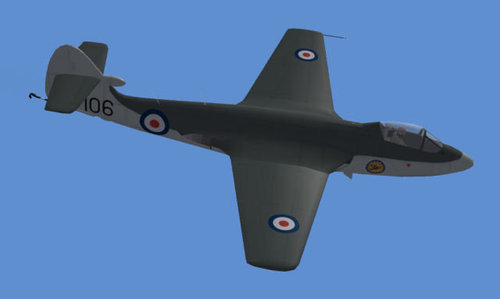
542 downloads
This represents the later version of the Sea Hawk F.1 with the tail fairing, brass chutes, and ram air intake on the nose. -
which missions have you installed (links)?
-
It's certainly not a common problem & at the moment the developers don't have a public help site. Have you installed patch 1?
-
You need to use Skypat's cat extractor (available in the download section at Biohaz) - it is in Strike Fighters\Objects\ObjectData.cat (near the bottom of the list). PS. I know where Port Glasgow is I'm just to the north of the Clyde tunnel.
-
The files should have a readme for installation. Missions are just text files with .msn instead of .txt & they go into the mission folder - it's as easy as that. Should be a few to download around the web before you start to make your own.
-
Yes, it is there but you need to use Skypat's cat extractor (available in Biohaz files area) to extract the .ini from Wings over Vietnam\Flight\FlightData.cat.
-
Well, I haven't seen it because I haven't added counter measures to every aircraft (because they didn't have them) nor used missiles that didn't exist. You must remember that the countermeasures are being enabled by hacks - TK hasn't fully implemented everything in the game engine let alone tweaked it. However, if you have read about Vietnam then you will know that the AIM-7 was known as "the Great White Hope" - it ws notoriously unreliable often simply falling away from the a/c or going ballistic. As I said about a 4% hit rate.
-
The files are also available in the downloads section of Biohaz
-
-
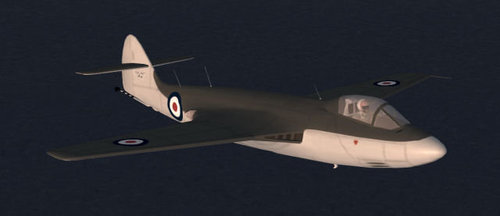
504 downloads
This varient represents an aircraft from the first batch of 35 Sea Hawk F.1s. It differs from later versions in that the tail fairing, expended brass chutes, and ram air intake on the nose are not present. There were several other minor differences that don't show up on the model and were of minimal consequence. Armament consists of four 20mm Hispanos. Simple and to the point... Later varients could carry bombs and rockets so there will be fun for us mud movers too. -
http://www.omegadrivers.net/
-
They didn't but shortly thereafter they did following experience. Pretty much the same with ECM. e.g. in early years chaff tended to be laid by dedicated aircraft with pods - some pilots shoved handfuls of chaff into their speedbrakes to give them a 1 shot ability. Afaik none had flares (pods became available later & later mks of aircraft gained internal dispensers). btw iirc in Vietnam no. of US radar guided missiles expended versus hits was about 4% & that was without the Migs having chaff ...
-
Hi, Did you look in the sticky "SF Editing Notes"? "HUD Text removal How do I remove the HUD info text Content 1. Make a backup copy of Flight/HUDData.ini file. 2. Edit the Flight/HUDData.ini (in notepad) and change the following lines in the [infoDisplay] section: DisplayWidth=0.0 EnemyTargetColor=0.0,0.0,0.0,0.0 FriendlyTargetColor=0.0,0.0,0.0,0.0 UnknownTargetColor=0.0,0.0,0.0,0.0 NormalColor=0.0,0.0,0.0,0.0 WarningColor1=0.0,0.0,0.0,0.0 WarningColor2=0.0,0.0,0.0,0.0 3. Save the file. Additional Notes: - Setting NormalColor, WarningColor1 and WarningColor2 gets rid of the text about your aircraft (left info box). - Setting EnemyTargetColor,FriendlyTargetColor and UnknownTargetColor to transparent gets rid of the text about targets in right info box. - Setting DisplayWidth to 0 gets rid of the translucent background of info boxes. You can customize all this, ie have only the left info box info available (but if you want to have an info box available do not set the width to 0)" You will need to use Skypat's cat extractor (available in Biohaz files area) to extract the .ini from Wings over Vietnam\Flight\FlightData.cat.
-
Ji, I very, very much doubt that this is possible as a mod - it would involve rewriting the game engine afaik & that is Thirdwire's job/intellectual property. Have you ever tried this in the heli sim Gunship! as it supports this?
-
http://www.gamestop.com/product.asp?product%5Fid=646024 but I believe that there are cheaper. Also a couple of outlets selling new on ebay.
-
No details yet of a European distribution deal for WoV but I know that Thirdwire have plans. You can import a copy from the US for about £22/€30 delivered.
-
Open the P-51D-30_Data.ini file, scroll down to the engine section and delete the last three lines that set the Oil Pressure parameters. where did you d/l - i thought that I had fixed that in the Biohaz file?
-
Isn't it in either the F-18 file download or the latest weapons pack? (I'm sorry but it's hard to keep on top of every detail of every single file - there are so many these days )
-
Take your existing mission & open with a text editor (Notepad etc.) In it you should have something like; [MissionHeader] AircraftType=F-4J MissionMap= MissionType=CAP StartDate=05/10/1972 StartTime=16:00 simply add an entry/ replace existing with 1 for your A-4. save file (make sure it saves as .msn rather than .txt)
-
Hi & sorry for missing this for a couple of days Whoever uploaded the file appears to have called it F_16 instead of F-16 so when you extract it you get a folder with the wrong name too. Just edit the folder name to F-16_IAF & it should be fine. I expect that the problem with the A is the same. Please lmk how you get on & I'll get the file names changed.
-
I take it that C is your HDD? Can you check if that file has actually been copied to your HDD? You also might want to try installing it without any anti-virus running. Could you try another partition/directory for WoV & are you trying to play the game without the CD in the drive (the patch removes this need but with the original install you need the CD)? You've got me confused here. SF P1 & WoV are 2 separate games with separate installs - where SF P1 is installed should have no effect upon WoV install. Nor should the patch status of your SF P1 install have any effect upon WoV. The patch to install for WoV is http://forum.biohazcentral.com/index.php?download=643 which should be applied after installing WoV.
-
Are there a lot of mods available for it? Not too many yet but increasing rapidly as SF P1 mods are updated. Because SFP1 Sp3 & WoV with P1 use the same code the majority of Sp3 compatible mods should transfer - earlier versions may have glitches. Is there a sticky post that answers all this? Not really You could read Dagger's review for some more info on it. Where do I begin, update-wise, with the sim, once I install it? Patch 1 for WoV available here at Biohaz or from Thirdwire's site. Enjoy it - it's a lot of fun.
-
Is it the initial installation of WoV that is failing or when you are trying to run the programme after installation? Service Pack 3 is for Strike Fighters - you want patch 1 for WoV which you can get here at Biohaz. http://forum.biohazcentral.com/index.php?dlcategory=31
-
-