

Stephen1918
-
Posts
1,181 -
Joined
-
Last visited
-
Days Won
19
Content Type
Profiles
Forums
Gallery
Downloads
Store
Everything posted by Stephen1918
-

Two Armored Cars for the Eastern Front
Stephen1918 replied to Stephen1918's topic in General Discussion
I agree that realism is important. There seems to have been quite a bit of improvisation during WWI, so I make a distinction between "Real" and "Realistic" This especially comes in to play when more detail starts impacting game performance, or when time becomes a factor (will a detail be worth the time I need to spend?) Also, I must admit that sometimes I do things just because it "feels' right, as long as it seems reasonably realistic. Of course, I have a much different attitude when I'm working professionally. -
Two Armored Cars for the Eastern Front
Stephen1918 replied to Stephen1918's topic in General Discussion
Ojcar - Good catch! I didn't even think of the SCW, but now that you pointed it out, I see the similarity. I'm adding it to my install of SCW. Crawford - Thanks for your comments. I did take some liberties for the sake of the game, and I added a spare tire to the side, just because I thought it looked good! -
Two Armored Cars for the Eastern Front
Stephen1918 replied to Stephen1918's topic in File Announcements
Thanks for the info Crawford. A good resource for me was the Wikipedia article - https://ru.wikipedia.org/wiki/Руссо-Балт_тип_С- (No - I used Google Translate) Another resource (in English) is here - http://www.tanks-encyclopedia.com/ww1/russia/Russo-Balt.php -
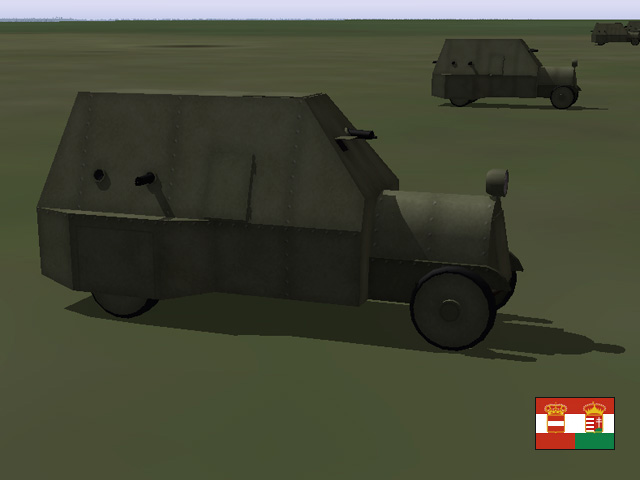
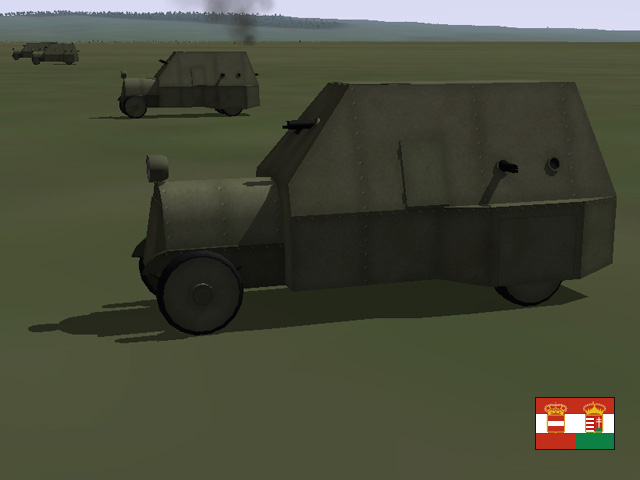
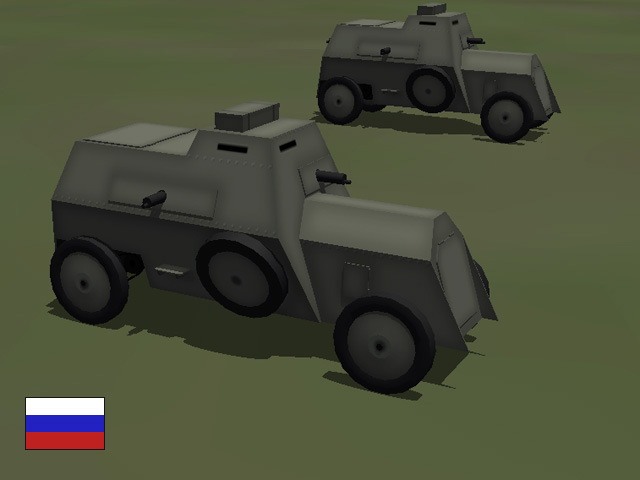
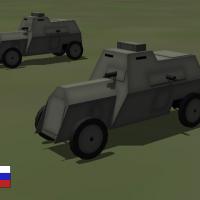
I've been pretty busy for the last month or so, and haven't worked much on my big FE projects. But I did manage to get some little things finished. Today i uploaded two new armored cars. These were produced in pretty low numbers, but I'm adding them so we can get some variety in the ground forces. The Austro-Hungarian car was also used on the Italian Front.

-
View File Two Armored Cars for the Eastern Front Two new armored cars for the Eastern Front. Both cars were produced in relatively low numbers, I'm including them for the sake of variety. The Russo-Balt Type C was produced by the Russo-Baltique motor car company. About 15 were built. The armored car was built on a automobile chassis and had four gun ports, each with a Vickers machine gun. It had a crew of 4 or 5, had a top speed of 20 kph with a range of about 100km. The Russo-Balt Type C was used throughout the war and was used in the Civil War. The Junovicz P.A.1 was built on a truck chassis. There were different versions based on different trucks, about 5 were built. The armored car had six gun ports with 3 or 4 Schwartzlose machine guns. It had crew of 5, a top speed of 35 kph, and a range of 350km. The Junovicz P.A.1 was used on both the Galician and Italian Fronts. In First Eagles, the armored cars take the role of a tank, drop them into your ground object folder and First Eagles will randomly assign them to some of your Army Co-operation missions. Installation Instructions Unzip the file and open my "GroundObject" folder. Copy the folders named "AustrianArmoredCar" and "RussBaltCar" to your FirstEagles/Objects/GroundObject folder. Both armored cars use the same skin for damage as my other armored cars. If you have already installed any of my armored cars, you may already have the file. If not, copy the file named "DestroyedArmoredCar.bmp" into your GroundObject folder. Note that the "DestroyedArmoredCar.bmp" file should not be inside any other folder. Submitter Stephen1918 Submitted 05/05/2017 Category First Eagles - WWI and Early Years - Object Mods
-
70 downloads
Two new armored cars for the Eastern Front. Both cars were produced in relatively low numbers, I'm including them for the sake of variety. The Russo-Balt Type C was produced by the Russo-Baltique motor car company. About 15 were built. The armored car was built on a automobile chassis and had four gun ports, each with a Vickers machine gun. It had a crew of 4 or 5, had a top speed of 20 kph with a range of about 100km. The Russo-Balt Type C was used throughout the war and was used in the Civil War. The Junovicz P.A.1 was built on a truck chassis. There were different versions based on different trucks, about 5 were built. The armored car had six gun ports with 3 or 4 Schwartzlose machine guns. It had crew of 5, a top speed of 35 kph, and a range of 350km. The Junovicz P.A.1 was used on both the Galician and Italian Fronts. In First Eagles, the armored cars take the role of a tank, drop them into your ground object folder and First Eagles will randomly assign them to some of your Army Co-operation missions. Installation Instructions Unzip the file and open my "GroundObject" folder. Copy the folders named "AustrianArmoredCar" and "RussBaltCar" to your FirstEagles/Objects/GroundObject folder. Both armored cars use the same skin for damage as my other armored cars. If you have already installed any of my armored cars, you may already have the file. If not, copy the file named "DestroyedArmoredCar.bmp" into your GroundObject folder. Note that the "DestroyedArmoredCar.bmp" file should not be inside any other folder. -
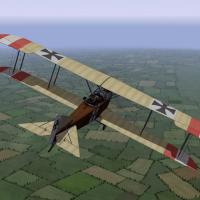
I tried making a streamer as a pilot. No luck. The pilot does not have a built-in animation, the game engine controls his head motion, and it moves it 'way too much, about 180 degrees side-to-side. The streamer was swinging all over the place, not realistically at all. I think the answer will be a weapon/gun pod/fuel tank kind of attachment. Maybe Geezer will have more luck.
-
 Thank you! I have a lot on my list, the Walfisch is on the list, but I don't know when I'll get to it.
 -
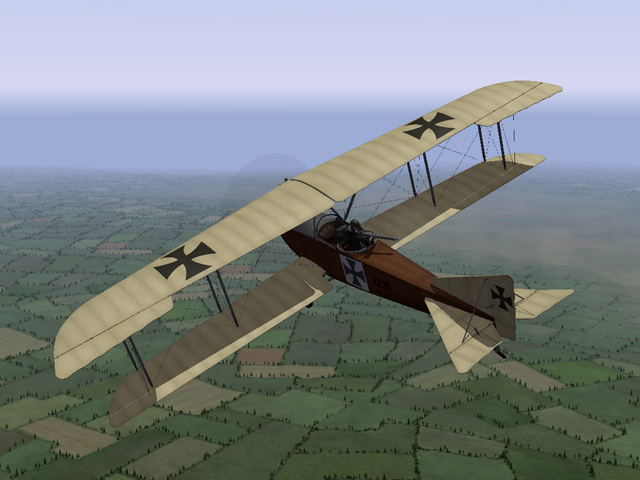
Last night I uploaded a new version of the Lloyd C.II. This was one of my first planes and I have learned a lot over the years. This version has better details around the nose, and better component structure. I have made all new LODs and all new skins. Ojcar has also revised the FM. http://combatace.com/files/file/12079-lloyd-cii/


- 6 replies
-
- 11
-

-
Making something to attach as a loadout shouldn't be too hard (like the Le Prieur tubes) but I don't know how you would get the game to run the animation. Does anyone know how to make a weapon animate?
-
CrazyhorseB34 - have you tried Nippy's Dogfight editor for FE1 and FE2? It lets you select the types of planes (up to 4 types for each side) - but you cannot set targets or waypoints. I have used it for making simple missions.
-
Trotski00 - I have an M7/B.I in the download section. It's very similar to the M10E/B.II (with single bay wings) and it is unarmed. Bortdafarm has a B.I with two bay wings, so it's similar to the M10Z/B.II. Maybe those will work for you? Gterl - The "remove component trick" does work in FE1/Gold. I learned about it in the SF forums (which uses the same game engine as FE.) Search on Combat Ace for "remove component trick" and you'll find several threads that mention it.
-
I like this terrain! A great addition to the Eastern Front. Are you planning to upload it someday soon?
-
I only have two unarmed 2 seaters - the Fokker M.7/B.1 and the recent Farman HF.20 - there may be others that I don't know about. I know that other modders (such as Whiteknight) have modified the Data.ini of some planes to make unarmed 2 seaters, maybe they will upload their mods for us...
-
I made two 2 seater SPADs a little more than a year ago. They're available in the download area.
-
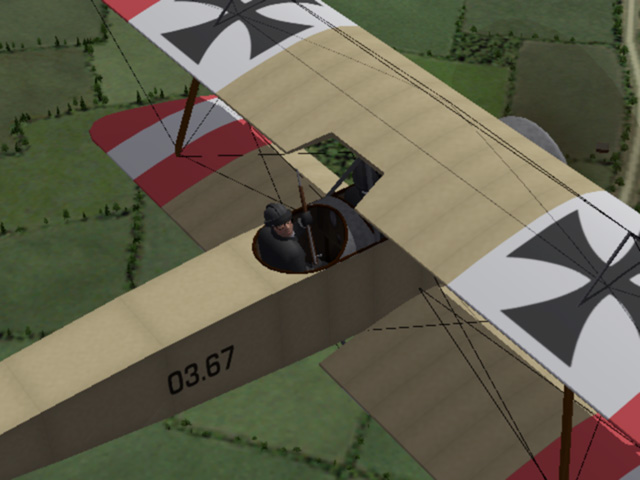
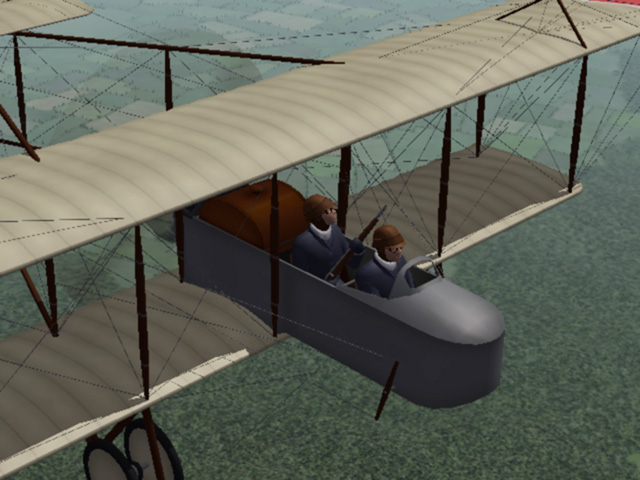
In another thread, Whiteknight06604 suggested an "eye-candy" observer carrying a gun. I uploaded some today. I made the skins using the stock FE pilot skins, so their uniforms should match. I also made versions with helmets to go with the helmeted pilots I made before. We don't have many unarmed planes, but I enjoy flying an unarmed recon mission occasionally. Dodging and weaving your way back to base must have been something a lot of pilots did in the early years of the war. My thanks to Whiteknight for making the suggestion and for beta-testing the observers.

-
View File Armed Observers for First Eagles When World War I began, airplanes were designed strictly for reconnaissance. They were unarmed and built for stable flight rather than maneuverability. Within a very short time air crews began to carry weapons. Observers with pistols or rifles became common until armed aircraft were produced. I have made a set of armed observers for First Eagles. The observer carries a rifle "at the ready." He moves his head, but does not shoot the gun. There is one for each stock pilot color, and one for each of the helmeted pilots I made before. A total of six observers. You will need to install the observers into the game, then make a change to the data.ini for each plane to make them appear in the game. The center point matches the center point of the FE Gold and FE2 stock pilot, so they should swap into your plane without any adjustment. If the plane uses the old style FE1 pilot, some minor tweaking may be required. Note that this only replaces the stock pilot and will not replace a gunner built into the 3D model. My thanks to Whiteknight06604 for suggesting the idea and for beta-testing the observers. Installing the observers into the game: For FE1 - Open my folder named "FE1" and copy all twelve files into your "Aircraft" folder. Don't put them into any of the other folder. The LOD names are the names of the new "pilot." The numbers match the FE pilot numbers so uniform colors will match. For FE2 - Open my folder named "FE2" and copy all six folders into your Objects/Pilots folder. The folder names are the names of the new "pilot." The numbers match the FE pilot numbers so uniform colors will match. Putting the observers into a plane: For both FE1 and FE2 - Open the plane's data.ini file. Find the section for crew (about 1/2 to 3/4 of the way down). The Observer should be in SeatID=2. Change the PilotModelName to the name of one of the new observer. Save the file and fly. (You might want to comment out the original name and type in a new line, like in my example, in case you want to change back.) Example: // Crew --------------------------------------------------------- [Pilot] SystemType=PILOT_COCKPIT SeatID=1 PilotModelName=WWIpilotNew2 PilotHeadNodeName=head Position=0.0,-0.2,0.70 MinExtentPosition=-0.32,-0.41,-0.26 MaxExtentPosition= 0.32,0.36, 0.82 [Observer] SystemType=PILOT_COCKPIT SeatID=2 //PilotModelName=WWIpilotNew2 <--old pilot name PilotModelName=WWIObserver2 <--new pilot name PilotHeadNodeName=head Position=0.0,-1.0,0.70 MinExtentPosition=-0.32,-1.28,-0.26 MaxExtentPosition= 0.32,-0.50, 0.82 Submitter Stephen1918 Submitted 03/14/2017 Category First Eagles - WWI and Early Years - Add On Cockpits
-
71 downloads
When World War I began, airplanes were designed strictly for reconnaissance. They were unarmed and built for stable flight rather than maneuverability. Within a very short time air crews began to carry weapons. Observers with pistols or rifles became common until armed aircraft were produced. I have made a set of armed observers for First Eagles. The observer carries a rifle "at the ready." He moves his head, but does not shoot the gun. There is one for each stock pilot color, and one for each of the helmeted pilots I made before. A total of six observers. You will need to install the observers into the game, then make a change to the data.ini for each plane to make them appear in the game. The center point matches the center point of the FE Gold and FE2 stock pilot, so they should swap into your plane without any adjustment. If the plane uses the old style FE1 pilot, some minor tweaking may be required. Note that this only replaces the stock pilot and will not replace a gunner built into the 3D model. My thanks to Whiteknight06604 for suggesting the idea and for beta-testing the observers. Installing the observers into the game: For FE1 - Open my folder named "FE1" and copy all twelve files into your "Aircraft" folder. Don't put them into any of the other folder. The LOD names are the names of the new "pilot." The numbers match the FE pilot numbers so uniform colors will match. For FE2 - Open my folder named "FE2" and copy all six folders into your Objects/Pilots folder. The folder names are the names of the new "pilot." The numbers match the FE pilot numbers so uniform colors will match. Putting the observers into a plane: For both FE1 and FE2 - Open the plane's data.ini file. Find the section for crew (about 1/2 to 3/4 of the way down). The Observer should be in SeatID=2. Change the PilotModelName to the name of one of the new observer. Save the file and fly. (You might want to comment out the original name and type in a new line, like in my example, in case you want to change back.) Example: // Crew --------------------------------------------------------- [Pilot] SystemType=PILOT_COCKPIT SeatID=1 PilotModelName=WWIpilotNew2 PilotHeadNodeName=head Position=0.0,-0.2,0.70 MinExtentPosition=-0.32,-0.41,-0.26 MaxExtentPosition= 0.32,0.36, 0.82 [Observer] SystemType=PILOT_COCKPIT SeatID=2 //PilotModelName=WWIpilotNew2 <--old pilot name PilotModelName=WWIObserver2 <--new pilot name PilotHeadNodeName=head Position=0.0,-1.0,0.70 MinExtentPosition=-0.32,-1.28,-0.26 MaxExtentPosition= 0.32,-0.50, 0.82 -
I've been working on an early plane in which the observer shoots a rifle. Getting him to move and shoot wasn't any more complicated than making a conventional gunner move and shoot. (You were right, he pivots from the hips.) But he is part of the plane, I haven't figured out how to make an add-on gunner for existing planes. I like your idea of an "eye candy only" observer with a gun. I could make one holding a rifle "at the ready" (port arms) and moving his head. The pilot moves his head quite a bit, I don't think an observer would look good if he moved that much from the hip. I'll play with your idea and see what I can come up with.
-
This is an intriguing idea. I tried once to make a gunner that could be assigned as a weapon, like the machine guns that can be added to a plane. I made a figure that will sit in the plane, but I couldn't figure out how to make him move and shoot...
-
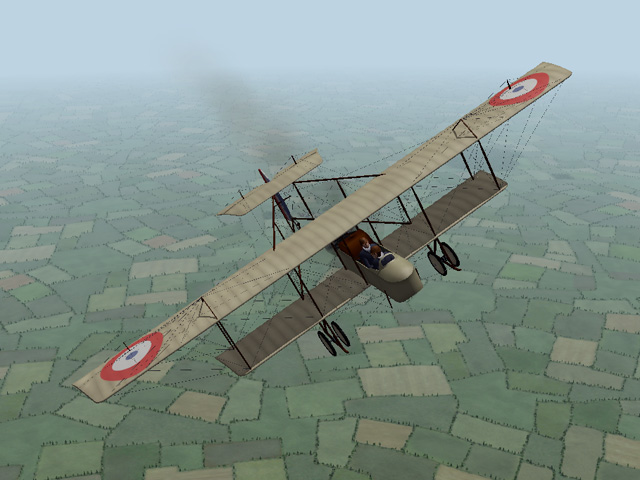
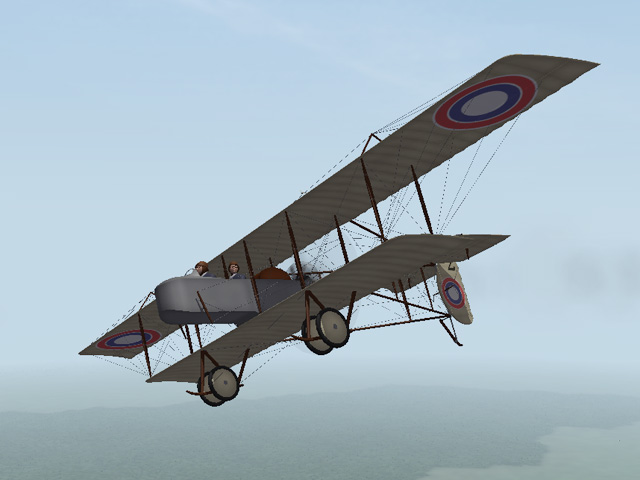
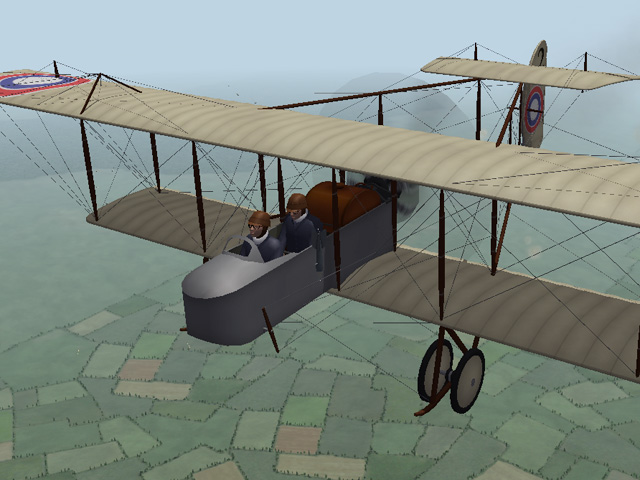
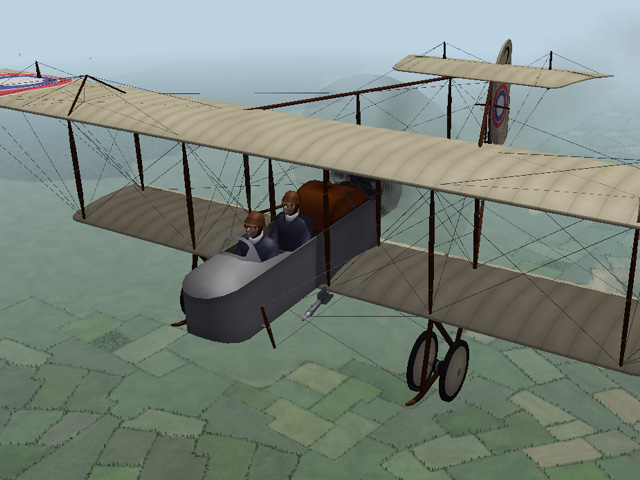
Back in January, Crawford and Whiteknight were talking about an unarmed version of the Farman HF.20. I posted one yesterday. This version has the pilot in front and no machine gun. It has a small bomb loadout and the bombs drop from beside the cockpit, as if the observer is dropping them over the side. This version uses the same skins as the original, but has a unique name so you can have both versions in the game. The decals on the Russian version use the decal positions that Crawford posted.
-
View File Farman HF.20 unarmed The Farman HF.20 was developed in 1913 and was being used by most of the air forces in Europe by the time World War I began. It was designed for reconnaissance and had very stable flight characteristics, but it didn't have a very powerful engine and wasn't suitable for fighter or bomber missions, although some pilots made the attempt. The Farman F.20 was withdrawn from front line service as more nimble aircraft became available. This version does not have a machine gun and places the observer behind the pilot.It can carry a small bomb load, with the bombs being released over the side. This install will not replace the original Farman HF.20, so you can fly both of them in First Eagles. My skins for Belgian, French, and Russian versions will work for both versions of the HF.20. I have included all three in this download. The Russian version uses the decal.ini posted by Crawford in the forums. Decals and my skinning templates are included in the download. Some flyers wore simple crash helmets in WWI, especially in the early days. I am using a pilot with a helmet in this plane. The pilot and installation instructions are included in the download, in case you don't already have it. The Farman HF.20 has a wider wingspan than First Eagles expects so you should install my "Airfields for Large Planes" available in the Combat Ace downloads area. Otherwise, when starting on the runway, your wings may be touching the wings of the planes next to you. This will cause an immediate collision and you or other planes in your flight may lose their wingtips as soon as the game starts. Credits Thanks to Ojcar for making the data file for the Farman HF.20. Thanks also to Crawford who created a more accurate decal.ini for the Russian version and who provided resources for the Farman cockpits. Installation Instructions For FE1 - Unzip the file. Move the folder named "FarmanHF20U" into your FirstEagles/Objects/Aircraft folder. For FE2 - Unzip the file. Move the folder named "FarmanHF20U" into your FirstEagles/Objects/Aircraft folder. Then in the FirstEagles/Objects/Decals folder, create a new folder named "FarmanHF20U". Move the folder named "D" from your Aircraft/FarmanHF20U folder into the Decals/FarmanHF20U folder you just made. You may not need to install the pilot with helmet, it has been available for download for some time and you may already have it. If you don't already have it, I have included the pilot and instructions for installing in a separate folder included in this download. Submitter Stephen1918 Submitted 03/12/2017 Category Other Entente Aircraft
-
- 4
-
-
100 downloads
The Farman HF.20 was developed in 1913 and was being used by most of the air forces in Europe by the time World War I began. It was designed for reconnaissance and had very stable flight characteristics, but it didn't have a very powerful engine and wasn't suitable for fighter or bomber missions, although some pilots made the attempt. The Farman F.20 was withdrawn from front line service as more nimble aircraft became available. This version does not have a machine gun and places the observer behind the pilot.It can carry a small bomb load, with the bombs being released over the side. This install will not replace the original Farman HF.20, so you can fly both of them in First Eagles. My skins for Belgian, French, and Russian versions will work for both versions of the HF.20. I have included all three in this download. The Russian version uses the decal.ini posted by Crawford in the forums. Decals and my skinning templates are included in the download. Some flyers wore simple crash helmets in WWI, especially in the early days. I am using a pilot with a helmet in this plane. The pilot and installation instructions are included in the download, in case you don't already have it. The Farman HF.20 has a wider wingspan than First Eagles expects so you should install my "Airfields for Large Planes" available in the Combat Ace downloads area. Otherwise, when starting on the runway, your wings may be touching the wings of the planes next to you. This will cause an immediate collision and you or other planes in your flight may lose their wingtips as soon as the game starts. Credits Thanks to Ojcar for making the data file for the Farman HF.20. Thanks also to Crawford who created a more accurate decal.ini for the Russian version and who provided resources for the Farman cockpits. Installation Instructions For FE1 - Unzip the file. Move the folder named "FarmanHF20U" into your FirstEagles/Objects/Aircraft folder. For FE2 - Unzip the file. Move the folder named "FarmanHF20U" into your FirstEagles/Objects/Aircraft folder. Then in the FirstEagles/Objects/Decals folder, create a new folder named "FarmanHF20U". Move the folder named "D" from your Aircraft/FarmanHF20U folder into the Decals/FarmanHF20U folder you just made. You may not need to install the pilot with helmet, it has been available for download for some time and you may already have it. If you don't already have it, I have included the pilot and instructions for installing in a separate folder included in this download. -
I'm hoping that Gterl will be inspired to finish the Spanish terrain that he started some time ago. I'm also looking forward to Geezer's planes for the SCW. I have several more planes for SCW started, but I'll be bouncing back and forth between WWI and SCW. I have some new planes for WWI started too.
-
The kudos go to Geezer. The "Woody" is one of Geezer's vehicles, part of the 1930's ground and terrain object sets he uploaded a couple of years ago. I used three of my own WWI era trucks I made for Galicia. The rest of the vehicles in the Spanish terrain were made by Geezer.