VonS
-
Posts
1,026 -
Joined
-
Last visited
-
Days Won
2
Content Type
Profiles
Forums
Gallery
Downloads
Store
Everything posted by VonS
-
Hello Gents', thought I'd drop by with a word of support - rest assured that some of us appreciate each and every one of the mods brought out over the years for FE and FE2. Thank you for taking the time and effort to bring out such mods. It's a pleasure to fly FE2 and tweak further the FMs for FE2 - rarely does a flight sim offer such a great balance of fun, realism, and expandability. Happy flying, Von S
-
Hi Nick, The stats. I've posted above I was able to get in early and mid-war scenarios using the following (latest) tweaks that I applied to the general aircraftaidata ini file (will post this one with an 8.5 update of the FMs but here is the data below for those who are interested). It is difficult to get kills from one-gun aircraft I've noticed too but I find them challenging so I usually fly earlier war scenarios - shots that exceed about 200 meters with a one-gun setup are usually useless - best is to get closer than 100 meters, ideally 50 meters before opening fire. Usually it takes more rounds too since the field of fire is not as wide as on a two-gun setup. I usually try to take out the tail section, the engine, or pilot if you're lucky - hammering the wings and fuselage is usually a waste of time with single-gun setups. Data follows below: Happy flying, Von S P.S. The gun setups that I'm using are from my big modifications for the 8.0 update with historical rates of fire and ammo. loads whenever possible. This is for the general aircraftaidata ini file.... [AIData] AileronDeltaRoll=1.0 AileronRollRate=-0.8 ElevatorDeltaPitch=1.2 ElevatorPitchRate=-0.04 ThrottleDeltaSpeed=0.06 ThrottleVelocity=-0.06 MaxPitchForAltitude=25.0 MinPitchForAltitude=-15.0 PitchForThrottle=0.1 PitchForAltitude=0.00087 PitchForVerticalVelocity=-0.024 RollForHeading=10.0 RollForHeadingRate=-0.04 MinRollHeading=5.0 MaxRollForHeading=30.0 PitchForRoll=0.23 FormationSpeedForPosition=0.8 FormationSpeedForRate=0.5 GunnerFireChance=80 GunnerFireTime=5.0 GunnerAimOffset=0.080 GunnerAimAccuracy=65 MaxRollCombat=70.0 MaxPitchCombat=55.0 MaxRollFormation=3.0 FormationRollForPosition=0.01 FormationRollForVelocity=0.2 RollForGunAttack=1.0 RollForGunAttackRate=-0.1 RudderForGunAttack=2.8 RudderForHeading=0.7 RudderForYawRate=-0.3 RudderForSideslip=2.5 TakeOffRotationAngle=10.0 [DogfightNovice] SafeAltitude=40 DefensiveAngle=35 ChanceDefensiveTurn=70 ChanceBreakTurn=80 ChanceHardTurn=70 ChanceTurnDirection=90 ChanceContinue=45 ChanceCheckNewTarget=30 ChanceUseVertical=40 RollForGunAttack=2.5 RollForGunAttackRate=-0.15 MaxRollForGunAttack=70 CannonFireAngle=35.0 MaxCannonRange=1000 OptimalCannonRange=120 MinCannonRange=50 CannonBurstLengthShort=6.0 CannonBurstLengthLong=10.0 [DogfightGreen] SafeAltitude=20 DefensiveAngle=45 ChanceDefensiveTurn=80 ChanceBreakTurn=90 ChanceHardTurn=80 ChanceTurnDirection=85 ChanceContinue=55 ChanceCheckNewTarget=35 ChanceUseVertical=50 RollForGunAttack=3.0 RollForGunAttackRate=-0.2 MaxRollForGunAttack=90 CannonFireAngle=30.0 MaxCannonRange=800 OptimalCannonRange=120 MinCannonRange=40 CannonBurstLengthShort=5.0 CannonBurstLengthLong=8.0 [DogfightRegular] SafeAltitude=60 DefensiveAngle=60 ChanceDefensiveTurn=90 ChanceBreakTurn=90 ChanceHardTurn=90 ChanceTurnDirection=70 ChanceContinue=65 ChanceCheckNewTarget=45 ChanceUseVertical=65 RollForGunAttack=3.5 RollForGunAttackRate=-0.2 MaxRollForGunAttack=120 CannonFireAngle=25.0 MaxCannonRange=600 OptimalCannonRange=90 MinCannonRange=30 CannonBurstLengthShort=4.0 CannonBurstLengthLong=6.0 [DogfightVeteran] SafeAltitude=100 DefensiveAngle=75 ChanceDefensiveTurn=100 ChanceBreakTurn=100 ChanceHardTurn=100 ChanceTurnDirection=55 ChanceContinue=75 ChanceCheckNewTarget=60 ChanceUseVertical=80 RollForGunAttack=4.0 RollForGunAttackRate=-0.25 MaxRollForGunAttack=150 CannonFireAngle=15.0 MaxCannonRange=500 OptimalCannonRange=80 MinCannonRange=20 CannonBurstLengthShort=3.0 CannonBurstLengthLong=5.0 [DogfightAce] SafeAltitude=80 DefensiveAngle=90 ChanceDefensiveTurn=100 ChanceBreakTurn=100 ChanceHardTurn=100 ChanceTurnDirection=40 ChanceContinue=90 ChanceCheckNewTarget=70 ChanceUseVertical=90 RollForGunAttack=5.0 RollForGunAttackRate=-0.25 MaxRollForGunAttack=180 CannonFireAngle=10.0 MaxCannonRange=400 OptimalCannonRange=70 MinCannonRange=10 CannonBurstLengthShort=2.0 CannonBurstLengthLong=4.0
-
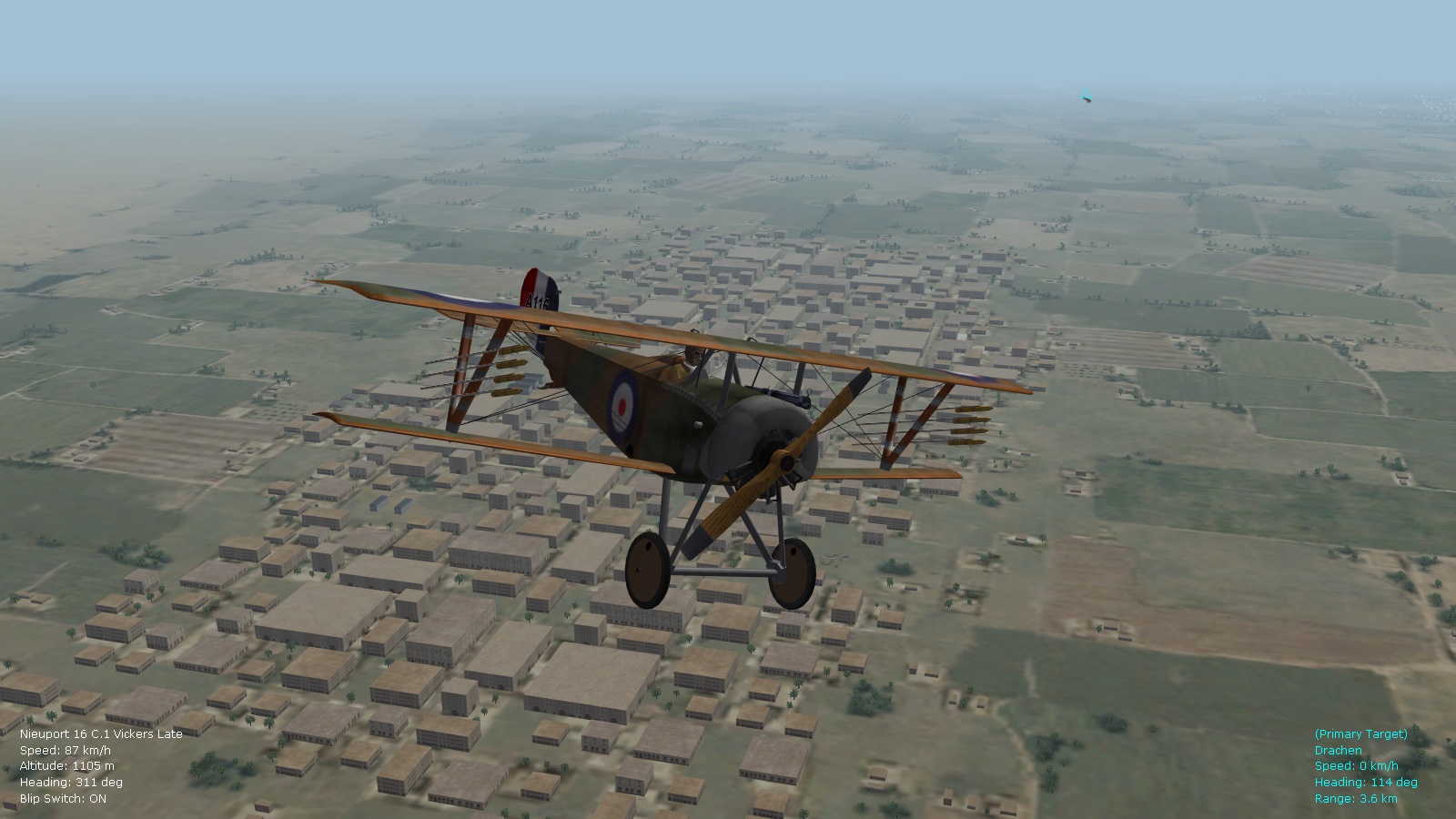
Hi Von Oben (and others following this thread), Here are some stats. using the latest modifications I've made of the general aircraftaidata ini file - fellow flyers now get most of their ammo. out during a fight, and many of them get hits out too - one even got a kill. Overall everyone is now more aggressive and evasive maneuvers are more effective/entertaining. This was from a test dogfight between Nieu. 16 types and the Fokk. E.IV that I just tweaked today. Will upload these latest modifications with an 8.5 update of the FM pack and will scrap the two separate versions (hard and very hard) I had previously for the general ai file. Happy flying, Von S P.S. Apologies for posting under this thread (was trying to post under the forum for my FM tweaks but can't add attachments there for some reason). Max. ammo. load on the Nieu. 16 was 485 by the way (97 x 5 drums).
-
Hi VonOben, Yes, those modified effects require corresponding tga files from either the Laton or Starry effects pack, to work properly. Happy flying, Von S
-
Hi VonOben, Yes it's "normal" in FE2 that the estimated mission times on the briefings screen are sometimes not precise. I have seen this happen in single mission mode often, where a mission lasted maybe one hour but it is displayed as lasting two or three hours and some minutes. It happens in custom-mission mode too but is not too bad there - there I get estimated mission times of 10 or 20 minutes usually, which is closer to how long the actual dogfight lasted. This is a mystery I have not tinkered with since I assume that the inaccuracy is a part of the game's actual code (not related to the mods or the game's user folders). Happy flying, Von S
-
Hi VonOben, it's possible that the exhaust emitter values are included directly within the particle ini files, from what I remember they don't exist as separate inis...but I will study the particle ini file more thoroughly as soon as I get a chance. Happy flying, Von S
-
Hi VonOben, Yes you are correct - getting good frame rates and good visual effects is usually a balancing act of various values in the particle ini file. The strange effect you had previously is probably some kind of banding or dithering effect due to the lower values I recommended earlier to improve frame rates. If you are having frame rate trouble during high activity in FE2 then the values should be kept lower in the particle ini file, as per my earlier suggestions in this forum. The best option then is to remove the rotary smoke emitter value or to replace it with something more subtle that doesn't dither as much with lower settings in the particle ini file - for example the inline exhaust effect would be a good choice. Happy flying, Von S
-
Hi VonOben, Yes, that dark, smoky exhaust seen on some of the rotary types is I believe the RotaryExhaustEmitter. The relevant entries are included in the Starry particle ini file, while the Laton one is missing several of those entries. It's possible that by including the Laton particle ini file you've then removed those rotary smoke effects. The strange effect you're seeing might have something to do with the particle ini file suggestions I've given for lower-end systems in one of my previous posts above. Try the following values to see if it makes the smoke effects more subtle, in the Starry particle ini file: [ParticleSystem] MaxParticlesPerEmitter=2048 MaxEmitters=1024 MaxEffects=1024 MaxFields=32 AdditionalEffectsFolder=Effects Happy flying, Von S
-
Having good results with VolumeStructurePoint in the Aircraftobject.ini file set to 2000. The DH.2 is now harder to knock down by wing breakage than previously, but not impossible. Then I tried the DH.2 against the Fokk. E.IIa, and the E.IIa is a bit harder to bring down too - requires a pilot kill or getting up really close and lighting his engine on fire. All still possible but a bit more challenging. Knocking down Morane "H" types and Sopwith Tabloids and Schneiders is still fairly easy with the E.IIa but takes a bit longer than previously (this was tested out in custom dogfights and in early single missions in the Middle east theater). Flying the E.Ia and E.IIa - managed 8 kills with about 47 hits on target, fired all 200 rounds on the E.Ia - three of those kills were ground objects. With the E.IIa, managed 11 kills with about 95 hits on target, fired a total of 320 rounds - four of those kills were ground objects. My wingman on both missions got off about 50 rounds only, but scored no hits or kills - at least they didn't get shot down. Will retest with the VolumeStructurePoint set to 2500 and 3000. Will also retest with the general aircraftaidata.ini file removed - to see if wingmen become better shots. And also, ideally, so that I have a harder time knocking things down. Will also compare with increased armor rating settings on some of these early types in further testing, but ideally I'm hoping to find a sweet spot with the VolumeStructurePoint suggestion. Happy flying, Von S
-
This is excellent advice - I will tinker with the VolumeStructurePoint and compare results with my current settings. Much more efficient than armoring everything differently, particularly since the armor values seem adequate as they are. Happy flying, Von S
-
Yes, it's still somewhat easy for the player to score hits no matter what AI modifications are used. I'm thinking that the simplest way of making it more difficult is to increase the armor ratings on the planes (this may not be historical to the fragility of some of the types) - but it would make it more difficult to acquire kills. My current armor ratings in the data ini tweaks range from about 20, for the earliest types like the Morane H, to about 26 for the Austrian Albatroses and the SE5a, the Phonix D.2a, etc. Changing the range of 20 to 26 to something like 23 to 29 is worth a try. I remember it being very difficult to shoot anything down using the Zantack damage modelling in RB3D (that was combined with the Greybeard FMs). Then again, this will also make it much more difficult for the AI to get any kills at all - if the armor ratings are too high. A stimulating topic at any rate - will tinker with damage ratings further. Happy flying, Von S
-
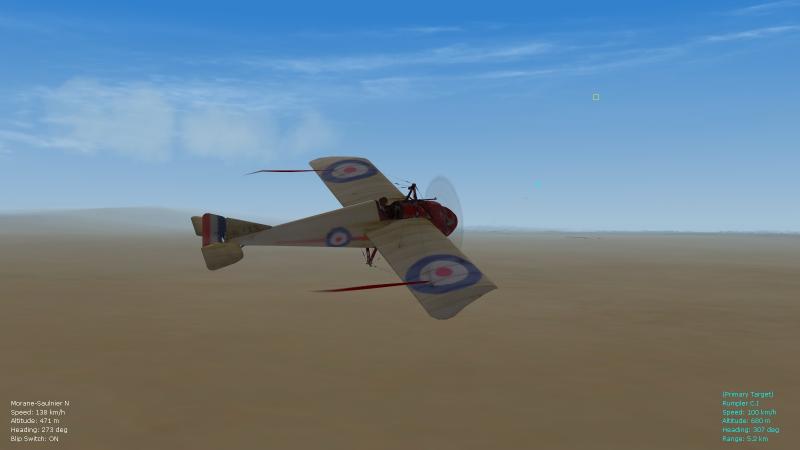
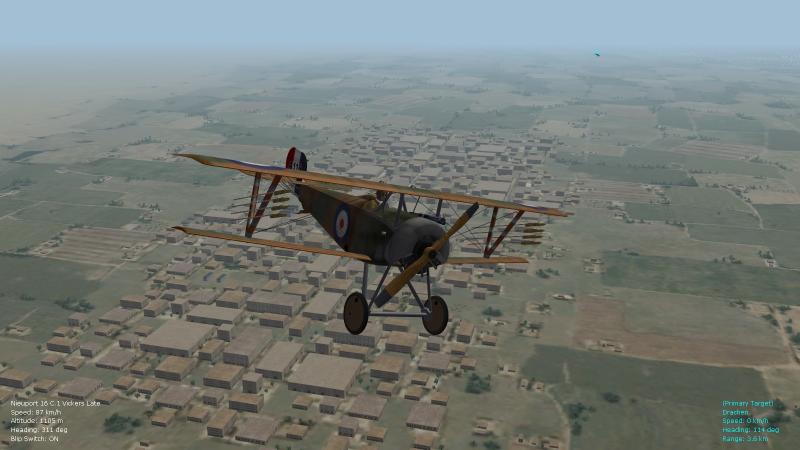
Hello Crawford, yes I am very pleased that several things were resolved in this thread, thanks to input by several members, particularly Wrench and NBell. The long-standing problem that I had with a missing Vickers gun on one of the Nieu. 16 types, also the missing LePrieurs on the early Nieuports, and the strange problem with the streamers on the Morane Bullet - have been resolved. The solution for the streamers is very simple - the Weapons folder that had resided in my main FirstEagles2 user folder was placed into the Objects folder. Also taken out of the Weapons folder and placed directly into the Objects folder were the Weapondata.dat and Weapondata.ini files (those were for some reason initially located inside my Weapons folder). This simple rearrangement allows for the streamers to show up on the Morane N if flight leader is selected in the loadout section of the menu, before flying the Morane Bullet in FE2. I had seen the streamer in some pictures from the FE1/FEgold days - but until this folder rearrangement I could not reduplicate it in FE2. The streamers do flutter, and produce a nice effect. I think however that they are only red in color, but I am glad that they work now. The Vickers on the late Nieu. 16 now also works, as do LePrieurs on the 16 and 17 types, and on the 11 (after some modification of its data ini file). I will post the modified data inis with a version 8.5 update to my FM tweaks. The Nieu 23 also can carry LePrieurs, the 24 and later Nieuport types don't have them - possibly this is historical since Le Prieurs were somewhat outdated by later 1917/early 1918 - and incendiary bullets were by then more frequently used for "balloon busting." Happy flying, Von S
-
I got rid of the top-wing Lewis gun on the Nieu17C1 and 17bis types by looking under the relevant section of the data ini file, such as [Fuselage], [Nose], [TopWing], etc., and getting rid of the entry that reads as: SystemName[001]=InternalGun InternalGun might be written as InternalGun1 or InternalGun01, and the SystemName might have a different number, but once you spot the offending one and remove it you're half way there. The other thing to do is to go under the // Internal Guns ---- section and remove the offending [internalGun] entry. This did the trick for removing the Lewis on the Vickers-armed Nieu. 17 since most of those came from the factory with the Vickers-only anyway. Top-wing Lewises on Nieu. 17 and later types were field mods from what I've read. The RFC would sometimes remove the Vickers entirely on those. Also check out the post linked below, since it mentions how to include a "dummyweapon" to make the offending weapon invisible: http://combatace.com/topic/72556-dh4-single-guns-how-to-mod/?p=571158 If for some reason the tips above don't work, it means that the guns are "hardcoded" onto the plane in one of the LOD files that's included in the plane's folder - I think a program like 3Ds Max is needed to open LOD files. Happy flying, Von S
-
Glad you have the rockets now on the Nieu11. Some of the code inside the data ini for the Nieu11 had to be modified for the LePrieurs to show up. The mods are included below if you'd like to see them (adding of weapon nodes to the left and right sections of the wings, also specifying the weapon station types - the original Nieu11 data ini had none of that included, no wonder the rockets weren't showing up). Happy flying, Von S Code changes follow: [TopWingMidLeft] SystemName[002]=centerWingStation SystemName[003]=centerWingStation3 SystemName[004]=WingRockets02 SystemName[005]=WingRockets04 SystemName[006]=WingRockets06 SystemName[007]=WingRockets08 SystemName[008]=leftWingRocketRail [TopWingMidRight] SystemName[002]=centerWingStation2 SystemName[003]=centerWingStation4 SystemName[004]=WingRockets01 SystemName[005]=WingRockets03 SystemName[006]=WingRockets05 SystemName[007]=WingRockets07 SystemName[008]=RightWingRocketRail // Weapon Stations ----- [LeftWingRocketRail] SystemType=WEAPON_STATION StationID=1 StationGroupID=1 StationType=EXTERNAL AttachmentPosition=-2.68,0.362,0.00 AttachmentAngles=0.0,15.0,0.0 LoadLimit=5 AllowedWeaponClass=FT AttachmentType=NATO ModelNodeName= PylonMass=0.01 PylonDragArea=0.00 NoJettisionTank=TRUE FuelTankName=LePrieurTube [RightWingRocketRail] SystemType=WEAPON_STATION StationID=2 StationGroupID=2 StationType=EXTERNAL AttachmentPosition=2.68,0.362,0.00 AttachmentAngles=0.0,15.0,0.0 LoadLimit=5 AllowedWeaponClass=FT AttachmentType=NATO ModelNodeName= PylonMass=0.01 PylonDragArea=0.00 NoJettisionTank=TRUE FuelTankName=LePrieurTube [WingRockets01] SystemType=WEAPON_STATION StationID=3 StationGroupID=3 StationType=EXTERNAL LoadLimit=5 AttachmentPosition=2.68,0.362,0.017 AttachmentAngles=0.0,15.0,0.0 AllowedWeaponClass=RCKT EjectVelocity=0.0,150.0,30.0 AttachmentType=NATO ModelNodeName= PylonMass=0.001 PylonDragArea=0.00 [WingRockets02] SystemType=WEAPON_STATION StationID=4 StationGroupID=3 StationType=EXTERNAL LoadLimit=5 AttachmentPosition=-2.68,0.362,0.017 AttachmentAngles=0.0,15.0,0.0 AllowedWeaponClass=RCKT EjectVelocity=0.0,150.0,30.0 AttachmentType=NATO ModelNodeName= PylonMass=0.001 PylonDragArea=0.00 [WingRockets03] SystemType=WEAPON_STATION StationID=5 StationGroupID=3 StationType=EXTERNAL LoadLimit=5 AttachmentPosition=2.68,0.362,0.137 AttachmentAngles=0.0,15.0,0.0 AllowedWeaponClass=RCKT EjectVelocity=0.0,150.0,30.0 AttachmentType=NATO ModelNodeName= PylonMass=0.001 PylonDragArea=0.00 [WingRockets04] SystemType=WEAPON_STATION StationID=6 StationGroupID=3 StationType=EXTERNAL LoadLimit=5 AttachmentPosition=-2.68,0.362,0.137 AttachmentAngles=0.0,15.0,0.0 AllowedWeaponClass=RCKT EjectVelocity=0.0,150.0,30.0 AttachmentType=NATO ModelNodeName= PylonMass=0.001 PylonDragArea=0.00 [WingRockets05] SystemType=WEAPON_STATION StationID=7 StationGroupID=3 StationType=EXTERNAL LoadLimit=5 AttachmentPosition=2.68,0.362,0.257 AttachmentAngles=0.0,15.0,0.0 AllowedWeaponClass=RCKT EjectVelocity=0.0,90.0,18.0 AttachmentType=NATO ModelNodeName= PylonMass=0.001 PylonDragArea=0.00 [WingRockets06] SystemType=WEAPON_STATION StationID=8 StationGroupID=3 StationType=EXTERNAL LoadLimit=5 AttachmentPosition=-2.68,0.362,0.257 AttachmentAngles=0.0,15.0,0.0 AllowedWeaponClass=RCKT EjectVelocity=0.0,150.0,30.0 AttachmentType=NATO ModelNodeName= PylonMass=0.001 PylonDragArea=0.00 [WingRockets07] SystemType=WEAPON_STATION StationID=9 StationGroupID=3 StationType=EXTERNAL LoadLimit=5 AttachmentPosition=2.68,0.362,0.377 AttachmentAngles=0.0,15.0,0.0 AllowedWeaponClass=RCKT EjectVelocity=0.0,150.0,30.0 AttachmentType=NATO ModelNodeName= PylonMass=0.001 PylonDragArea=0.00 [WingRockets08] SystemType=WEAPON_STATION StationID=10 StationGroupID=3 StationType=EXTERNAL LoadLimit=5 AttachmentPosition=-2.68,0.362,0.377 AttachmentAngles=0.0,15.0,0.0 AllowedWeaponClass=RCKT EjectVelocity=0.0,150.0,30.0 AttachmentType=NATO ModelNodeName= PylonMass=0.001 PylonDragArea=0.00
-
Here's a zipped folder that contains my modified lodouts for the late Vickers Nieu. 16, the Nieu. 11, and also a modified data file that I just made for the Nieu. 11 that does give me rockets in FE2 (the services dates are for the Eastern front in this Nieu. 11 data file but you can change it around for the relevant front - I will get around to uploading the changes eventually in an 8.5 version of my FM and realism update pack). Glad to hear that the Guns/Weapons folder works well now! The Nieu. 11 data file was missing rocket and pod info. for some reason so I had to copy-and-paste from the Nieu. 16 data ini. Also its lodout file is now similar to that of the Nieu. 16 - previously it was missing several entries. The Nieu.17 and 17bis types are fine as is - rockets do show up - have just tested those. Happy flying, Von S
-
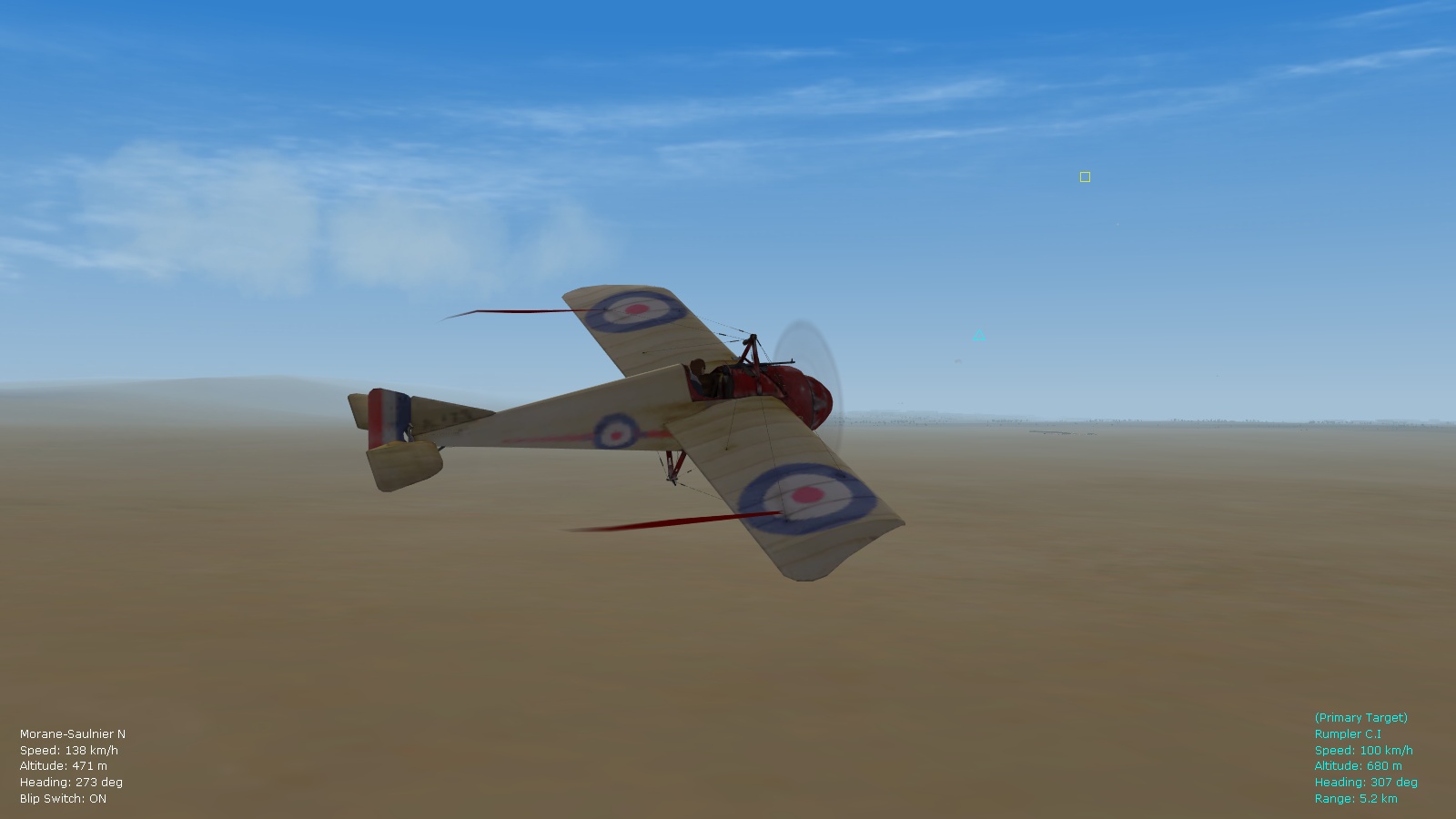
Quick update: streamers now work fine on the flight leader's Morane Bullet in FE2. Happy flying, Von S
-
Hi CPerleBerg, yes I'm on FE2 and using Nick Bell's and Wrench's suggestions - to place the Weapons folder inside Objects - I managed to get rockets working, and also the Vickers gun on the late model Nieuport 16. Haven't tested the streamers on the Morane Bullet yet but will try that out later. I'll pm a zipped file to you that contains my Weapons and Guns folders, and the dat and ini files that correspond with those two folders - simply unzip and install, overriding those folders in your Objects folder. (I've added a few extra gun variants inside the Guns folder - those gun variants use extra sounds that are available in the install file for my FM and realism update pack for FE2 - it's located under "flight model" updates for FE2 here on the site.) Happy flying, Von S
-
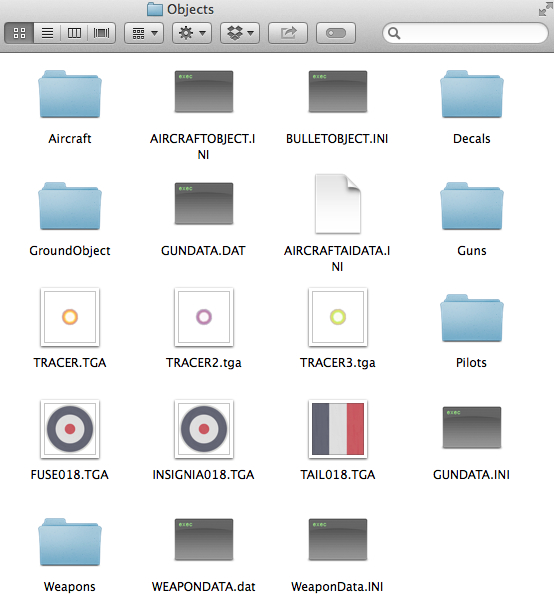
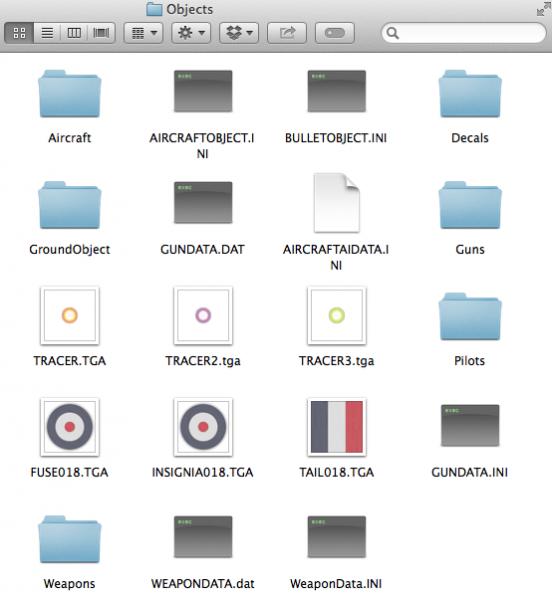
Hi Wrench, thanks for the detailed info. I'm on FE2 but for some reason always had a gundata.ini and gundata.dat file in my main "Objects" folder (maybe this was something that WineSkin did once I installed FE2 into it on OS X). Now I've got my Objects folder sorted out as posted in the pic below, and LePrieurs are working great - also good is that the Vickers is now showing up on the Nieu16 (Late) model. Glad to know that I don't have to paste weapons/guns entries into the gundata.ini and weapondata.ini files anymore since the individual gun/weapon data inis do all of that for you on FE2 - for some reason I thought all of the files worked together (even the inis in the main Objects folder) so I was keeping all of the inis as consistent as possible - how they got there considering that I'm on FE2 I can't explain other than to attribute it to WineSkin. Happy flying, Von S
-
Thank you Nick for this info. - have now done an experiment, I placed the Weapons folder inside the Objects folder, took the Weapondata.dat and Weapondata.ini files out of the Weapons folder and placed those two directly into the Objects folder - imitating the setup for "Guns" - and a great surprise, I then had functional Le Prieur rockets showing up on the Nieu 16 in a balloon busting mission! Will see if this resolves the problem with the missing Vickers gun on the late Nieu 16 too. Von S
-

Something not right with my SF2 series install...- help needed.
VonS replied to jack72's topic in General Discussion
Hello, FE and FEgold share lots of code with SF1. FE2 is more similar to SF2. I think that only FE2 runs on Win7 or higher. FE/FEgold is better for WinXP and lower. Happy flying, Von S -
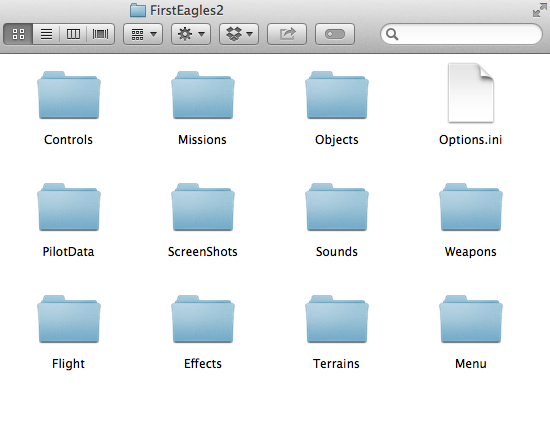
Hello, the main user directory for FE2 should contain both the Objects and Weapons folders. Here's a pic. of my setup below. Inside your Weapons folder there should be a WeaponData.ini file somewhere. It's likely then that the file structure is not identical across FE2 and SF2. Von S
-
I'm assuming that FE2 handles weapons similarly to SF2. Most of the aircraft guns are stored in your user directory for FE2 - in the "Guns" folder (found inside the "Objects" folder). There is also a Gundata.ini file that should be directly inside the "Objects" folder. The aircraft data ini files then call up the relevant gun data, sounds, etc. (there should also be a Soundlist.ini file located in your "Flight" folder - where extra gun/engine sounds are added to correspond with stuff in the gundata.ini, also in the gun ini files themselves that are located in the specific gun folders inside "Guns"). There is also a "Weapons" folder located on the same level as the "Flight" folder in your user directory for FE2. From what I've noticed, most of the weapons inside that folder are bombs, although there are a few references there too to Lewis, Vickers. etc. - that Weapons folder I have to admit is a bit of a mystery to me since it also contains streamers for the Morane N and the LePrieur rockets - neither of which I've ever been able to get working inside FE2. There were a few old threads floating here on the FE/FE2 forums from a few years back - with directions for installing the rockets and streamers - I've tried all the directions but nothing worked. I think another issue that is related to the same problem is the difficulty of getting a Vickers gun set up on the Nieuport 16 in FE2. The stock model with the Lewis gun on the top wing is fine, since it loads it as a part of the plane parts themselves - but the "weapons" load inis that are supposed to switch between Lewis guns, Vickers guns, etc., don't seem to work at all in FE2 - I've tested this several times while trying to get the Vickers onto the Nieu. 16 - never managed to get it there, either through weapons load or through standard "internal gun" placement as is the case with most models for FE2. I think the mystery is somewhere in there - getting the Vickers to show up on the Nieu 16 will also get the streamers on the Bullet and the LePrieurs showing up, or vice versa. I look forward to a resolution of the mystery. Happy flying, Von S
-
Hello, try setting the screen resolution for FE/FE2 manually in the Options.ini file of your user directory for FE2...if you are running FE1/FEgold, the Options.ini file might be located in a different spot. The settings to tamper with are the following ones: [GraphicsOptions] DisplayDeviceID=0 DisplayWidth=1600 DisplayHeight=900 DisplayDepth=32 The cat extractor that works with SF2 should work fine with FE2, I use it all the time. Here's the link to the cat program: http://combatace.com/files/file/13040-3rd-wire-toolkits-april-2012/ Happy flying, Von S
-
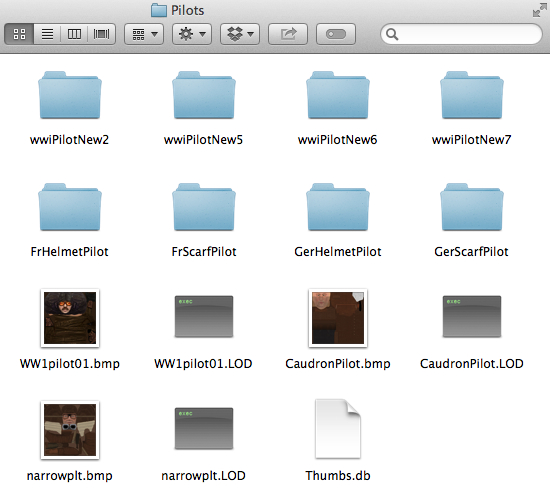
Edit: disregard the "Thumbs.db" file located in the pic of my main Pilots folder, that's a thumbnails database file generated automatically in folders on OS X. Von S
-
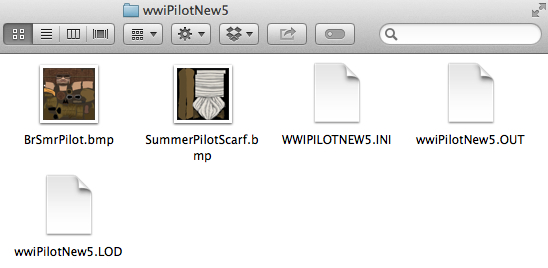
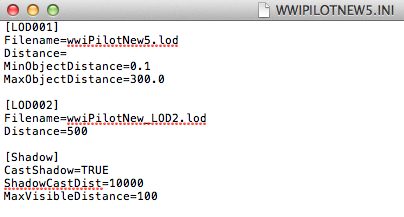
Hi Geezer, yes I've tested it now and the nested folder works for the Euro Pilot too - and it's the 1930s one with the oxygen mask as you indicated - how that ended up in my FE2 folder I have no idea, but I've removed it now since it doesn't fit with WWI. Here's a brief tutorial below for anyone struggling with invisible pilots in FE2, and my data inis. Been tweaking some more and nested folders work well for many of the pilots. A nicely organized Pilots folder should look something like this: The top four folders correspond with the German blue scarf pilot, British summer pilot, British winter pilot, and desert pilot. The next four are Stephen's cork helmet and/or scarf pilots (the order of the folders is not important, I'm simply referring to what's on my pic). The files that are missing inis and outs, such as WWIpilot01, should not be placed in nested folders but left as indicated in the main Pilots folder, otherwise they can't be called up by the data ini files for the planes. Illustrated below is the inside of the British summer pilot folder, now renamed to wwiPilotNew5 Don't forget to edit the corresponding, top LOD entry inside the ini file of the relevant folder, so that the correct LOD file is called, as indicated below (leave the LOD002 stuff alone since any changes to that disable the nested folder from being called up by the plane's data ini file): Relevant toggles in the data inis then become: PilotModelName=WWIpilot (this is the old blocky-head pilot) PilotModelName=wwiPilotNew1 (standard new pilot) PilotModelName=wwiPilotNew2 (German blue scarf pilot) PilotModelName=wwiPilotNew3 (standard new pilot, different colored coat) PilotModelName=wwiPilotNew4 (standard new pilot, different coat color) PilotModelName=wwiPilotNew5 (British summer pilot) PilotModelName=wwiPilotNew6 (British winter pilot) PilotModelName=wwiPilotNew7 (desert pilot) PilotModelName=WW1pilot01 (Ansaldo pilot, fits into other planes but looks like he's 6 foot 8 inches when installed in something like a DH.2) PilotModelName=CaudronPilot (nice generic looking pilot and fits well in other bombers and some planes, not only the Caudrons) PilotModelName=narrowplt (this one is probably best to use in the H-Brandenburg D.I, will require some repositioning of coordinates for other planes) Von S