VonS
-
Posts
1,019 -
Joined
-
Last visited
-
Days Won
2
Content Type
Profiles
Forums
Gallery
Downloads
Store
Everything posted by VonS
-

Advice Please - FE2 Aircraft Graphics Issues
VonS replied to Mike Dora's topic in General Discussion
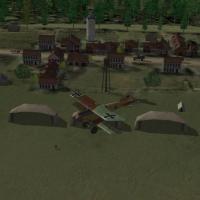
I see that the thread is making good progress - have now double-checked the Fokk. Eindeckers in my install and yes the little white band is present on the wings of the E.Ia, IIa, and the E.III - these are all models carried over from FE into FE2 as Mike says. I look forward to more discoveries/solutions regarding this. Happy flying, Von S Pic attached: -
 Excellent - the work being done on FE/FE2 always amazes me. I look forward to flying this map! Von S
 -
Advice Please - FE2 Aircraft Graphics Issues
VonS replied to Mike Dora's topic in General Discussion
Happy new year to you as well Mike, I've noticed those white bits on some of the models, such as the Eindeckers - I think those models were originally made for FE/FEgold but can be used without trouble in FE2. Perhaps some of the modellers know what those white bits are, perhaps it's as simple as "unpainted" parts in the aircraft skins, and then some of the un-skinned area shows through. Happy flying, Von S -
Hi Coupi (and others following this thread), After more testing, it appears that the StructuralFactor value for lift surfaces is related to MaxG forces for those same lift surfaces, to the extent that the values can be made to work together. In other words, lower StructuralFactor numbers, together with a MaxG force limit, can increase the risk of structural failure (even with absence of bullet damage). I did an experiment on the Nieu 17/23 types by lowering the typical StructuralFactor numbers of 2 and 4, for lift surfaces, to something like 1.5 and 3, or sometimes to 2, from 4 - and when implemented with MaxG limits - this further increases the chance of planes falling apart. In my opinion, they then become too flimsy. For the Nieup. types it seems a good option to leave the StructuralFactor values as they are, and to include MaxG limits for lift surfaces. Also I spotted that some of the lift surfaces have a strange DamageRating value of "Disabled" - I am currently going through the Nieu data inis and changing DamageRating to "Destroyed" for lift surfaces - this results in more realistic physics post-damage (from reckless flying). The Morane Saulnier N also had this problem - with both wings broken off it would still fly - changing all damage ratings to "Destroyed" solved the problem - will roll these important changes into ver. 8.6 of the FM updates. Happy flying, Von S
- 8 replies
-
- 2
-

-
- damage models
- fe2
- (and 5 more)
-
Thank you friend, and for all the wonderful models you have done for First Eagles - happy holidays to you as well, and to all fans and flyers of FE/FE2, and a happy new year too! P.S. Santa lands well at about 85kph - but keep the front hooves high and use the blip switch frequently. Von S
-
Further thinking on this topic leads me to the following conclusions: (a) MaxG under FlightControl of equal value to MaxG values for lift surfaces = you and the same plane-type AI follow the same "rules" of gforces (b) MaxG under FlightControl set less than MaxG values for lift surfaces = you can be more reckless than the AI in the same plane type (c ) MaxG under FlightControl set greater than MaxG values for lift surfaces = you are at a disadvantage to AI flying the same type Von S
- 8 replies
-
- 1
-
-
- damage models
- fe2
- (and 5 more)
-
Hi Ojcar, Thank you for the feedback. You are right that it might make flying more difficult in FE2 - from further observations, I have noticed that these tweaks don't seem to affect the AI. The AI, being "smart," will never fly above the MaxG limits set in the data inis - so that only the player seems to be at risk for these structural disasters to the plane. I did spot in one of my tests the wings coming off of a MS-N but that was after they were shot down and accelerating - while being flown by the AI, no structural problems occurred to the aircraft, even when I set MaxG values very low to about 0.5, 1.0, 1.5. I tried a few more experiments: considering that the MaxG value under FlightControl is the one that the AI "listens" to - I increased that value to something like 6.0, 7.0, etc., but left the MaxG values for the wing and tail surfaces quite low, around 2.0, to see if the AI would be more reckless and would cause structural failure to AI-flown aircraft. Again I had the same results, with the AI always being careful not to break anything. This means that the player will be at a "disadvantage" to AI-flown planes if MaxG values are set too low, resulting in aircraft that are too fragile. Unless there is a way to implement structural failure risk across player and AI-flown aircraft, like in RB3D - it is best to use caution with the MaxG values for lifting surfaces. I think that a "safe" solution is to copy the MaxG number located under FlightControl into the left/right wing panels attached to the fuselage, also into the tail surfaces (left/right stab). This way there is sometimes a risk of structural failure, making it more challenging for the player to maneuver in the game (and making the AI appear more difficult) - but too much flimsiness should be avoided. One other factor to consider here is the sensitivity of the elevators - stiff ones allow a plane to stay safe even with relatively low MaxG limits. Sensitive elevators can easily rip things apart if the MaxG is too low. I will implement some subtle MaxG limits for the Nieu. types as an experiment (for the 8.6 FM update) - but will avoid too much of these changes for now. Edit: I remember the Aviatik D.I breaking sometimes in steep dives, but didn't make the connection with MaxG values for lifting surfaces until I started tweaking the Nieu. 12 (I always found that impressive on the Aviatik). Happy flying, Von S
- 8 replies
-
- 1
-
-
- damage models
- fe2
- (and 5 more)
-
More updates: Values for MaxG, for wing components, can be set to the same value as MaxG listed under FlightControl in the data ini, providing that that value is realistic/low enough (most of my MaxG values for the FE2 data ini tweaks are fairly low whenever possible). Other things that are important: setting the top wing panels to a lower MaxG value than the bottom wings will guarantee that all wings break off in a quick attempt to get out of a power dive. Leaving the bottom wing values low, and the top wings high, for MaxG - should result in the bottom wings breaking off while the top wing remains intact. A simpler solution is to set all panels to the same MaxG - and to match up with the MaxG under FlightControl. Also, if you include a MaxG value for the LeftStab and RightStab entries - you will be able to rip your elevators/tail assembly off in a dive too - very fun. The slow part will be testing how much breakage is realistic - eventually this will be rolled out into one of my FM update packs (since I have to go back and tweak more than 170 data inis). Edit: I might roll this "flimsiness" into the Nieuport line for ver. 8.6 of the FM pack, as a start. Happy flying, Von S
- 8 replies
-
- 3
-
-
- damage models
- fe2
- (and 5 more)
-
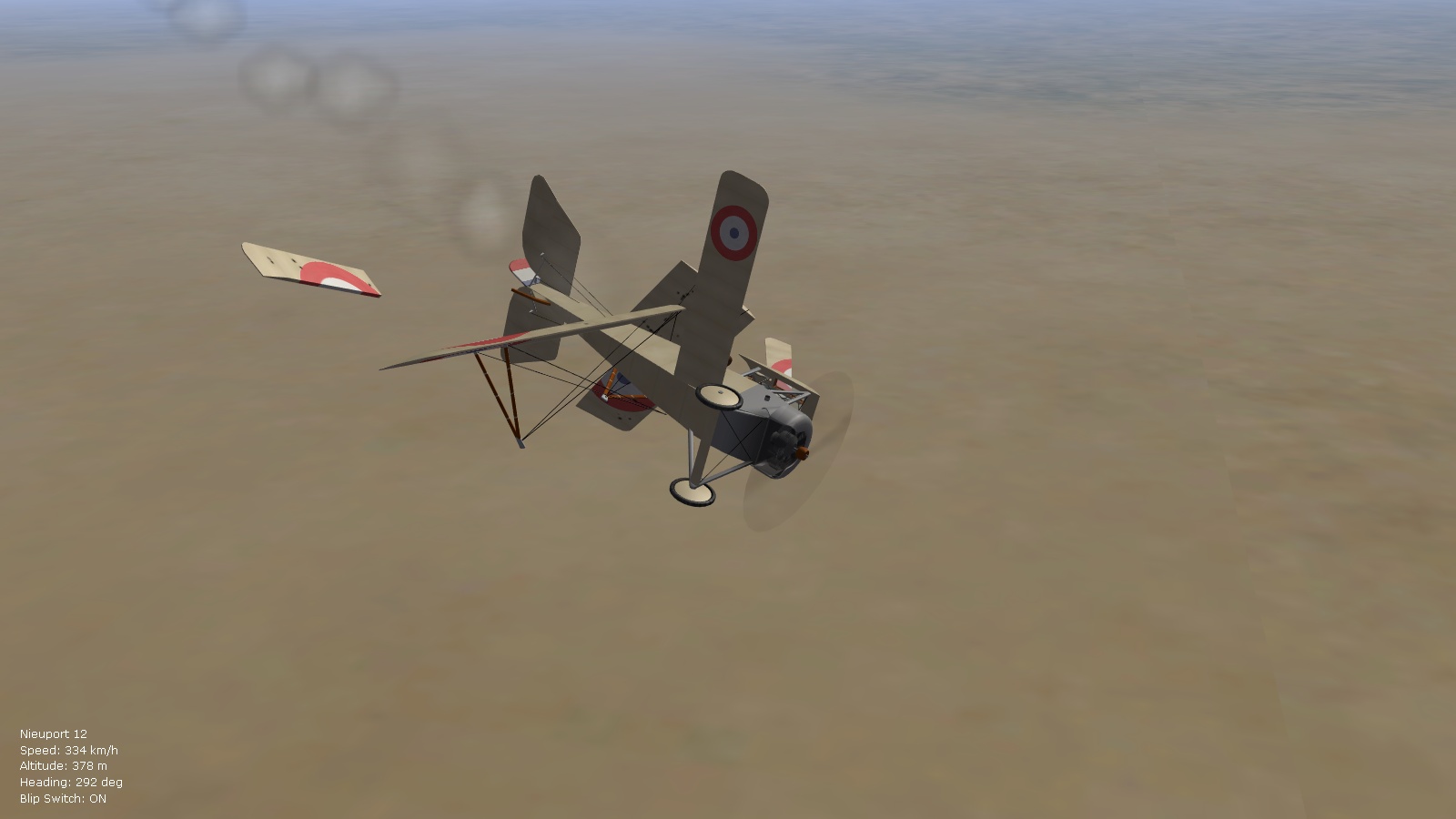
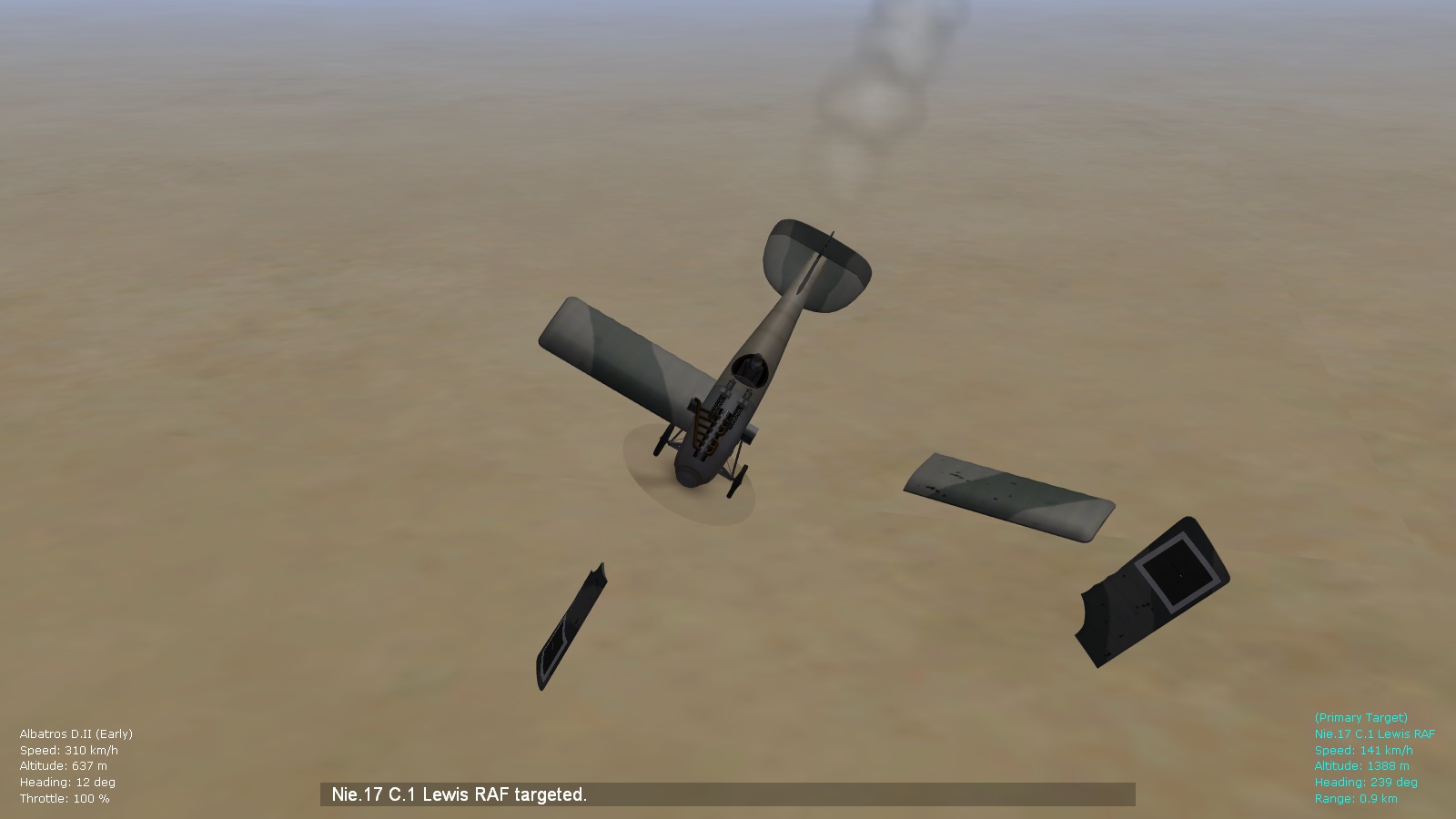
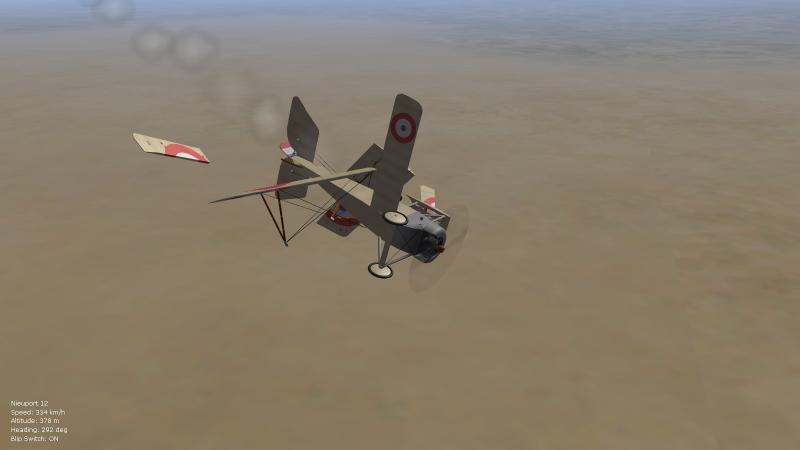
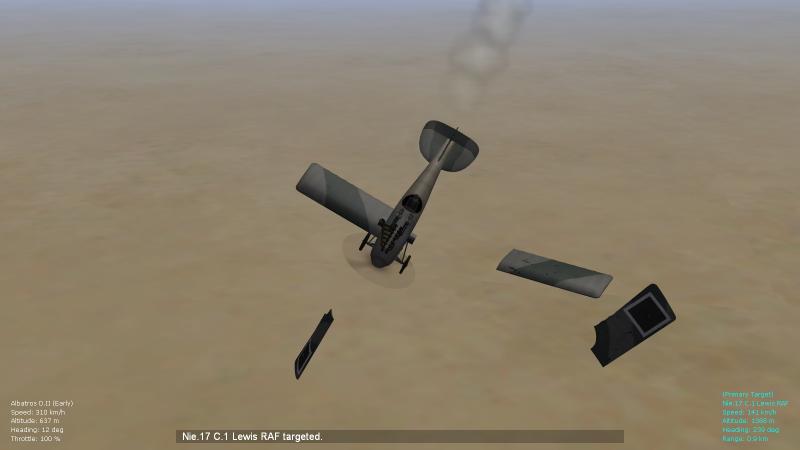
Hello FE/FE2 flyers, Thought I'd start a new post for this topic since it's something I was thinking of for several months in FE2 - how to make dives and recovery from dives more dangerous/realistic (reminiscent of RB3D). The tweak is a fairly simple one but requires patience. A MaxG value should be included for upperright, upperleft, bottomright, and bottomleft wing values in the data ini files. I stumbled on this while tweaking the Nieu 12 today - there is a general MaxG value under FlightControl in the data inis that I've modified for previous updates of the FM packs - but the trick is to include such values for the wings as well, and to modify those values further - I am assuming that this would work for wing tip entries as well but I have so far tested only with main wing panels - the results are very good. (I will roll these modifications into a future version of the FM updates, once I am happy with the results.) In the meantime, here are a couple of pics of quick (unsuccessful) recovery from power dives. Happy flying, Von S
- 8 replies
-
- 4
-
-
- damage models
- fe2
- (and 5 more)
-
Hi VonOben I'm happy that you're getting many flamers now - I am enjoying the new settings in my installs of FE2. The frame-rate problem you are getting when flamers erupt in black smoke is strange - perhaps you are using a mixture of Laton's and Starry's effects. I recommend trying out the modified files for aircraft smoke damage and balloon explosions that I've posted here: http://combatace.com/topic/88700-fe2-bad-framerates/?p=716980 Also, I will pm you the particlesystem.ini file that I am currently using (with further reduced ParticleSystem entries that are giving me very good average fpm-s of about 80, on an Intel integrated 4000 graphics card with 1GB of ram). Happy flying, Von S
-
Excellent skins, and thank you for the Alb. D.II skins and others as well Trotski. I look forward to your E.I and E.II skins that I'm sure will also look beautiful. Happy flying, Von S
-
Thought I'd post a few test shots of the [ObjectFire] mods. in the aircraftobject ini file, as mentioned above. Good variety is now present - I'm having nice results with mostly Laton's effects and the mods. applied to the data ini file - although the variety is probably noticeable with the Starry effects too but I wouldn't know by how much (haven't tested with the Starry effects). Fuel fire on a Morane N - light smoke indicates that it still hasn't progressed to an irreversible fire (sometimes it may go out) Progression beginning (darker smoke as evidence) Progression complete (stream of dark smoke now) Fire expands (now an inferno) Happy flying, Von S
-
Hi VonOben, I will take a look at Quack74's effects and will also look into the FlightData.cat file - I would also like to remove any duplicate files (perhaps this will improve frame rates further in game?). Happy flying, Von S
-
Hi Von Oben, Yes, none of the separate ini files (for effects) should be removed since this may create strange problems. This also applies to the sky/cloud effects: if some of the cloud tga files are removed (from the PanamaRed install) - as I have done to improve frame rates - only specific ones should be removed as indicated on the previous page of this particular forum/thread, otherwise the sky (in a 360 degree view) will not look seamless. Have now checked my modification of the AircraftSmokeEffect.ini file and it is a tweak of Laton's, not of Stary's file - but the file does include an "AircraftSmokeEmitter" data entry, as does the Stary one - so I am assuming that either file is okay to use. Happy flying, Von S
-
Hi Von Oben, I would also assume that effects belonging to FlightData.cat belong in the Flight folder. Other effect files should go into the Effects folder. I have not extracted any effects from the game itself, but have only installed the Stary and Laton effects from CombatAce in a somewhat convoluted way to get the effects looking as I like them, and for good frame rates (the Stary install puts a few of those Smoke.tga files into the Effects folder, even though the same files are already placed into the Flight folder by the game itself). I first install the Stary "FE effects pack," then the "FE FX Update" also by Stary. This is followed by the earlier, better "AircraftEngineDamageEffect" also by Stary that eliminates the green smoke problem from engines. I then install the Laton effects on top of the previous installs, replacing files with the same names. The Laton effects are installed in the following order: "Effects_test," then "smokeeffectv2," then my small tweaks to Laton's "AircraftSmokeEffect" file and to the generic "BalloonFireEffect" are installed (to improve frame rates) (available on CombatAce under the FrameRate forum for FE2 as "BetterSmokeAndBalloonEffects"). Finally, I replace Laton's Particlesystem.ini file with Stary's since Stary's contains a few extra effects, and I reduce some of the Emitter numbers at the top of that file to further improve frame rates. Happy flying, Von S
-
Hi VonOben, Below follow pics. of my Flight, Effects, and Objects folders - you can follow the files inside to see what effects go where (I have thrown files out of some of the folders that are not relevant to the effects so that I could make less pics. that way) - but the relevant files are all in place. Hope this helps with file organization. Happy flying, Von S And here is the top half of the Effects folder. Von S
-
Hi VonOben, I think that both the Starry and Laton effects were made initially for FE/FEgold. But they work well in FE2. I will experiment with using the default Particlesystem.ini with the Laton effects, although I am getting good results on an Intel integrated graphics card (Intel 4000) using the Starry particle system ini with reduced effects, as per my tweaks, and the Laton effects - flamers are abundant, and I am getting maximum frame rates as high as 90 or 100, with the delta frame rate numbers usually in the 50s and 60s. (This is all in Wine8, version 1.5.1, in WineSkin, with two winetricks installed - the Direct3D ver. 11 (43) drivers, and also code telling WineSkin that my video card is using 1GB of video ram. Those proficient in WineSkin can find the D3D drivers under the "dll" section of winetricks, while the code telling the program how much video ram to use is located under the "settings" section.) Happy flying, Von S
-
Further experiments with flamers have led me to the following settings in the aircraftobject ini file: [ObjectFire] FireCheckTime=20.0 APRoundFireChance=70 HERoundFireChance=40 HERoundExplosionChance=0 ExplosionChance=0 SuppressionChance=30 ProgressionChance=60 This certainly increases the chance of flamers, of small flamers but also sometimes of bigger fireballs around the engine. Note that with these settings, on rare occasion, a well-flown plane by the AI (and maybe the player too) can put out a fire and get back to fighting, unless the engine has been destroyed - short fires that are put out seem to leave minimal damage. The variety is an improvement to FE2 I think. I have had no in-air explosions, even after being hit or hitting an opponent, with these settings so far - very pleased to report that. The settings work well with Nick Bell's suggestion to comment out the ObjectExplosionEffect under [GameObjectEffect], further improving the historical realism. Will include the modified file with a future FM update pack. In the meantime I am posting the settings above. There is no need to toggle the FireSuppression entry in individual data ini files for planes from FALSE to TRUE for the above settings to work, by the way. Happy flying, Von S
-
Hello Gents', thought I'd drop by with a word of support - rest assured that some of us appreciate each and every one of the mods brought out over the years for FE and FE2. Thank you for taking the time and effort to bring out such mods. It's a pleasure to fly FE2 and tweak further the FMs for FE2 - rarely does a flight sim offer such a great balance of fun, realism, and expandability. Happy flying, Von S
-
Hi Nick, The stats. I've posted above I was able to get in early and mid-war scenarios using the following (latest) tweaks that I applied to the general aircraftaidata ini file (will post this one with an 8.5 update of the FMs but here is the data below for those who are interested). It is difficult to get kills from one-gun aircraft I've noticed too but I find them challenging so I usually fly earlier war scenarios - shots that exceed about 200 meters with a one-gun setup are usually useless - best is to get closer than 100 meters, ideally 50 meters before opening fire. Usually it takes more rounds too since the field of fire is not as wide as on a two-gun setup. I usually try to take out the tail section, the engine, or pilot if you're lucky - hammering the wings and fuselage is usually a waste of time with single-gun setups. Data follows below: Happy flying, Von S P.S. The gun setups that I'm using are from my big modifications for the 8.0 update with historical rates of fire and ammo. loads whenever possible. This is for the general aircraftaidata ini file.... [AIData] AileronDeltaRoll=1.0 AileronRollRate=-0.8 ElevatorDeltaPitch=1.2 ElevatorPitchRate=-0.04 ThrottleDeltaSpeed=0.06 ThrottleVelocity=-0.06 MaxPitchForAltitude=25.0 MinPitchForAltitude=-15.0 PitchForThrottle=0.1 PitchForAltitude=0.00087 PitchForVerticalVelocity=-0.024 RollForHeading=10.0 RollForHeadingRate=-0.04 MinRollHeading=5.0 MaxRollForHeading=30.0 PitchForRoll=0.23 FormationSpeedForPosition=0.8 FormationSpeedForRate=0.5 GunnerFireChance=80 GunnerFireTime=5.0 GunnerAimOffset=0.080 GunnerAimAccuracy=65 MaxRollCombat=70.0 MaxPitchCombat=55.0 MaxRollFormation=3.0 FormationRollForPosition=0.01 FormationRollForVelocity=0.2 RollForGunAttack=1.0 RollForGunAttackRate=-0.1 RudderForGunAttack=2.8 RudderForHeading=0.7 RudderForYawRate=-0.3 RudderForSideslip=2.5 TakeOffRotationAngle=10.0 [DogfightNovice] SafeAltitude=40 DefensiveAngle=35 ChanceDefensiveTurn=70 ChanceBreakTurn=80 ChanceHardTurn=70 ChanceTurnDirection=90 ChanceContinue=45 ChanceCheckNewTarget=30 ChanceUseVertical=40 RollForGunAttack=2.5 RollForGunAttackRate=-0.15 MaxRollForGunAttack=70 CannonFireAngle=35.0 MaxCannonRange=1000 OptimalCannonRange=120 MinCannonRange=50 CannonBurstLengthShort=6.0 CannonBurstLengthLong=10.0 [DogfightGreen] SafeAltitude=20 DefensiveAngle=45 ChanceDefensiveTurn=80 ChanceBreakTurn=90 ChanceHardTurn=80 ChanceTurnDirection=85 ChanceContinue=55 ChanceCheckNewTarget=35 ChanceUseVertical=50 RollForGunAttack=3.0 RollForGunAttackRate=-0.2 MaxRollForGunAttack=90 CannonFireAngle=30.0 MaxCannonRange=800 OptimalCannonRange=120 MinCannonRange=40 CannonBurstLengthShort=5.0 CannonBurstLengthLong=8.0 [DogfightRegular] SafeAltitude=60 DefensiveAngle=60 ChanceDefensiveTurn=90 ChanceBreakTurn=90 ChanceHardTurn=90 ChanceTurnDirection=70 ChanceContinue=65 ChanceCheckNewTarget=45 ChanceUseVertical=65 RollForGunAttack=3.5 RollForGunAttackRate=-0.2 MaxRollForGunAttack=120 CannonFireAngle=25.0 MaxCannonRange=600 OptimalCannonRange=90 MinCannonRange=30 CannonBurstLengthShort=4.0 CannonBurstLengthLong=6.0 [DogfightVeteran] SafeAltitude=100 DefensiveAngle=75 ChanceDefensiveTurn=100 ChanceBreakTurn=100 ChanceHardTurn=100 ChanceTurnDirection=55 ChanceContinue=75 ChanceCheckNewTarget=60 ChanceUseVertical=80 RollForGunAttack=4.0 RollForGunAttackRate=-0.25 MaxRollForGunAttack=150 CannonFireAngle=15.0 MaxCannonRange=500 OptimalCannonRange=80 MinCannonRange=20 CannonBurstLengthShort=3.0 CannonBurstLengthLong=5.0 [DogfightAce] SafeAltitude=80 DefensiveAngle=90 ChanceDefensiveTurn=100 ChanceBreakTurn=100 ChanceHardTurn=100 ChanceTurnDirection=40 ChanceContinue=90 ChanceCheckNewTarget=70 ChanceUseVertical=90 RollForGunAttack=5.0 RollForGunAttackRate=-0.25 MaxRollForGunAttack=180 CannonFireAngle=10.0 MaxCannonRange=400 OptimalCannonRange=70 MinCannonRange=10 CannonBurstLengthShort=2.0 CannonBurstLengthLong=4.0
-
Hi Von Oben (and others following this thread), Here are some stats. using the latest modifications I've made of the general aircraftaidata ini file - fellow flyers now get most of their ammo. out during a fight, and many of them get hits out too - one even got a kill. Overall everyone is now more aggressive and evasive maneuvers are more effective/entertaining. This was from a test dogfight between Nieu. 16 types and the Fokk. E.IV that I just tweaked today. Will upload these latest modifications with an 8.5 update of the FM pack and will scrap the two separate versions (hard and very hard) I had previously for the general ai file. Happy flying, Von S P.S. Apologies for posting under this thread (was trying to post under the forum for my FM tweaks but can't add attachments there for some reason). Max. ammo. load on the Nieu. 16 was 485 by the way (97 x 5 drums).
-
Hi VonOben, Yes, those modified effects require corresponding tga files from either the Laton or Starry effects pack, to work properly. Happy flying, Von S
-
Hi VonOben, Yes it's "normal" in FE2 that the estimated mission times on the briefings screen are sometimes not precise. I have seen this happen in single mission mode often, where a mission lasted maybe one hour but it is displayed as lasting two or three hours and some minutes. It happens in custom-mission mode too but is not too bad there - there I get estimated mission times of 10 or 20 minutes usually, which is closer to how long the actual dogfight lasted. This is a mystery I have not tinkered with since I assume that the inaccuracy is a part of the game's actual code (not related to the mods or the game's user folders). Happy flying, Von S
-
Hi VonOben, it's possible that the exhaust emitter values are included directly within the particle ini files, from what I remember they don't exist as separate inis...but I will study the particle ini file more thoroughly as soon as I get a chance. Happy flying, Von S
-
Hi VonOben, Yes you are correct - getting good frame rates and good visual effects is usually a balancing act of various values in the particle ini file. The strange effect you had previously is probably some kind of banding or dithering effect due to the lower values I recommended earlier to improve frame rates. If you are having frame rate trouble during high activity in FE2 then the values should be kept lower in the particle ini file, as per my earlier suggestions in this forum. The best option then is to remove the rotary smoke emitter value or to replace it with something more subtle that doesn't dither as much with lower settings in the particle ini file - for example the inline exhaust effect would be a good choice. Happy flying, Von S