Wrench
-
Posts
28,335 -
Joined
-
Last visited
-
Days Won
189
Content Type
Profiles
Forums
Gallery
Downloads
Store
Everything posted by Wrench
-
they're called "frames" or supports. The reason you don't see them from the outside, is the cockpit is a seperate LOD from the aircraft's LOD. They're not associated with each other, per se. ============ if you use the 'move mesh trick' cockpit ini edits -and one needs to know EXACTLY which meshes are specfified*-, you'll leave huge gaps in the windshield, as that framing "supports" the canopy glass tga called for in the cockpit.lod perhaps if we knew which aircraft you're working on, suggestions for other cockpits could be made as to the textures "looking bad", well, that's really a fairly simple matter of repainting the existing ones. Just like doing an aircraft skin, you create a layered template and paint what you want. Out of curiosity, which "edited" cockpit ini are we talking about? I've "moved" lots of things for lots of cockpits -- *and as we no longer have access to ANY lods, its a moot point. unless one has access to 1stGen lods, or prelocked SF2 lods, and can use a hex editor ps: your english is quite good!
-
we can 'make do' with a very simple mod like shown above. building an entire twin-engine cockpit, let alone one with radar, is simply too much to ask. shoot, I'd even given thought of using an excessively modded Phantom pit, as I know (or can figure out) which meshes to move. but converting the jet gauges to prop is a little more than I want to do (given the aircraft and TERRAINS I'm supposed to be working on! )
-
that's ok .. wait till you see what I'm gonna do with it! Well need the OUT file, too. (to move framing) if you want diagrams ... me gots some!!
-
Black Widow
-
How much work would it be to add a box, as shown below, to the Late WW2 cockpit 2, and a small screen (scope) posttioned, and few knobs? Bascially, adding a radar scope. It could even be bigger than my crappy drawing, just need room at the bottom for a couple of fake knobs TIA!!
-
thanks brudda! I forgot to add in the readme, "G" system means "Geometric" .. all them funny dots, lightnig bolts, pinetrees, etc. In mid-summer 45, the Navy started used CVW letters like we have today
-
View File SF2 WW2 SB2C-1 Helldiver Tweeks Pak SF2 WW2 SB2C-1 Helldiver Tweeks Pak -- Something for the PTO players -- = For SF2, Full-5 Merged (Reccomended/Preferred) = Some tweeks, and a new skin for Veltro2K's recently released Curtiss SB2C-1 "Helldiver" WW2 USN dive bomber. It is to be applied to the aircraft package available at the following url: http://combatace.com/files/file/13772-curtiss-sb2c-1-helldiver/ This pak contains a brand new 3-tone camo skin and 'generic' modex number decal set. The skin iteself can be also considered generic, as all units, when the Helldiver first entered service, were painted in the 3-tone. Some, including -3 & -4 models, carried it until VJ-Day. However, after late 43/early 44, the "G" system of Air Group marking came into being. This pak does NOT contain any G-system markings. They can easily be added via decals ini tweeking. And probably will be, as time permits :) . Included are Tweeked Data, loadout, and main inis as well as Sounds; weapons are NOT included. (excepting the drop tank). A brand NEW SF2-stye 'flight deck' hangar screen is. The skin is in jpg format, and decal randomization is set to TRUE. As always, fairly easy to follow, yet detailed install instructions are included. So, please read them. Also, give the "Notes" section a read too. It contains the Change List. Good Hunting! wrench kevin stein with thanks to Veltro2K for getting these airplanes out for us to enjoy! Submitter Wrench Submitted 01/27/2013 Category SBD / TBD / TBF / SB2C
-
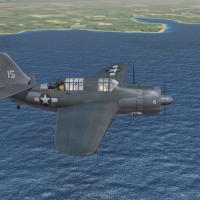
158 downloads
SF2 WW2 SB2C-1 Helldiver Tweeks Pak -- Something for the PTO players -- = For SF2, Full-5 Merged (Reccomended/Preferred) = Some tweeks, and a new skin for Veltro2K's recently released Curtiss SB2C-1 "Helldiver" WW2 USN dive bomber. It is to be applied to the aircraft package available at the following url: http://combatace.com/files/file/13772-curtiss-sb2c-1-helldiver/ This pak contains a brand new 3-tone camo skin and 'generic' modex number decal set. The skin iteself can be also considered generic, as all units, when the Helldiver first entered service, were painted in the 3-tone. Some, including -3 & -4 models, carried it until VJ-Day. However, after late 43/early 44, the "G" system of Air Group marking came into being. This pak does NOT contain any G-system markings. They can easily be added via decals ini tweeking. And probably will be, as time permits :) . Included are Tweeked Data, loadout, and main inis as well as Sounds; weapons are NOT included. (excepting the drop tank). A brand NEW SF2-stye 'flight deck' hangar screen is. The skin is in jpg format, and decal randomization is set to TRUE. As always, fairly easy to follow, yet detailed install instructions are included. So, please read them. Also, give the "Notes" section a read too. It contains the Change List. Good Hunting! wrench kevin stein with thanks to Veltro2K for getting these airplanes out for us to enjoy! -
the knowledge base is your friend: http://combatace.com/topic/54856-converting-sfwo-terrains-to-sf2-usage/
-
even better... replace the canopy statement with this: [Canopy] SystemType=ANIMATION InputName=ANIMATION_10 DeploymentMethod=MANUAL AnimationTime=2.60 AnimationID=8 use Shift/0 to open and close
-
not updated since maybe 2007... http://combatace.com/topic/21870-the-mods-thread-a-listing-of-whats-available/ the KB is your friend (but, unfortunately, things DO get lost in it!)
-
skinning the Fort proceeds apace... although I'm going bat-s**t crazy trying to figure out WHERE each of the cowl flaps are mapped at (I know where they are on the map, just not sure which color is top or bottom of camo parting line).
-
i hope i'm not seeing a malcom hooded Jug in the PTO (~200 converted in England) ... and Ms (as used by the 56th ONLY) are VERY different from the Ns used in the pacific. the 325th MTO skin is nice. pity most folks that want that Jug, can't get it -- required screenie Vichy D.520 over Syria
-
this part must have escaped notice the aircraft was removed due to legal issues. It is NOT available here at CA
-
over at simmerspaintshop.com, they have the pds with "World Markings", that go back to WW1, so some post-war should be there too somwhere on this page, i think http://www.simmerspa...php?do=cat&id=3 edit: Stephan, I merged to 2 topics together.
-
fat, lazy, old and unemployed?? oh..what am I in the SF2 world!! misread the idea!! Mustang, methinks, or maybe Corsair (with Hellcat a close 3rd)
-
had this bookmarked for a long time .. got some cool shots from 'back in the day' http://members.tripod.com/airfields_freeman/
-
wow! I've been doing it right years, and never knew it was the correct way!!! I do that with ALL planes!!
-
View File SF2 WW2 ETO A-26B Invader Pak SF2 WW2 ETO A-26B Invader Pak -- Something for the WW2 ETO players -- = For SF2 ONLY, Full-5 Merged (Reccomended/Preferred -PLUS Expansion Pak 1) = *Note: there is a DISTINCT possibility that this mod, like it's KAW brother, will =NOT= work in 1stGen installs, at any patch level. Having SF2I Expansion Pak 1 is reccomended, as the loadout references the Stock 3W WW2 bombs.* A reskining of Bobrock's SUPERB B-model Invader, recreate those as used from late 1944 through war's end in the European Theatre of Operations. This is a complete aircraft pak, with all the trimmings. Skins/Decal sets included are for the following units: 670th BS, 416th BG, 9th AF 552nd BS, 386th BG, 9th AF (actually, ALL Invader units in the ETO were in the 9th) Skins are in DDS format, and decal randomization is set to TRUE. There are no nose arts, unfortunately, in this pak. Weapons, for the most part are NOT included. The bombs used reference those from SF2I ExpPak1, but are easily swapped out for the older WepPak version by a simple loadout ini text edit. Pilot figures (the gunner) is included, and a NEW engine engine sound; now using the AvHistory R2600 x2 sound. The Standard Animation Keystroke (shift/0) opens the canopy. When 'in game', you'll see... A-26B Invader (BR) on the Aircraft Selection Drop down menu. This, also, will help to diferentiate the aircraft from any other Invader you may (or may not) have. As always, fairly easy to follow, yet detailed install instructions are included. So, please read them. And the "Notes" section, too. Important changes there. Good Hunting!! wrench kevin stein Submitter Wrench Submitted 01/25/2013 Category Other
-

417 downloads
SF2 WW2 ETO A-26B Invader Pak -- Something for the WW2 ETO players -- = For SF2 ONLY, Full-5 Merged (Reccomended/Preferred -PLUS Expansion Pak 1) = *Note: there is a DISTINCT possibility that this mod, like it's KAW brother, will =NOT= work in 1stGen installs, at any patch level. Having SF2I Expansion Pak 1 is reccomended, as the loadout references the Stock 3W WW2 bombs.* A reskining of Bobrock's SUPERB B-model Invader, recreate those as used from late 1944 through war's end in the European Theatre of Operations. This is a complete aircraft pak, with all the trimmings. Skins/Decal sets included are for the following units: 670th BS, 416th BG, 9th AF 552nd BS, 386th BG, 9th AF (actually, ALL Invader units in the ETO were in the 9th) Skins are in DDS format, and decal randomization is set to TRUE. There are no nose arts, unfortunately, in this pak. Weapons, for the most part are NOT included. The bombs used reference those from SF2I ExpPak1, but are easily swapped out for the older WepPak version by a simple loadout ini text edit. Pilot figures (the gunner) is included, and a NEW engine engine sound; now using the AvHistory R2600 x2 sound. The Standard Animation Keystroke (shift/0) opens the canopy. When 'in game', you'll see... A-26B Invader (BR) on the Aircraft Selection Drop down menu. This, also, will help to diferentiate the aircraft from any other Invader you may (or may not) have. As always, fairly easy to follow, yet detailed install instructions are included. So, please read them. And the "Notes" section, too. Important changes there. Good Hunting!! wrench kevin stein -
View File SF2 A-26C Invader Pak (Revamped) by Bobrock, Gerwin & Wrench SF2 A-26C Invader Pak (Revamped) by Bobrock, Gerwin & Wrench 3/5/2023 = For SF2, Full-5 Merged (Reccommended/Preferred) = *Note: This a semi=major overhaul of the original A-26C released in 2013. Gerwin has reworked many aspects of the model, and THIS MOD WILL REPLACE ALL OTHER EARLIER VERSIONS!!! You are advised to move, remove, or delete any other versions of this you have in any/all mod folders. This new packaging covers the WW2 and post-war time frame. * *Note: (again!) In 1947, the "A" for "Attack" designation was removed from use, and the A-26 Invader renamed to B-26 Invader (for Light Bomber Squadrons). Also, with the retirement of the Martin B-26 Marauder after WW2, the number was "open for reuse". However, the displayed name on the Single Mission screen will read "A-26C Invader"; as that's what it be. BTW, this is the GLASS NOSED bomber version, with working Norden bombsight. Instructional PDF included. The revamp is supplied with 3 skins: 552nd BS, 386th BG, 9th AF ETO (1944 start date) 13th BS, 3rd BG (<1950) Korean War Era Generic NMF for any time period (10/47 start date) All skins are "natural metal", some with painted on national or squadron markings. The Generic NMF marking are ALL decals, and carries post-1947 USAF markings. The serial/Buzz numbers =ARE= correct for this aircraft, but represent no particular unit. This is true for the WW2 skins serials as well. The SF2 "Date Switch" is active, and will change from the WW2 to the post-war skin in October 1947. Weapons are =NOT= included; all stock items are used.The engine sound are included, it's been switched to the AvHistory R2600 x2 wav. Each skin has its own Hangar Screen. This aircraft is also equipped with a fully functional bombsight/bombadiar position. Included is Kesselbruts pdf on "How To Use the Bombsight". I'd suggest reading it however many times it takes, and to practice, Practice, PRACTICE!!! using it on the Bombing Range Terrain. The canopy opens with the Standard Animation Keystroke (tm), Shift/0. When 'in game', you'll see A-26C Invader (BRG) on the Aircraft Selection Drop down menu. This, also, will help to differentiate the aircraft from any other Invader you may (or may not) have. It stands for "Bobrock/Gerwin" as they did the real heavy lifting. As always, fairly easy to follow, yet detailed install instructions are included. So, please read them. Also, give the "Notes" section a read too. Good Hunting! Wrench Kevin Stein from the KAW Team, circa 2013 Submitter Wrench Submitted 01/25/2013 Category Other
-

819 downloads
SF2 A-26C Invader Pak (Revamped) by Bobrock, Gerwin & Wrench 3/5/2023 = For SF2, Full-5 Merged (Reccommended/Preferred) = *Note: This a semi=major overhaul of the original A-26C released in 2013. Gerwin has reworked many aspects of the model, and THIS MOD WILL REPLACE ALL OTHER EARLIER VERSIONS!!! You are advised to move, remove, or delete any other versions of this you have in any/all mod folders. This new packaging covers the WW2 and post-war time frame. * *Note: (again!) In 1947, the "A" for "Attack" designation was removed from use, and the A-26 Invader renamed to B-26 Invader (for Light Bomber Squadrons). Also, with the retirement of the Martin B-26 Marauder after WW2, the number was "open for reuse". However, the displayed name on the Single Mission screen will read "A-26C Invader"; as that's what it be. BTW, this is the GLASS NOSED bomber version, with working Norden bombsight. Instructional PDF included. The revamp is supplied with 3 skins: 552nd BS, 386th BG, 9th AF ETO (1944 start date) 13th BS, 3rd BG (<1950) Korean War Era Generic NMF for any time period (10/47 start date) All skins are "natural metal", some with painted on national or squadron markings. The Generic NMF marking are ALL decals, and carries post-1947 USAF markings. The serial/Buzz numbers =ARE= correct for this aircraft, but represent no particular unit. This is true for the WW2 skins serials as well. The SF2 "Date Switch" is active, and will change from the WW2 to the post-war skin in October 1947. Weapons are =NOT= included; all stock items are used.The engine sound are included, it's been switched to the AvHistory R2600 x2 wav. Each skin has its own Hangar Screen. This aircraft is also equipped with a fully functional bombsight/bombadiar position. Included is Kesselbruts pdf on "How To Use the Bombsight". I'd suggest reading it however many times it takes, and to practice, Practice, PRACTICE!!! using it on the Bombing Range Terrain. The canopy opens with the Standard Animation Keystroke (tm), Shift/0. When 'in game', you'll see A-26C Invader (BRG) on the Aircraft Selection Drop down menu. This, also, will help to differentiate the aircraft from any other Invader you may (or may not) have. It stands for "Bobrock/Gerwin" as they did the real heavy lifting. As always, fairly easy to follow, yet detailed install instructions are included. So, please read them. Also, give the "Notes" section a read too. Good Hunting! Wrench Kevin Stein from the KAW Team, circa 2013 -
gonna beat on you like a drum!!!
-
the section I posted, goes in the FlightControl section, at the top of the data ini, NOT in the controls section with the flaps themselves. Thusly: [FlightControl] StallSpeed=33.440 CruiseSpeed=93.88 ClimbSpeed=84.49 CornerSpeed=140.500 MaxG=5.00 MaxSpeedSL=150.07 MachLimit=0.80 PitchDamper=0.5 RollDamper=0.125 YawDamper=0.1 GunBoresightAngle=0 RocketBoresightAngle=0 FlapSettingForLanding=2 FlapSettingForTakeOff=0 ==================================== (cough) Raven's Hurri's (Cough) even though built for 1stGens, work EXCELLENTLY in SF2 -- chk the WW2 download section for some stuff I've done, and the WW2 1stGEn section too (for some of the originals. I've ported a few, but they really need VERY litle work to bring them SF2 -just some cockpit/and data ini tweeks to had the external framing)
-
a little "oopsy" in the decals.ini I forgot the add the 'fake' insigina decal, that will activate the Nation name display on the loadout screen. in the VB7 skin folder, add this to the decals ini, at the bottom [Decal016] MeshName=leftaileron DecalLevel=0 DecalFacing=BOTTOM FilenameFormat=Insignia Position=6.5,0.55 Scale=0.00000001 Rotation= DecalMaxLOD=1 because the national markings are painted on, there's no other way for the game engine to 'know' who it belongs to