


Muesli
-
Posts
2,693 -
Joined
-
Last visited
-
Days Won
39
Content Type
Profiles
Forums
Gallery
Downloads
Store
Everything posted by Muesli
-
Hi! Awesome! Was long due! I replaced the tga file with "smoke3.tga" and the graphics are better now. Before this smoke clouds were a bit squared off. Anyway, cudo's to you!
-
Well known bug? Never experienced it or ever heard of it before. Is it a problem consistent with the standard package, or is it just with an add-on plane? If so, it might be a matter of re-installing a cockpit or checking if the needed LOD files are in the folder. Sometimes LOD files are needed from another existing plane, so you need to copy them Good luck man!
-
You see no cockpit? install one and edit apropriate files! You see no plane? Maybe re-install plane, check LOD files and such.
-
change everything in the "decals" file in the skin folder from "finflash" to "finflash031" and from "insignia" to "insignia031". Might do the trick. Needless to ask: You have the nations pack from this site installed?? ( http://forum.combatace.com/index.php?autoc...p;showfile=1630 ) Cheers
-
nice mud mover!
-
Although maybe not your cup of tea, It is a bit too harsh to make that statement that way. IMHO we should be happy with every nice mod created, incomplete or not. If other things are needed but not included, but can be found somewhere else AND if it is mentioned (as is in this case) I think nothing's wrong. I hope you didn't mean any harm, and I hope you will enjoy every little effort made and put on this forum! I know I am! I bet you know yourself what kind of work and trouble goes inside a succesful mod! Cheers mate, no pun intended!
-
Normally on the disk. You have to use the extract tool to get the files out of the flightdata.cat file (i think) in which countless tga files are located. -You need insignia and finflash 031 which are the red-white-black with 2 green stars. -Or you need insignia anf finflash 031, green-white-black with 3 red stars. Hope that helps! Cheers
-
Hey Fallout3, Thank you for finally bringing us a MiG with a fixed radar nose! Cudo's to you! Only one question: Do you have a skin file for the fuselage better than the one included? The one included doesn't do justice to your work and makes the fuselage look choppy and ugly. If you do have it, can you change the attached file and include it please?? Cheers mate!
-
Hahahaha, WarlordATF.... What took you so long??!! Enjoy man!
-
2
-
Nice to know there are people like you, keeping the streets safe for others! Cudo's for you my man! Muesli
-
Hey Royohboy, WOI is really worth a try. It is graphically enhanced. better shadows and reflections and such. In my opinion the A.I. has improved, and so ar the flight models. Cheers
-
But hilarious still!!!
-
O.M.F.G.!!!!!!!!!!!!!!!!!!!!!!!!!
-
I think you will like: -Operation Mountain Twilight.
-
Have you properly installed the right avionics.ini file?
-
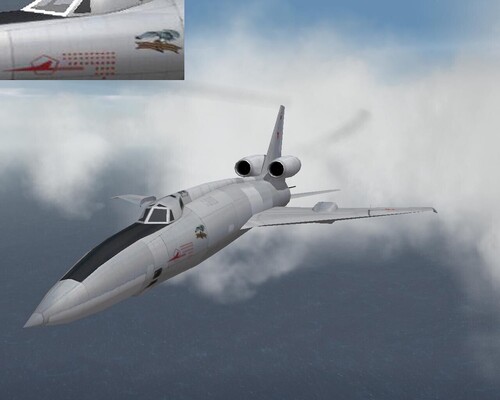
149 downloads
Skin of a Tupolev Tu-22P Blinder-E of the 203rd "Orlovsky" GvTBAP, Strategic Air Force. Particular aircraft flew in this livery in Afghanistan in November 1988. -
View File Tu-22P Blinder, 203 GvTBAP Skin of a Tupolev Tu-22P Blinder-E of the 203rd "Orlovsky" GvTBAP, Strategic Air Force. Particular aircraft flew in this livery in Afghanistan in November 1988. Submitter Muesli Submitted 06/05/2008 Category Bombers, Lght Attack, Transport, Trainer Skins
-
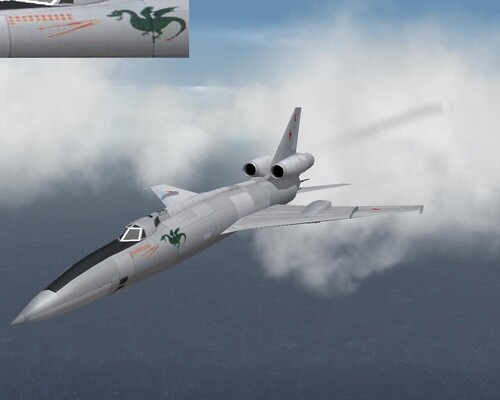
144 downloads
Skin of a Tupolev Tu-22P Blinder-E of the 341st TBAD, Strategic Air Force. Particular aircraft flew in this livery in Afghanistan between October 1988 and January 1989. -
View File Tu-22P Blinder, 341st TBAD Skin of a Tupolev Tu-22P Blinder-E of the 341st TBAD, Strategic Air Force. Particular aircraft flew in this livery in Afghanistan between October 1988 and January 1989. Submitter Muesli Submitted 06/05/2008 Category Bombers, Lght Attack, Transport, Trainer Skins
-
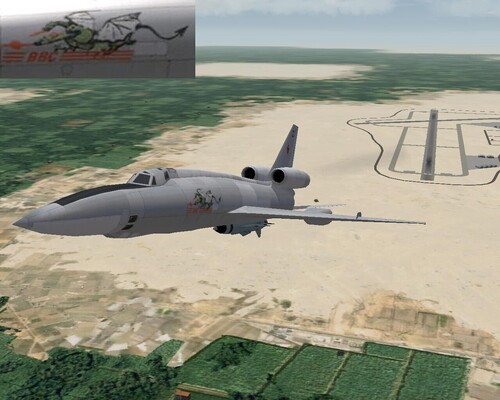
118 downloads
Skin of a Tupolev Tu-22K Blinder-B of the 341st TBAP, Strategic Air Force in the late 80s. -
View File Tu-22K Blinder, 341st TBAP Skin of a Tupolev Tu-22K Blinder-B of the 341st TBAP, Strategic Air Force in the late 80s. Submitter Muesli Submitted 06/05/2008 Category Bombers, Lght Attack, Transport, Trainer Skins
-
Soviet Union?
-

Do you have a single or multi core processor?
Muesli replied to samtheeagle's topic in General Discussion
I have a lightning fast Pentium 4 Extreme Edition which blew anything else out of the water when I first got it. Now it has been (slightly) overtaken by Intel Dual and Quad Cores, but it still does the job nicely. Next to that, 2 GB RAM, a 7.1 Soundblaster and an NVidia 8800 with 1GB memory. It is all packed in a neat and very silent Shuttle system, so not bulky and noisy. Yeah, that's my toy! -
S!