


malibu43
-
Posts
2,242 -
Joined
-
Last visited
-
Days Won
6
Content Type
Profiles
Forums
Gallery
Downloads
Store
Everything posted by malibu43
-
Awesome work Dave, C5, and the rest of the team!!! It is just awesome to be able to drag and drop four times and get all this great stuff!!! I've only had a little time to try things out, but the one thing I did notice is that the tornados don't have any ripple settings. Just one at 50ms. I added some more myself, to allow better coverage. Otherwise looks good so far!
-
WOV Oct 08 "Noi Bai" campaign bug fix... kinda...
malibu43 replied to malibu43's topic in General Discussion
I believe it has to do with the fact that the campaign engine in the '08 patch wants to assign strke targets near ground offensives, but in WOV there are no ground offensives, so it goes after runways instead...? -
SWEET!!!
-
WOV Oct 08 "Noi Bai" campaign bug fix... kinda...
malibu43 replied to malibu43's topic in General Discussion
Well... it's been a while since I did all the work on this. I've since moved on to SF2V where it's not an issue. But I will say this, I tried everything, and I mean EVERYTHING, that I and others could think of to resolve this issue. Adding Mig Units, moving Mig units, changing supply levels and start dates for mig units, changing campaign parameters, start dates, supply levels, offensive priorities, supply levels, etc... I'm not going to rack my brain to remember everything I did - just trust me... I tried it all. The bottom line is this: 1. Get SF2V or use the '06 WOV patch if want a properly functioning campaign. 2. If you want to use the '08 patch, you either: a) Strike Noi Bai over and over again in campaigns with little to no A/A or, b) Get no A/A at all in campaigns but varying strike targets. That's just the way it is. -
Well, technically, I don't think the F-18A's could carry mavericks. The C's were the first ones to get that capability. Also, the C's can only carry one per station. But let's say you want your A to carry 3 per station anyway: 1. go into the FA-18A_data.ini file 2. make sure the allowable type on the inner wing stations includes "TLR" 3. make sure the weight limits for the station will allow 3 mavericks.
-
WOV Oct 08 "Noi Bai" campaign bug fix... kinda...
malibu43 replied to malibu43's topic in General Discussion
That was added by eburger and myself, as part of the expansion pack. SF2V still just has one map in its stock form. -
SF2V / WOV Air & Ground Expansion Packs
malibu43 replied to eburger68's topic in Mission & Campaign Building Discussion
The aircraft that are included were chosen because they met the following criteria: 1) Played a significant role in the air war over Vietnam 2) Fit within the missions types and roles that are used by the game engine (in other words, we could include tankers and transports, but the game won't let you fly a tanker or transport mission) Sure we could have included anything and everything, but then the download and install would be huge. Helicopters are a different story. Two reason for not including helicopters: 1) In my opinion, the helo's that are publicly available for TW games don't fly like helicopters, and that kills the immersion (for me...) 2) The helos that are publicly available aren't really available publicly, and we couldn't include them. -
I've been doing all my simming for the last couple of years on my MacBook (bootcamp 2.x and win XP). Other than the keyboard missing some windows keys, you would never know the difference!
-
Yes, because the AI doesn't use LGB's correctly. If you (the player) are flying the aircraft, you should go in and manually change your loadout so you are carrying a real LGB. I don't have the ODS readme handy, but I think it said that...
-
SF2V / WOV Air & Ground Expansion Packs
malibu43 replied to eburger68's topic in Mission & Campaign Building Discussion
Eric has been getting some amazing stuff done! Check it out: Yen Bai Arsenal Phu Qui Munitions Depot Phu Van Munitions Depot & POL Storage Vinh Son Radar Facility Vinh Son Army Supply Depot Vu Con Barracks & Supply Depot Vinh Linh Radar Station Bac Long Radar Station Ta Xa POL Storage Kep Air Defense Command & Control Center Yen Son Ordnance & Ammunition Depot Quang Suoi Barracks Son Tay Barracks & Supply Depot Chanh Hoa Barracks & Division HQ Chap Le Barracks Dao Quan POL Storage Hai Duong Warehouse Complex & Marshalling Yard Phu Ly Transshipment Point Ai Mo Warehouse Complex Some pics of the Hai Duong Warehouse Complex & Marshalling Yard: -
That's a good point. I'll talk to eburger68 about that. I wonder if it will impact NF4+ at all as well.
-
I don't know if this has been answered somewhere already (my spanish isn't very good... at all...), but is this for SF1 or SF2?
-
That is quite possibly the best analogy for that that I have ever heard.
-
SF2V / WOV Air & Ground Expansion Packs
malibu43 replied to eburger68's topic in Mission & Campaign Building Discussion
Hey folk –here’s a quick update to what’s going on: The SF2V ExpansionPack was 99% there and almost ready for release. Eburger68 started fiddlingaround with adding some new target areas to the maps. This has now turned into: A dozen newbridges POL StorageAreas Haiphong Cement Plant HaiphongThermal Power Plant (East) rail bridge just west of Haiphong Xom Bong Munitions Dump (just north of DMZ) Van DienSAM Support & Vehicle Storage Depot Gia LamMachine Tools Facility BarracksFacilities Train Yards I haven’thad a chance to check these out yet, but they’ve got me pretty excited! This has set the final release back a little,but it should be well worth it! -
Any updates on this? I haven't tried it yet, as I was waiting to see if more people saw the same benefit and also waiting to see if these utilities work.
-
SF2V / WOV Air & Ground Expansion Packs
malibu43 replied to eburger68's topic in Mission & Campaign Building Discussion
topcat II, Check out this post in the knowledge base: http://forum.combatace.com/index.php/topic/40588-sf2sf2v-knowledge-base/page__view__findpost__p__289170 That should answer your question. In my experience, you should be able to do as many installs as you want. It's just a matter of installing to new directories with custom names and possibly removing titles from the "add/remove programs" list. Also look at this: http://forum.combatace.com/index.php/topic/40588-sf2sf2v-knowledge-base/page__view__findpost__p__306141 I've used this method for testing v2.0 of this mod while I still had v1.0 installed. All it involves is copying and renaming the .exe. Good luck. -
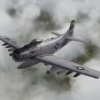
CAS on a rainy day I was "F6'ing" around during the mission and saw this guy... probably looking for a hole in the clouds to drop through...
-
SF2V / WOV Air & Ground Expansion Packs
malibu43 replied to eburger68's topic in Mission & Campaign Building Discussion
There is an error in the EasterOffensive_data.ini file: Find this entry and delete the line in bold below: [CarrierUnit004] CarrierType=CVA-63 CarrierNumber=43 UnitName=CVA-43 Coral Sea ForceID=1 Nation=USN RetireDate=7/1972 BaseArea=Yankee Station NumSquadron=5 BaseSize=MEDIUM Experience=100 Morale=100 Supply=100 eburger68, can you include this change in the next updated campaign files? -
OK, Here's post number 1: http://forum.combatace.com/index.php/blog/6-malibu43s-ppl-bolg/ Again, the blog will be kind of rambly and just describe where I'm at. If I have major updates on cost, good/bad time of year to learn, how long it's taking, etc..., I'll post that here. That way someone else thinking of doing it could come here to get a quick summary.
-
For anyone who's interested, I'm going to take advantage of the blog feature here at CA to give periodic updates on my progress. I'll probably post back here if I have any questions or comments that I think would be helpful in the sticky. *edit* - OK, can someone tell me how to start a new blog?
-
Korean Air War Ground Object and Campaign Update
malibu43 replied to malibu43's topic in File Announcements
I actually don't remember. I think the original KAW mod should say, though... -
Korean Air War Ground Object and Campaign Update View File Korean Air War Update to SP4 standards by malibu43 This update just organizes the ground objects into proper folders, fixes some aircraft carrier bugs, and ensure the air units in the campaigns use the right aircraft included with the install. Installation: Delete the campaigns folder and the ground objects folder in your Korean Air War install and replace them with the ones included in this zip file. You'll also have to download wrench's F4U: http://forum.combatace.com/index.php?app=downloads&showfile=6831 Remember to back up these folders before you delete them, in case something goes wrong. Malibu43 Submitter malibu43 Submitted 08/28/2009 Category User Made Campaigns
-
803 downloads
Korean Air War Update to SP4 standards by malibu43 This update just organizes the ground objects into proper folders, fixes some aircraft carrier bugs, and ensure the air units in the campaigns use the right aircraft included with the install. Installation: Delete the campaigns folder and the ground objects folder in your Korean Air War install and replace them with the ones included in this zip file. You'll also have to download wrench's F4U: http://forum.combatace.com/index.php?app=downloads&showfile=6831 Remember to back up these folders before you delete them, in case something goes wrong. Malibu43 -
Haven't had a chance to try the fix yet. Maybe this weekend. And that burning balloon effect looks great!!!