Menrva
-
Posts
4,646 -
Joined
-
Last visited
-
Days Won
48
Content Type
Profiles
Forums
Gallery
Downloads
Store
Everything posted by Menrva
-
No need to apologise, IMHO. You seem polite and well educated, in contrast to someone else asking hundreds of questions without looking at the Knowledge Base, and treating those who help him like sh*t.
-
Seems very interesting. Yeah, I never understood how strategic nodes work exactly. Common users think that to create a campaign is a very easy task. But for a campaign to be complex and play beautifully, it takes a lot of in-game testing and playing. When you feel like, you might want to create your own thread about the campaign. Someone else could be interested.
-
Very good to know that you've read through the Knowledge Base. A lot of users don't and then claim themselves to be expert modders. Keep me posted and let me know. As for the custom campaign, I'm interested to hear more about it. Not many modders are willing to build campaigns anymore. I had some campaigns for this terrain in the works, RAAF & RNZAF vs. Indonesia over Timor, set in 1950, 1965, 1975 and 1999. Unfortunately, a good campaign needs good aircraft, and there are many needing new skins and upgrades. We'll see what the future brings...
-
Well, the terrain uses the VietnamSEA.cat archive as a base for stock objects like the runways and most buildings (the only runway models you see should be the two custom ones made by gerwin). If you do not have SF2 Vietnam, you must change which .cat archive to use inside the TimorNO.ini file. Have a look at my last post in the following link, and you should understand: https://combatace.com/forums/topic/92310-all-pilots-scramble-new-terrains-inbound/?tab=comments#comment-746136 I had already posted this link in a previous post. I reckon I never write this stuff in the ReadMe file, so it's my mistake if new users encounter those issues. Let me know if you solve the problem with my suggestion. Otherwise, it would be a very strange bug.
-
 Gepard had a hi-res tileset for the Kuril Islands in the works, based on satellite imagery, very nice I can tell you. But it's not seasoned. You might want to join forces with him, but he is currently working on the Faroer terrain. I also made a 250m heightmap from scratch for the Kuril Islands terrain, as well as new planning maps and little tweaks here and there. But it's Gepard's terrain. First, I'd like to see his final product, then I might release a small (not standalone) enhancement package. Back to the thread, keep up the good work, JosefK! I am really liking your screenshots with those lightnings (not the F-35s, LOL!)
-
Yes, those are the shaders. As for the above statements, the hell I know what they exactly mean or how exactly they affect something. All I know is that they have to do with the level of detail of the terrain mesh. It's sort of self explanatory; distant areas are not full quality. Only when you approach them, the higher quality mesh is fully loaded. But please, first try other terrain packages I have made. I need to know if you have the same issue on them too.
-
But, out of curiosity, have you only tried Sweden? Because I would be puzzled to see that my other terrain packages work in SF1, then. Give a try at those with a bigger sea area, and report back. Also, if you're using SF1, you should try Fubar512's shaders. He improved both the terrain and water shaders. And of course, re-enable the shader statements in the _data.ini. You're probably the only one testing a 250m heightmap terrain in the SF1 engine. Hence why I guess there is not so much support. Stary discovered that such heightmaps work flawlessly in SF2, with some _data.ini value tweaks. Even 125m heightmaps can work but, according to Stary, only with smaller or stock-sized terrains, otherwise CTDs and visual anomalies like yours could appear. If such terrains don't work with the original values found in my package (except for the material/shader settings, which must be stock SF1), I guess chances are slim. These are the only values worth checking, tweak them and see if anything improves: [TerrainMesh] TextureThreshold=0.80 LowDetailMeshThreshold=0.90 MedDetailMeshThreshold=0.80 RenderMeshVertexCount=4096 RenderMeshIndexCount=16384 [HeightField] DetailScale=1.0 DetailFrequency=1.0 [HeightOffset] MedDetailMesh=-15 LowDetailMesh=-25 WaterMesh=0.8 Have you also considered lowering or increasing the graphics options in the game's menu? This is the only other thing I could ever think of for this issue.
-
I did. And other hundreds of users who downloaded the terrain did, and have never reported such bug. I built it for SF2, not for SF1. If it doesn't work in SF1, I'm not surprised at all; 250m resolution heightmaps already push the SF2 engine to some limits. No offense, UllyB, but you should know that I am rather obsessed with perfection, and I hate to release stuff which shows bugs whatsoever. And even if I do release bugged stuff, I'm always ready to fix issues later. Not many (paid) developers are like this, nowadays. The terrain has been released for SF2 for quite some time, and no one complained about it to this moment. So, that tells me that it is working and it is rather solid, in SF2, on multiple machines. SF1 is very similar to SF2, but not identical. SF2 can deal with 250m heightmaps easily. SF1 looks like it doesn't. I can only suggest that you try experimenting with values in the _data.ini. That bug you call with "height differences" it's not a bug with height, it's a rendering bug. The height is plain in such areas. You can see it for yourself with gerwin's TFDtool.
-
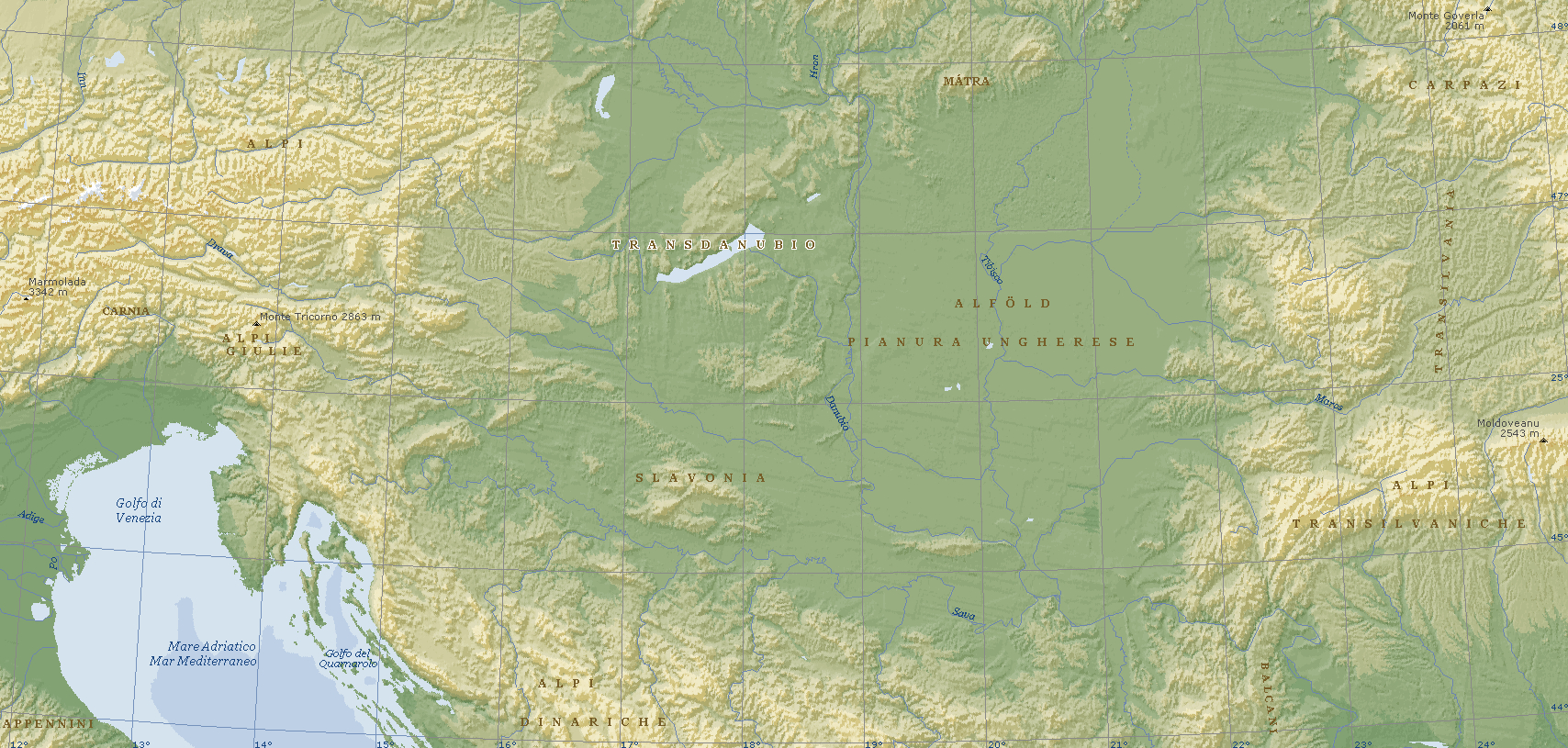
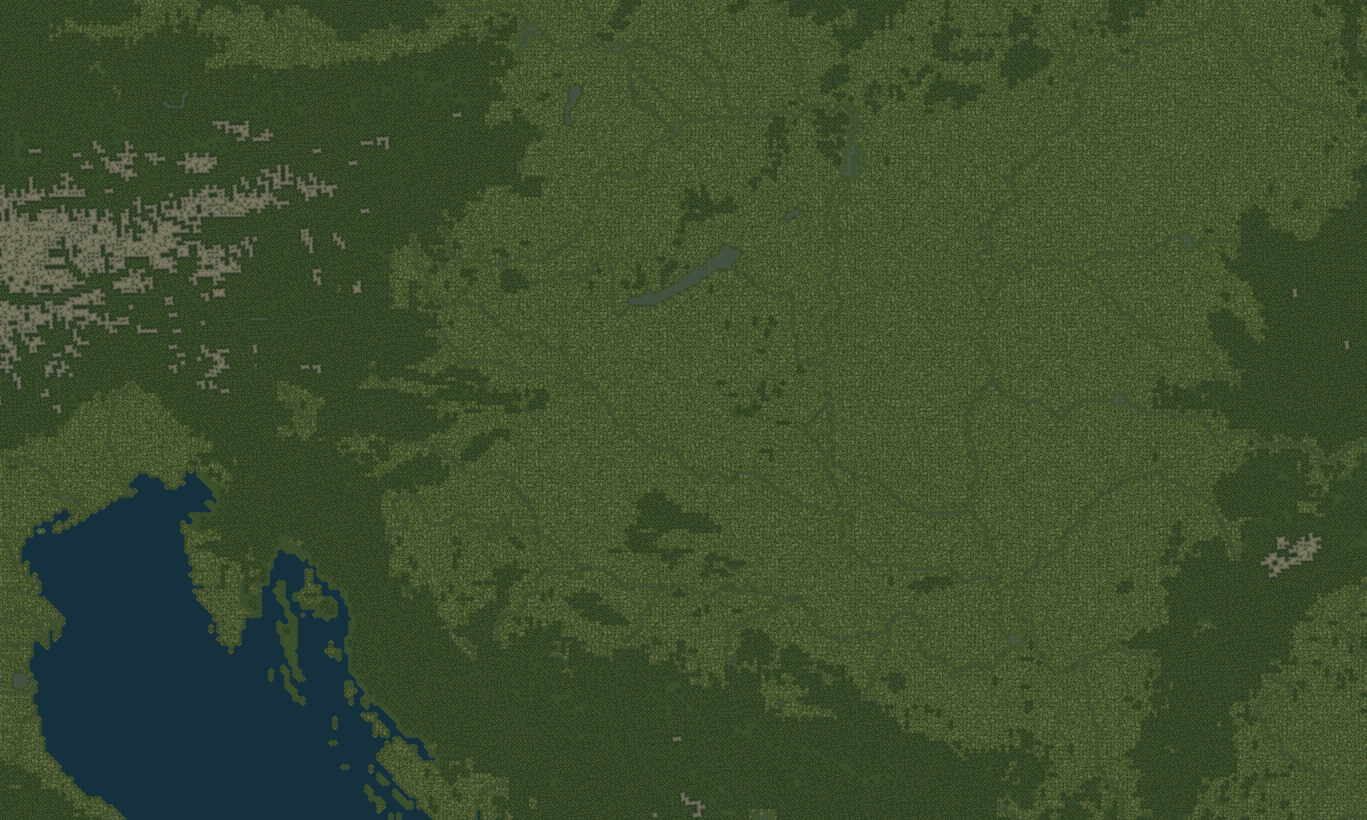
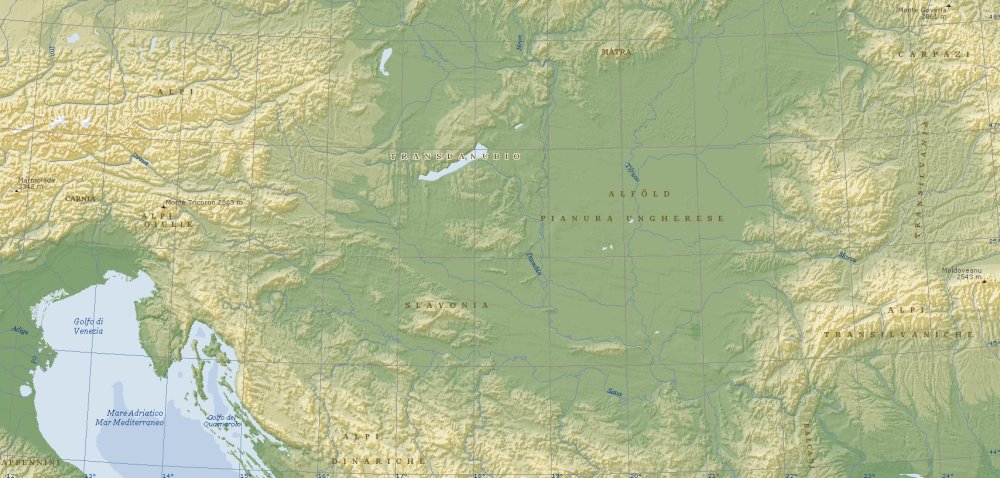
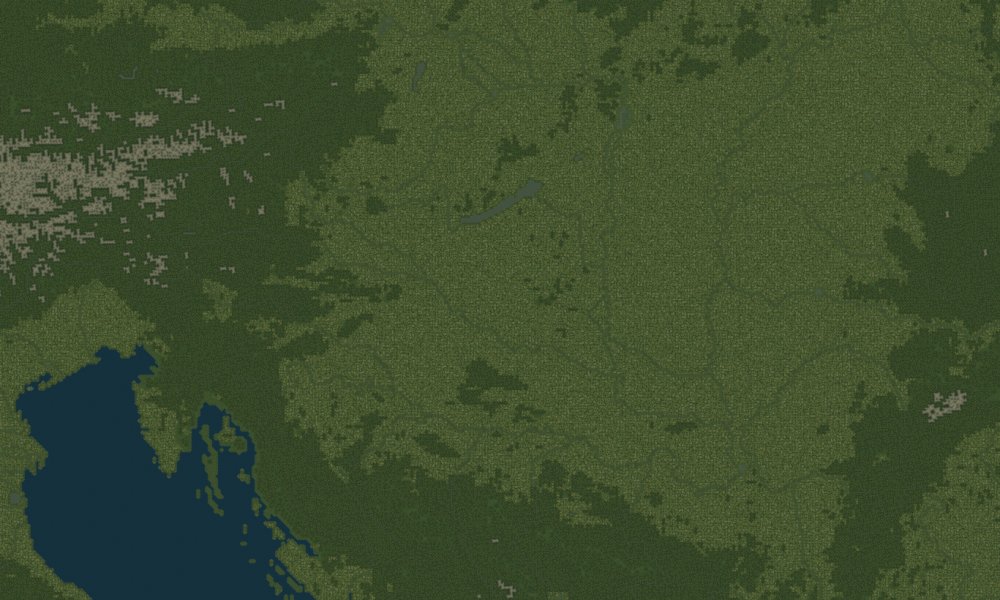
SONO TORNATO! Odio lasciare le cose in sospeso. non credevate mica che avrei lasciato perdere, vero? Ecco un po' di aggiornamenti; Il terreno ha ricevuto obiettivi aggiuntivi. Dall'ultima volta che ho postato, sono stati aggiunti aeroporti, installazioni Radar e SAM in Ungheria, Austria, Grecia, Svizzera (neutrale, giusto per eye-candy) e persino in una piccola parte della Romania! Alcuni target sono troppo vicini se non oltre il famoso Muro, quindi nel caso li disattiverò per non causare bug di gameplay. Inoltre, sempre pur considerando i limiti del motore grafico, ho riprodotto assai fedelmente i percorsi dei numerosi fiumi nell'Est Europa, cosa che avevo già fatto per la Pianura Padana e il resto dell'Italia. Mettete a confronto la seguente mappa e l'estratto bitmap delle texture del terreno; noterete anche la presenza del noto lago Balaton in Ungheria. Anche altri laghi sono riprodotti, ovviamente!
-
All the used terrain shaders are listed in the _data.ini file. If you have replaced those statements with SF1 ones, then why do you think that SF2 shaders are being used? There's no mistery; you have that bug over sea, and those sea tiles use the water shader. Nothing different from the other areas where the bug doesn't show. So it's not about the shaders.
-
They are at the same level. And even if they aren't, generally you wouldn't see such cracks because all elevation changes appear smooth with this terrain engine. The more I look at the screenshots the more I think it's some kind of memory issue, or something to do with video drivers. It's a bug I've never seen before. If no-one else has other suggestions about _data.ini values, then I think that SF1 simply can't deal with 250m heightmaps properly.
-
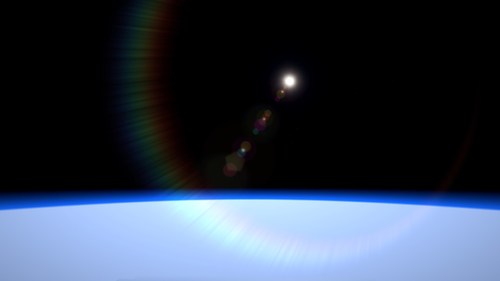 And I agree with you. I tried to tweak the rain effect to reduce the number of lightnings, because they are too many for my taste too. However, I failed to find a good solution; I could slow down the lightning strikes, but at the expense of the other effects, so rain was not showing properly anymore. I wanted to release this mod as is, instead of keeping it on my HD until it was perfect. I will try to improve it for a next version. If you want to disable the lightnings, have a look at the RainEffect.ini file. It's all in there, together with other effects meant to enhance the stock rain effect.
-
Unfortunately no, not out of the box. SF2 uses a different and bigger set of shaders. The environmentsystem.ini file in SF1/WOE is somewhat simpler in certain sections. It can be made to work with SF1, but it's up to you. I have no plans to make a SF1 version.
-
Beware, SF1 only reads .BMP textures, IIRC. No .JPGs or other formats.
-
Yeah. On January 18, an Italian Tornado was shot down by AA, and both officers have been POWs for the entirety of the war. Their plane was the only one in the formation to have successfully refueled in-flight, and so proceeded alone with a recon mission, while the other 9 aircraft (not Tornados) returned to base.
-
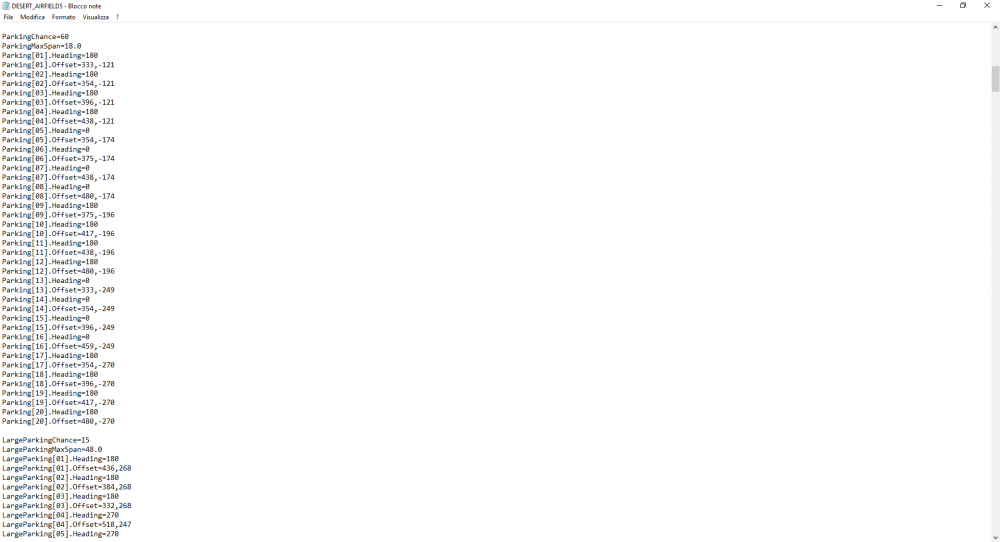
It IS useful! Keep in mind that the bug with bigger planes merging also has to do with the type of size you have given to the aircraft in its _data.ini file. Planes which are SMALL and MEDIUM should use the Parking entity, LARGE planes use another set of coordinates, those of the LargeParking entity defined inside the airfield's .ini file (check the image I attached in the previous post). So, airliners should generally be defined as Large aircraft in their _data.ini, not as Small or Medium.
-
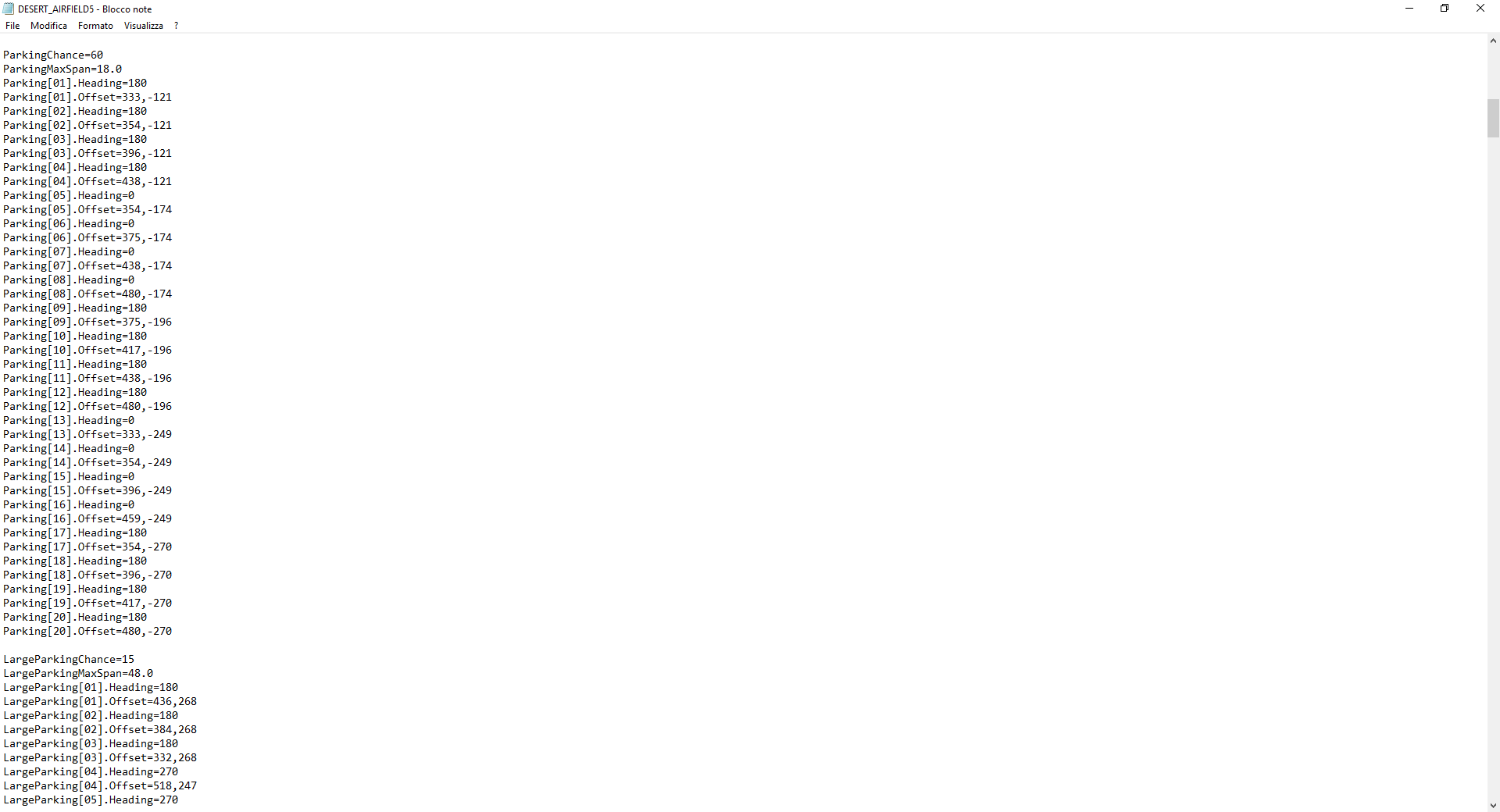
Sure. My apologies because I didn't explain well. What I was saying is that such coordinates are not identical for all airfields. They have to be relative to the 3d model you're using. If I copy certain coordinates from a stock airfield .ini file to a custom one, I most likely get airplanes parked at the runway or in the middle of the desert. For instance, those are the coordinates of the stock desert_airfield5.ini
-
Not really, yakarov. The game is not that smart. Parking spots' coordinates must be defined inside the airfield's .INI file. We have them predefined for the stock game airfields, but for custom 3d models, it's a different story. I would like to know if there's an easy way to add precise parking spots, as well as night lights. I don't know which reference the coordinates use, if the center of the airbase or...
-
Thank you for the kind words. You are right about the optional files thing, I'll consider it for the next update. You should have target highlights in any case, generic yellow squares instead of red and blue, and the info box describing what you've locked on is still there. As for the briefing room, it has no map in the SF1 games. The Briefing Screen depends on a different .dll and I really doubt I can show the planning map there. But you have a dedicated Planning Map Screen for this. The Briefing Screen has no real use, except for knowing the kind of visibility/weather of a given mission during the campaign.
-
View File Wings Over World Menu Screens Wings Over World Menu Screens January 13th, 2019 (1st Release) by Menrva >For Strike Fighters 2 games This package is my personal conversion of the beautiful Strike Fighters: Project One menu screens, with a number of enhancements for use in Strike Fighters 2. The main menu screen is a reworked version of the NACA Main Screen released by Camouflage (Checksix-fr.com). The title I chose for the main menu screen is "Strike Fighters: Wings Over World", in honor of the old WOE/WOV/WOI series of SF1 games. I find this name suitable for those who have a large mod folder spanning different world scenarios. Here below a quick summary of enhancements and additions: -All the music tracks from the SF games have been included; now there's a unique track for each screen. -Hangar Screen has got the hangar noise sounds which were present in the SF1 games. -Option to turn Lens Flare off as in the SF1 games is back. -Opportunity to change pilot at the Campaign Screen is reintroduced, as in the SF1 games. -Briefing Screen has been reintroduced for eye-candy (it has a small string "bug" with certain missions, since ThirdWire's removal of the FAC mission type). -Added generic _briefing.ini files for all the stock SF2 terrains (terrains without a _briefing.ini file might cause CTDs when accessing the Briefing Screen). -Added Launch/Fly button in the Briefing, Loadout, Flight Roster and Planning Map screens. -Added the missing PILOTPIC25 bitmap which is available in the SF1 games. -Loading Screen shows a generic runway and a new, longer loading sound is used. -Mission Editor DLC is supported with a new screen in the same style of the other screens. -Campaign Customizer DLC is supported with a new screen in the same style of the other screens. -Disabled unnecessary functions of the the System Menu, such as accessing ThirdWire's online site for viewing the game manual. As a bonus, the package includes 42 single missions taking place across all theatres of the SF2 series; most of them have been made by ThirdWire and released in their SF1 games. Five single missions are Instant Action scenarios of Strike Fighters 2, which I converted to be choosable and playable in the Single Missions Screen. Additional missions include historical scenarios created by guyran for the Israel theater. I renamed all single missions to use a nicer naming convention. Needless to say, all SF2 titles must be installed to be able to play all the missions. In addition, I have tweaked some Flight folder files to improve the realism of the game's HUD and in-game map. Since users may not like such changes, those files are not included by default, they must be installed manually. They can be found inside the "(Additional Tweaks)" folder. Here below a quick summary of changes they bring: -Disabled all the unuseful Labels when viewing the in-game map. -Disabled the arcade cones; lock your target and press F4 to visually track it. -Tweaked icons' colours so that they match the text's colours. -The in-game text background is less noticeable. -Text's font is now different, it is generally smaller and less obtrusive. -No more red and blue arcade squares when locking objects on; a faint yellow square is now used. -The white triangle showing the next waypoint is now a faint yellow, unlike the default strong white. -Disabled the radar box display; check the radar of your plane's cockpit, instead. >Credits (in no particular order): -ThirdWire, for the fantastic menu screens which are included in the stock SFP1 game. -kout, for the System Menu icon I have taken from his SF1 Grey Main Menu Replacement mod. -Camouflage, for the NACA Main Screen (still available at the archives of Checksix-fr.com), which I have reworked. -HomeFries, for the planning map enhancements available in his Semi-Transparent Map Icons package. -Viper63a, for the Loading sound, which I got from one of his menu mods. -paulopanz, for collecting and updating guyran's WOI custom missions properly to SF2 standards. -guyran, for the original custom missions he created for Wings Over Israel. -KJakker, for his interest and welcome support. >Disclaimer: This is a freeware; yet it can be redistributed ONLY in other CombatACE mods/mod packages. Any changes to the package's files and/or any copy-and-paste attempts of their contents are NOT authorized if you plan to release them in other mods. But permission might be granted to those who request it to me at CombatACE. This mod may NOT in any way, shape or form be used in any payware additions. Submitter Menrva Submitted 01/13/2019 Category Menus
-
View File realSKY Environment realSKY Environment January 13th, 2019 (1st Release) by Menrva >For Strike Fighters 2 games This is my sky enhancement mod. It also combines the work of many other modders, in order to provide a realistic, better looking sky. Here below a quick summary of the changes: -Tweaked sky colours, something in between Cellinsky's widesky and the stock SF2 colours. -More realistic Night colours, sky and ambient are much darker. -More atmospheric, reddish transition from Twilight to Night. -New "dark blue" High Altitude colours (fly near space with a NF-104). -Moon produces a yellowish light instead of the default purple. -Sky is "wider" much like Cellinsky's widesky mod (background horizon clouds are bigger and more noticeable). -Added beautiful cloud graphics made by Cellinsky and ShrikeHawk, tweaked for each weather type. -Added a low number of stray clouds to Clear weather. -Added noticeable clouds to Overcast weather and Inclement weather, "fixing" a known SF2 "bug". -Combined various mods to produce a more interesting Rain Effect under Inclement weather. -Added Stary's lens flare effects from the SARCASM 2 mod, in place of Cellinsky's widesky effects. -Added Cloud Layer graphics by Stary, Fubar512 and Brain32. -Reworked secondary atmospheric effects, such as contrails and wingtip vortexes. In addition, the package includes alternative environment configuration files in the Alternative Weather folder; they enable different effects for the Inclement weather. You can choose between thunderstorm (default, adapt for most terrains), snowstorm (for cold, icy terrains) and sandstorm (for hot, desert terrains). For those who wish not to change the effect globally, I highly suggest to try the included terrain-specific environment example provided for stock SF2 terrains; the default global effect is thunderstorm, while terrains with their own environment file either use sandstorm or snowstorm as appropriate. Use this as a basis to customize other terrains. By setting the Effects to Unlimited, the game makes use of a DirectX 10 post processing effect; the stock game's post processing shader generates a pointless and horrible bloom effect which excessively blinds the player during twilight transitions. By default, realSKY includes a reworked post processing shader (TWPOSTPROCESS.FX) which provides more contrast, more vignetting, minor color correction and a daytime-only bloom effect, so it's miles better than what the stock game offers. Alternative post processing tweaks are included in the Alternative Shaders folder; choose the one you wish to try (check the included screenshots for fast comparisons) and overwrite the default one in your mod's Flight folder. If you don't care about the post processing effect, you may want to set the game's Effects to High in the Options menu. >Credits (in no particular order): -Cellinsky, for his fantastic widesky mod from which I borrowed some tweaks. -Stary, for his Thunderstorm and Heavy Snowfall weather mods, and his SARCASM 2 beta mod from which I borrowed some effects. -PanamaRed, for tweaks in regards to Clouds (especially the Broken weather ones). -Fubar512 and Brain32, for their Cloud Layer Top bitmaps, which I have smoothed for a better looking effect. -ShrikeHawk, for his CloudSkins mods, from which I took the spectacular cloud graphics. -BearGryllis, for his Thunderstorm Pack With Enhanced Lightnings 2.0b package. -Orsin, for his Improved Rain Effect and Heavy Rain 0.8 mods. -luk1978, for his interesting WeatherEffect package. -ArmedLightning, for his Special FX v2.2 mod for the GTR 2 game, from which I borrowed a lens flare effect. -baffmeister, for the idea of recreating sandstorm weather effects. -tiopilotos, for suggesting improvements on other subjects. -Eagle114th, for his Improved Wingtip Vortex mod which I have reworked. -JosefK, guuruu and Coupi, for their interest and support. I included the original readme files from the mentioned mods, where available, to the end of giving proper credit to everyone involved directly or not. >Disclaimer: This is a freeware; yet it can be redistributed ONLY in other CombatACE mods/mod packages. This mod may NOT in any way, shape or form be used in any payware additions. Submitter Menrva Submitted 01/13/2019 Category Environmental Mods
-
Version 1.7
3,588 downloads
realSKY Environment January 13th, 2019 (1st Release) by Menrva >For Strike Fighters 2 games This is my sky enhancement mod. It also combines the work of many other modders, in order to provide a realistic, better looking sky. Here below a quick summary of the changes: -Tweaked sky colours, something in between Cellinsky's widesky and the stock SF2 colours. -More realistic Night colours, sky and ambient are much darker. -More atmospheric, reddish transition from Twilight to Night. -New "dark blue" High Altitude colours (fly near space with a NF-104). -Moon produces a yellowish light instead of the default purple. -Sky is "wider" much like Cellinsky's widesky mod (background horizon clouds are bigger and more noticeable). -Added beautiful cloud graphics made by Cellinsky and ShrikeHawk, tweaked for each weather type. -Added a low number of stray clouds to Clear weather. -Added noticeable clouds to Overcast weather and Inclement weather, "fixing" a known SF2 "bug". -Combined various mods to produce a more interesting Rain Effect under Inclement weather. -Added Stary's lens flare effects from the SARCASM 2 mod, in place of Cellinsky's widesky effects. -Added Cloud Layer graphics by Stary, Fubar512 and Brain32. -Reworked secondary atmospheric effects, such as contrails and wingtip vortexes. In addition, the package includes alternative environment configuration files in the Alternative Weather folder; they enable different effects for the Inclement weather. You can choose between thunderstorm (default, adapt for most terrains), snowstorm (for cold, icy terrains) and sandstorm (for hot, desert terrains). For those who wish not to change the effect globally, I highly suggest to try the included terrain-specific environment example provided for stock SF2 terrains; the default global effect is thunderstorm, while terrains with their own environment file either use sandstorm or snowstorm as appropriate. Use this as a basis to customize other terrains. By setting the Effects to Unlimited, the game makes use of a DirectX 10 post processing effect; the stock game's post processing shader generates a pointless and horrible bloom effect which excessively blinds the player during twilight transitions. By default, realSKY includes a reworked post processing shader (TWPOSTPROCESS.FX) which provides more contrast, more vignetting, minor color correction and a daytime-only bloom effect, so it's miles better than what the stock game offers. Alternative post processing tweaks are included in the Alternative Shaders folder; choose the one you wish to try (check the included screenshots for fast comparisons) and overwrite the default one in your mod's Flight folder. If you don't care about the post processing effect, you may want to set the game's Effects to High in the Options menu. >Credits (in no particular order): -Cellinsky, for his fantastic widesky mod from which I borrowed some tweaks. -Stary, for his Thunderstorm and Heavy Snowfall weather mods, and his SARCASM 2 beta mod from which I borrowed some effects. -PanamaRed, for tweaks in regards to Clouds (especially the Broken weather ones). -Fubar512 and Brain32, for their Cloud Layer Top bitmaps, which I have smoothed for a better looking effect. -ShrikeHawk, for his CloudSkins mods, from which I took the spectacular cloud graphics. -BearGryllis, for his Thunderstorm Pack With Enhanced Lightnings 2.0b package. -Orsin, for his Improved Rain Effect and Heavy Rain 0.8 mods. -luk1978, for his interesting WeatherEffect package. -ArmedLightning, for his Special FX v2.2 mod for the GTR 2 game, from which I borrowed a lens flare effect. -baffmeister, for the idea of recreating sandstorm weather effects. -tiopilotos, for suggesting improvements on other subjects. -Eagle114th, for his Improved Wingtip Vortex mod which I have reworked. -JosefK, guuruu and Coupi, for their interest and support. I included the original readme files from the mentioned mods, where available, to the end of giving proper credit to everyone involved directly or not. >Disclaimer: This is a freeware; yet it can be redistributed ONLY in other CombatACE mods/mod packages. This mod may NOT in any way, shape or form be used in any payware additions. -
Version 1.5
514 downloads
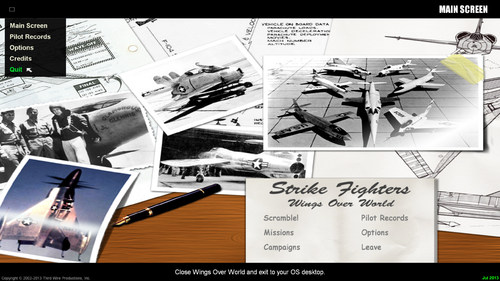
Wings Over World Menu Screens January 13th, 2019 (1st Release) by Menrva >For Strike Fighters 2 games This package is my personal conversion of the beautiful Strike Fighters: Project One menu screens, with a number of enhancements for use in Strike Fighters 2. The main menu screen is a reworked version of the NACA Main Screen released by Camouflage (Checksix-fr.com). The title I chose for the main menu screen is "Strike Fighters: Wings Over World", in honor of the old WOE/WOV/WOI series of SF1 games. I find this name suitable for those who have a large mod folder spanning different world scenarios. Here below a quick summary of enhancements and additions: -All the music tracks from the SF games have been included; now there's a unique track for each screen. -Hangar Screen has got the hangar noise sounds which were present in the SF1 games. -Option to turn Lens Flare off as in the SF1 games is back. -Opportunity to change pilot at the Campaign Screen is reintroduced, as in the SF1 games. -Briefing Screen has been reintroduced for eye-candy (it has a small string "bug" with certain missions, since ThirdWire's removal of the FAC mission type). -Added generic _briefing.ini files for all the stock SF2 terrains (terrains without a _briefing.ini file might cause CTDs when accessing the Briefing Screen). -Added Launch/Fly button in the Briefing, Loadout, Flight Roster and Planning Map screens. -Added the missing PILOTPIC25 bitmap which is available in the SF1 games. -Loading Screen shows a generic runway and a new, longer loading sound is used. -Mission Editor DLC is supported with a new screen in the same style of the other screens. -Campaign Customizer DLC is supported with a new screen in the same style of the other screens. -Disabled unnecessary functions of the the System Menu, such as accessing ThirdWire's online site for viewing the game manual. As a bonus, the package includes 42 single missions taking place across all theatres of the SF2 series; most of them have been made by ThirdWire and released in their SF1 games. Five single missions are Instant Action scenarios of Strike Fighters 2, which I converted to be choosable and playable in the Single Missions Screen. Additional missions include historical scenarios created by guyran for the Israel theater. I renamed all single missions to use a nicer naming convention. Needless to say, all SF2 titles must be installed to be able to play all the missions. In addition, I have tweaked some Flight folder files to improve the realism of the game's HUD and in-game map. Since users may not like such changes, those files are not included by default, they must be installed manually. They can be found inside the "(Additional Tweaks)" folder. Here below a quick summary of changes they bring: -Disabled all the unuseful Labels when viewing the in-game map. -Disabled the arcade cones; lock your target and press F4 to visually track it. -Tweaked icons' colours so that they match the text's colours. -The in-game text background is less noticeable. -Text's font is now different, it is generally smaller and less obtrusive. -No more red and blue arcade squares when locking objects on; a faint yellow square is now used. -The white triangle showing the next waypoint is now a faint yellow, unlike the default strong white. -Disabled the radar box display; check the radar of your plane's cockpit, instead. >Credits (in no particular order): -ThirdWire, for the fantastic menu screens which are included in the stock SFP1 game. -kout, for the System Menu icon I have taken from his SF1 Grey Main Menu Replacement mod. -Camouflage, for the NACA Main Screen (still available at the archives of Checksix-fr.com), which I have reworked. -HomeFries, for the planning map enhancements available in his Semi-Transparent Map Icons package. -Viper63a, for the Loading sound, which I got from one of his menu mods. -paulopanz, for collecting and updating guyran's WOI custom missions properly to SF2 standards. -guyran, for the original custom missions he created for Wings Over Israel. -KJakker, for his interest and welcome support. >Disclaimer: This is a freeware; yet it can be redistributed ONLY in other CombatACE mods/mod packages. Any changes to the package's files and/or any copy-and-paste attempts of their contents are NOT authorized if you plan to release them in other mods. But permission might be granted to those who request it to me at CombatACE. This mod may NOT in any way, shape or form be used in any payware additions.- 2 comments
- 4 reviews
-
- 8
-

-

-
- gui
- menu screens
- (and 4 more)
-
The more I try WoE, the more I am angered; even in WoE the FAC doesn't seem to spawn (I'm using the latest Oct2008b patch), but at least the ground forces' chatter is complete, they talk to Snoopy and request assistance. In SF2, the ground forces are silent mostly, saying only "we're moving out" or "enemy units southeast of our position". This shows that the cut FAC ruined something more in SF2, something that in WoE worked perfectly. No Snoopy? Alright, but at least the ground unit could talk. And it's not the speechsystem.ini file. This broken behaviour is hardcoded, I am afraid.