FastCargo
-
Posts
8,142 -
Joined
-
Last visited
-
Days Won
16
Content Type
Profiles
Forums
Gallery
Downloads
Store
Everything posted by FastCargo
-
Nope. B-1s have become the darlings of the ground troops in the sandbox because of 3 factors: 1) Speed - B-1s can get there RIGHT NOW compared to other assets. 2) Loiter time - Apaches and A-10s outloitering Bones? Are you kidding me? A Bone can low level from Los Angeles to New York at 500 feet and .9 mach on internal fuel only. Good luck getting getting a Hog or Apache to do that...even without the speed. 3) Weapons available - Bones can carry 2000 and 500 lb JDAMS, JSOWs, CBUs or dumb weapons...all on one aircraft. And can carry a ****load of them. Commanders are using them by calling them in, delivering the weapons they need, then sending them back to loiter station. There's a reason the Sniper pod attachment was fast tracked...it's because theatre commanders wanted that capability on Bones ASAPly. Now we've got that cleared up...back to the discussion at hand. FastCargo
-
What's your goal? Flying the B-52 and launching the X-15, or being the X-15 getting launched by the B-52? If it's the first part, that's easy. If it's the second part, it's tougher, but doable, as the picture shows. FastCargo
-
Jeez, whatdidyado move it by a meter? Small steps! FastCargo
-
Eraser, Check the cockpit.ini file and look for these lines: Position=0.0000,4.0,0.9 ViewAngles=0.0,0.0,0.0 Offset=0.0,-0.1,0.1 I believe the Offset line is the one you are looking for. FastCargo
-
If a canopy opens or closes as seen from the inside depends on several factors. First, the traditional way is there are two separate canopy openings...one on the external model and one on the cockpit model. Both have to be animated and then the animations 'linked' in the cockpit.ini file. This works for models designed before First Eagles and WOI. A second method involves the external model being visible from the cockpit. There are two ways of doing this. One, is reducing the clip distance to within a meter. The problem with this method is that you can get severe flashing faces on external objects...especially buildings. The second method only works on FE and WOI. Adding the line 'OpenCockpit=TRUE' basically reduces the clip distance just for the cockpit view. See an example of the difference in the 'Thunderwarrior' thread by Wrench. In either case, the idea is actually using the external model for part of the cockpit. And you still need to animate the external model canopy...if the model has an external model canopy to animate. FastCargo
-
Fine, you guys got me convinced. Just picked up BoBII at half price books for 6 bucks. And EECH2 for 7 bucks...a two fer! FastCargo
-
Yes. FastCargo
-
Alright ladies and gentlemen, topics have been merged. Emotions are running high right now for obvious reasons. Language and cultural differences can easily cause misunderstandings of intent. I urge caution when posting. So far it's been relatively civil here...lets keep it that way. FastCargo
-
Typhoid, You sure you haven't been talking to that friend of mine? That was one of the incidents he told me about...and one of the reasons why the FAA is not happy with UAVs in the airspace...and I'm even more leery of flying in that area now! FastCargo
-
Yeah, what he said. A good friend of mine is the squadron commander for one of the Global Hawk units. There are some significant limitations in the UAS system from what he was telling me...so I can't see UCAVs ruling the skies anytime in the near future. Or does ANYONE like the idea of a totally autonomous armed air vehicle... FastCargo
-
Like this? http://forum.combatace.com/index.php?showtopic=25897 FastCargo
-
What really puzzles me is that no one in the company has figured out that stuff folks put out like this is actually free advertising... FastCargo
-
Rudders in swept wing aircraft at speed are basically useless. The effect you describe is exactly what happens in the real thing. Now, once you get high AOA, and slow airspeed, that's a different story. Depending on the aircraft, all sorts of funky things can happen, up to and including departure from controlled flight. FastCargo
-
When you mean yaw all the way to the left or right...are you expecting the aircraft to turn completely around like a helocopter? FastCargo
-
Okay, time for a mini tutorial on how an aircraft data.ini works...specifically how to add something. Like the actual 3d models, the data.ini works on a hierarchy. Look for this entry first: [AircraftData] EmptyMass=8273.00 EmptyInertia=49679.11,12218.32,61897.43 ReferenceArea=27.87 ReferenceSpan=9.449 ReferenceLength=14.52 //ReferenceChord=5.75 CGPosition=0.00,0.00,0.00 Component[001]=Fuselage Component[002]=LeftStab Component[003]=RightStab Component[004]=LeftWing Component[005]=RightWing Component[006]=LeftOuterWing Component[007]=RightOuterWing Component[008]=LeftVertTail Component[009]=RightVertTail Note the part in bold. These components serve as the main aerodynamic definitions to the flying characteristics of the model. Think of these as your major pieces of the aircraft. Now, you'll note right after this entry, the components have their own entries: [Fuselage] ModelNodeName=Fuselage MassFraction=0.597 HasAeroCoefficients=TRUE ...(omitted for room)... Armor[TOP].Thickness=4 Armor[bOTTOM].Thickness=4 SystemName[001]=Engine SystemName[002]=InternalTank SystemName[003]=Pilot SystemName[004]=NoseGear SystemName[005]=LeftMainGear SystemName[006]=RightMainGear SystemName[007]=InternalGun SystemName[008]=LeftMissileBay SystemName[009]=RightMissileBay SystemName[010]=LeftWeaponsBay SystemName[011]=RightWeaponsBay SystemName[012]=LeftWeaponsBayLarge SystemName[013]=RightWeaponsBayLarge SystemName[014]=FlareDispenser SystemName[015]=ChaffDispenser SystemName[016]=ECM SystemName[017]=LaserDesignator SystemName[018]=Cockpit SystemName[019]=CockpitArea SystemName[020]=FuselageSlimers SystemName[021]=LandingLight SystemName[022]=Airbrake Note the bold item...the SystemName[xxx]= These items are your details...engines, cockpits, pilots, ECM, etc... If these lines are not under the Component entries, anything else you add will not work. And finally, the SystemName entry: [Engine] ReferenceName=General Electric F110-GE-100 SystemType=JET_ENGINE InputName=THROTTLE_CONTROL EngineID=1 HasAfterburner=TRUE NumAfterburnerStages=4 ...(omitted for room)... So, in summary... [AircraftData] --Component [xxx] -----[Component] -------SystemName [xxx] ----------[systemName] I'll put money that says you didn't make the SystemName entry under one of the Components... FastCargo
-
Just look at the data.ini of any aircraft that have ECM and expendables. It's literally as simple as typing it in. FastCargo
-
Heck, I thought this thread was about Russia resuming Bear flights... FastCargo
-
Actually, LockMart tried this crap before about 10 years ago in regard to the F-22. The idea was that Novalogic was going to get exclusive rights to the trademark of the F-22 for their simulations. The USAF and the government pretty much nulled that because the F-22 was paid for by tax money...making it de facto public domain in that aspect of it. http://www.wired.com/culture/lifestyle/news/1997/06/4317 Now, I'm not a lawyer, don't even play one on TV, but I'm pretty sure that even if it wasn't for the fact that the name, images, hell, even older simulators have models of the B-24 in them and have existed for years, that this decision on the F-22 a decade ago already establishes such reasoning. FastCargo
-
I'm assuming it allows you to run the TW series sims in windowed mode....now I'm curious...useful during debugging models... FastCargo
-
Don't look at me man...the timing was good...I had a LONG layover in Lubbock, TX and so had nothing to do but get this badboy in game. Having literally a full day to dedicate to nothing but one model is very rare for me... Blame Dave, he's the one always roping me into projects... FastCargo
-
Florian, when you get a chance, can you PM me (or say it here) how you're doing this? I THINK I know, but I'd be curious how you're going about it...would make lots of sense considering I'm working on the Northrop 2 seaters...(though it might triple my workload). FastCargo
-
Not as far as I know...2260 and climbing... FastCargo
-
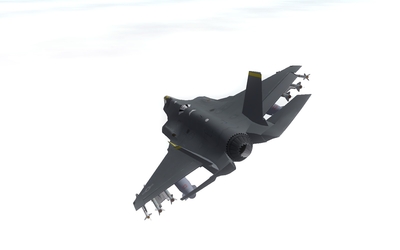
Yes, it did. I wanted to make sure the F-35 would have the proper working control movements. Now, to be fair, there are other aircraft that already do this sort of thing in the sim (the F-14, F-22, F-23, Gripen, EF2000, etc). However there is a significant difference between those aircraft and the F-35. As far as I can tell, the F-35 is the only aircraft where the wing only has one TEF surface (other aircraft have at least 2 trailing edge surfaces per wing) AND that TEF surface is influenced by three separate channels (speedbrake, flaps, and aileron). Also, some of the other aircraft achieve manuvering through 'virtual' surfaces...where nothing moves on the model but an aerodynamic effect is seen with a control input. On the F-35, you put in an input...SOMETHING is going to move on the visual model... FastCargo
-
A lesson in control logic (or how to make a non-FBW sim engine simulate a FBW aircraft in control surface movement). Through a system that combines animations and multiple invisible links, we can simulate multi-input control surface movement. Starting with a clean F-35 (the white background is overcast with the bloom mod): We then deploy the speedbrake: The control deflections are based on the LockMart testpilot notes, talking about what surfaces move to do the speedbrake function. Rudders, leading and trailing edge flaps. My assumption was the rudders move inward, the TEFs (trailing edge flaps) move up to increase drag and spoil lift, but the LEFs (leading edge flaps) move downward to compensate for the loss of lift (plus I've never heard of LEFs deflecting upward). Now, then I throw the stick hard right: Note that though the speedbrake is still deployed (and remains so for the rest of the pictures), the left TEF now switches downward, and the right TEF increases it's deflection. In addition, you can see the elevators swing to help with the turn (like various other fighters, the elevators perform rolling and pitch duties). As the aircraft slows down and AOA increases, the flaps deploy automatically (note the speedbrake is still deployed) and switch downward to increase lift. As the AOA continues to increase, the slats deflect further downward: And while this is going on, I throw in full left rudder: Note how the rudders will increase or decrease deflection to give the yaw input directed by the pilot. Finally, throw in a left aileron input (again, the speedbrake has been deployed the whole time): You can see how all the surfaces work to execute the input done by the pilot. Now, this is all sort of smoke and mirrors. Things work correctly in the proper direction. However, because, unlike the real aircraft where there are limiters in deflection amounts, the sim doesn't have such a thing. So the visual limits have to be smaller to prevent ugly deflection amounts in an additive sense. It will take an FM guru to adjust the numbers to make it pretty with no 'twitching'. But it's a facinating exercise...and fun to make happen. FastCargo
-