


FastCargo
-
Posts
8,142 -
Joined
-
Last visited
-
Days Won
16
Content Type
Profiles
Forums
Gallery
Downloads
Store
Everything posted by FastCargo
-
Okay, part of the issue is that you've got a combo HUD there...you've got parts of the older F/A-18A HUD mixed in with the newer F/A-18A HUD. The 'fuzzy' stuff is the old stuff. Alright, here is the most straight forward way to fix it, but it takes a while to download the file you need. Go to this link and download the Mega Pack C6: http://www.checksix-fr.com/bibliotheque/in...hp?Fichier=4541 It's a HUGE download, and has a lot of stuff in it. Install the pack, but NOT into any of your current installs. Make a 'fake' install location for it. Once that's done, look in the Objects/Aircraft section for a F-18BA. It's a Blue Angel F/A-18A, but has the modern avionics. Put that aircraft into your Objects/Aircraft directory of the install you want to fly the F/A-18 in. Now, go into your old F-18 directory...you see the subdirectorys of skins? (most named for the squadrons they belong to). Copy those directories to your F-18 Blue Angel directory. Go into the F-18 Blue Angel directory (F-18BA)...you see the subdirectories with the Blue Angel skins (BA, B1, B2, B3, etc)? Delete them...all of them. Open up the F-18BA.ini file and first look for the entry that says this: [AircraftData] AircraftFullName=F-18 Blue Angel etc... Change it to: AircraftFullName=F/A-18A Hornet Then, find these entries: [TextureSet001] Directory=BA Name=BlueAngels N°1 Nation=USN Squadron=Blue Angels Specular=0.150000 Glossiness=0.500000 Reflection=0.100000 [TextureSet002] Directory=B2 Name=BlueAngels N°2 Nation=USN Squadron=Blue Angels Specular=0.150000 Glossiness=0.500000 Reflection=0.100000 [TextureSet003] Directory=B3 Name=BlueAngels N°3 Nation=USN Squadron=Blue Angels Specular=0.150000 Glossiness=0.500000 Reflection=0.100000 [TextureSet004] Directory=B4 Name=BlueAngels N°4 Nation=USN Squadron=Blue Angels Specular=0.150000 Glossiness=0.500000 Reflection=0.100000 [TextureSet005] Directory=B5 Name=BlueAngels N°5 Nation=USN Squadron=Blue Angels Specular=0.150000 Glossiness=0.500000 Reflection=0.100000 [TextureSet006] Directory=B6 Name=BlueAngels N°6 Nation=USN Squadron=Blue Angels Specular=0.150000 Glossiness=0.500000 Reflection=0.100000 Delete the entries...yep, go ahead and delete all of them. Save the file as FA-18A.ini. Delete the following files from the F-18BA directory: F18_fuse.bmp F18_leftwing.bmp F18_nose.bmp F18_rightwing.bmp F18_tails.bmp patch.bmp Rename the F-18BA directory as FA-18A. Done. It works...I just did every single step myself to verify it works. Also, you should be able to delete your old F/A-18 too. Let me know if this works for you. FastCargo
-
Hey wagsled, Could you do us a favor and post a screenshot with what you are seeing? I think that'll help us figure out what's going on. That's kind of a strange combo of symptoms. FastCargo
-
I have to tell folks something, seeing it from the other side (as an instructor)... Combat flight sims really do not help you when starting in your flight career. I'll say that again...combat flight sims do not help you when starting your flight career. The majority of folks who wash out of training wash out in the basic parts of training...when you're still trying to learn how to do the simple stuff...maintaining altitude, situational awareness, and aircraft parameters. Jug can talk to this more...but IMHO, if you want to make it through to become a hunter-killer (or a trash hauler, take your pick), get the basics down first. If that is your intent...I would suggest MSFS first and discipline yourself to fly instruments and fly procedures well. That's the foundation that almost everything else flows from. FastCargo
-
Wish I could help...I'm in the middle of cockpit hell myself. I suspect 'glass' cockpits would be easier because you could go with 'planes' for moving stuff, and be able to texture entire MFDs with one base texture. FastCargo
-
Well, speaking as a US Air Force pilot, here is my .02: Assuming you are looking for a air combat simulator for a modern day aircraft, the simulator that I think comes closet to actual USAF operation of a single aircraft type is Falcon 4.0: Allied Force (F4:AF or just F4). On hard mode, and/or with certain mods, it's damn near as close as you can get to flying an actual F-16. But be forwarned, it ain't a 'jump in and go fly' kind of sim. It takes dedication and time...like the real thing. A close second is Lock On: Modern Air Combat and it's addon pack, Flaming Cliffs (LOMAC and FF, respectively), which does a pretty good job of Russian aircraft operations...maybe not quite the 9.5/10ths fidelity of Falcon 4.0...but, you won't know the difference, especially with the Frogfoot in Flaming Cliffs, which seems to fly just right... And you'll see debates on either side as to which sim is better (LOMAC or F4). Personally, I've always thought the debate pointless, because 90%+ of the hardcore debaters don't have real time (as in 'sole manipulators') in any aircraft at all, and 98%+ of the debaters have no time in any of the specific aircraft in either sim. Good luck. FastCargo
-
Try this my friend: http://bbs.thirdwire.com/phpBB/viewtopic.php?t=2343 FastCargo
-
-
-
Damn dude. You work fast! That's some nice stuff there. FastCargo
-
pic of a British aircraft in development
FastCargo replied to Bongodriver's topic in Mods/Skinning Discussion
Craig, Out-friggin-standing! Don't you have a real job? Where do you find the time for this stuff??? FastCargo -
Hey guys, thanks for the answers. I appreciate all the help! However, some of the answers provide for masking, which I can do consistently. It's the overall transparancy of the item I'm concerned with, not the 'masking' of specific portions. Hinch, I think that's what I've done too!! (PSP to Gimp). Makes no sense, but it's worked... I'm going to try that paint.net program... FastCargo
-
The extended vertical stab was a modification that was applied to only some F-5Es, not all of them and not all at once. FastCargo
-
Where can I get a copy of 3D Studio Max?
FastCargo replied to mppd's topic in Mods/Skinning Discussion
I can neither confirm nor deny at this time... However, it's quite a bit away from being done. So don't salivate too much. LOL! Good one! The MarDon? FastCargo -
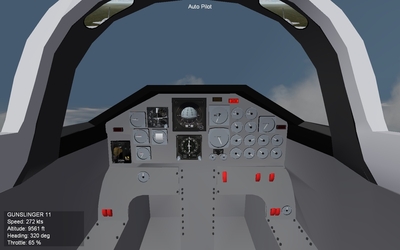
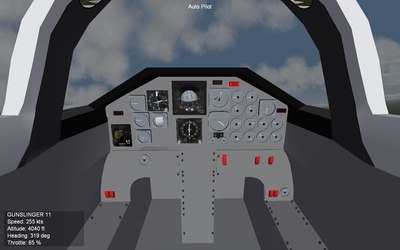
Okay folks, TGAs are driving me nuts. Hey, masking I can do...it's pretty easy, especially with PSP or Photoshop. But I can't seem to consistently make a proper transparency TGA. I know the value is stored on the Alpha channel, but half the time, it seems as if the alpha channel isn't even there. Usually, I end up flailing with Gimp/PSP/Photoshop and somehow muddle through to eventually get the transparency value I want. Question, is there a failure resistant (I hate to say fail proof...) way in any one of those programs to set the transparency, save it in the alpha channel, and have it work. First time, every time? I'm working on the cockpit of the T-38 right now, and there are an awful lot of transparencies I need.... Any explanations you have, please make it pilot simple...lots of pictures helps! FastCargo
-
Where can I get a copy of 3D Studio Max?
FastCargo replied to mppd's topic in Mods/Skinning Discussion
You can, but again, you need someone with 3ds max to convert the file for you. Flying Toaster (who's quite excellent F-8 models from the MF you've been seeing) uses Blender. In fact, he's just finished a model that has been converted and is being worked on. A hint: It's named after 2 animals with lots of teeth. FastCargo -
Where can I get a copy of 3D Studio Max?
FastCargo replied to mppd's topic in Mods/Skinning Discussion
Well, you don't have to use 3ds max. There are other programs (GMax which is free) that can make the 3d models for you, you just need someone to convert them. The other option is getting a student version of 3ds max. It's still not cheap (almost 400 USD) but at least you don't feel like you're buying a car. Plus, it's not neutered in any way as far as I can tell, it just can't be used to make commerical products (ie payware). There is also ebay for older versions...or if you know someone 'in the biz' who would sell you an older copy... FastCargo -
1) I don't know if that's possible. I don't think it is. 2) As far as I know yes. It's because you have to assign a transparancy value to the glass of something other than 100 which affects the whole mesh. However, I'm curious what would happen if you used a TGA file on that mesh with parts of it that are solid colored....I haven't tried such a thing. I've seen it done before, but I don't think I've ever seen it done to make a canopy frame 'solid' while keeping the glass clear... FastCargo
-
Weather FX Progress: Lightning works!
FastCargo replied to Fubar512's topic in Mods/Skinning Discussion
Cool!!! Rock on. FastCargo -
This is an interesting topic. I've found personally to think that bloom is overdone a bit in games, but HDR is a nice idea. Simulating temporary blindness (too much white) is pretty neat. Just never been crazy about the 'fuzz' that happens...or 'motion blur' for that matter. FastCargo
-
Ditto! FastCargo
-
'Flew off by hand'...I set the catapult that I sit on with no length or strength to speak of...so when I release brakes, I just do a real jump jet style takeoff. However, it also means that the number 5 guy in your flight (the guy that will appear in your 'slot') after your number 4 takes off won't get airborne...so I usually 'Alt-N' before he has a chance to appear and takeoff...he magically shows up...:). FLIGHT_DECK is a parameter in the data.ini that sets the 'mesh' for your flight deck and sets the altitude above the ground that it is. Maybe you're colliding with the actual 'hull' of the ship? On second thought, that probably isn't it either...disregard my FLIGHT_DECK comment. Try the AV-8C and see what you can come up with. Also, I think there is a data.ini available that updates the Harrier FM to make it easier to ground handle... FastCargo
-
Just flew a mission in WOI in campaign. Flew off the carrier by hand and wingies all got airborne. One thing I did do with the wingie's 'cat' shots is instead of making them long, I angled them up slightly. Simulates doing a 'jump jet' T/O since the AI can't do TV takeoffs. Coming back, I did a normal VTOL landing. The jet was just fine once it touched down...no blow ups or anything. Even taxied clear to let the wingies land (if they could...). I'm not sure what the issue you are having is. Are you saying ALL your aircraft handle oddly on ALL your carriers? If so, there is a deeper problem. If it's just the AV-8C and USS Tarawa, it could be something as simple as a FLIGHT_DECK issue. FastCargo
-
That sounds really odd. Let me check...because I've built a campaign using the USS Tawara and the AV-8C, and they work just fine last time I flew it... FastCargo
-
I wish I knew about that tutorial about a year ago...would have saved SO much freaking time! Hell, just that Flatten Mapping tool would have been nice to have used. Well, that'll make future projects easier...nice find! FastCargo
-
Grinch, couldn't tell ya on the 'stitch' function. However, if you 'instance' mirror copy a part, the duplicate retains the UVW mapping. It just means that for things like wings, twin tails, etc, that the bmp outlines will look the same, but one of the parts is reverse aligned. A good example is look at the Su-27 bitmaps for the wings. Note that the right and left wing outlines look the same. But they have a different scheme. One is simply 'reversed'. FastCargo PS Julhelm...yes, please tell us of this stitch function...I've seen the button but didn't have any idea what it means or does. I used Mustang's tutorials as my base guide.